
Introduction
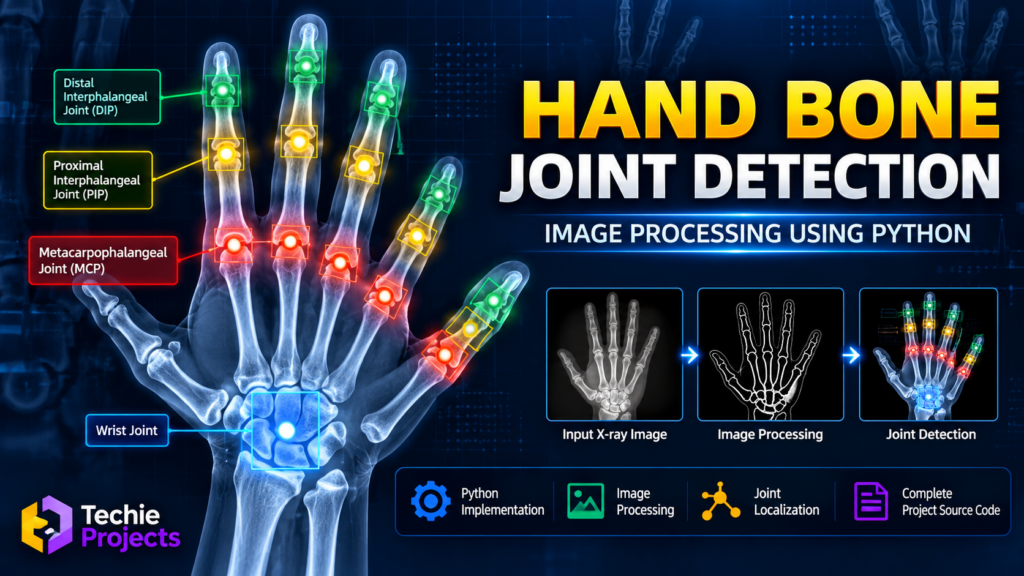
Hand bone joint detection using image processing is an interesting Python-based project that demonstrates how digital image processing techniques can be applied to hand X-ray images to identify and highlight joint regions. This project is suitable for computer science engineering students who want to explore image processing, computer vision, and medical image analysis for their final-year projects.
The system focuses on processing hand images, enhancing important visual features, and displaying potential joint locations based on the implemented algorithm. It provides a practical opportunity to understand how Python can be used to develop image-based analysis applications.
🎬 Project Demo – Hand Bone Joint Detection Using Image Processing
Watch the project demonstration to understand the interface, image processing workflow, and joint detection output. The demo helps students explore how the project works before selecting it for an academic submission.
📌 Project Overview
The Hand Bone Joint Detection project uses Python and image processing techniques to analyze hand images. Depending on the implementation, the system can apply image enhancement, thresholding, edge detection, contour analysis, and joint-region highlighting.
This project is designed for students interested in medical image processing and computer vision. It can also be extended with machine learning or deep learning methods for more advanced image analysis.
🎯 Objectives of the Project
The main objectives of this project are:
- To process hand images using Python.
- To improve image visibility through image enhancement techniques.
- To identify and highlight selected hand joint regions.
- To demonstrate image processing concepts in a practical application.
- To provide a foundation for further research in medical image analysis.
⚙️ Key Features
The available features depend on the actual source code and implementation.
- Hand Image Input: Load an image for processing.
- Image Preprocessing: Prepare the input image for analysis.
- Image Enhancement: Improve the visibility of relevant structures.
- Joint Region Highlighting: Display detected or selected joint locations.
- Visual Output: Compare the input image with the processed result.
- Python Implementation: Explore image processing functions and their application.
🔄 How Does the Project Work?
The general workflow consists of the following stages:
- Image acquisition: Load a hand image or X-ray image into the application.
- Preprocessing: Convert the image to grayscale or apply other suitable preprocessing steps.
- Image enhancement: Use techniques such as filtering or contrast adjustment when required.
- Feature extraction: Apply the implemented image processing algorithm to identify relevant structures.
- Joint localization: Highlight the regions identified by the algorithm.
- Result visualization: Display the processed image for examination.
The actual detection method depends on the project’s code. Basic image processing does not automatically establish the anatomical accuracy of detected joints.
💻 Technologies Used
The following technologies may be used, depending on the supplied implementation:
- Programming Language: Python
- Image Processing Library: OpenCV
- Numerical Operations: NumPy
- Image Display: Matplotlib or OpenCV
- Development Environment: Visual Studio Code, PyCharm, or Jupyter Notebook
Confirm the exact dependencies in the project’s source code before installation.
🖥️ Software and Hardware Requirements
Software Requirements
- Python
- OpenCV
- NumPy
- A compatible Python IDE
- Required project dependencies
Hardware Requirements
- Laptop or desktop computer
- Minimum 4 GB RAM recommended for a basic implementation
- Adequate storage for Python packages, source code, and sample images
Requirements may vary according to the selected libraries and image sizes.
🎓 Applications of the Project
Hand bone joint detection using image processing can demonstrate concepts relevant to:
- Medical image processing education
- Computer vision research
- Anatomical image visualization
- Image enhancement and feature extraction
- Academic projects involving Python and OpenCV
This project is an educational prototype. Its output should not be used to diagnose fractures, determine treatment, or make clinical decisions without appropriate medical validation.
🚀 Advantages
- Provides hands-on experience with Python image processing.
- Helps students understand image preprocessing and feature extraction.
- Can be extended with additional computer vision techniques.
- Offers a practical topic for final-year engineering demonstrations.
- Supports learning about the challenges of analyzing medical images.
🔬 Future Scope
Students can extend the project with additional features, subject to available data and development time:
- A graphical user interface for uploading and processing images.
- Improved image enhancement and noise reduction.
- Anatomical landmark detection using computer vision.
- Machine learning or deep learning models trained on suitable, properly labeled datasets.
- Performance evaluation using expert-annotated images.
- Report generation and image comparison functionality.
Advanced detection requires suitable datasets, careful testing, and evaluation. Adding a machine learning library alone does not guarantee better results.
How Hand Bone Joint Detection Using Image Processing Works
Hand bone joint detection using image processing involves analyzing hand images with Python to identify and highlight relevant joint regions. The workflow may include image preprocessing, contrast enhancement, edge detection, and feature extraction, depending on the implemented algorithm.
Features of Hand Bone Joint Detection Using Image Processing
This hand bone joint detection using image processing project demonstrates how Python and OpenCV can support image analysis. Students can explore image input, preprocessing, joint-region highlighting, and visualization of the processed output.
Applications of Hand Bone Joint Detection Using Image Processing
Hand bone joint detection using image processing can be used as an educational example for learning computer vision, medical image visualization, and feature extraction. The project can also serve as a foundation for further experiments with machine learning and labeled X-ray datasets.
Why Choose This Python Project?
The hand bone joint detection using image processing project offers students an opportunity to practice Python programming and image analysis in a practical academic application. Contact Techie Projects to ask about source code availability, project features, documentation, and customization options.
🛒 Get the Hand Bone Joint Detection Project
Looking for a Python image processing project for your final-year engineering submission? Techie Projects can help you explore project availability and discuss the implementation, source code, and customization options.
Contact us to confirm the included features, supported Python version, installation requirements, and available documentation before purchasing.
Request project details and pricing:
- 📲 Call/WhatsApp: +91-9460060699
- 🌎 Website: www.techieprojects.com
- 📺 Instagram: @pythonprojects_
Contact us to discuss your requirements and confirm whether customization is available.
🔗 Explore Related Projects
Students interested in this project may also explore:
- Image Processing Projects
- Cyber Security Projects
- Machine Learning Projects
- Deep Learning Projects
- Python Projects for Final-Year Engineering Students
Browse the Techie Projects website to explore available project topics and implementation options.
❓ Frequently Asked Questions
1. What is a hand bone joint detection project?
It is an image processing project that demonstrates techniques for analyzing hand images and highlighting joint regions using a computer-based workflow.
2. Which programming language is used?
Python is the primary programming language for this project.
3. Is OpenCV required?
OpenCV is commonly used for image preprocessing and analysis. Check the actual implementation to confirm the required libraries.
4. Can this project be used for a final-year engineering submission?
It can be considered as an academic project topic. Students should confirm their institution’s requirements and ensure they understand the implementation and can explain the results.
5. Does the system detect fractures accurately?
Not necessarily. Joint highlighting and fracture detection are different tasks. Accuracy must be established through appropriate testing and validation; this educational project should not be treated as a clinically validated diagnostic system.
6. How can I get the project details?
Contact Techie Projects through WhatsApp to ask about availability, pricing, source code, and included documentation.
Conclusion
Hand bone joint detection using image processing is a useful academic topic for learning Python, OpenCV, image enhancement, and computer vision fundamentals. It offers a starting point for exploring medical image analysis and can be extended with more advanced techniques as students develop their skills.
If you are interested in this project for your final-year submission, contact Techie Projects to discuss the available implementation, project requirements, and purchasing options.