
Master NLP with spaCy: A Powerful Python Library Explained
In Artificial Intelligence; Natural Language Processing (NLP) is most exciting field. Day by Day growing demand for AI based applications like text classification, chatbot and sentiment analysis there is a powerful tool require to process language efficiently.
What is spaCy?
spaCy is such a powerful python library and designed for fast development with ready NLP task in Python. It’s developed for production use, means scalable, efficient and fast- perfect for AI Tools, search engine and chatbots.
In this blog, you’ll learn everything about spaCy, including installation, features, examples, and comparisons.
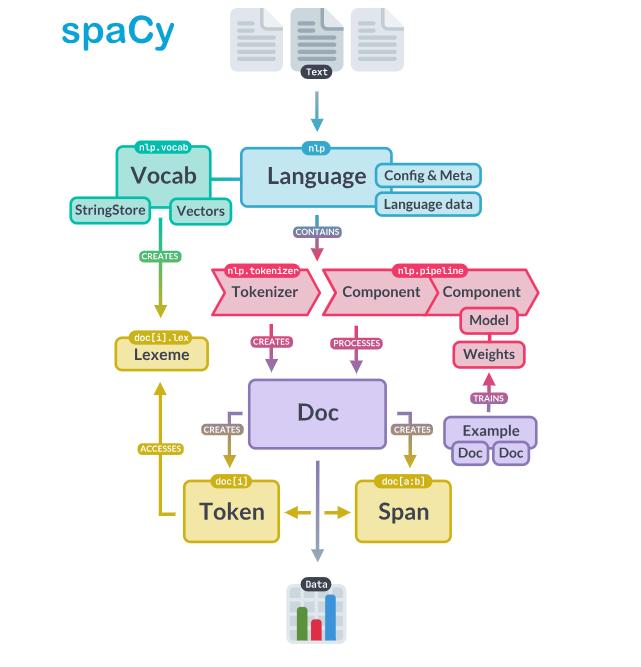
Table of Contents:
- Introduction
- Library Installation
- Key Features
- Basic Example
- Pipeline Components
- spaCy v/s NLTK
- Use Case
- Advantage
- Application
Library Installation:
User have to first download python from official website “python.org” and add path in environment variable. Then install library from terminal or any code editor.
pip install spacy
python -m spacy download en_core_web_sm
“spaCy Python library tutorial”
Key Features:
- Part of Speech Tagging (POS)
- Named Entity Recognition (NER): detect date, place and name
- High Performance: Written in Cython for speed
- Similarity Matching: Compare text meaning
- Dependency Parsing: Understand sentence structure
- Tokenization: Break text into word/ sentence
Basic Example:
Basic Example:
import spacy

# Load model
nlp = spacy.load("en_core_web_sm")

# Process text
doc = nlp("Techie Projects: We Help to Build Engineering Projects")

# Tokenization
for token in doc:
    print(token.text, token.pos_)

# Named Entity Recognition
for ent in doc.ents:
    print(ent.text, ent.label_)
Pipeline Components:
- Parser: Builds dependency tree
- Tokenizer: Splits text into tokens
- NER: Detects entities
- Tagger: Assign POS Tags
spaCy vs NLTK
| Feature | spaCy | NLTK |
|---|---|---|
| Speed | ⚡ Fast | 🐢 Slower |
| Ease of Use | Easy | Moderate |
| Production | ✅ Yes | ❌ Limited |
| Pre-trained Models | Yes | Limited |
| Best For | Real-world apps | Learning & research |
Use Cases:
- New Analysis
- Text Classification
- Chatbots and Virtual Assistant
- Search Engines
- Sentiment Analysis
Advantage:
- Production Ready Design: spaCy optimized memory usage, provide stable API’s, easy integration with web application or machine learning framework and it is designed most for real world use.
- High Accuracy: It provides pre-trained model for performing task like Named Entity Recognition (NER), dependency parsing.
- Speed and Efficiency: Written in Cython and mostly built for high performance. Capable of handling large volume of data. Allowing quick text processing.
- Rich Ecosystem: Supported by strong environment, including tool like integrations with Hugging Face models and spaCy transformers.
Applications:
- Machine Translation Preprocessing: Used to tokenize, clean and linguistically analyze text.
- Document Classification: It classifies the documents in category like spam and non-spam or identifying sentiment in text.
- Information Extraction: It extracts structure information such as date, name and organizations from unstructured text data.
- Question Answering System: It helps in understanding user questions and extracting answers from large text corpora.
#Python #NLP #Deeplearning #Engineering #Assignment
☎️ Contact Us For More Queries:-
📲 Call/WhatsApp: +91-9460060699
🌎 Website: www.techieprojects.com
📺 Instagram: @pythonprojects_
💡 Checkout Related Projects:-
1. Android App:- Click Here
2. Java Projects:- Click Here
3. OpenCV Projects:- Click Here
4. Data Science Projects:- Click Here
5. Data Analytics Projects:- Click Here
5. Deep Learning Projects:- Click Here
6. Cyber Security Projects:- Click Here
7. Machine Learning Projects:- Click Here
8. Image Processing Projects:- Click Here
9. Web Development Projects:- Click Here
10. Game Development Projects:- Click Here
11. Artificial Intelligence Projects:- Click Here
12. Database Management System:- Click Here
💬 If you found this helpful, share it with your friends!