
Introduction
The address book project in HTML CSS JavaScript is a web development project designed to help users manage contact information through an interactive interface. This project is suitable for B.Tech, B.E., BCA, MCA, diploma, and computer science students who want to learn front-end web development by building a practical application.
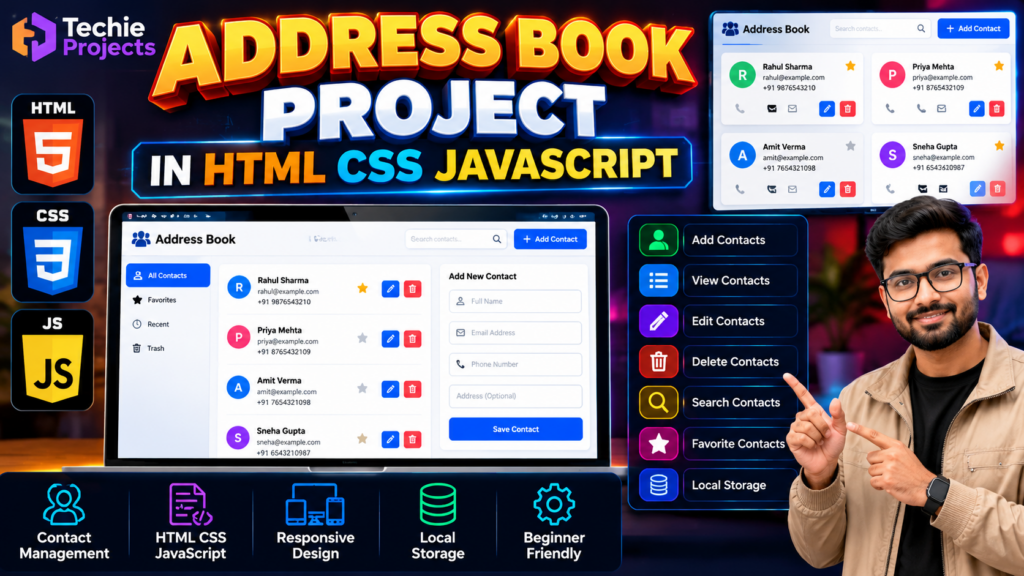
An address book application allows users to organize contact details such as names, phone numbers, and email addresses. Depending on its implementation, it can also support adding new contacts, editing existing records, deleting contacts, searching for information, and marking favorite contacts.
This address book project in HTML CSS JavaScript provides an opportunity to understand how HTML structures a web page, CSS styles the interface, and JavaScript handles user interactions and application logic.
🎥 Watch the Address Book Project in HTML CSS JavaScript Working Demo
Watch the Address Book Project in HTML CSS JavaScript Demo to see how the application manages contact information through an interactive web interface. Explore the implemented features, including adding, viewing, searching, editing, and deleting contacts, to understand how HTML, CSS, and JavaScript work together in a practical web development project.
This working demonstration helps students understand the project workflow and evaluate its suitability for college assignments and final-year project work.
What Is an Address Book Project?
An address book project is a web application that helps users store, view, search, and manage contact information. It provides a simple interface for organizing personal or professional contacts.
The application can be developed using HTML, CSS, and JavaScript without requiring a complex back-end system for a basic implementation. Browser storage, such as Local Storage, can be used to retain contact records between sessions if that functionality is implemented.
🎯 Objectives of the Address Book Project
The main objectives of this project are:
- Build an interactive contact management application.
- Understand HTML page structure and form elements.
- Apply CSS for layout, styling, and responsive design.
- Use JavaScript to manage contact records.
- Implement contact search and editing functionality where supported.
- Explore browser-based data storage.
- Develop practical front-end programming skills.
✨ Key Features of the Address Book Project
1. Add New Contacts
Users can enter contact information, such as a name, phone number, and email address, through a form if this feature is implemented.
2. View Contact Details
The application can display saved contacts in a list or card-based layout for convenient access.
3. Edit Existing Contacts
An editing feature allows users to update stored contact details without creating a duplicate record.
4. Delete Contacts
Users can remove unwanted contact records through a delete function, subject to the application’s implementation.
5. Search Contacts
A search field can help users find contacts by name, phone number, or another supported field.
6. Favorite Contacts
If implemented, a favorites feature allows users to mark frequently accessed contacts for quick reference.
7. Browser-Based Storage
JavaScript Local Storage can be used to save contact records in the browser so they remain available after a page refresh.
8. Responsive User Interface
CSS media queries and flexible layouts can help the application adapt to different screen sizes.
Note: Confirm that each feature is included in your supplied source code before advertising it as fully functional.
🛠️ Technologies Used
HTML
HTML provides the structure of the application, including forms, buttons, navigation, contact lists, and input fields.
CSS
CSS controls the visual appearance of the address book, including colors, spacing, typography, layouts, and responsive styling.
JavaScript
JavaScript manages user interactions and application logic, such as adding, searching, updating, and deleting contacts.
Local Storage
Browser Local Storage can preserve contact data between sessions without requiring a separate database, provided the application uses this functionality.
These technologies make the project a useful introduction to front-end web development.
⚙️ How the Address Book Project Works
The general workflow of the application is as follows:
- Open the Application: The user opens the address book in a supported web browser.
- Enter Contact Details: The user fills in the contact form.
- Validate Input: JavaScript checks the required fields according to the application’s validation rules.
- Save Contact: The application adds the contact to its current data collection and, if implemented, saves it in browser storage.
- Display Contacts: The saved records appear in the contact list.
- Manage Records: Users can search, edit, or delete contacts through the available controls.
- Retrieve Saved Data: If persistent browser storage is implemented, the application can load saved records when reopened.
This workflow demonstrates how HTML, CSS, and JavaScript work together to create an interactive web application.
💻 Software Requirements
The typical requirements for this project are:
- Operating System: Windows, Linux, or macOS
- Frontend Technologies: HTML, CSS, and JavaScript
- Code Editor: Visual Studio Code or another text editor
- Web Browser: Google Chrome, Microsoft Edge, Firefox, or another compatible browser
- Internet Connection: Generally not required for a basic offline version unless external resources are used
The exact requirements depend on the project’s source code and any additional libraries.
🎓 Applications of the Address Book Project
An address book application can be useful for demonstrating:
- Personal contact management
- Front-end web development
- JavaScript form handling
- Browser-based data storage
- Search and filtering functionality
- Responsive interface design
- Basic CRUD operations: create, read, update, and delete
Students can use the project to explore how a common application is designed and implemented using standard web technologies.
✅ Advantages of the Project
- Suitable for learning HTML, CSS, and JavaScript.
- Demonstrates practical front-end development.
- Provides experience with forms and event handling.
- Can introduce basic data management concepts.
- Can be extended with additional features.
- Offers a practical project for academic demonstrations and portfolios.
🚀 Future Scope
The address book project can be extended with additional functionality, such as:
- User registration and login
- Database integration
- Cloud-based contact synchronization
- Import and export of contacts
- Contact grouping and filtering
- Duplicate contact detection
- Profile images for contacts
- Advanced search functionality
- Improved mobile-responsive design
Features such as authentication and cloud synchronization require suitable back-end services or additional integrations.
🎥 Watch the Address Book Project in HTML CSS JavaScript Working Demo
Watch the Address Book Project in HTML CSS JavaScript Project Demo to see how the contact management interface works and how users can interact with contact records.
The demonstration helps students understand the application’s layout, contact management workflow, and implemented features. It also provides a practical overview of how HTML, CSS, and JavaScript can be combined to build a useful web application.
Watch the video below to explore the project in action.
🛒 Purchase the Address Book Project
Looking for an address book project in HTML CSS JavaScript for your college assignment, web development practice, or final-year project?
Techie Projects can help you enquire about project availability, source code, included features, installation instructions, and customization options.
Before purchasing, discuss your requirements with us so you can confirm whether the available implementation is suitable for your academic objectives.
📲 Call/WhatsApp: +91-9460060699
🌎 Website: www.techieprojects.com
📺 Instagram: @pythonprojects_
🔗 Explore Related Projects
Explore these related project categories for more web development ideas:
❓ Frequently Asked Questions
1. What is an address book project in HTML, CSS, and JavaScript?
It is a web application that demonstrates how to manage contact information using HTML for structure, CSS for styling, and JavaScript for functionality.
2. Can the address book project store contact details?
Yes, contact details can be stored using browser Local Storage or a database, depending on the implementation.
3. Is this project suitable for beginners?
Yes. A basic address book is a useful learning project for students who want to practice forms, events, data handling, and interface design.
4. Can I customize the address book application?
Customization may include changing the interface, adding contact fields, implementing search filters, or integrating a database, depending on the supplied source code.
5. Do I need a database for this project?
Not necessarily. A basic version can use JavaScript and Local Storage, while a more advanced version can integrate a database and back-end.
6. How can I purchase the address book project?
Contact Techie Projects through WhatsApp to enquire about source code availability, included features, customization, and pricing.
Conclusion
The address book project in HTML CSS JavaScript is a practical way to learn front-end web development while building a contact management application. It introduces students to form handling, JavaScript functionality, data management, and responsive interface design.
If you want this project for your academic work or web development practice, contact Techie Projects to discuss the available source code, features, customization options, and pricing.