
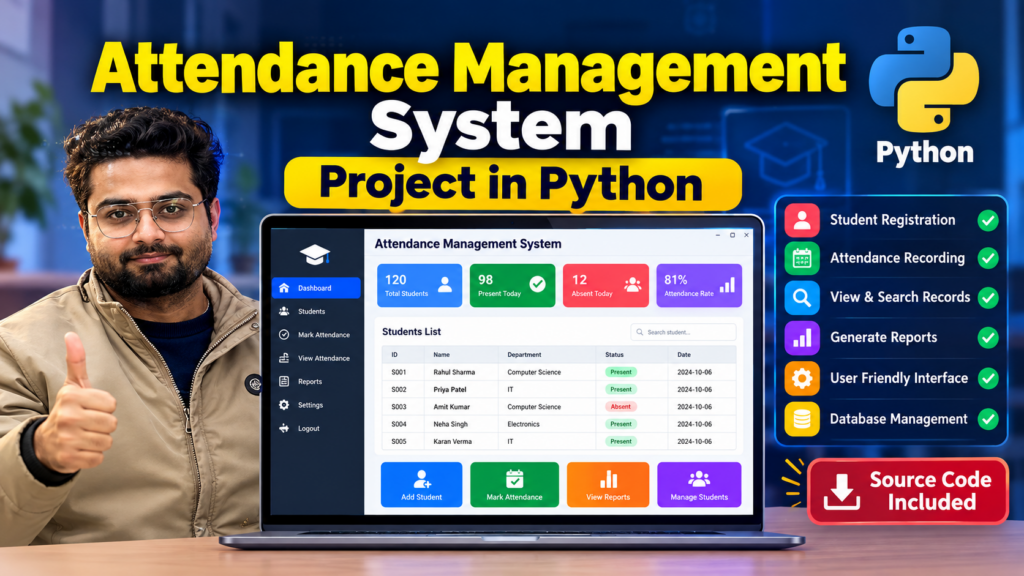
An Attendance Management System Project in Python is a software application designed to record, manage, and monitor student attendance digitally. Instead of maintaining attendance manually in registers or spreadsheets, the system stores attendance records in a structured database and makes it easier to search, update, and generate attendance reports.
Attendance Management System Project Overview
A typical system can provide features such as:
The main purpose of an attendance management system is to simplify the process of recording and managing attendance.
- Student registration
- Student information management
- Attendance recording
- Attendance searching
- Attendance reports
- Date-wise attendance
- Student-wise attendance
- Database storage
- User-friendly interface
- Attendance history
- Record updating and deletion
The project can be implemented using Python with technologies such as Tkinter, OpenCV, MySQL, or SQLite, depending on the selected implementation.
Attendance Management System Project in Python
Objectives of the Attendance Management System
The main objectives of this project are:
- To digitize the traditional attendance process.
- To reduce manual attendance-recording work.
- To store student information systematically.
- To maintain attendance records in a database.
- To make attendance records easier to search.
- To generate useful attendance reports.
- To reduce errors associated with manual record keeping.
- To provide a simple interface for managing student attendance.
Key Features
1. Student Registration
The administrator can add student information such as:
- Student ID
- Name
- Course
- Department
- Semester
- Contact information
The information can then be stored in the database.
2. Attendance Recording
The system allows attendance to be recorded for registered students.
Depending on the project implementation, attendance can be marked manually or automatically using technologies such as face recognition.
3. Student Database
Student information and attendance records can be stored in a database.
This makes it easier to retrieve records whenever required.
4. Attendance History
The system can maintain previous attendance records so that administrators or teachers can check attendance for a particular date or student.
5. Search Functionality
Users can search for student information and attendance records using details such as:
- Student ID
- Name
- Date
- Department
- Class
6. Attendance Reports
The system can generate attendance summaries showing the attendance status of individual students.
Reports can include:
- Total classes
- Classes attended
- Classes absent
- Attendance percentage
7. Record Management
Administrators can add, update, or remove student records depending on their permissions.
How the Attendance Management System Works
The basic workflow of the system can be represented as:
User Login → Student Registration → Student Database → Attendance Recording → Attendance Database → Attendance Report
Step 1: User Login
An authorized user logs into the application.
The login system can help prevent unauthorized access to attendance records.
Step 2: Student Registration
The administrator enters student details into the system.
The information is stored in the database.
Step 3: Attendance Recording
Attendance is recorded for the selected students.
In a basic implementation, the teacher can manually mark students as present or absent.
In an advanced implementation, a camera and face-recognition system can be integrated to automate attendance.
Step 4: Database Storage
The attendance information is stored with relevant details such as:
- Student ID
- Student name
- Date
- Time
- Attendance status
Step 5: Report Generation
The system retrieves stored information and presents attendance records in a readable format.
Teachers or administrators can use these reports to monitor attendance.
Technologies Used
The exact technologies depend on the implementation of the project.
A Python-based attendance management system may use:
Python
Python is the primary programming language used to develop the application.
It provides a large collection of libraries for GUI development, database connectivity, image processing, and automation.
Tkinter
Tkinter can be used to create the graphical user interface.
It allows developers to create components such as:
- Buttons
- Labels
- Forms
- Tables
- Input fields
- Menus
SQLite or MySQL
A database such as SQLite or MySQL can be used to store student and attendance information.
SQLite is convenient for smaller standalone applications, while MySQL can be suitable for systems requiring a separate database server.
OpenCV
If the project includes camera-based or face-recognition functionality, OpenCV can be used for image and video processing.
NumPy
NumPy can be useful for numerical operations and image-processing workflows.
Software Requirements
The software requirements may include:
- Windows 10/11 or another supported operating system
- Python 3.x
- VS Code, PyCharm, or another Python IDE
- Tkinter
- SQLite or MySQL
- OpenCV, if required
- NumPy, if required
- Required Python packages
The exact package requirements depend on the implementation.
Hardware Requirements
For a basic attendance management system, the hardware requirements are relatively modest.
Recommended hardware may include:
- Computer or laptop
- Minimum 4 GB RAM
- Dual-core processor or better
- Adequate storage
- Keyboard and mouse
- Monitor
For a face-recognition-based version, a webcam is additionally required.
Database Design
A basic database can contain tables such as:
Student Table
| Field | Description |
|---|---|
| Student ID | Unique student identifier |
| Name | Student name |
| Department | Student department |
| Course | Course name |
| Semester | Current semester |
| Contact | Contact information |
Attendance Table
| Field | Description |
|---|---|
| Attendance ID | Unique attendance record |
| Student ID | Registered student ID |
| Date | Attendance date |
| Time | Attendance time |
| Status | Present/Absent |
The database structure can be modified according to the requirements of the institution and project.
Attendance Percentage Calculation
One useful feature of an attendance management system is calculating attendance percentage.
The basic formula is:
Attendance Percentage = (Number of Classes Attended / Total Number of Classes) × 100
For example, if a student attended 42 out of 50 classes:
Attendance Percentage = (42 / 50) × 100 = 84%
The application can automatically calculate this value from stored attendance records.
Face Recognition-Based Attendance
The project can be extended into a Face Recognition Attendance System using Python.
In this version, a webcam captures the student’s face and a computer vision model compares the detected face with registered student information.
A simplified workflow is:
Camera → Face Detection → Face Recognition → Student Identification → Attendance Recording → Database
This approach can reduce manual attendance work, but its accuracy depends on factors such as image quality, lighting, camera position, training data, and recognition method.
For educational projects, it is important to test the system carefully and handle personal biometric data responsibly.
Advantages of the Attendance Management System
The system provides several potential benefits:
Reduced Manual Work
Teachers do not need to maintain large paper attendance registers.
Faster Record Management
Student attendance can be searched and retrieved more quickly.
Better Organization
Attendance information is stored in a structured database.
Easy Reporting
Attendance summaries can be generated from stored records.
Reduced Data Entry Errors
Automated calculations can reduce mistakes in attendance percentage calculations.
Scalability
The basic project can be extended with additional features as requirements increase.
Applications
An attendance management system can be adapted for:
- Schools
- Colleges
- Universities
- Coaching institutes
- Training centers
- Computer institutes
- Corporate training programs
- Workshops
- Educational organizations
The implementation should be customized according to the organization’s attendance policies and data-management requirements.
Limitations
Although an attendance management system can simplify record management, it also has some limitations.
Data Security
Student information should be protected from unauthorized access.
Hardware Dependency
A face-recognition version may require a suitable camera and sufficient computing resources.
Recognition Accuracy
Face-recognition systems can produce incorrect results under poor lighting, occlusion, or other challenging conditions.
Database Backup
Regular backups are important to prevent loss of attendance records.
User Training
Teachers or administrators may require basic training to use the system effectively.
Future Scope
The project can be improved with several advanced features.
Mobile Application
A mobile application can allow authorized users to access attendance information remotely.
Cloud Database
Attendance records can be stored in a secure cloud-based system.
Automated Notifications
The system could send notifications when a student’s attendance falls below a defined threshold.
Advanced Reports
The application can generate monthly, semester-wise, and department-wise reports.
Role-Based Access
Different access levels can be created for:
- Administrator
- Teacher
- Student
Face Recognition
A computer-vision-based attendance module can automate attendance recording where appropriate.
Dashboard
A graphical dashboard can display:
- Total students
- Present students
- Absent students
- Attendance percentage
- Monthly attendance trends
Attendance Management System Project Workflow
The overall workflow can be summarized as:
Start → User Login → Dashboard → Student Registration → Store Student Information → Select Attendance Module → Record Attendance → Save Attendance to Database → Generate Attendance Report → View/Search Records → Logout
For a face-recognition version:
Start → Open Camera → Capture Image → Detect Face → Recognize Student → Match Student ID → Mark Attendance → Store Record → Generate Report
Why This Is a Good Python Project
The attendance management system is a practical project because it combines several important software-development concepts.
Students can learn:
- Python programming
- GUI development
- Database management
- CRUD operations
- Authentication
- File handling
- Data validation
- Report generation
- Computer vision
- Application design
The project can therefore be developed at different complexity levels depending on the student’s knowledge and academic requirements.
Frequently Asked Questions
What is an Attendance Management System Project in Python?
An attendance management system project in Python is a software application that records, stores, manages, and reports student attendance using Python and related technologies.
Can this project be developed using Python?
Yes. Python can be used to develop the application’s interface, business logic, database connectivity, and optional computer-vision functionality.
Which database can be used?
SQLite and MySQL are common choices. SQLite is convenient for standalone applications, while MySQL can be useful for larger or multi-user systems.
Can face recognition be added?
Yes. A face-recognition module can be integrated using computer-vision and machine-learning technologies. This converts the basic system into an automated attendance solution.
Is this suitable as a final-year project?
Yes. The project can be suitable for B.Tech, BCA, MCA, diploma, and other computer science students when implemented with appropriate functionality, documentation, testing, and original development work.
What technologies are required?
A basic implementation may require Python, Tkinter, and SQLite/MySQL. An advanced version may additionally use OpenCV, NumPy, and face-recognition or machine-learning components.
Can attendance percentage be calculated automatically?
Yes. The system can calculate attendance percentage using the number of classes attended and the total number of classes.
Conclusion
The Attendance Management System Project in Python is a practical application for learning Python programming, database management, GUI development, and attendance automation. A basic version can record student attendance manually, while an advanced implementation can include features such as face recognition, automated reports, dashboards, notifications, and cloud-based storage.
For students, this project provides practical experience in developing a complete software application from student registration and database management to attendance recording and reporting.
The project can also be customized according to the requirements of a school, college, training institute, or other educational organization.
Note: If biometric or face-recognition functionality is implemented, collect and process personal data only with appropriate authorization, transparency, and security measures.
- Python Projects
- Machine Learning Projects
- Computer Vision Projects
- Final Year Projects
- Artificial Intelligence
- IOT Projects
☎️ Contact Us For More Queries:-
📲 Call/WhatsApp: +91-9460060699
🌎 Website: www.techieprojects.com
📺 Instagram: @pythonprojects_