
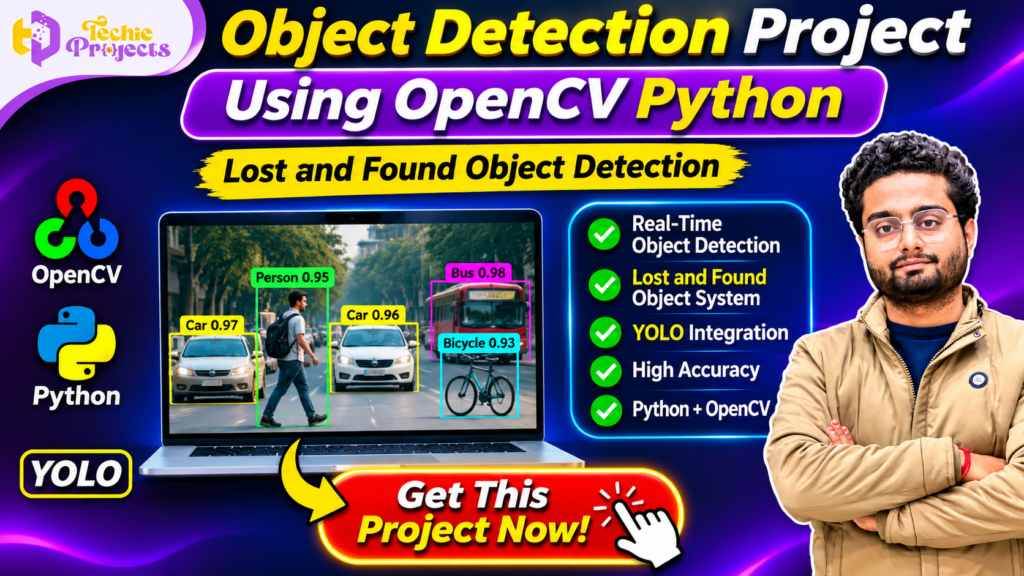
🚀 Looking for an impressive final-year Python project that combines Computer Vision, Artificial Intelligence, and real-time object detection? Get the Object Detection Project Using OpenCV Python from Techie Projects!
If you are a B.Tech, BCA, MCA, M.Tech, or Computer Science Engineering student searching for a practical final-year project, this is an excellent topic to explore. The Object Detection Project Using OpenCV Python demonstrates how computer vision techniques and deep learning models can identify objects in images or video streams.
This project focuses on object detection and a lost-and-found object detection concept. It provides an opportunity to understand how a computer can identify objects such as cars, people, buses, bicycles, and other supported categories through a camera or image input.
Instead of spending weeks building everything from scratch, you can enquire about the project package from Techie Projects. Get information about Python source code, implementation details, project documentation, installation guidance, and available technical support.
Whether you need a practical project for your final-year submission, a computer vision demonstration, or an opportunity to strengthen your Python skills, this project can help you explore important concepts in modern AI development.
📞 Contact Techie Projects for Project Enquiries
Want to purchase the Object Detection Project Using OpenCV Python? Contact Techie Projects to enquire about the available package, source code, documentation, pricing, and implementation guidance.
- 📲 WhatsApp: Get Project Details
- ☎️ Contact Number: +91 94600 60699
- 🌐 Website: https://techieprojects.com/
- 📸 Instagram: @pythonprojects_
🎬 Watch the Object Detection Project Using OpenCV Python – Project Demo
Explore the Object Detection Project Using OpenCV Python in action. Watch the demonstration to understand how the YOLO model detects and identifies multiple objects in images or video frames using Python and OpenCV.
🎯 What Is an Object Detection Project Using OpenCV Python?
The Object Detection Project Using OpenCV Python is a computer vision application designed to identify and locate objects in images or video frames.
Object detection is an important area of artificial intelligence. Unlike basic image classification, which predicts the overall category of an image, object detection can identify multiple objects and mark their locations using bounding boxes.
For example, when a camera captures a road scene, an object detection model may identify:
- 🚗 Cars
- 🚌 Buses
- 🚲 Bicycles
- 🚶 People
- 🏍️ Motorcycles
- 🚚 Trucks
The system can display a bounding box around each detected object, along with its predicted class and confidence score.
This project also explores the lost-and-found object detection concept. A computer vision system can help identify visible objects in camera footage or images, making it a useful starting point for developing applications related to object monitoring and identification.
The implementation combines Python programming, OpenCV, and a YOLO-based object detection model.
🔍 Understanding the Lost and Found Object Detection Concept
Losing personal belongings in public places, colleges, offices, transport facilities, and other crowded environments is a common problem.
A technology-based lost-and-found application can help organise the process of identifying objects and reviewing available camera footage or uploaded images.
For example, consider a student who loses a backpack on a college campus. A computer vision application could analyse available images or video frames and identify objects that match supported detection categories.
The detected objects can then be reviewed to help locate relevant footage or identify possible matches.
A complete lost-and-found platform may also require additional features such as:
- Object descriptions and categories.
- Time and location information.
- Image storage and retrieval.
- Search and filtering.
- User reports.
- Verification of ownership.
The object detection model provides the visual recognition component. Additional application modules are required to build a complete lost-and-found management platform.
⚙️ How Does the Object Detection Project Work?
The Object Detection Project Using OpenCV Python follows a structured workflow. The application receives an image or video stream, processes the input, runs object detection, and displays the results.
1. 📷 Image or Video Input
The first step is to provide an image, video file, or live camera feed.
OpenCV helps load and process image and video data. If a webcam is supported by the implementation, the application can capture frames continuously.
2. 🖼️ Image Preprocessing
The input frame is prepared before being passed to the detection model.
Preprocessing may include:
- Resizing the image.
- Converting colour formats.
- Preparing image dimensions.
- Normalising input values when required.
- Formatting frames for model inference.
Proper preprocessing helps ensure that the input matches the model’s expected format.
3. 🧠 YOLO Model Integration
YOLO stands for You Only Look Once. It is a family of object detection models designed to detect objects in images efficiently.
The model analyses the input and predicts object categories, bounding box coordinates, and confidence scores.
YOLO-based detection is useful for projects that demonstrate multiple-object detection in a single image or video frame.
4. 📦 Object Detection
After model inference, the system processes the detection results.
For every recognised object, the application can display:
- Object category.
- Bounding box.
- Confidence score.
- Object location within the frame.
The output helps users understand which objects the model has identified.
5. 🎨 Display Detection Results
OpenCV can draw bounding boxes and labels on the original image or video frame.
Different colours can be used to distinguish detected objects. The resulting frame can then be displayed in the application.
6. 🔎 Lost and Found Object Identification
The object detection output can support a lost-and-found workflow by helping identify visible objects in images or recorded video.
For a more advanced system, detected object information can be stored and compared with user-submitted descriptions or images. Such matching functionality requires additional application logic beyond basic object detection.
✨ Key Features of the Object Detection Project Using OpenCV Python
The project demonstrates important features of computer vision and Python-based AI development.
🧠 1. YOLO-Based Object Detection
The project uses a YOLO-based detection approach to identify supported objects in images or video frames.
📹 2. Real-Time Detection Concept
With a compatible camera and implementation, the system can process video frames and display detection results continuously.
📦 3. Multiple Object Detection
The model can identify multiple supported objects within a single frame, depending on the trained model and its available classes.
🏷️ 4. Bounding Boxes and Labels
Detected objects can be highlighted with bounding boxes, class names, and confidence scores.
🐍 5. Python Implementation
Python is used to connect image processing, model inference, and application functionality.
👁️ 6. Computer Vision Integration
OpenCV provides image and video processing capabilities that support the object detection workflow.
🔎 7. Lost and Found Application Concept
The project demonstrates how object detection can contribute to applications that help review images or video footage for visible objects.
📊 8. Visual Output
The system displays processed frames with detection labels, making the results easier to understand during demonstrations.
🛠️ Technologies Used in the Project
The Object Detection Project Using OpenCV Python combines tools and libraries commonly used in computer vision development.
| Technology | Purpose |
|---|---|
| Python | Main programming language |
| OpenCV | Image and video processing |
| YOLO | Object detection |
| NumPy | Numerical operations |
| PyTorch or supported model framework | Model execution, depending on implementation |
| Visual Studio Code | Development environment |
| HTML and CSS | Optional web interface |
| Flask | Optional web application integration |
The exact framework and library versions depend on the supplied project implementation.
📚 Main Modules of the Project
The project can be understood through the following functional modules.
1. Input Management Module
This module accepts image or video input. It may also connect to a webcam when live camera functionality is included.
2. Image Processing Module
This module prepares the input frames for detection. It uses image processing operations to ensure compatibility with the model.
3. YOLO Detection Module
This module loads the object detection model and performs inference on the input image or video frame.
4. Object Labelling Module
This module processes the detection results and displays the predicted class names, confidence scores, and bounding boxes.
5. Result Display Module
This module displays the final processed image or video frame with the detected objects highlighted.
6. Lost and Found Concept Module
This module represents how detected objects can be used in a larger lost-and-found application. Advanced features such as object searching, report management, and image matching require additional development.
🎓 Benefits of the Object Detection Project Using OpenCV Python for Students
A practical computer vision project can help students understand how AI technologies are used in real applications.
1. Learn Python Programming
Students gain practical exposure to Python functions, modules, libraries, image processing, and application development.
2. Understand Computer Vision
The project demonstrates how computers analyse visual information and identify objects within images or video streams.
3. Explore YOLO Architecture
Students can learn about object detection models, bounding boxes, confidence scores, and class predictions.
4. Gain Practical OpenCV Experience
OpenCV is widely used for image and video processing. Working with it helps students understand how visual data is handled programmatically.
5. Improve Final-Year Project Knowledge
The project provides a practical topic for academic demonstrations, technical discussions, and further development.
6. Build a Technical Portfolio
After understanding and extending the implementation, students can present their work as a computer vision project in an academic or personal portfolio.
7. Explore Real-World Applications
Students can investigate how object detection may be used in traffic monitoring, surveillance research, inventory management, and lost-and-found assistance systems.
🌍 Real-World Applications of Object Detection
Object detection is used in many areas of computer vision research and software development.
🚦 Traffic Monitoring
Object detection can identify vehicles, pedestrians, and other road users in traffic images or video footage.
🏢 Smart Surveillance
Computer vision systems can help analyse camera footage and identify supported objects in monitored environments.
🏬 Retail and Inventory Management
Object detection can support product recognition, shelf monitoring, and inventory-related applications.
🏫 College and Campus Management
A campus-based application can explore how computer vision helps identify objects in common areas, classrooms, libraries, and other locations.
📦 Lost and Found Assistance
A lost-and-found application can use object detection to identify visible objects in available images or footage. Additional matching and verification features are needed to confirm whether an object belongs to a particular person.
🏭 Industrial Automation
Object detection can support inspection, item identification, and automated monitoring in industrial environments.
💡 Future Scope of the Project
The Object Detection Project Using OpenCV Python can be extended with additional features to create a more advanced computer vision application.
1. Object Tracking
Object tracking can be added to follow detected objects across consecutive video frames.
2. Lost Object Search
A search module could allow users to submit an object description or image and review possible matches from stored records.
3. Database Integration
A database can store object descriptions, image references, timestamps, and reported locations.
4. Web-Based Application
A web interface can make the system accessible through a browser and provide a convenient way to upload images or review results.
5. Notification System
Notifications can be added to inform users when a possible match is identified. Such matches should be reviewed before confirming an object’s identity or ownership.
6. Improved Detection Models
Students can experiment with different YOLO versions, model configurations, and datasets to compare detection performance.
7. Mobile Application Integration
A mobile interface could allow users to submit photographs of lost belongings and review possible matches.
💼 Why Choose Techie Projects for Your College Project?
Selecting a suitable final-year project is an important step for engineering students. A project should provide practical learning opportunities and help students understand the technologies involved.
Techie Projects provides engineering project resources for students interested in Python, artificial intelligence, machine learning, deep learning, computer vision, IoT, and other technical domains.
When you enquire about the Object Detection Project Using OpenCV Python, you can ask our team about:
- Python source code availability.
- YOLO and OpenCV implementation details.
- Project documentation.
- Installation and execution instructions.
- Software and hardware requirements.
- Project demonstration details.
- Technical guidance options.
- Pricing and delivery information.
The exact package contents and support depend on the selected project package. Contact our team to confirm the available deliverables before purchasing.
📦 What Can Be Included in the Project Package?
Depending on package availability, the project may include:
- Python project source code.
- Required project files.
- Model and library configuration details.
- Installation instructions.
- Project documentation.
- Software requirement information.
- Execution guidance.
- Technical support options.
Contact Techie Projects to confirm the exact inclusions for the current package.
💻 Software and Hardware Requirements
The following are general requirements for running a Python-based object detection project. Actual requirements depend on the YOLO model, image resolution, and processing workload.
Software Requirements
- Operating System: Windows 10/11 or compatible Linux.
- Programming Language: Python.
- IDE: Visual Studio Code or PyCharm.
- Image Processing Library: OpenCV.
- Object Detection Model: YOLO.
- Numerical Library: NumPy.
- Model Framework: Compatible PyTorch or other supported framework.
- Browser: Google Chrome or another modern browser, if a web interface is included.
Hardware Requirements
- Processor: Modern Intel or AMD processor.
- RAM: 8 GB recommended for basic experimentation.
- Storage: Sufficient space for model weights, project files, and input data.
- GPU: Optional, but a compatible GPU can improve inference performance.
❓ Frequently Asked Questions (FAQs)
1. What is the Object Detection Project Using OpenCV Python?
It is a Python-based computer vision project that uses OpenCV and a YOLO-based model to identify and locate supported objects in images or video frames.
2. What is the main purpose of this project?
The project demonstrates object detection and explores how detected objects can support a lost-and-found application concept.
3. Which algorithm is used?
A YOLO-based object detection model is used in the project. The specific version depends on the implementation.
4. Which programming language is required?
Python is the main programming language used for image processing, model execution, and application development.
5. Is this project suitable for final-year engineering students?
Yes. It is a relevant project topic for students studying computer science, information technology, artificial intelligence, and related engineering disciplines.
6. Can the project detect multiple objects?
A YOLO-based model can detect multiple supported objects in the same image or video frame, depending on its trained classes and configuration.
7. Can this project work with a webcam?
Webcam-based detection is possible when live camera input is supported and configured in the implementation.
8. Can I purchase the source code?
You can contact Techie Projects to check source code availability, pricing, and the current project package.
9. Does the project include documentation?
Documentation availability depends on the selected package. Confirm the deliverables with Techie Projects before placing an order.
10. Can I extend the project?
Yes. Possible extensions include object tracking, database integration, lost-object search, notifications, and a web-based interface.
🔗 Explore Related Python and AI Projects
Explore more engineering project ideas and technical resources from Techie Projects:
- Python Projects
- Artificial Intelligence Projects
- Machine Learning Projects
- Deep Learning Projects
- Computer Vision Projects
- Image Processing Projects
- YOLO Projects
- Final-Year Engineering Projects
Visit Techie Projects to explore available project categories and resources.
🚀 Get the Object Detection Project Using OpenCV Python Now!
Are you ready to work on a practical computer vision project for your academic journey?
The Object Detection Project Using OpenCV Python brings together Python programming, OpenCV image processing, YOLO-based object detection, and the lost-and-found application concept.
It is a useful opportunity to explore how AI systems identify objects in images and video streams while developing an understanding of real-world computer vision workflows.
Don’t spend unnecessary time searching for an appropriate project package. Contact Techie Projects to enquire about the source code, documentation, pricing, implementation details, and available technical guidance.
👉 GET THIS PROJECT NOW!
📲 CLICK HERE TO PURCHASE / ENQUIRE ON WHATSAPP
- 📲 Call/WhatsApp: +91-9460060699
- 🌎 Website: www.techieprojects.com
- 📺 Instagram: @pythonprojects_
Techie Projects – Practical Engineering Projects for Students.