
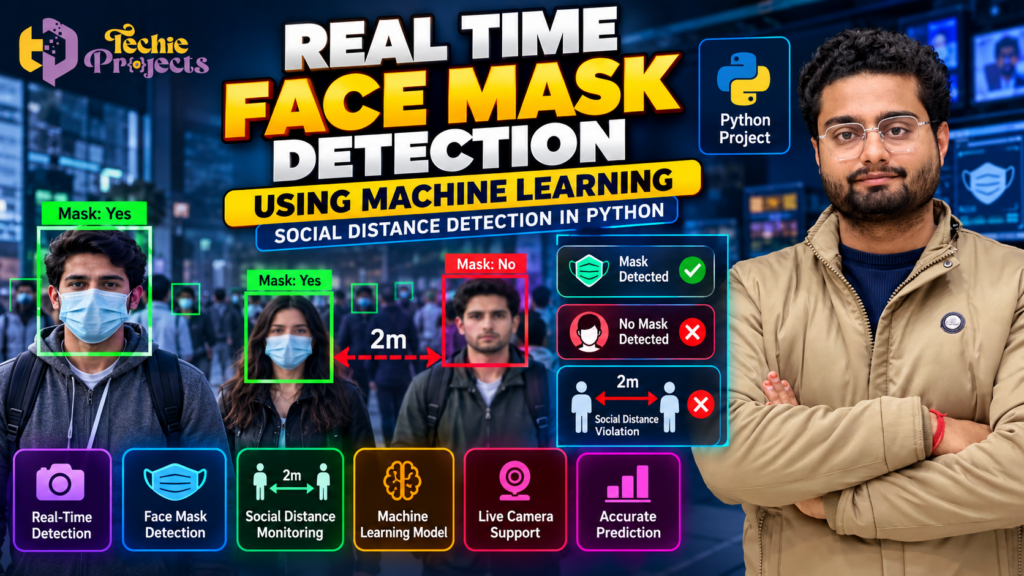
🎓 Looking for a ready-to-explore machine learning project for your final-year engineering submission? The Real Time Face Mask Detection Using Machine Learning project from Techie Projects is an excellent topic for students interested in Python, Artificial Intelligence (AI), computer vision, and real-time image processing. Instead of struggling to build a project idea from scratch, explore this practical application, understand its workflow, and prepare for your project demonstration with a clearer technical direction.
Whether you are a B.Tech, B.E., computer science, IT, or AI and Data Science student, this project can help you explore how machine learning techniques are applied to images and live video. Contact Techie Projects to discuss the available project package, pricing, source code, documentation, and installation requirements before purchasing.
🎬 Watch the Real Time Face Mask Detection Using Machine Learning Project Demo
Explore the project demonstration to understand its interface, workflow, and potential real-time detection capabilities. A demonstration can help you evaluate whether the implementation matches your academic requirements and interests.
The project may identify faces and classify them according to whether a face mask is detected. Depending on the implemented version, it may also include social distancing monitoring and visual alerts. Review the available demonstration and confirm the exact features before placing an order.
😷 What Is Real Time Face Mask Detection Using Machine Learning?
Real Time Face Mask Detection Using Machine Learning is a computer vision application designed to analyse images or video frames and identify whether a person is wearing a face mask. The system uses image-processing techniques and a trained machine learning or deep learning model to classify detected faces.
The application can process frames from a webcam, video file, or other supported image source, depending on its implementation. The model analyses the available visual information and produces a prediction for each detected face.
This project provides an educational introduction to several important technical concepts:
- Computer vision and image processing
- Face detection and image classification
- Machine learning and deep learning workflows
- Python programming and relevant libraries
- Real-time video processing
- Model evaluation and prediction visualisation
Students can use these concepts to understand how AI systems process visual data and convert it into useful predictions.
🎯 Objectives of the Project
The main objective is to demonstrate how machine learning can be applied to face mask detection in a computer vision environment.
Key learning objectives include:
- Understanding the fundamentals of image processing and computer vision.
- Learning how images and video frames are collected and processed.
- Exploring face detection and classification techniques.
- Understanding the role of training data in model development.
- Displaying classification results through visual labels or bounding boxes.
- Studying model performance and prediction limitations.
- Preparing to explain the technical workflow during an academic presentation.
These objectives make the project relevant to students who want practical exposure to AI-based applications.
⚙️ How Does the Project Work?
The workflow of a typical face mask detection application involves several stages. The exact implementation may vary according to the model, libraries, and features included in the project package.
1. Image or Video Input
The application receives visual input from a webcam, video file, or image. In a real-time implementation, the system continuously captures video frames for analysis.
2. Face Detection
A face detection algorithm identifies the regions of an image that contain faces. The detected regions are then passed to the classification stage.
3. Image Preprocessing
The detected face regions may be resized, normalised, or converted into the format required by the trained model. Preprocessing helps ensure that input data is compatible with the model.
4. Machine Learning Model
The trained model analyses the face image and predicts a class, such as mask or no mask. Depending on the implementation, the project may use a convolutional neural network (CNN) or another suitable classification approach.
5. Prediction Display
The application can display the predicted class using labels, bounding boxes, or different colours. For example, a green box might represent a detected mask, while a red box might indicate that no mask was detected.
6. Real-Time Processing
In webcam-based implementations, the system repeats the process for incoming frames. The processing speed depends on the model, input resolution, hardware, and software configuration.
🎯 Benefits of Real Time Face Mask Detection Using Machine Learning
Real Time Face Mask Detection Using Machine Learning helps students understand how computer vision and AI models can analyse visual data. This project combines face detection, image preprocessing, and machine learning classification to demonstrate a practical AI application. It is useful for exploring Python programming, deep learning concepts, and real-time video analysis as part of an engineering project.
💻 Learn Computer Vision with Real Time Face Mask Detection Using Machine Learning
With Real Time Face Mask Detection Using Machine Learning, students can explore how a model processes face images and predicts whether a mask is present. The project can provide practical learning opportunities in OpenCV, Python, model training, and prediction visualisation. The exact technologies and features depend on the implementation available in the selected project package.
🧠 Technologies Used in the Project
The following technologies are commonly relevant to this type of application. Confirm the actual libraries and versions included in your chosen package before purchasing.
Python
Python is widely used for AI and computer vision development because of its readable syntax and extensive ecosystem of libraries.
OpenCV
OpenCV supports image processing, video capture, frame manipulation, and displaying visual results. It is commonly used in real-time computer vision applications.
TensorFlow or PyTorch
A deep learning framework may be used to train, load, or run a face mask classification model. The framework depends on the implementation.
NumPy
NumPy provides numerical array operations that can support image preprocessing and model input preparation.
Machine Learning and Deep Learning
These techniques enable a model to learn patterns from training examples and predict whether a face image belongs to a particular class.
💡 Key Features of a Face Mask Detection System
The following are common capabilities in face mask detection projects. Actual availability depends on the version offered by Techie Projects.
- Face Mask Classification: Predicts whether a detected face appears to have a mask.
- Face Detection: Identifies face regions within supported images or video.
- Live Camera Processing: May analyse webcam frames in real time.
- Visual Prediction Labels: May display classification results on the screen.
- Image Processing: Prepares visual input for analysis.
- Model-Based Predictions: Uses a trained model to classify detected faces.
- Social Distancing Detection: May be included as an additional feature in some implementations.
Before purchasing, request a list of the actual features and verify them against the available demonstration.
🎓 Why Choose This Project for Your Final Year?
A face mask detection application is a practical topic for students interested in applying AI concepts to a real-world scenario. It combines visual data, model predictions, and a user-facing application in one project.
By studying the implementation, you can explore the complete workflow from input collection to prediction display. You can also investigate challenges such as poor lighting, overlapping faces, camera quality, and inaccurate predictions.
The project can support academic learning in areas such as:
- Python programming
- Artificial intelligence
- Computer vision
- Image processing
- Deep learning
- Model testing and evaluation
Remember that a project demonstration is only one part of academic preparation. You should understand the code, explain the model’s limitations, and follow your institution’s rules for project submission.
🖥️ Software and Hardware Requirements
The exact requirements depend on the model and libraries used in the selected version.
Common software requirements may include:
- Python
- A code editor or IDE
- OpenCV
- A compatible machine learning framework
- Required Python dependencies
Common hardware requirements may include:
- A laptop or desktop computer
- A compatible webcam for live detection
- Sufficient RAM and storage
- A suitable processor for running the model
A dedicated GPU may help with some implementations, but it is not necessarily required for every face mask detection model. Confirm the recommended configuration and supported Python version before installation.
📊 Applications and Limitations
Face mask detection is an educational example of how computer vision can analyse visual information. Similar techniques can be studied in access-control prototypes, public-space monitoring research, and other image classification applications.
However, model predictions are not always accurate. Lighting conditions, camera angles, face coverings, occlusion, image quality, and differences between training and real-world data can affect performance. A predicted mask label should not be treated as a guarantee of compliance or safety.
If social distancing detection is included, the estimated distance may depend on camera calibration, perspective, and the method used to estimate real-world measurements. Confirm how the feature works before relying on its results.
🛒 Buy Real Time Face Mask Detection Using Machine Learning Project
Looking for Real Time Face Mask Detection Using Machine Learning for your final-year project? Contact Techie Projects to enquire about the available package, pricing, source code, installation instructions, documentation, and technical support options. Confirm the included deliverables and compatibility before purchasing.
Need a practical Python project for your academic work? Contact Techie Projects to enquire about the Real Time Face Mask Detection Using Machine Learning project package and check whether it meets your requirements before purchasing.
Before placing your order, ask for confirmation of the following deliverables:
- Source code availability
- Installation and execution instructions
- Project documentation or report, if included
- Dataset details and model information
- Supported Python and library versions
- Demonstration video or preview availability
- Technical support terms, if offered
- Price, delivery method, and any additional charges
Confirming these details helps you select a suitable project and avoid unexpected installation or compatibility issues.
📲 Contact Techie Projects
- 📲 Call/WhatsApp: +91-9460060699
- 🌎 Website: www.techieprojects.com
- 📺 Instagram: @pythonprojects_
Send a message with your course, branch, deadline, and project requirements to discuss the available options.
🔗 Explore Related Python Projects
If you are exploring more engineering project ideas, browse related topics on Techie Projects:
- Machine Learning Projects
- Deep Learning Projects
- Computer Vision Projects
- Image Processing Projects
- Artificial Intelligence Projects
- Python Projects for Final Year Students
Compare the project objectives, technologies, demonstrations, and requirements before deciding which project best fits your interests.
❓ Frequently Asked Questions
1. What is a face mask detection project?
It is a computer vision application that analyses images or video frames to predict whether detected faces appear to be wearing masks.
2. Which programming language is used?
Python is commonly used because it supports image processing and machine learning libraries. The exact requirements depend on the implementation.
3. Can the project work in real time?
A version designed for real-time use may process webcam frames continuously. Performance depends on the model, hardware, input resolution, and software configuration.
4. Is a GPU required?
Not always. Some models can run on a CPU, while larger or more computationally demanding implementations may benefit from a GPU.
5. Does the project include social distancing detection?
Some implementations include this feature, while others focus only on face mask classification. Contact Techie Projects to confirm what is included in the available version.
6. Can beginners learn from this project?
Yes. Students with basic Python knowledge can use it to explore image processing and machine learning. Understanding the code and dependencies is important for successful installation and presentation.
7. How can I purchase this project?
Visit https://techieprojects.com/ or contact Techie Projects through https://wa.me/919460060699 to enquire about availability, pricing, deliverables, and installation requirements.
🚀 Get Started with Your Python Project
The Real Time Face Mask Detection Using Machine Learning project offers an opportunity to explore Python, computer vision, and model-based image classification in a practical setting. Review the available demo, confirm the project specifications, and choose a package that matches your academic goals.
Ready to enquire? Contact Techie Projects on WhatsApp or visit techieprojects.com to discuss the available project options.