
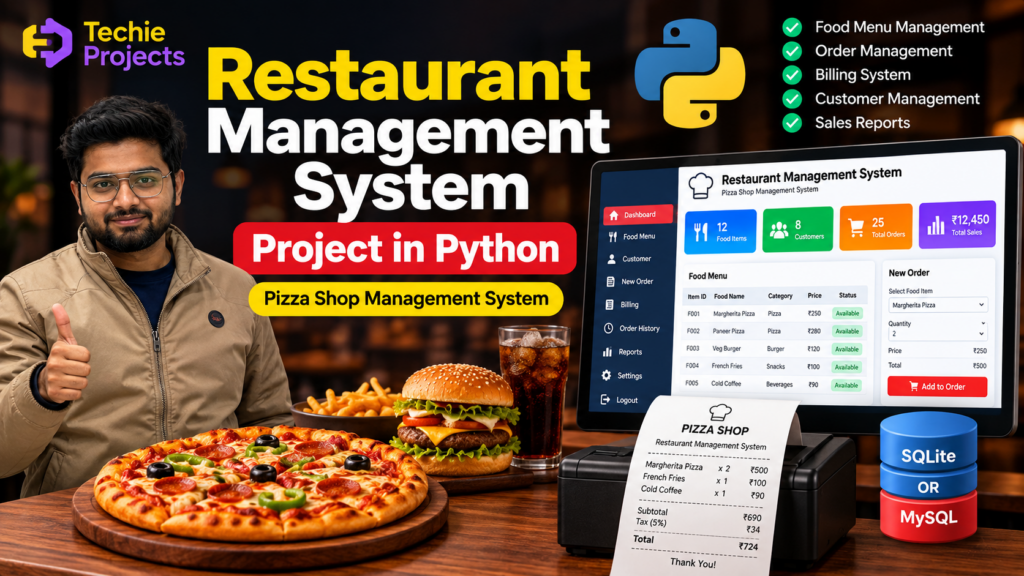
A Restaurant Management System Project in Python is a software application designed to simplify restaurant operations such as managing food items, taking customer orders, calculating bills, and maintaining sales records. Instead of handling restaurant operations manually, the system provides a digital platform for managing important restaurant activities efficiently.
This project is suitable for B.Tech, BCA, MCA, diploma, and computer science final-year students who want to develop a practical Python project involving GUI development, database management, billing, and CRUD operations.
Cafe Management System in Python With Source Code
Restaurant Management System Project Overview
A restaurant management system helps restaurant staff manage daily operations through a centralized application.
Depending on the implementation, the system can provide features such as:
- Food menu management
- Customer order management
- Restaurant billing
- Product quantity management
- Price calculation
- Order records
- Customer information
- Sales management
- Database storage
- Search functionality
- Receipt generation
- Record updating and deletion
The project can be developed using Python with technologies such as Tkinter, SQLite, MySQL, and other Python libraries.
Objectives of the Restaurant Management System
The main objectives of this project are:
- To digitize restaurant order management.
- To simplify food menu management.
- To automate bill calculation.
- To maintain customer and order records.
- To reduce manual calculation errors.
- To store restaurant data in a structured database.
- To provide an easy-to-use interface for restaurant staff.
- To make order and billing information easier to search and manage.
Key Features
1. Food Menu Management
The administrator can add and manage food items available in the restaurant.
Food information may include:
- Food ID
- Food name
- Category
- Price
- Availability
- Description
The menu can be updated whenever new food items are introduced or prices change.
2. Customer Management
The system can store basic customer information when required.
Customer details may include:
- Customer ID
- Customer name
- Contact number
- Order number
- Order date
For simple restaurant applications, customer registration can also be optional.
3. Order Management
Restaurant staff can select food items and add them to a customer’s order.
The system can maintain:
- Order ID
- Food item
- Quantity
- Price
- Total amount
- Order date
- Order status
4. Automatic Bill Calculation
One of the main features of a restaurant management system is automatic billing.
The system can calculate:
Subtotal + Tax + Additional Charges − Discount = Final Bill
This reduces the need for manual calculations.
5. Search Functionality
Users can search for information such as:
- Customer name
- Order ID
- Food item
- Date
- Bill number
This makes it easier to retrieve previous records.
6. Order History
The system can store previous orders in a database.
Authorized users can view historical orders whenever required.
7. Receipt Generation
The application can generate a digital or printable receipt containing information such as:
- Restaurant name
- Order number
- Food items
- Quantity
- Price
- Subtotal
- Tax
- Discount
- Total amount
- Date and time
8. Record Management
Administrators can add, update, search, and delete records according to their permissions.
How the Restaurant Management System Works
The restaurant management system project in Python can automate the complete process from menu management and order creation to billing and receipt generation.
The basic workflow can be represented as:
Login → Menu Management → Customer/Order Selection → Add Food Items → Calculate Bill → Save Order → Generate Receipt
Step 1: User Login
An authorized restaurant employee can log in to the application.
Authentication can help prevent unauthorized access to restaurant records.
Step 2: Manage Food Menu
The administrator can add food items and their prices to the system.
Existing items can also be updated or removed.
Step 3: Create Customer Order
The staff member selects the required food items and enters the quantity.
The system retrieves the corresponding prices from the database.
Step 4: Calculate the Bill
The system calculates the price of each item and generates the order subtotal.
Taxes, discounts, or other applicable charges can then be included.
Step 5: Save the Order
The completed order is stored in the database.
The record can later be used for order history and sales reporting.
Step 6: Generate Receipt
The system displays or prints the final bill for the customer.
Technologies Used
The technologies depend on the project’s implementation.
Python
Python is the primary programming language used to develop the restaurant management application.
It can handle:
- Application logic
- Database connectivity
- Calculations
- User input
- Data processing
- File handling
Tkinter
Tkinter can be used to develop the graphical user interface.
It provides components such as:
- Buttons
- Labels
- Forms
- Entry fields
- Tables
- Menus
- Dialog boxes
SQLite
SQLite can be used as a lightweight database for storing restaurant information.
It is particularly suitable for small standalone applications because it does not require a separate database server.
MySQL
MySQL can be used when the application requires a dedicated database server or a multi-user architecture.
Python Database Libraries
Python database libraries can be used to connect the application with SQLite or MySQL and perform database operations.
Software Requirements
The software requirements may include:
- Windows 10/11 or another supported operating system
- Python 3.x
- VS Code, PyCharm, or another Python IDE
- Tkinter
- SQLite or MySQL
- Required Python packages
- Web browser, if applicable
The exact requirements depend on the implementation of the project.
Hardware Requirements
A basic restaurant management system does not require high-end hardware.
Recommended hardware may include:
- Desktop computer or laptop
- Minimum 4 GB RAM
- Dual-core processor or better
- Adequate storage
- Keyboard
- Mouse
- Monitor
- Printer, if printed receipts are required
Database Design
A restaurant management system can use multiple tables to organize information.
Food Table
| Field | Description |
|---|---|
| Food ID | Unique food identifier |
| Food Name | Name of food item |
| Category | Food category |
| Price | Food item price |
| Availability | Item availability |
Customer Table
| Field | Description |
|---|---|
| Customer ID | Unique customer identifier |
| Name | Customer name |
| Contact | Customer contact information |
| Date | Customer/order date |
Order Table
| Field | Description |
|---|---|
| Order ID | Unique order identifier |
| Customer ID | Customer reference |
| Order Date | Date of order |
| Total Amount | Total bill amount |
| Status | Order status |
Order Details Table
| Field | Description |
|---|---|
| Order Detail ID | Unique record identifier |
| Order ID | Related order |
| Food ID | Selected food item |
| Quantity | Number of items |
| Price | Item price |
| Total | Quantity × price |
The database structure can be modified according to the requirements of the restaurant and project.
Restaurant Bill Calculation
The restaurant management system can automatically calculate the total bill.
For example:
Food Item: Pizza
Quantity: 2
Price: ₹250 each
The item total is:
2 × ₹250 = ₹500
If the subtotal is ₹500 and tax is ₹50:
Final Amount = ₹500 + ₹50 = ₹550
The application can perform these calculations automatically.
Restaurant Management System Workflow
The complete workflow can be summarized as:
Start → Login → Dashboard → Manage Menu → Select Customer → Create Order → Select Food Items → Enter Quantity → Calculate Total → Apply Tax/Discount → Save Order → Generate Bill → Print/View Receipt → Logout
This workflow can be customized according to the requirements of the project.
Advantages of Restaurant Management System
Reduced Manual Work
Restaurant employees can manage orders and bills digitally instead of maintaining paper records.
Faster Billing
Automatic calculations make the billing process faster.
Reduced Calculation Errors
The application can automatically calculate quantities, prices, taxes, discounts, and totals.
Better Record Management
Restaurant data can be stored systematically in a database.
Easy Order Tracking
Previous orders can be searched using order IDs, dates, or customer information.
Improved Organization
Food items, customers, orders, and billing information can be managed through a centralized application.
Scalability
The basic application can be extended with advanced restaurant-management features.
Applications
A restaurant management system can be used in:
- Restaurants
- Cafes
- Fast-food outlets
- Pizza shops
- Food courts
- Bakeries
- Hotels
- Canteens
- College cafeterias
- Food delivery businesses
- Small food businesses
The actual features should be customized according to the organization’s requirements.
Limitations
A basic restaurant management system may have some limitations.
Limited Payment Integration
A basic project may not include online payment gateways.
Local Database
If SQLite is used, the application may be designed primarily for a single computer or limited local usage.
Security
Restaurant and customer information should be protected against unauthorized access.
Hardware Dependency
Receipt printing requires a compatible printer.
Limited Multi-User Support
A simple desktop application may not support multiple employees simultaneously.
Future Scope
The project can be expanded with advanced features.
Online Food Ordering
Customers could place food orders through a web or mobile application.
Online Payment
Payment gateways can be integrated to support digital payments.
Inventory Management
The system can track ingredients and automatically update inventory when food items are sold.
Employee Management
The application can include employee registration, attendance, roles, and salary management.
Customer Management
Customer profiles and order history can be maintained for better service.
Sales Dashboard
A dashboard can display:
- Daily sales
- Weekly sales
- Monthly sales
- Popular food items
- Total orders
- Revenue
Automated Notifications
The system could send notifications regarding orders, inventory levels, or other restaurant activities.
Cloud Database
Restaurant data can be stored on a secure cloud-based database to support access from multiple locations.
Multi-Branch Management
A larger system can manage multiple restaurant branches from a centralized platform.
Role-Based Access
Different permissions can be provided for:
- Administrator
- Manager
- Cashier
- Waiter
- Kitchen staff
The system can also be extended with inventory management to track ingredients and stock levels.
Restaurant Management System Project Using Python and MySQL
For a more advanced implementation, MySQL can be used instead of SQLite.
A Python application can connect to MySQL and perform database operations such as:
- Insert
- Select
- Update
- Delete
- Search
This approach can be useful when the project needs a separate database server or multiple users.
A typical architecture can be:
Python Application → Database Connector → MySQL Database
The database stores food, customer, order, and billing information.
Restaurant Management System Using Tkinter
Tkinter is a popular choice for developing a desktop-based restaurant management system in Python.
A Tkinter interface can include:
- Login screen
- Dashboard
- Food menu
- Customer form
- Order form
- Billing section
- Search section
- Reports
- Exit/logout options
This makes the project suitable for students learning Python GUI development.
Pizza Shop Management System
The same restaurant management concept can be customized into a Pizza Shop Management System.
The application can provide features such as:
- Pizza menu management
- Pizza size selection
- Topping selection
- Quantity selection
- Customer information
- Order management
- Automatic price calculation
- Bill generation
- Order history
For example, the system could calculate the final price based on:
Base Pizza Price + Size Charges + Topping Charges + Quantity + Tax − Discount
This makes the project useful for demonstrating real-world billing and order-management functionality.
Why This Is a Good Python Project
The restaurant management system is a practical project because it combines multiple programming concepts.
Students can learn:
- Python programming
- GUI development
- Database management
- SQL
- CRUD operations
- Authentication
- Data validation
- Billing calculations
- Form handling
- Report generation
- Application design
The project can therefore be developed at different complexity levels depending on the student’s programming experience and academic requirements.
Frequently Asked Questions
What is a Restaurant Management System Project in Python?
A Restaurant Management System Project in Python is a software application used to manage restaurant activities such as food menus, customer orders, billing, and records using Python and database technologies.
Can a restaurant management system be developed using Python?
Yes. Python can be used to develop the application’s interface, business logic, billing calculations, database connectivity, and reporting features.
Which database can be used for a restaurant management system?
SQLite and MySQL are common choices. SQLite is suitable for small standalone applications, while MySQL can be useful for larger or multi-user systems.
Can Tkinter be used for this project?
Yes. Tkinter can be used to create a desktop-based graphical user interface for a Python restaurant management system.
Can this project generate restaurant bills?
Yes. The system can calculate item prices, quantities, taxes, discounts, and the final bill automatically.
Can this project be converted into a Pizza Shop Management System?
Yes. The application can be customized to manage pizza menus, sizes, toppings, quantities, customer orders, and billing.
Is this suitable as a final-year project?
Yes. A restaurant management system can be suitable for B.Tech, BCA, MCA, diploma, and other computer science students when developed with appropriate functionality, documentation, testing, and original implementation.
Can MySQL be used instead of SQLite?
Yes. MySQL can be used when the application requires a dedicated database server or multiple users.
What technologies are required?
A basic implementation may use Python, Tkinter, and SQLite. A more advanced implementation can use Python, Tkinter, MySQL, additional libraries, and reporting or payment integrations.
Conclusion
The Restaurant Management System Project in Python is a practical application for learning Python programming, GUI development, database management, order processing, and billing automation.
A basic system can manage food items, customer orders, and billing, while an advanced version can include inventory management, online ordering, digital payments, employee management, sales dashboards, cloud databases, and multi-branch support.
The project can also be customized as a Pizza Shop Management System or other food-business management application according to specific requirements.
For students, this project provides practical experience in developing a complete software application involving user interfaces, databases, CRUD operations, calculations, and real-world business workflows.
Note: If customer or employee personal information is stored, the application should implement appropriate access controls, data security, and responsible data-handling practices.
☎️ Contact Us For More Queries:-
📲 Call/WhatsApp: +91-9460060699
🌎 Website: www.techieprojects.com
📺 Instagram: @pythonprojects_
Related Python Projects
- Hotel Management System Project in Python
- Billing Software Project in Python
- Inventory Management System in Python
- Online Food Ordering System in Python
- Pizza Shop Management System in Python