
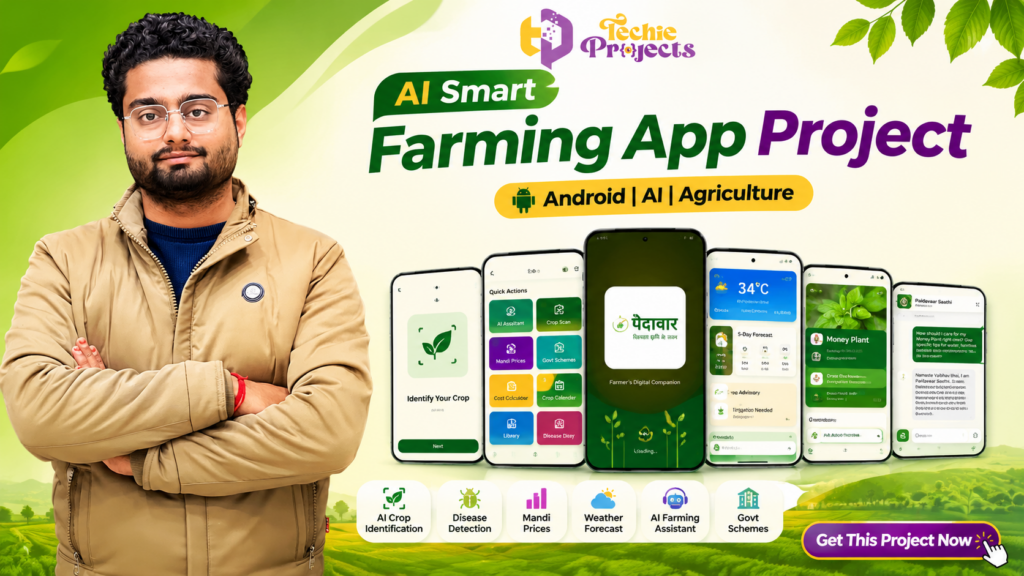
🚀 Looking for an innovative AI Smart Farming App Project for your final-year engineering project? Get Paidavaar Saathi – a smart agriculture Android application designed to bring Artificial Intelligence, digital farming assistance, crop identification, disease information, weather updates and agricultural market information together in one platform!
Are you an engineering student searching for an impressive Android application development project? Do you want to develop something meaningful using Artificial Intelligence and modern mobile technologies? The AI Smart Farming App Project is an excellent project concept that demonstrates how technology can support farmers in their daily agricultural activities.
Introducing Paidavaar Saathi (पैदावार साथी) – Farmer’s Digital Companion. This smart agriculture application provides multiple farming-related features through a user-friendly mobile interface. From identifying crops using images to accessing an AI farming assistant, checking mandi prices and exploring crop care information, the application brings several useful agricultural tools together.
Developing an AI Smart Farming App Project is an excellent opportunity for computer science and engineering students to understand Android application development with artificial intelligence. The application demonstrates how mobile technology can solve real-world agricultural challenges.
🎓 Get this complete project from Techie Projects and explore an innovative combination of Android application development, AI-powered assistance and smart agriculture.
📞 Contact Techie Projects for Project Enquiries
Want to purchase the AI Smart Farming App Project for your college submission, final-year project or technical demonstration?
Contact Techie Projects to enquire about project availability, source code, implementation details and project support.
- 🌐 Website: www.techieprojects.com
- 📱 WhatsApp: Contact Techie Projects
- 📸 Instagram: @pythonprojects_
🎬 Watch the AI Smart Farming App Project Demo
Explore the Paidavaar Saathi Android application and its different screens, including the home dashboard, AI crop identification, crop advisory, farming chatbot, mandi prices and agricultural knowledge library.
Project Name: Paidavaar Saathi – Farmer’s Digital Companion
Project Type: Android Application Development Project
Domain: Artificial Intelligence, Smart Agriculture and Mobile Application Development
🌾 What Is an AI Smart Farming App Project?
The AI Smart Farming App Project is an Android-based smart agriculture application designed to provide digital farming assistance through a collection of useful features.
Traditional farming requires farmers to make several decisions regarding crop selection, plant health, irrigation, fertilizer requirements, market prices and weather conditions. Accessing reliable information about these topics can be challenging, particularly when information is scattered across different platforms.
Paidavaar Saathi brings multiple agricultural information features into one mobile application.
The application includes an AI assistant for farming-related questions, a crop identification feature, mandi price information, weather forecasts, government scheme information, crop calendars and a digital agriculture library.
The main objective of this AI Smart Farming App Project is to demonstrate how mobile technology and artificial intelligence can make agricultural information more accessible.
🚀 Key Features of the Paidavaar Saathi Application
The AI Smart Farming App Project provides a smart digital solution for modern agriculture. It combines artificial intelligence, crop identification, disease detection, weather forecasting, and farming assistance to help farmers make better agricultural decisions.
The application contains multiple modules designed around common agricultural information requirements.
1. 🤖 AI Farming Assistant
The AI Farming Assistant is one of the important features of this smart agriculture application.
Farmers can enter agriculture-related questions and receive AI-generated responses through a conversational interface.
For example, users can ask questions about:
- Crop care and maintenance.
- Watering requirements.
- Fertilizer and plant nutrition.
- Seasonal farming practices.
- General agricultural guidance.
- Plant protection information.
The application includes a chat interface called Paidavaar Saathi, which acts as a digital farming companion.
This feature demonstrates how conversational AI can be integrated into an Android agriculture application.
2. 🌱 AI-Based Crop Identification
Crop identification is another important feature of the AI Smart Farming App Project.
Users can identify a plant or crop by uploading an image from their phone gallery or capturing a new photograph using the mobile camera.
The application provides a dedicated crop scanning interface.
The identification workflow includes:
- Open the Identify Crop module.
- Select an image from the gallery or capture a photograph.
- Submit the plant image for identification.
- View the identified crop information.
- Explore available care and maintenance information.
The application also displays an example of Money Plant identification, along with its botanical name, Epipremnum aureum.
This module demonstrates the practical application of image-based identification in agriculture.
3. 🦠 Plant Disease Detection and Crop Advisory
Plant diseases can affect crop growth and agricultural productivity. Identifying possible plant health problems is therefore an important part of modern farming.
The application includes a crop scanning feature and crop-related advisory information.
Users can explore plant care information and guidance associated with different agricultural conditions.
The crop identification section also provides information about plant care, fertilizer and nutrition.
This feature makes the application useful for demonstrating AI-assisted plant analysis and agricultural information management.
Note: Actual disease diagnosis and prediction capabilities depend on the configured image-analysis model and supported crop dataset.
4. 🌦️ Weather Forecast and Agricultural Advisory
Weather conditions play an important role in agricultural activities.
The Paidavaar Saathi dashboard displays weather information, including:
- Current temperature.
- Feels-like temperature.
- Humidity.
- Wind speed.
- Rain information.
- Five-day weather forecast.
The application also includes a Crop Advisory section.
For example, the displayed dashboard provides an irrigation advisory when conditions are dry and hot.
Weather information can help users understand how environmental conditions relate to crop management decisions.
5. 📊 Mandi Bhav – Agricultural Market Prices
Knowing agricultural market prices is important for farmers when planning the sale of their produce.
The application includes a dedicated Mandi Bhav section where users can explore commodity price information.
The displayed interface provides:
- Crop selection.
- State selection.
- Market price information.
- Low and high price indicators.
- Minimum Support Price (MSP) comparison.
- Seven-day price chart.
- Market-wise price information.
- Sell-price alert interface.
For example, the application demonstrates wheat prices for Gujarat, including market price comparisons and an MSP reference.
This feature demonstrates how agricultural market information can be presented through a mobile dashboard.
6. 🏛️ Government Schemes for Farmers
Government schemes are an important source of agricultural support.
The application includes a dedicated Government Schemes module to help users explore agricultural scheme-related information.
The module is designed to provide a convenient entry point for discovering available schemes and understanding eligibility-related information.
It makes the application more comprehensive by combining agricultural information with government-related resources.
Users should always verify current eligibility, application dates and benefits through official government portals.
7. 📚 Digital Agriculture Library
The Library module provides organized agricultural information.
The displayed interface includes categories such as:
- Fasal (Crops).
- Keednashak (Pesticides).
- Stage Guide.
The Stage Guide section includes different crop growth stages, such as:
Seedling Stage (0–21 Days)
The application displays common issues to watch for during the seedling stage, including:
- Damping-off.
- Root rot caused by excessive watering.
- Aphid attacks on tender shoots.
- Poor germination.
It also displays suggested actions such as seed treatment, avoiding water stagnation and maintaining suitable soil conditions.
This section demonstrates how agricultural knowledge can be organized into a practical digital reference library.
8. 🧮 Crop Cost Calculator
Understanding farming expenses is important for agricultural planning.
The application includes a Cost Calculator feature in its Quick Actions dashboard.
This module is intended to help users explore crop-related expenses and profitability information.
A well-designed agricultural cost calculator can help organize details such as cultivation expenses, input costs and estimated returns.
9. 📅 Crop Calendar and Reminders
Agricultural activities are closely connected to crop growth stages and seasonal schedules.
The Crop Calendar module provides a dedicated interface for tasks and reminders.
It can help organize farming activities and make important agricultural schedules easier to access.
10. 📝 Disease Diary
The application also provides a Disease Diary module.
This feature is designed to support the recording and tracking of crop disease-related information.
Maintaining agricultural records can help users organize observations and review plant health information over time.
Benefits of Smart Farming App Project
One of the major advantages of the AI Smart Farming App Project is its ability to bring multiple farming services together in a single mobile application. Farmers can access useful agricultural information without depending on multiple platforms.
📱 AI Smart Farming App Project – Application Screenshots
The following screenshots represent the actual application interface and its major modules.
Application Splash Screen
The application starts with the Paidavaar Saathi branding and a farmer-focused digital companion theme.
Home Dashboard
The dashboard provides quick access to important modules, including AI Assistant, Crop Scan, Mandi Prices, Government Schemes, Cost Calculator, Crop Calendar, Library and Disease Diary.
Crop Identification Screen
Users can capture a photograph or select an existing image to identify a plant or crop.
Crop Identification Result
The application demonstrates Money Plant identification and provides related plant information.
Plant Care and Fertilizer Information
Users can explore care steps, watering guidance, fertilizer information and other plant maintenance details.
AI Farming Chatbot
The chatbot provides a conversational interface for asking agriculture-related questions.
Mandi Bhav Dashboard
The market price screen presents commodity information, price comparisons, charts and market details.
Agriculture Library
The Library screen organizes crop information, pest-related resources and crop growth-stage guidance.
💻 Technologies Used in the AI Smart Farming App Project
The project demonstrates the integration of mobile application development and intelligent agriculture-related functionality.
The exact technology stack depends on the implementation and configured services.
The main technology areas associated with this project include:
- Android Development: For building the mobile application interface and navigation.
- Artificial Intelligence: For intelligent farming assistance and AI-related functionality.
- Image Processing: For processing crop and plant photographs.
- Machine Learning: For image-based identification or classification where configured.
- API Integration: For connecting external information services where required.
- Database Management: For storing relevant application data.
- UI/UX Design: For designing a user-friendly mobile experience.
Students should refer to the actual source code and project documentation for the exact frameworks, programming languages, libraries and APIs used.
⚙️ How Does the AI Smart Farming App Project Work?
The general application workflow can be understood through the following steps.
Step 1: Open the Android Application
Users launch Paidavaar Saathi and access the main dashboard.
Step 2: Select a Farming Feature
Users choose the required module, such as AI Assistant, Crop Scan, Mandi Bhav or Library.
Step 3: Enter Information or Upload an Image
Depending on the selected module, users can enter a question, choose a crop, select an image or explore available information.
Step 4: Process the Request
The application processes the selected action using its configured functionality, data sources and services.
Step 5: Display the Result
The application displays the relevant result, information or advisory through its mobile interface.
Step 6: Explore Additional Features
Users can navigate between different modules to access more agricultural information.
🎓 Why Choose This AI Smart Farming App Project for Your Final Year?
Engineering students often look for projects that demonstrate practical applications of modern technologies.
The AI Smart Farming App Project offers an interesting combination of Android development, AI-based functionality and an agriculture-focused use case.
Here are some reasons to consider this project:
Practical Application
The project focuses on real-world agricultural information requirements rather than being limited to a basic demonstration application.
Multiple Functional Modules
It includes crop identification, chatbot assistance, market information, weather forecasts and an agricultural library.
AI and Android Integration
Students can explore how intelligent features can be incorporated into mobile applications.
Attractive User Interface
The application uses a modern interface with multiple dashboards, cards, navigation elements and informational screens.
Learning Opportunities
Students can understand application navigation, image handling, API integration, data presentation and AI-related workflows.
Project Demonstration
The application provides multiple modules that can be demonstrated during a college project presentation or technical viva.
🛒 Get the AI Smart Farming App Project from Techie Projects
Are you searching for a ready-to-explore agriculture Android application project?
Techie Projects provides engineering project solutions for students who want to understand modern technologies and develop practical software applications.
The Paidavaar Saathi project is a great option for students interested in:
- Android Application Development.
- Artificial Intelligence Projects.
- Machine Learning Applications.
- Smart Agriculture Projects.
- Image Processing Projects.
- Final-Year Engineering Projects.
- Innovative Mobile Application Development.
Instead of starting your project research from scratch, explore this application and understand its features, workflow and implementation.
What Can You Enquire About?
Contact our team to discuss the available project package and deliverables.
You can enquire about:
- Project source code availability.
- Android application setup.
- Project documentation.
- Installation and execution guidance.
- Demonstration and implementation details.
- Available customization options.
- Technical support.
The exact deliverables and support depend on the selected project package. Contact our team for complete details before purchasing.
<blockquote> 🚀 **Ready to Get Started?**
Bring your agriculture-based Android project idea to life with Paidavaar Saathi!
📱 WhatsApp: https://wa.me/919460060699
🌐 Website: www.techieprojects.com
📸 Instagram: https://www.instagram.com/pythonprojects_/
Contact Techie Projects today for project enquiries and purchase details!
</blockquote>
🔮 Future Scope of the Smart Agriculture Application
The AI Smart Farming App Project offers several possibilities for future development.
Students and developers can extend the application with additional features according to their requirements.
Some possible enhancements include:
1. Advanced Crop Disease Classification
Integrate additional machine learning models and crop disease datasets to support more plant categories and disease classifications.
2. Multilingual AI Farming Assistant
Introduce additional Indian languages to make agricultural information accessible to more users.
3. Soil Health Monitoring
Add soil-related information such as pH, moisture and nutrient levels using suitable sensors or external data sources.
4. IoT-Based Smart Irrigation
Integrate IoT devices to monitor soil moisture and automate irrigation operations.
5. Advanced Market Price Analysis
Add historical market data analysis and price trend visualization to help users understand market movements.
6. Personalized Crop Recommendations
Introduce location, season and soil-based crop recommendation functionality using suitable datasets and agricultural rules.
7. Voice-Based Farming Assistance
Add speech recognition and text-to-speech functionality to make the application easier to use for farmers who prefer voice interaction.
These enhancements can make the application more comprehensive and provide additional opportunities for research and development.
❓ Frequently Asked Questions (FAQs)
1. What is the AI Smart Farming App Project?
It is an Android agriculture application that combines AI-related farming assistance, crop identification, mandi price information, weather forecasts and agricultural knowledge resources.
2. What is Paidavaar Saathi?
Paidavaar Saathi is the name of the smart farming application. Its tagline is Farmer’s Digital Companion.
3. Is this project suitable for final-year engineering students?
Yes. It is a suitable project concept for students interested in Android development, artificial intelligence, machine learning and smart agriculture.
4. Does the application support crop identification?
Yes. The displayed application includes a crop identification module where users can capture or upload plant images.
5. Does the project include a chatbot?
Yes. The application includes an AI farming assistant with a conversational chat interface.
6. Can users check mandi prices?
The application includes a Mandi Bhav module that displays commodity and market price information.
7. Does the application provide weather information?
Yes. The displayed dashboard includes current weather information and a five-day forecast.
8. Can this project be customized?
Customization possibilities depend on the available source code and implementation. Contact Techie Projects to discuss your requirements.
9. How can I purchase this project?
You can contact Techie Projects through WhatsApp or visit the website to enquire about project availability, pricing and deliverables.
10. What is the main objective of this project?
The main objective is to demonstrate how artificial intelligence and mobile application technology can bring different agricultural information services together in one platform.
💡 Recommended Projects
Looking for more innovative engineering projects? Explore other project ideas available through Techie Projects.
- Vehicle Detection and Counting Using Python
- Brain Tumor Detection Using Deep Learning
- Helmet and Number Plate Detection Using AI
- Intrusion Detection System Using Machine Learning
- AI Exam Proctoring System Using Python
- Accident Detection and Alert System Using AI
- AI-Based Smart Waste Segregation System
- IoT-Based Smart Irrigation System
Explore more engineering and final-year projects at www.techieprojects.com.
🎯 Conclusion
The AI Smart Farming App Project – Paidavaar Saathi demonstrates how modern mobile application development and artificial intelligence can be combined to create a smart agriculture platform.
With features such as AI farming assistance, crop identification, plant care information, mandi prices, weather forecasts, government schemes, crop calendars and an agricultural knowledge library, the application provides a comprehensive project concept for engineering students.
For students interested in Android development, AI, machine learning and smart agriculture, this project offers an opportunity to explore multiple technologies through a practical application.
If you are planning your next final-year engineering project, explore Paidavaar Saathi and contact Techie Projects for purchase details.
🌾 Build innovative technology. Explore smart agriculture. Create practical engineering projects with Techie Projects!