
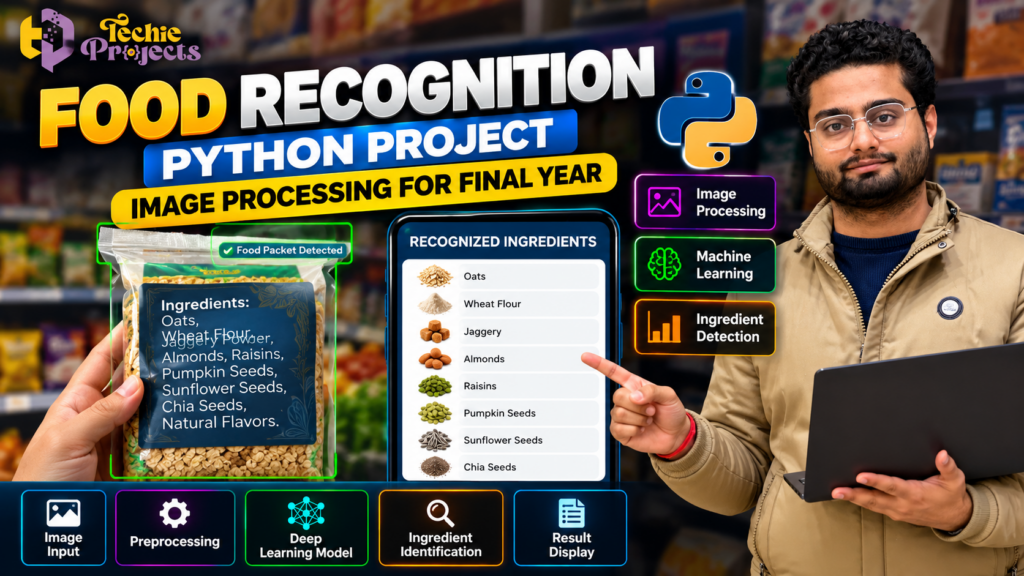
🎓 Looking to purchase a Food Recognition Python Project for your final-year engineering submission? Get started with a practical computer vision topic from Techie Projects. This project explores how Python and image processing techniques can help computers analyze food images and recognize food-related categories.
Stop spending hours searching for disconnected code examples and project ideas that may not match your college requirements. If you are a Computer Science Engineering (CSE) student searching for a minor project, major project, or final-year submission, this topic offers an opportunity to explore image analysis, machine learning, and intelligent food recognition.
At Techie Projects, you can enquire about available project packages and confirm their implementation, source code, installation requirements, documentation, and pricing before purchasing.
Ready to discuss your project? Visit Techie Projects or contact us directly on WhatsApp to check availability and find out which package suits your academic requirements.
🎬 Watch the Food Recognition Python Project Demo
Explore the project demonstration to understand the concept of food recognition and how an image-processing application may display its results.
The demo can help you evaluate the general workflow and decide whether the project matches your interests. Before purchasing, ask about the implemented recognition method, supported food categories, application interface, and available deliverables.
Reviewing these details beforehand helps you make a more informed decision and prepares you to understand the project you select.
🍎 What Is a Food Recognition Python Project?
A Food Recognition Python Project is an educational application that explores how digital images can be analyzed to identify food items, ingredients, or food-related categories.
The application may use image processing techniques, machine learning, or deep learning, depending on its implementation. For example, a system trained on suitable images might classify food items such as fruits, vegetables, packaged foods, or other supported categories.
Image processing prepares the image for analysis, while a trained model can learn visual patterns from labeled examples. The application then uses those patterns to generate a prediction.
The system’s accuracy depends on factors such as dataset quality, model design, lighting, image resolution, and the variety of food images used during training. A prediction should not be treated as a guarantee of ingredient composition or nutritional information.
🍎 Why Choose a Food Recognition Python Project?
A Food Recognition Python Project is a practical choice for students interested in Python programming, image processing, and computer vision. It explores how digital food images can be analyzed to identify supported food categories using image-processing techniques or trained machine learning models.
For CSE students, this topic provides opportunities to study image preprocessing, feature extraction, classification, and prediction results. It can also be extended to investigate different food categories, improve image quality, and evaluate model performance.
At Techie Projects, you can enquire about the available project package and confirm its source code, installation requirements, documentation, and implemented features before purchasing.
🎯 Objectives of the Project
The primary objective is to explore how Python-based image analysis can be applied to food recognition.
Key learning objectives include:
- Understanding digital image processing fundamentals.
- Loading and displaying food images using Python.
- Exploring image preprocessing techniques.
- Understanding image classification and recognition workflows.
- Investigating machine learning or deep learning methods, where implemented.
- Presenting recognition results through a suitable interface.
- Evaluating model performance using appropriate test images.
These objectives help students connect programming concepts with a practical computer vision application.
⚙️ How Does the Food Recognition System Work?
A typical food recognition application follows several stages. The exact workflow depends on the project version.
1. Image Input
The user provides a food image through an upload option or another supported input method. The image may contain a single food item, multiple ingredients, or packaged food.
Clear images generally make visual analysis easier. Poor lighting, cluttered backgrounds, and partially hidden objects can affect recognition.
2. Image Preprocessing
Preprocessing prepares the image for analysis. Common operations include resizing, changing color formats, and normalizing pixel values.
These steps help ensure that image data matches the input requirements of the selected algorithm or model.
3. Feature Extraction and Recognition
Traditional image processing methods may analyze characteristics such as color, shape, and texture. A machine learning or deep learning model can instead learn useful visual patterns from training images.
The method used depends on the project’s design and the type of recognition required.
4. Classification or Prediction
The application evaluates the input image and generates a prediction from its supported classes. A basic classification system may return one food category, while an object detection system may locate multiple items in an image.
Recognizing multiple food items requires an appropriate model and implementation; it should not be assumed to be included in every project.
5. Result Display
The application presents the predicted category through its interface. Depending on the implementation, the output may include a label, confidence score, or annotated image.
This stage makes it easier to demonstrate the application during an academic presentation.
🧠 Applications of a Food Recognition Python Project
A Food Recognition Python Project demonstrates how computer vision can be applied to food image analysis. Depending on its model and supported categories, such a system may be used for educational demonstrations, food image classification, ingredient image organization, or experiments involving visual recognition.
Students can test different images, compare predicted categories, and investigate how lighting, background, and image quality influence results. These experiments help explain the strengths and limitations of image recognition systems.
The actual applications depend on the implemented model and dataset, so confirm the available features before describing specific capabilities in your project presentation.
🛠️ Technologies Used in the Project
The following tools are commonly used in Python-based food recognition applications. Confirm which are included in the available package before purchasing.
- Python: Used for application logic and image analysis.
- OpenCV: Supports image loading, transformation, filtering, and preprocessing.
- NumPy: Provides numerical operations for image arrays.
- TensorFlow or PyTorch: Can be used for deep learning model development and inference.
- Keras: Provides tools for building and training neural networks.
- Matplotlib: Helps visualize images and model evaluation results.
- Streamlit or Flask: May provide a web-based interface, depending on the implementation.
Not every project uses all these technologies. The actual programming language, libraries, and versions should be confirmed before installation.
🌟 Important Features to Explore
The following features are common possibilities in food recognition applications. Ask Techie Projects to confirm which features are available in the specific project you intend to purchase.
Food Image Upload
Users may be able to select a food image from their computer for analysis.
Image Preprocessing
Image preprocessing methods can prepare images for the recognition algorithm and improve consistency between inputs.
Food Category Recognition
Where supported, a trained model may predict food categories from the classes represented in its training data.
Prediction Results
The application may display the predicted class and, if implemented, confidence scores or visual annotations.
User-Friendly Interface
A graphical interface can make image selection and result presentation easier to understand during a project demonstration.
Scope for Further Development
Students can investigate adding more categories, improving preprocessing, comparing models, or testing the system under different image conditions.
These are possible features and extensions, not a guarantee that all are included in the current package.
🎓 Why Choose This Project for Your Final Year?
A Food Recognition Python Project can be a useful academic topic for students interested in programming, image processing, and artificial intelligence.
Practical programming: Explore how Python connects image input, processing, and prediction.
Computer vision fundamentals: Learn how computers analyze visual information and identify patterns.
Technical understanding: Investigate preprocessing, classification, model evaluation, and the limitations of recognition systems.
Academic presentation: Explain the project’s objectives, methodology, implementation, results, and possible improvements.
Portfolio development: A project you have installed, tested, and understood can help demonstrate your technical learning to potential employers.
Choose a project whose implementation you can explain rather than selecting a topic based only on its title.
📦 What Should You Confirm Before Purchasing?
Before ordering your project, clarify the package contents and technical requirements.
Ask Techie Projects about:
- Source code: Is the complete source code included?
- Dataset and model: Are sample images, a dataset, training code, or a trained model provided?
- Installation instructions: Are the required libraries and setup steps documented?
- Project report: Is technical documentation or a report included?
- Demonstration: Can you review the available demo or screenshots?
- Code explanation: Is code explanation or technical guidance included?
- System compatibility: Which operating system, Python version, and hardware are required?
- Customization: Can the project be modified to match your requirements, and will additional charges apply?
- Pricing and delivery: What is the total cost, delivery method, and support policy?
Deliverables vary by project and package. Confirm these details before making payment, and check that your college permits the intended use of external project resources.
🚀 Possible Future Enhancements
Students can explore several extensions after understanding the basic implementation:
- More food categories: Expand the model using suitable labeled images.
- Multi-item recognition: Investigate object detection for images containing several food items.
- Transfer learning: Compare suitable pretrained models.
- Performance evaluation: Test predictions on separate images and study common classification errors.
- Improved interface: Add image previews and clearer result presentation.
- Dataset diversity: Test images under different lighting conditions and backgrounds.
- Application deployment: Explore making the system accessible through a suitable web interface.
The feasibility of each enhancement depends on the existing source code, model, dataset, and available computing resources.
🛒 Buy a Food Recognition Python Project from Techie Projects
Looking to purchase a Food Recognition Python Project for your minor or final-year engineering submission? Techie Projects can help you enquire about available project packages and their technical requirements.
Before placing an order, confirm the source code, model files, dataset, installation instructions, documentation, pricing, and available support. Check that the project matches your college requirements and is compatible with your computer.
- 📲 Call/WhatsApp: +91-9460060699
- 🌎 Website: www.techieprojects.com
- 📺 Instagram: @pythonprojects_
Before placing an order, confirm all deliverables, compatibility, and terms. Select a project that fits your academic guidelines and gives you the opportunity to understand and explain the implementation.
🔗 Explore Related Python Projects
Looking for other topics? Explore the relevant project categories on Techie Projects.
- Python Projects: Applications for programming practice and automation.
- Image Processing Projects: Projects focused on analyzing and transforming digital images.
- Computer Vision Projects: Applications that interpret images or video.
- Machine Learning Projects: Systems that learn patterns from data.
- Deep Learning Projects: Applications using neural networks.
- Data Science Projects: Projects involving data analysis, visualization, and evaluation.
Compare the available topics and choose an option that aligns with your interests and academic requirements.
❓ Frequently Asked Questions
1. What is a Food Recognition Python Project?
It is an educational application that explores how Python-based image processing or trained models can identify food-related categories from digital images.
2. Which programming language is used?
Python is commonly used for food recognition projects. Confirm the programming language and dependencies of the package you plan to purchase.
3. Is this project suitable for final-year engineering students?
It may be suitable for students interested in computer vision, image processing, and machine learning. Confirm the required complexity and topic approval with your college supervisor.
4. Does the project use deep learning?
Some implementations use trained deep learning models, while others use traditional image processing or machine learning methods. Ask Techie Projects to confirm the actual approach.
5. Can the system recognize multiple food items?
That depends on the model and implementation. Recognizing multiple items generally requires an appropriate object detection or multi-label classification approach.
6. What is included after purchase?
Package contents vary. Confirm source code, model files, datasets, installation instructions, documentation, and any technical support before ordering.
7. How can I purchase the project?
Visit Techie Projects or contact us through WhatsApp to discuss availability, pricing, and package details.
✅ Conclusion
A Food Recognition Python Project offers an opportunity to explore image processing, computer vision, and machine learning through a practical food image analysis application.
By understanding image preprocessing, recognition methods, classification results, and performance evaluation, students can build their technical knowledge and prepare to explain the project confidently.
If you want to purchase this project for your academic work, contact Techie Projects to confirm the implementation, included deliverables, compatibility, and price before ordering.
🚀 Start your project enquiry today: Visit Techie Projects | Chat on WhatsApp