
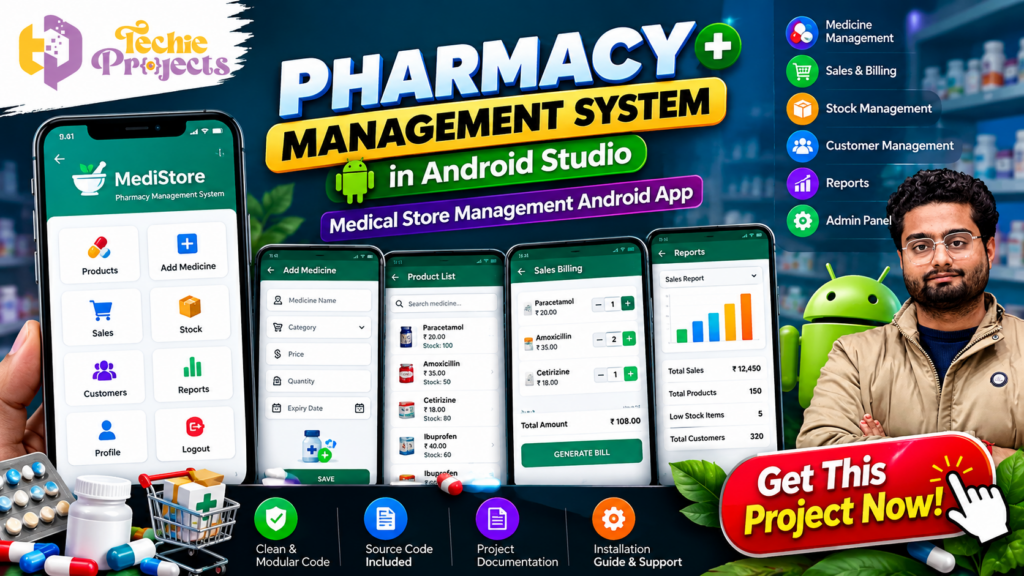
Looking for a practical Android application project that demonstrates real-world software development skills? The Pharmacy Management System in Android Studio is an excellent project for students who want to understand how mobile applications can simplify medical store operations, medicine inventory management, sales billing, customer records, and reporting.
Get the Pharmacy Management System in Android Studio project package from Techie Projects and make your final-year project preparation easier. Instead of spending weeks building every module from scratch, you can explore a ready-made project, study its implementation, understand its functionality, and prepare for your academic demonstration. Project source code, installation guidance, documentation, and technical assistance can help you understand the complete development workflow.
Whether you are pursuing B.Tech, BCA, MCA, or another computer-related course, this Android application offers an opportunity to explore practical programming concepts through a pharmacy management use case.
📞 Contact Techie Projects for Project Enquiries
Want to purchase this project or know more about its features and package details? Contact Techie Projects directly.
- 📲 Call/WhatsApp: +91-9460060699
- 🌎 Website: www.techieprojects.com
- 📺 Instagram: @pythonprojects_
🎬 Pharmacy Management System in Android Studio – Project Demo
💊 What Is a Pharmacy Management System?
A Pharmacy Management System is a software application designed to help manage the regular activities of a medical store. A pharmacy handles multiple operations, including maintaining medicine information, checking available stock, recording sales, managing customer details, and preparing bills.
Managing these activities manually can become time-consuming, especially when a store maintains a large collection of medicines. A digital management application provides a structured way to organize this information.
The Pharmacy Management System in Android Studio demonstrates how an Android application can provide a mobile interface for managing different pharmacy-related activities.
The application can include modules for:
- Medicine and product management
- Adding new medicines
- Product and stock information
- Sales and billing management
- Customer management
- Reports and summaries
- Administrator operations
- User profile and logout
The project is useful for understanding how different application modules work together in an Android development environment.
🚀 Key Features of Pharmacy Management System in Android Studio
The following are the important modules and functionalities demonstrated by the project.
1. 💊 Medicine Management
Medicine management is one of the primary modules of a pharmacy application. It allows users to maintain medicine-related information in an organized manner.
Depending on the implemented functionality, medicine records can include:
- Medicine name
- Medicine category
- Price
- Available quantity
- Expiry date
- Product details
An organized medicine management module makes it easier to access product information and maintain inventory records.
2. ➕ Add Medicine Module
The Add Medicine module allows authorized users to enter new medicine details into the application.
Users can provide information such as medicine name, category, price, quantity, and expiry date.
This module demonstrates important Android development concepts, including:
- Form design
- Input fields
- Data validation
- Button click events
- Data storage operations
It also helps students understand how application interfaces collect and process user information.
3. 📦 Stock Management
Stock management helps organize the available medicine inventory.
A pharmacy needs to maintain accurate information about the products available for sale. The stock management module can help users review medicine quantities and identify products that require attention.
Important stock-related operations may include:
- Viewing available stock
- Updating medicine quantities
- Checking product information
- Identifying low-stock medicines
- Maintaining inventory records
This module provides a practical example of data management in an Android application.
4. 🧾 Sales and Billing Management
Sales and billing are important operations in a medical store.
The billing module demonstrates how medicine products can be selected, quantities can be managed, and the total amount can be calculated.
Typical billing operations include:
- Selecting medicines
- Entering product quantities
- Calculating item totals
- Calculating the final bill
- Displaying sales information
Students can use this module to understand calculations, user interactions, and data handling within Android applications.
5. 👥 Customer Management
Customer management provides a structured way to maintain customer-related information.
A pharmacy application may allow users to add, view, and manage customer records according to the implemented functionality.
This module helps students understand how to design forms, organize records, and connect different application screens.
6. 📊 Reports and Dashboard
Reports provide a summarized view of pharmacy operations.
A dashboard can display information such as total products, sales summaries, available stock, and customer counts when these features are implemented in the application.
Visual reports can make information easier to understand.
Students can explore how to present numerical data using dashboard cards, tables, and graphical elements.
7. ⚙️ Admin Panel
The administrator module provides access to the application’s management features.
Depending on the project configuration, administrative operations may include managing medicine records, reviewing inventory, accessing reports, and maintaining application information.
This module demonstrates how different application functions can be organized through a central interface.
8. 👤 Profile and Logout
The profile and logout options provide basic account-related navigation.
A user can access profile-related information and use the logout option to exit the application.
These features help students understand application navigation and session-related workflows.
📱 Technology Stack Used in the Project
The Pharmacy Management System demonstrates Android application development using the following technologies and tools.
Android Studio
Android Studio is the official integrated development environment used for Android application development. It provides tools for writing code, designing interfaces, building applications, and testing functionality.
Java
Java is used for implementing application logic in this project configuration. Students can explore object-oriented programming, methods, classes, conditional statements, event handling, and application workflows.
Android SDK
The Android Software Development Kit provides the libraries and development tools required to build Android applications.
XML Layout Design
XML is commonly used in Android development to design application interfaces. Students can understand how buttons, text fields, layouts, images, and other UI elements are arranged on different screens.
Development Environment
The project can be explored using a compatible Android Studio installation and the required Android development tools. Exact version requirements should be checked against the supplied project package.
🏗️ How the Pharmacy Management System Works
The application follows a module-based workflow. The general working process can be understood through the following steps.
Step 1: Open the Application
Start the application in the configured Android environment and access its available screens.
Step 2: Access the Main Dashboard
The dashboard provides navigation to the different management modules.
Step 3: Manage Medicine Information
Use the medicine-related screens to add or view product information, depending on the available functionality.
Step 4: Maintain Stock Records
Review and update medicine quantities to maintain inventory information.
Step 5: Manage Sales and Billing
Select products, enter quantities, and review the calculated billing information.
Step 6: Review Customer Information
Access the customer management section to work with customer records.
Step 7: View Reports
Use the reports section to review available summaries and management information.
This workflow demonstrates how separate application modules can be connected to support a common business process.
🎓 Why Choose This Pharmacy Management System for Your Final-Year Project?
Choosing a suitable final-year project is an important part of an engineering or computer applications course. A good project should demonstrate programming knowledge, application design, problem-solving, and practical implementation.
The Pharmacy Management System in Android Studio offers several learning opportunities.
Practical Application Development
Students can understand how an Android application is developed for a practical business use case.
Multiple Functional Modules
The project covers several application modules, helping students understand how different screens and features work together.
Android Programming Experience
Students can explore Java programming, XML layouts, user interactions, and Android application structure.
Useful for Academic Demonstrations
A working application can help students explain its interface, modules, workflow, and technical implementation during project presentations.
Learning Through Source Code
Studying the source code helps students understand how individual functions are implemented and how the application is organized.
📂 What Do You Get with the Techie Projects Package?
When you enquire about purchasing the Pharmacy Management System from Techie Projects, you can ask about the available project package and support options.
The package may include:
- Project Source Code: Application files for studying and running the project.
- Installation Guidance: Assistance with setting up the project in the development environment.
- Project Documentation: Technical information about the project and its implementation.
- Code Explanation: Guidance to understand important modules and programming logic.
- Technical Support: Assistance with project-related installation and implementation queries.
- Demonstration Guidance: Help understanding the application’s workflow and functionality.
Confirm the exact deliverables, compatibility, and support included in your selected package before purchasing.
💻 Software and Hardware Requirements
Software Requirements
- Operating System: Windows 10 or Windows 11
- IDE: Android Studio
- Programming Language: Java
- Development Tools: Android SDK
- Interface Design: XML
- Android Emulator or compatible Android device
Hardware Requirements
- Processor: Intel or AMD processor
- RAM: 8 GB recommended for a smoother development experience
- Storage: Sufficient free disk space for Android Studio and project files
- Input Devices: Keyboard and mouse
- Android Device: Optional, for testing the application on a physical device
Actual requirements may vary depending on the Android Studio version and emulator configuration.
🛠️ How to Install the Pharmacy Management System Project
Follow the general installation workflow below. Exact steps may vary according to the supplied project files.
- Install a compatible version of Android Studio.
- Extract the downloaded project package.
- Open Android Studio.
- Select the option to open an existing project.
- Browse to the extracted project folder.
- Allow Gradle synchronization to complete.
- Resolve any environment or SDK configuration requirements.
- Select an Android emulator or connected device.
- Build and run the application.
- Explore the available application modules.
If you encounter an installation issue, contact Techie Projects for project-related assistance according to your package terms.
📚 Important Concepts Students Can Learn
Working with this Android application can help students explore several programming and software development concepts.
- Object-oriented programming using Java
- Android application lifecycle
- XML-based user interface design
- Form handling and input validation
- Event-driven programming
- Data management
- Application navigation
- Software testing
- Debugging and error handling
- Mobile application development
Understanding these concepts can help students explain their project more confidently during academic evaluations.
🏥 Applications of a Pharmacy Management System
A pharmacy management application demonstrates how software can support different medical store activities.
Potential application areas include:
- Retail medical stores
- Small pharmacy management demonstrations
- Medicine inventory management
- Sales and billing workflows
- Customer record management
- Academic Android development projects
Important: This project is intended for educational and demonstration purposes. It should not be treated as certified pharmacy software or used for real medical, prescription, or patient-care decisions without appropriate professional validation, security, regulatory compliance, and testing.
🧪 Testing and Validation
Testing is an important part of Android application development. Students should verify that each implemented module behaves as expected.
Some useful test cases include:
- Checking whether the application opens correctly.
- Testing medicine entry forms.
- Verifying required input fields.
- Checking product information display.
- Testing stock quantity updates.
- Verifying billing calculations.
- Checking customer record operations.
- Testing dashboard navigation.
- Verifying logout functionality.
Testing helps identify errors and improves the reliability of the application.
🌟 Benefits of Pharmacy Management System in Android Studio
The Pharmacy Management System in Android Studio offers students an opportunity to explore how mobile technology can simplify pharmacy operations. It combines different management modules into one Android application, making it a useful example of practical software development.
Some important benefits include:
- Organized Medicine Records: The application demonstrates how medicine information can be maintained digitally.
- Inventory Management: Students can understand how stock information and product quantities are managed.
- Billing Operations: The billing module demonstrates product selection and automatic amount calculations.
- Customer Management: The application provides a structured approach to managing customer information.
- Report Generation: Dashboard and reporting screens help present important management information.
- Android Development Practice: Students can explore Java programming, XML layouts, and Android Studio tools.
By studying the Pharmacy Management System in Android Studio, students can understand how multiple application modules work together to solve a practical management problem.
📱 Who Should Purchase This Pharmacy Management System in Android Studio?
This project is suitable for students interested in learning Android application development and exploring a practical management application.
The Pharmacy Management System in Android Studio can be considered by:
- B.Tech Computer Science Engineering students
- BCA and MCA students
- Diploma Computer Engineering students
- Android application development learners
- Students preparing academic software demonstrations
- Beginners interested in Java-based Android projects
If you are searching for a Pharmacy Management System in Android Studio with source code, contact Techie Projects to check the available package, documentation, and installation assistance.
💼 Get a Pharmacy Management System in Android Studio with Source Code
Choosing the right project package can make your academic project preparation more organized. Techie Projects provides project resources to help students understand software implementation and application workflows.
With the Pharmacy Management System in Android Studio, you can explore medicine management, stock records, billing interfaces, customer information, and reporting modules.
You can also enquire about source code, installation guidance, documentation, and technical explanations to understand how the application works.
Purchase your project from Techie Projects and get started with practical Android development.
💡 Why Purchase Your Android Project from Techie Projects?
Finding a project that is suitable for your academic requirements can take time. Techie Projects provides project-related resources for students who want to explore software development through practical implementations.
By choosing the Pharmacy Management System in Android Studio from Techie Projects, you can enquire about:
- Project source code
- Installation assistance
- Documentation
- Code explanation
- Technical project guidance
- Project demonstration support
Our goal is to help students understand project implementation and learn from practical software development examples.
Before placing an order, share your course, academic requirements, preferred technology, and expected deliverables so that the project package can be discussed appropriately.
🛒 Get This Pharmacy Management System Project Now!
Ready to work on your Android application project?
Purchase the Pharmacy Management System in Android Studio from Techie Projects and explore a practical Android development project covering medicine management, inventory, billing, customer records, and reporting.
Get in touch to check the latest package details, source code availability, documentation, and installation support.
Contact Techie Projects:
- 📲 Call/WhatsApp: +91-9460060699
- 🌎 Website: www.techieprojects.com
- 📺 Instagram: @pythonprojects_
Get your project and start exploring Android application development today!
❓ Frequently Asked Questions (FAQs)
1. What is the Pharmacy Management System in Android Studio?
It is an Android application project designed to demonstrate pharmacy-related operations such as medicine management, inventory, billing, customer records, and reports.
2. Which programming language is used in this project?
The project configuration described here uses Java for application logic and XML for Android interface layouts.
3. Is this project suitable for final-year students?
Yes. It can be considered by B.Tech, BCA, MCA, and other students looking for an Android application development project, subject to their academic requirements.
4. Does the project include source code?
Contact Techie Projects to confirm the current source code package and its included files.
5. Can I run the project in Android Studio?
The project is intended for Android Studio. You should use a compatible IDE and SDK configuration based on the supplied project files.
6. Does the application include medicine inventory management?
The project demonstration includes medicine and stock management interfaces. The exact operations available should be confirmed from the supplied implementation.
7. Does the project include billing functionality?
The demonstrated application includes a sales and billing interface. Enquire about the exact billing features before purchasing.
8. How can I purchase this project?
You can contact Techie Projects through WhatsApp at +91 94600 60699 or visit https://techieprojects.com/ to enquire about purchasing the project.
🎓 Explore Related Android and Final-Year Projects
Looking for more project ideas? Explore other categories available at Techie Projects:
- Android App Development Projects
- Java Projects
- Python Projects
- Machine Learning Projects
- Artificial Intelligence Projects
- Computer Vision Projects
- Data Science Projects
- Web Development Projects
- Final-Year Engineering Projects
Visit https://techieprojects.com/ to explore available project topics and enquire about source code and technical assistance.
🏁 Conclusion
The Pharmacy Management System in Android Studio is a practical academic project for students interested in Android application development. It demonstrates how medicine management, stock information, billing, customer records, and reports can be organized through a mobile application.
By exploring its modules and source code, students can gain a better understanding of Java programming, Android Studio, XML layouts, application navigation, and software testing.
If you are looking for an Android project with source code and project-related guidance, contact Techie Projects to discuss the Pharmacy Management System package and get started with your academic project.