
Introduction
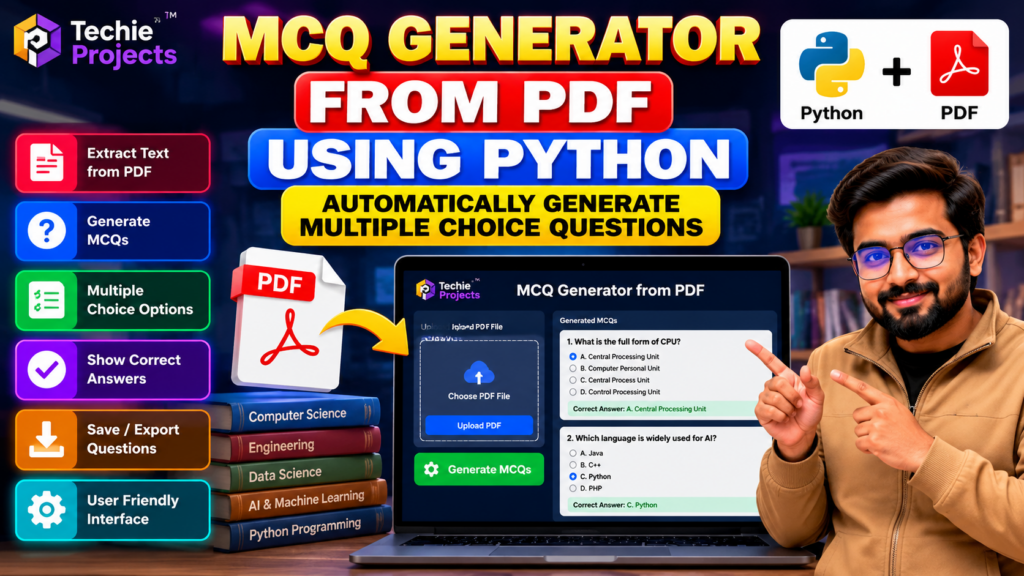
The MCQ Generator from PDF Using Python is a Python-based project designed to explore how text extracted from PDF documents can be used to create multiple-choice questions (MCQs). This project demonstrates PDF processing, question generation, answer options, and educational automation in a single application.
Creating quizzes manually from lengthy documents can be time-consuming for students, teachers, and educators. An automated MCQ generator can help streamline parts of this process by extracting document content and using configured rules or supported language-processing techniques to generate questions.
This project is suitable for B.Tech Computer Science Engineering, BCA, MCA, and other students interested in Python programming, automation, natural language processing, and educational software development.
🎬 Project Demo
Watch the project demonstration to see how the MCQ generator processes a PDF document and presents multiple-choice questions. The demo provides an overview of the interface, document-processing workflow, and question-generation process.
Review the demonstration to understand the project’s functionality before choosing it for your mini-project or final-year submission.
📚 What Is an MCQ Generator from PDF Using Python?
An MCQ generator from PDF is an application that processes the text contained in a PDF document and uses it as input for creating multiple-choice questions.
The application can extract readable text, identify useful information, and generate questions with answer options according to its implemented logic. Depending on the project version, it may also display correct answers and organize the generated questions for review.
Python is well suited to this type of application because it provides libraries for PDF processing, text analysis, data handling, and interface development.
🎯 Objectives of the Project
The main objectives of this project are:
- To develop a Python application for generating MCQs from PDF content.
- To explore automated text extraction from PDF documents.
- To understand question-generation techniques.
- To organize multiple-choice questions and answer options.
- To reduce some of the manual effort involved in quiz preparation.
- To gain practical experience with Python-based educational applications.
🚀 Key Features
1. PDF Text Extraction
The application processes supported PDF documents and extracts readable text for further processing. Extraction quality depends on the document format and whether the PDF contains selectable text or scanned images.
2. Automatic MCQ Generation
The project demonstrates how questions can be generated from extracted document content using the question-generation logic included in the implementation.
3. Multiple-Choice Options
Generated questions can be presented with several answer options, making them suitable for quiz-style practice and assessment.
4. Correct Answer Display
If supported by the implementation, the application can display the expected answer for each generated question.
5. User-Friendly Interface
A graphical interface can make it easier to select a PDF, start the generation process, and review the resulting questions.
6. Educational Automation
The project demonstrates how document processing and automation can support quiz preparation and learning activities.
Note: The quality of generated questions and answers depends on the project’s actual algorithm, input document, and implemented validation logic. Confirm the included features before purchasing.
⚙️ How Does the MCQ Generator Work?
The general workflow consists of the following steps:
- Upload a PDF: The user selects a supported PDF document.
- Extract text: A suitable Python library extracts readable text from the document.
- Process the content: The extracted text is cleaned and prepared for question generation.
- Generate questions: The application applies its implemented rules or supported language-processing method to create questions.
- Create answer options: Multiple-choice options are assembled according to the project’s logic.
- Display the results: The application presents the generated questions and available answers.
- Review the output: Users can check whether the questions and answers accurately reflect the source document.
Scanned PDFs may require OCR, and automatically generated answers should be reviewed for correctness before the questions are used in assessments.
🛠️ Technologies Used
The technologies depend on the supplied implementation and may include:
- Python: Main programming language.
- PDF processing libraries: For extracting text from PDF documents.
- Natural Language Processing (NLP): If included, for processing text and identifying useful content.
- Tkinter: For a desktop graphical interface, if implemented.
- PyPDF2 or PyMuPDF: Possible libraries for PDF text extraction.
- Additional Python libraries: For text processing, question generation, and application functionality.
Confirm the actual libraries and versions included with the project before installation.
💻 Software Requirements
- Python installed in a compatible version.
- A code editor such as Visual Studio Code or PyCharm.
- Required PDF-processing libraries.
- Any additional dependencies listed in the project documentation.
- Sample PDF documents for testing.
- A compatible graphical interface framework, if required.
🖥️ Hardware Requirements
- Desktop computer or laptop.
- Recommended 4 GB RAM or more for a basic development environment.
- Sufficient storage for Python, dependencies, source code, and test documents.
- Internet access for downloading dependencies when required.
Actual requirements depend on the selected libraries and whether advanced language models are used.
🎓 Applications of an MCQ Generator
Educational Institutions
Teachers and educators can explore automated quiz preparation from suitable study material.
Student Practice
Students can use generated questions as a starting point for revision and self-assessment.
Online Learning Platforms
The concept can be extended into educational applications that create practice questions from supported learning resources.
Training and Assessment
Training teams can explore document-based question generation for learning materials and internal assessments.
Academic Research
Students can investigate document processing, question-generation algorithms, and natural language processing techniques.
✅ Advantages of the Project
- Demonstrates practical Python programming.
- Introduces PDF text extraction and processing.
- Explores automated question-generation concepts.
- Can reduce repetitive work in quiz preparation.
- Provides opportunities to learn about NLP and educational automation.
- Can be extended with additional document formats and question types.
⚠️ Limitations
- Poorly formatted PDFs may produce incomplete text extraction.
- Scanned documents may require OCR.
- Generated questions may be ambiguous or unrelated to the intended learning objective.
- Incorrect answer options can affect the quality of a quiz.
- The system may require manual review to ensure factual accuracy.
- Advanced question generation may require additional models, libraries, or configuration.
🔮 Future Scope
The MCQ Generator from PDF Using Python can be extended with features such as:
- Support for scanned PDFs through OCR.
- Different question types, including true/false and fill-in-the-blank.
- Adjustable question difficulty.
- Exporting generated questions to PDF or Word documents.
- Question categorization by topic.
- A web-based interface for multiple users.
- Improved question generation using suitable NLP or language models.
- Answer validation and duplicate-question detection.
These enhancements may require additional development beyond the current project version.
🎓 Why Choose This Project for Your Final Year?
The MCQ Generator from PDF Using Python is a useful project idea for students interested in Python automation, document processing, and educational technology.
It provides opportunities to demonstrate:
- PDF text extraction.
- Text preprocessing and analysis.
- Question-generation logic.
- User interface development.
- Testing and evaluation of generated questions.
Students can also explain the application’s workflow, limitations, and possible improvements during their project presentation or viva.
Before selecting the project, verify that the available implementation meets your institution’s requirements and that you understand how its main components work.
❓ Frequently Asked Questions
1. What is an MCQ generator from PDF using Python?
It is an application that processes text from PDF documents and uses the extracted content to generate multiple-choice questions according to its implemented logic.
2. Which programming language is used?
Python is the primary programming language used for document processing and application development.
3. Can the application generate questions from any PDF?
Not necessarily. Results depend on the PDF’s format, text extraction quality, language, and the capabilities of the implemented question-generation method.
4. Does the project use artificial intelligence?
Some versions may use NLP or AI-based question generation, while others rely on rules or simpler text-processing techniques. Confirm which approach is included before purchasing.
5. Is this project suitable for B.Tech students?
Yes, it can be suitable for B.Tech, BCA, MCA, and related students interested in Python programming and educational software, subject to their academic requirements.
6. Can I purchase the source code?
Contact Techie Projects to confirm project availability, source code, documentation, dependencies, installation requirements, and pricing.
🎓 Recommended Projects
Explore these related projects to discover more Python automation and AI applications:
- PDF File Search Using Python — explore searching for keywords within PDF documents.
- AI Chatbot Using Python — learn about conversational application development.
- Text Summarization Using Machine Learning — explore automated text summarization.
- Document Management System Using Python — investigate document organization and retrieval.
- Student Management System Using Python — explore database-driven educational applications.
Visit Techie Projects to explore more engineering projects, Python projects, and final-year project ideas.
🚀 Get the MCQ Generator Project
Looking for a Python project for your mini-project or final-year submission?
Techie Projects can help you enquire about the available MCQ Generator from PDF Using Python project package, including source-code options, documentation, installation requirements, and implementation support.
Before purchasing, confirm the included features, compatibility, deliverables, and price.
Contact Techie Projects:
- 📲 Call/WhatsApp: +91-9460060699
- 🌎 Website: www.techieprojects.com
- 📺 Instagram: @pythonprojects_
Conclusion
The MCQ Generator from PDF Using Python demonstrates how document processing and automated question generation can be combined in an educational application. It provides students with a practical opportunity to explore Python, PDF extraction, text processing, and quiz-generation workflows.
Watch the project demo, verify the available functionality, and contact Techie Projects to discuss whether this project meets your academic requirements.