
Introduction
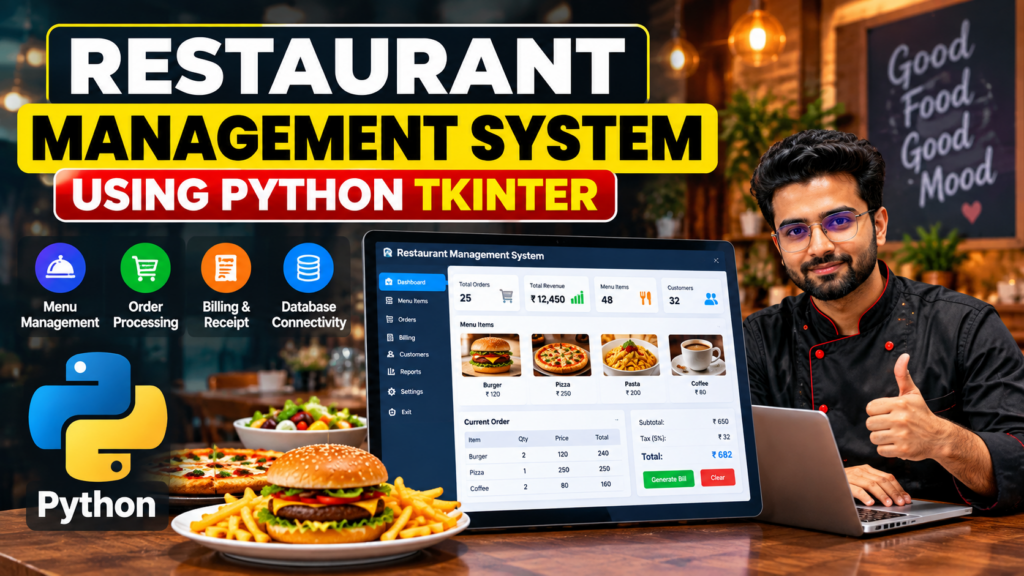
A restaurant management system project in Python is a useful software project for managing restaurant orders, menu items, billing, and customer transactions. This project demonstrates how Python can be used to develop a desktop-based restaurant billing and management application.
The system can be developed using Python Tkinter for the graphical user interface and a database such as MySQL or SQLite for storing menu, order, customer, and billing information. It is suitable for students looking for a practical Python project and demonstrates important concepts such as GUI development, database connectivity, event handling, and billing automation.
In this article, we will explore the features, technologies, workflow, requirements, advantages, limitations, and future scope of a restaurant management system using Python.
What Is a Restaurant Management System?
A restaurant management system is a software application designed to simplify daily restaurant operations. Instead of maintaining orders and bills manually, restaurant staff can use the application to select food items, record customer orders, calculate the total amount, and generate bills.
A Python-based restaurant management system can provide a graphical interface where users can manage menu items, process orders, calculate taxes, and store transaction information in a database.
The project can be customized according to the requirements of a restaurant, café, food shop, or small food business.
Objectives of the Restaurant Management System
The main objectives of this project are:
- To simplify restaurant order management.
- To automate bill calculation.
- To manage food and menu items.
- To reduce manual calculation errors.
- To store customer and transaction information.
- To provide an easy-to-use graphical interface.
- To demonstrate Python GUI and database programming.
- To generate restaurant bills quickly.
- To maintain organized transaction records.
Key Features
1. Menu Management
The system can display available food and beverage items along with their prices. The administrator can add, update, or remove menu items depending on the implementation.
2. Order Management
Restaurant staff can select food items and specify quantities. The selected items are added to the current customer order.
3. Automatic Bill Calculation
The system automatically calculates the subtotal based on selected items and quantities. Taxes or other charges can also be added to the final bill.
4. Receipt Generation
After completing an order, the system can generate a digital or printable receipt containing the selected items, quantities, prices, taxes, and final amount.
5. Customer Management
Customer information can be stored along with order details when required.
6. Database Connectivity
A database can be used to store menu items, customers, orders, and transaction records. SQLite and MySQL are common options for educational implementations.
7. Graphical User Interface
Python Tkinter can be used to create buttons, labels, text fields, tables, menus, and other graphical components.
8. Tax Calculation
The application can calculate applicable taxes automatically and add them to the subtotal.
9. Order History
The database can store previous transactions so that authorized users can review historical orders.
10. Simple User Interface
A well-designed interface allows restaurant staff to manage orders without needing advanced technical knowledge.
Restaurant Billing System Using Python Tkinter
Python Tkinter is a standard Python library for developing graphical user interfaces. It can be used to create the front end of a restaurant billing application.
The Tkinter interface can contain:
- Food item selection
- Quantity fields
- Menu buttons
- Customer information
- Order summary
- Subtotal
- Tax
- Total amount
- Generate Bill button
- Clear button
- Exit button
When a user selects an item, the application can retrieve its price, calculate the item total, and add it to the current order.
For example:
Item Total = Item Price × Quantity
The system can then calculate the subtotal and applicable tax before displaying the final bill.
How the Restaurant Management System Works
The basic workflow of the application can be divided into several steps:
Step 1: Start the Application
The user launches the Python Tkinter application and the main dashboard appears.
Step 2: Select Menu Items
The user selects food or beverage items from the available menu.
Step 3: Enter Quantity
The quantity of each selected item is entered into the system.
Step 4: Add Items to Order
The application adds the selected products to the current order.
Step 5: Calculate the Bill
The system calculates the subtotal, tax, and final payable amount.
Step 6: Generate Receipt
A receipt containing the order information and total amount is generated.
Step 7: Store Transaction
If database functionality is implemented, the order and transaction information can be saved for future reference.
Technologies Used
The following technologies can be used to develop this project:
Python
Python is the primary programming language used for implementing the application logic.
Tkinter
Tkinter is used to create the graphical user interface.
MySQL or SQLite
A database can be used to store menu items, customer information, orders, and transaction records.
SQL
SQL queries can be used for inserting, updating, deleting, and retrieving database records.
Software Requirements
The basic software requirements may include:
- Python 3.x
- Tkinter
- MySQL or SQLite
- MySQL Connector/Python if MySQL is used
- Windows 10/11 or another supported operating system
- Python IDE such as VS Code, PyCharm, or IDLE
The exact requirements may vary depending on the implementation and database selected.
Hardware Requirements
The project does not require high-end hardware.
Recommended requirements include:
- Processor: Intel Core i3 or equivalent
- RAM: 4 GB or more
- Storage: 500 GB or more
- Keyboard and mouse
- Display monitor
- Operating system capable of running Python
Database Design
A database can make the restaurant management system more organized and scalable.
Possible tables include:
Menu Table
The menu table can store information such as:
- Item ID
- Item Name
- Category
- Price
- Availability
Customer Table
The customer table can contain:
- Customer ID
- Customer Name
- Phone Number
- Email or other optional information
Orders Table
The orders table can store:
- Order ID
- Customer ID
- Order Date
- Total Amount
- Payment Status
Order Details Table
The order details table can contain:
- Order Detail ID
- Order ID
- Item ID
- Quantity
- Item Price
- Total Price
The exact database structure depends on the features implemented in the project.
Bill Calculation
One of the main functions of the restaurant management system is automatic bill calculation.
For example, if a customer orders:
- Burger: ₹120 × 2 = ₹240
- Pizza: ₹250 × 1 = ₹250
- Coffee: ₹80 × 2 = ₹160
The subtotal would be:
₹240 + ₹250 + ₹160 = ₹650
If a 5% tax is applied:
Tax = ₹650 × 5% = ₹32.50
The final amount would be:
Total = ₹650 + ₹32.50 = ₹682.50
The actual tax rate and billing rules should be configured according to the requirements of the application.
System Workflow
The overall workflow can be represented as:
Login or Start Application → Select Menu → Enter Quantity → Add to Order → Calculate Subtotal → Calculate Tax → Generate Bill → Store Transaction
This workflow can be expanded with customer management, inventory management, payment processing, and reporting features.
Advantages
A restaurant management system using Python can provide several advantages:
- Reduces manual billing work.
- Provides faster order processing.
- Minimizes calculation errors.
- Makes menu management easier.
- Provides an organized billing process.
- Can store transaction records.
- Provides a simple graphical interface.
- Useful for learning Python application development.
- Can be customized according to business requirements.
Applications
This type of project can be adapted for:
- Restaurants
- Cafés
- Fast-food shops
- Food courts
- Small food businesses
- College canteens
- Bakery shops
- Juice shops
- Small takeaway businesses
For a real commercial deployment, additional security, payment, backup, authentication, and compliance features should be implemented.
Limitations
A basic Python Tkinter restaurant management system may have some limitations:
- It may be designed for a single computer.
- It may not support multiple users simultaneously.
- Advanced payment gateway integration may not be included.
- Cloud synchronization may not be available.
- Inventory management may require additional modules.
- Security features may be limited in an educational implementation.
- Large restaurants may require a more scalable web or cloud-based system.
Future Scope
The project can be enhanced with several advanced features.
Online Food Ordering
Customers could place food orders through a website or mobile application.
Online Payment
Payment gateways could be integrated to support digital payments.
Inventory Management
The system could automatically track ingredients and notify staff when stock levels are low.
Customer Management
Customer profiles, order history, and loyalty programs could be added.
Sales Reports
The application could generate daily, weekly, and monthly sales reports.
Multi-User Access
Different user roles could be created for administrators, managers, cashiers, and other staff.
Cloud Database
The system could be migrated to a cloud database for centralized access.
Web-Based System
The desktop application could be converted into a web application using frameworks such as Django or Flask.
Mobile Application
A mobile application could be developed for restaurant staff and customers.
AI-Based Features
Future versions could include AI-based demand prediction, personalized recommendations, sales forecasting, and customer behavior analysis.
Why Choose This Python Project?
The restaurant management system is a practical Python project because it combines several important programming concepts in one application.
Students can learn:
- Python programming
- Object-oriented programming
- GUI development
- Tkinter
- Database connectivity
- SQL
- CRUD operations
- Event handling
- Billing calculations
- Software development workflow
It can also be extended with additional features depending on the requirements of a final-year or academic project.
Frequently Asked Questions
What is a restaurant management system project in Python?
A restaurant management system project in Python is a software application used to manage restaurant menus, orders, billing, customers, and transaction records.
Which Python library can be used for the GUI?
Tkinter can be used to create the graphical user interface of a Python-based restaurant management system.
Which database can be used?
SQLite or MySQL can be used depending on the project requirements.
Is this project suitable for students?
Yes. It is suitable as an educational Python project because it covers GUI development, database connectivity, SQL, billing, and application logic.
Can the project generate restaurant bills?
Yes. A billing module can calculate item totals, subtotal, applicable taxes, and the final payable amount.
Can this project be converted into a web application?
Yes. The project can be redesigned as a web application using frameworks such as Django or Flask.
Can inventory management be added?
Yes. Inventory management can be added to track food ingredients, stock quantities, purchases, and low-stock alerts.
Can online payment be integrated?
Yes. A production-ready version can integrate an appropriate payment gateway after implementing the required security and compliance measures.
Conclusion
The Restaurant Management System Project in Python is a practical application that demonstrates how Python can be used to automate restaurant ordering and billing operations. By using Tkinter, developers can create a user-friendly graphical interface, while MySQL or SQLite can be used to store menu, customer, order, and transaction information.
The project provides an excellent opportunity to learn Python GUI development, database connectivity, SQL, billing calculations, and software development concepts. It can also be expanded with inventory management, online ordering, payment integration, sales analytics, cloud databases, and AI-based features.
For students, this project can serve as a practical example of how programming concepts can be combined to develop a complete real-world software application.
Overall, the restaurant management system project in Python is a practical way to learn GUI development, database connectivity, billing automation, and real-world application development.
🚀 Need Help With Your Project?
Get help with Python, Machine Learning, AI, and final-year project development.
📲 WhatsApp: +91-9460060699
🌐 Website: Techie Projects
📸 Instagram: @pythonprojects_
Explore Related Python Projects
- Hotel Management System Project in Python
- Billing Software Project in Python
- Inventory Management System in Python
- Online Food Ordering System in Python