
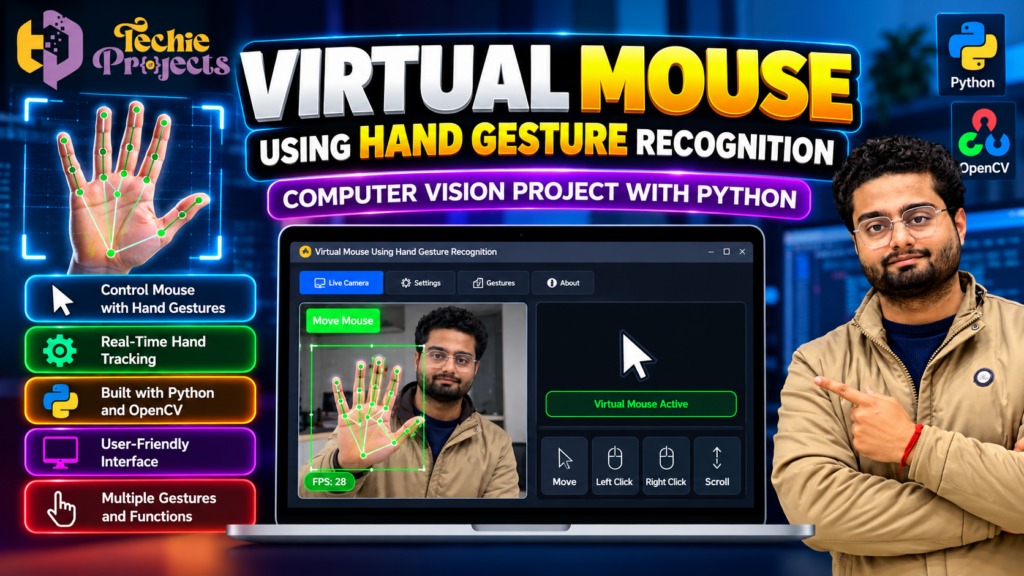
Are you looking for an innovative Python project that combines computer vision, hand tracking, and human-computer interaction? 🚀 Virtual Mouse Using Hand Gesture Recognition is an exciting project for engineering students who want to explore how hand movements can be used to control a computer without relying entirely on a physical mouse.
If you are preparing a final-year project, a minor project, or a computer vision demonstration, this project can help you explore practical applications of Python and image processing. Instead of spending weeks searching for a suitable idea and assembling different technical resources, you can contact Techie Projects to enquire about the available project package, installation requirements, source code, and documentation options.
🎓 Make your next academic project more interesting with a real-time hand gesture recognition concept. Contact Techie Projects to discuss availability, pricing, and the deliverables offered for this project before purchasing.
🎬 Watch the Virtual Mouse Using Hand Gesture Recognition Project Demo
See how a camera-based system can detect hand movements and translate supported gestures into computer mouse actions. A working demonstration can help you understand the interaction between hand tracking, gesture interpretation, and mouse control.
Watch the project demo embedded below to explore its interface and observe the functions implemented in the available version.
🖱️ What Is Virtual Mouse Using Hand Gesture Recognition?
Virtual Mouse Using Hand Gesture Recognition is a computer vision application designed to control selected mouse functions through hand movements captured by a camera. Instead of moving a physical mouse, the user performs supported gestures in front of the camera, and the application interprets them as commands.
Python provides the programming environment for implementing the application, while computer vision libraries can process camera frames and identify hand landmarks. Depending on the implementation, the system may use finger positions or specific gestures to control cursor movement, clicking, and scrolling.
For example, a detected fingertip position can be mapped to a position on the computer screen. A recognised gesture can then trigger a corresponding action, provided that the application has been programmed to support it.
The main objective of this project is to demonstrate how visual information can be converted into interactive computer commands.
🌟 Why Choose This Python Project for Your Engineering Course?
Choosing a project that combines practical implementation with a clear technical explanation can make academic preparation more productive. This computer vision project introduces several concepts that students can explore during development and demonstration.
Key learning opportunities include:
- Computer vision: Understand how camera frames are captured and processed.
- Hand tracking: Explore techniques for detecting hand landmarks and finger positions.
- Gesture recognition: Learn how visual hand patterns can represent different commands.
- Mouse automation: Study how recognised gestures can be connected to operating-system mouse actions.
- Real-time processing: Examine how the application processes successive frames from a live camera.
- Python development: Understand how different libraries and functions work together.
The project is suitable for students interested in artificial intelligence, image processing, Python programming, and human-computer interaction.
🖱️ Benefits of Virtual Mouse Using Hand Gesture Recognition
Virtual Mouse Using Hand Gesture Recognition is a useful Python computer vision project for students who want to understand gesture-based computer interaction. It combines camera input, hand landmark detection, and mouse automation in one practical application.
The main benefits of this project include:
- Practical learning: Understand how computer vision techniques can be applied to a real-time application.
- Gesture-based interaction: Explore how supported hand movements can control selected mouse functions.
- Python integration: Learn how computer vision and automation libraries work together.
- Project demonstration: Present an interactive application for a suitable academic project or technical exhibition.
- Scope for improvement: Experiment with additional gestures, cursor smoothing, and interface enhancements.
🚀 How Virtual Mouse Using Hand Gesture Recognition Works
The Virtual Mouse Using Hand Gesture Recognition system captures hand movements through a compatible camera and processes the video frames using computer vision techniques. A hand-tracking solution identifies important landmarks, and the program interprets selected finger positions or gestures according to predefined rules.
The detected coordinates can be mapped to screen positions to move the cursor. If the implementation supports clicking or scrolling, the corresponding gestures can trigger those actions. The accuracy and responsiveness depend on the camera quality, lighting, tracking method, and application configuration.
This workflow helps students understand how visual input can be transformed into computer commands using Python.
⚙️ How Does the System Work?
The exact workflow depends on the code and libraries used in the selected version. A typical implementation follows these steps.
1. Capture Video from the Camera
The application accesses a webcam and continuously captures frames. These frames provide the visual input required to detect the user’s hand.
2. Process the Camera Frames
The captured frames are prepared for analysis. Image processing techniques may be used to resize frames, convert colour spaces, or prepare the input for a hand-tracking model.
3. Detect Hand Landmarks
A hand-tracking solution identifies important points on the hand, such as fingertips and finger joints. MediaPipe Hands or a compatible hand-landmark solution can be used for this purpose.
4. Recognise Supported Gestures
The program analyses the detected landmarks and applies its gesture rules. For example, a particular finger configuration may be interpreted as a mouse click if that gesture has been implemented.
5. Map Hand Movement to Cursor Movement
The application maps selected hand coordinates to screen coordinates. Smoothing techniques can help reduce unwanted cursor movement caused by small changes in detected landmarks.
6. Perform Mouse Actions
The recognised gesture or movement is converted into an action, such as moving the cursor, clicking, or scrolling. The actual actions available depend on the implementation and its configured controls.
7. Display the Output
The application may display the camera feed, hand landmarks, or other visual indicators to help users understand what the system is detecting.
🧰 Technologies Used
The following technologies are commonly relevant to this type of application. Confirm the actual dependencies in the version you intend to purchase.
- Python: Main programming language.
- OpenCV: Camera access, image processing, and visualisation.
- MediaPipe: An option for detecting hand landmarks.
- PyAutoGUI or a similar library: An option for controlling mouse actions.
- NumPy: Numerical operations and coordinate processing.
- Tkinter: An optional choice for a graphical user interface.
Not every implementation uses all these libraries. Ask Techie Projects for the exact technology stack and compatible versions before purchasing.
💻 Software and Hardware Requirements
A typical development setup may include the following components.
Software Requirements
- Python installed on the computer.
- A compatible version of OpenCV.
- The hand-tracking library used by the implementation.
- Any additional packages required for mouse control.
- A suitable code editor or Python IDE.
- A compatible operating system.
Hardware Requirements
- A desktop computer or laptop.
- A working webcam or compatible camera.
- A keyboard and display.
- Sufficient memory and processing capability for the selected libraries.
The precise requirements can vary depending on the package and software versions. Confirm the installation procedure and system compatibility before ordering.
🚀 Key Features of a Virtual Mouse Project
The following features may be available in a typical implementation. Verify each feature against the actual project demonstration and deliverables.
Real-Time Hand Tracking
The application can use a camera to detect hand landmarks while the user moves their hand in front of it.
Gesture-Based Cursor Control
Supported finger movements or hand positions can be mapped to mouse cursor movement.
Click Recognition
Specific gestures may be configured to trigger left-click or other mouse actions.
Scroll Control
A suitable implementation may support scrolling through a recognised gesture or movement.
Visual Feedback
The interface may show the camera feed, detected landmarks, or recognised actions to help users understand system behaviour.
Python-Based Implementation
The project demonstrates how Python libraries can be combined to build an interactive computer vision application.
Important: The final feature list should match the version available from Techie Projects. Do not assume that every feature listed above is included without checking first.
🎓 Academic Benefits for Students
Virtual Mouse Using Hand Gesture Recognition can be a useful learning project for computer science, information technology, and related engineering courses.
Students can use the concept to explore:
- Image processing and camera input.
- Hand landmark detection.
- Gesture-based interaction.
- Python library integration.
- Real-time application design.
- Testing and debugging.
- Software installation and dependency management.
- Project presentation and technical explanation.
It can also provide a foundation for experimenting with more advanced ideas, such as customised gestures, improved cursor smoothing, accessibility-focused interfaces, or additional interaction modes.
For academic submissions, make sure you understand the implementation, follow your institution’s rules, and prepare your own explanation of the work.
🌍 Real-World Applications
Gesture-controlled interfaces are relevant to several areas of technology.
Touch-free interaction: Gesture interfaces can provide an alternative way to interact with selected computer functions in suitable environments.
Accessibility research: Researchers can explore alternative interaction methods for users who experience difficulty using conventional input devices. Suitability must be evaluated for each individual and use case.
Interactive demonstrations: The project can be used to demonstrate computer vision concepts during technical presentations, exhibitions, and laboratory sessions.
Human-computer interaction: Developers can investigate how visual gestures can make certain interactions more intuitive.
Educational experimentation: Students can modify the program to explore new gestures, input methods, and interface designs.
These are potential application areas rather than guarantees that the project is ready for commercial or medical use.
🛒 Get the Virtual Mouse Using Hand Gesture Recognition Project
Looking for a practical Python project for your engineering course? Virtual Mouse Using Hand Gesture Recognition is worth exploring if you are interested in computer vision, hand tracking, and gesture-based interaction.
Contact Techie Projects to confirm the current price, source code availability, documentation, installation instructions, supported software versions, and other package deliverables before purchasing.
When enquiring, ask about:
- Project source code availability.
- Supported Python and library versions.
- Installation instructions.
- Project documentation availability.
- Demonstration video or screenshots.
- Implemented gesture controls.
- Operating-system compatibility.
- Any available explanation or setup assistance.
The exact inclusions should be confirmed before payment so that the package matches your academic requirements.
📲 Contact Techie Projects
- 📲 Call/WhatsApp: +91-9460060699
- 🌎 Website: www.techieprojects.com
- 📺 Instagram: @pythonprojects_
Send a message describing your course, project requirements, and preferred delivery details to receive relevant information before making a purchase.
🔗 Explore Related Python Projects
If you are interested in computer vision and Python development, you can also explore related project categories on Techie Projects:
- Computer Vision Projects
- Image Processing Projects
- Artificial Intelligence Projects
- Machine Learning Projects
- Python Projects
- Deep Learning Projects
- Final-Year Engineering Projects
Choose a project that matches your interests, available resources, and institution’s requirements.
❓ Frequently Asked Questions
1. What is a virtual mouse using hand gesture recognition?
It is a computer vision application that uses camera input and recognised hand movements to control selected mouse functions.
2. Which programming language is used?
Python is commonly used to build this type of application because it supports camera processing, hand tracking, and automation libraries.
3. Does the project require a webcam?
A webcam or another compatible camera is generally needed to capture the hand movements used as input.
4. Can this project be used for a final-year submission?
It may be suitable for a final-year or minor project, depending on your institution’s requirements, the implementation’s scope, and the work you complete and understand yourself.
5. Is the source code included with the Techie Projects package?
Please contact Techie Projects to confirm whether source code is included in the currently available package and what other deliverables are provided.
6. Can I install it on my laptop?
Compatibility depends on your operating system, Python version, camera, and required libraries. Confirm the system requirements before purchasing.
7. How can I enquire about the price?
Contact Techie Projects through WhatsApp or visit techieprojects.com to ask about current pricing and package availability.
🎯 Conclusion
Virtual Mouse Using Hand Gesture Recognition is an engaging Python computer vision project that demonstrates how hand landmarks and gesture interpretation can be connected to computer interaction. It offers students an opportunity to explore image processing, real-time input, mouse automation, and software integration.
If you want to use this idea for your engineering project, contact Techie Projects to confirm the available implementation, technical requirements, and purchase options. Review the deliverables carefully before ordering, and make sure you understand the project well enough to explain and demonstrate it during your academic evaluation.
Ready to enquire? Contact Techie Projects on WhatsApp and discuss your project requirements today.