
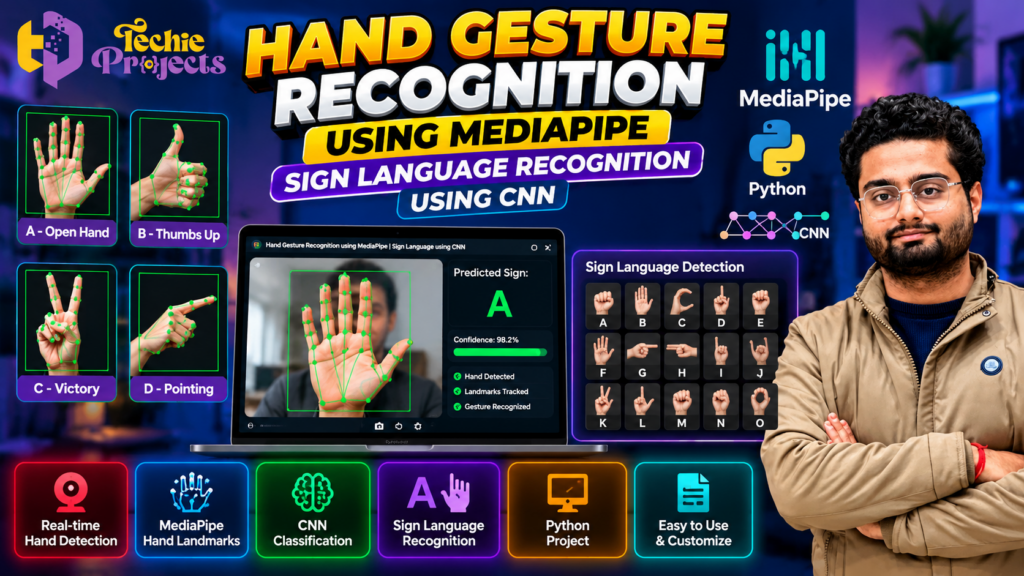
🚀 Looking for a practical AI project for your final-year engineering submission? The Hand Gesture Recognition Using MediaPipe project combines Python, computer vision, hand landmark detection, and CNN-based classification to explore how hand gestures can be recognized through a camera. It is a compelling project topic for students who want to demonstrate their understanding of artificial intelligence and image processing through an interactive application.
Instead of spending weeks searching for datasets, configuring Python libraries, debugging hand-detection code, and developing a complete application from scratch, you can enquire about the available project package from Techie Projects. Review the implementation, confirm the deliverables, and choose a project that fits your academic requirements and budget.
This project is particularly relevant to Computer Science Engineering, Information Technology, Artificial Intelligence, and Data Science students interested in computer vision and sign language recognition.
Want to purchase this project? Contact Techie Projects to ask about the available source code, supported gestures, CNN implementation, installation instructions, project documentation, pricing, and other deliverables before placing your order.
- 🌐 Website: Techie Projects
- 📲 WhatsApp: Enquire About This Project
- 📸 Instagram: Follow Techie Projects
🎬 Watch the Hand Gesture Recognition Using MediaPipe Project Demo
Explore the project demonstration to understand how hand gestures are detected and how the application displays its recognition results.
The demo can help you evaluate the interface, gesture-tracking process, and available functionality before making a purchase decision. It also provides a useful starting point for understanding the project’s workflow before your presentation or viva.
🧠 What Is Hand Gesture Recognition Using MediaPipe?
Hand gesture recognition is a computer vision technique that identifies specific hand positions or movements from images or video. These recognized gestures can be used to trigger predefined actions or represent selected symbols.
The Hand Gesture Recognition Using MediaPipe project explores how Python-based computer vision can identify hand landmarks and use hand information to support gesture classification.
MediaPipe provides tools for detecting hands and identifying landmarks such as fingertips and finger joints. These landmarks can help a program understand the arrangement of the hand.
A Convolutional Neural Network (CNN) is a deep learning model commonly used for image classification. In a gesture recognition application, a CNN can classify hand images or appropriately prepared visual features into predefined gesture classes.
The exact architecture depends on the implementation. Some systems classify hand images directly, while others use landmarks or processed images as inputs to a classification model.
When applied to sign language, the model may recognize selected signs, letters, or gestures from its supported classes. Recognizing a limited set of signs is not the same as translating an entire sign language, which can require additional linguistic and temporal context.
🎯 Objectives of the Project
The main objective is to explore how hand tracking and machine learning can be combined to recognize predefined hand gestures.
The learning objectives may include:
- Understanding image processing using Python.
- Learning how MediaPipe identifies hand landmarks.
- Exploring CNN-based image classification.
- Understanding dataset preparation and gesture labels.
- Studying the relationship between visual input and predicted output.
- Learning how to evaluate classification results.
- Exploring applications of human-computer interaction.
- Understanding the limitations of camera-based recognition.
These objectives help students connect theoretical concepts in artificial intelligence with a practical computer vision application.
⚙️ How Does the Project Work?
The workflow depends on the supplied implementation, but a typical system includes the following stages.
1. Camera Input and Image Capture
The application receives images or video frames from a webcam or another supported source. OpenCV may be used to capture frames and prepare them for processing.
Lighting, camera quality, distance, and hand visibility can affect the quality of the input.
2. Hand Detection Using MediaPipe
MediaPipe can detect a hand and identify important landmarks, such as fingertips and finger joints.
These landmarks provide information about the hand’s position and shape. The detected hand can then be used for gesture analysis or as part of a larger classification workflow.
3. Image Preprocessing
Depending on the model, the input image may need resizing, normalization, cropping, or other preprocessing operations before classification.
Consistent preprocessing is important because the model expects input in a format similar to the data used during training.
4. Gesture Classification Using CNN
A CNN can learn visual patterns from training images and use those patterns to predict a gesture class.
For example, a model trained on selected hand-sign classes may predict a particular letter or gesture when a suitable input image is supplied. Its predictions depend on the training data, class definitions, and testing conditions.
5. Displaying the Prediction
After classification, the application may display the predicted gesture or label on the interface. Depending on the implementation, it may also show hand landmarks, confidence scores, or other visual feedback.
6. Testing and Evaluation
The system should be tested using different users, backgrounds, lighting conditions, and hand positions. Evaluation may include accuracy, precision, recall, a confusion matrix, or other suitable classification metrics.
Testing helps identify classes that are frequently confused and conditions under which recognition becomes less reliable.
🌟 Key Features to Explore
The following are common features of this type of project. Confirm which features are included in the Techie Projects package before purchasing.
- Hand landmark detection: Identifies important points on a visible hand using a supported detection method.
- MediaPipe integration: Supports hand tracking and landmark extraction when configured in the implementation.
- CNN-based classification: Predicts gesture classes using a trained neural network if included.
- Live camera input: Processes webcam frames if real-time detection is supported.
- Gesture labels: Displays predicted classes or recognized symbols.
- Visual feedback: May show landmarks, detection status, or classification results.
- Python-based implementation: Demonstrates how computer vision and machine learning components can work together.
- Extensible design: May allow additional gesture classes after suitable dataset preparation, training, and testing.
Do not assume that all these features are included. Verify the actual code, trained model, supported classes, and interface before placing an order.
💻 Technologies Used
A project of this type may use the following technologies:
| Technology | Purpose |
|---|---|
| Python | Main programming language |
| MediaPipe | Hand detection and landmark tracking |
| OpenCV | Image and video processing |
| TensorFlow or Keras | CNN model development or inference, if used |
| NumPy | Numerical operations and array processing |
| Matplotlib | Visualizing data or training results, if used |
| Tkinter or another interface framework | User interface, if included |
The exact libraries depend on the supplied project. Confirm the Python version, dependency list, and model files before installation to avoid compatibility problems.
🖥️ Software and Hardware Requirements
Software Requirements
A typical setup may include:
- Windows or Linux operating system.
- Compatible Python installation.
- OpenCV and MediaPipe.
- TensorFlow or another compatible deep learning framework, if used.
- A code editor such as Visual Studio Code or PyCharm.
- Required model files, datasets, and Python dependencies.
Hardware Requirements
- A computer with sufficient RAM and storage.
- A webcam if live hand detection is supported.
- A suitable processor for image processing and model inference.
- A compatible GPU only if required by the implementation.
Actual requirements vary according to the model architecture and whether training or inference is performed. Confirm the required hardware and installation steps before purchase.
🖐️ Benefits of Hand Gesture Recognition Using MediaPipe
The Hand Gesture Recognition Using MediaPipe project helps students understand how computer vision identifies hand landmarks and supports gesture classification. By combining MediaPipe with Python and a CNN model, students can explore how visual input can be converted into meaningful predictions.
Key benefits include:
- Hand tracking: Understand how hand landmarks are detected from camera frames.
- Gesture classification: Explore how a trained model predicts predefined gesture classes.
- Python programming: Learn how computer vision and deep learning components work together.
- Practical AI experience: Study image preprocessing, prediction output, and model evaluation.
- Academic presentation: Explain the workflow, technologies, testing methods, and limitations.
- Project customization: Investigate adding supported gestures or improving the training dataset.
These benefits make the project a useful learning opportunity for students interested in artificial intelligence, image processing, and human-computer interaction.
⚙️ How Hand Gesture Recognition Using MediaPipe and CNN Works
The Hand Gesture Recognition Using MediaPipe and CNN workflow typically starts by capturing an image or video frame using a compatible camera. MediaPipe can identify hand landmarks, while a CNN may classify a prepared hand image or other suitable visual input into a predefined category.
The system then displays the predicted gesture or sign, depending on the available interface. The quality of recognition depends on the training data, supported classes, lighting conditions, and implementation.
For a reliable demonstration, test the model with different hand positions and backgrounds. Review incorrect predictions and explain the model’s limitations in your project report.
🎓 Who Should Choose Hand Gesture Recognition Using MediaPipe?
The Hand Gesture Recognition Using MediaPipe project may suit students pursuing Computer Science Engineering, Information Technology, Artificial Intelligence, and Data Science.
It is particularly relevant to students interested in:
- Computer vision and image processing.
- MediaPipe hand landmark detection.
- CNN-based image classification.
- Python and deep learning applications.
- Sign language gesture classification.
- Final-year engineering project demonstrations.
Before purchasing, confirm that the available implementation matches your syllabus, project requirements, and expected demonstration.
🎓 Why Choose This Project for Final-Year Engineering?
For Computer Science and IT Students
The project provides practical exposure to Python, image processing, data handling, and application logic. Students can study how multiple software components work together to produce a prediction.
For AI and Data Science Students
It offers a useful setting to investigate CNN classification, training data, model evaluation, and recognition errors.
For Students Interested in Accessibility Technology
Gesture recognition can be explored as one component of assistive communication systems. However, a small gesture-classification model should not be presented as a complete sign language translator unless it genuinely supports that capability.
For Project Presentations and Viva
Students can explain the data flow, hand landmarks, classification process, model limitations, and testing approach. Understanding these details is important for demonstrating individual learning.
Always follow your institution’s rules regarding project assistance and purchased code. Make sure you understand the implementation and can explain it independently.
🌍 Applications of Hand Gesture Recognition
Hand gesture recognition has potential applications across several areas:
- Sign language research: Recognizing selected signs or hand configurations.
- Human-computer interaction: Exploring alternative ways to interact with digital systems.
- Educational demonstrations: Teaching image processing and deep learning concepts.
- Gesture-controlled interfaces: Mapping supported gestures to predefined actions.
- Assistive technology research: Investigating tools that may support communication.
- Robotics research: Exploring how recognized gestures could be mapped to compatible robot commands.
- Smart interfaces: Studying camera-based interaction methods.
The effectiveness of these applications depends on the recognition model, training data, supported gestures, and real-world testing.
⚠️ Challenges and Limitations
Understanding the limitations is an important part of developing a reliable AI project.
- Lighting variations: Poor lighting may affect hand detection.
- Occlusion: Hidden fingers or partially visible hands can reduce recognition quality.
- Background differences: Models may perform differently outside their training conditions.
- Similar gestures: Visually similar hand signs can be difficult to distinguish.
- Dataset limitations: Insufficient or unbalanced training images may reduce generalization.
- Model compatibility: MediaPipe, TensorFlow, and other dependencies may require compatible versions.
- Recognition errors: A prediction may be incorrect even when the hand is detected successfully.
These limitations should be discussed honestly in the project report and demonstrated during testing where possible.
🚀 Future Scope
The project can be extended as a learning exercise by collecting more diverse training images, adding supported gesture classes, improving preprocessing, or evaluating different classification models.
Other possible improvements include multilingual interfaces, additional visual feedback, better error handling, and deployment through a web or desktop application.
For sign language applications, future development may require temporal gesture analysis, facial expressions, body posture, and linguistic context, depending on the language and intended use. Adding more classes alone does not automatically create a complete sign language translation system.
🛒 Purchase Hand Gesture Recognition Using MediaPipe from Techie Projects
Looking for a Hand Gesture Recognition Using MediaPipe project for your final-year engineering submission? Contact Techie Projects to enquire about package availability, pricing, source code, installation instructions, and documentation.
Before placing an order, confirm which gesture classes are supported, whether the CNN model and trained weights are included, and whether sign language recognition is part of the supplied implementation:
- Source code and Python version.
- MediaPipe hand-tracking implementation.
- CNN model and trained weights, if included.
- Supported gesture or sign classes.
- Dataset availability and usage permissions, if applicable.
- Installation instructions and dependency requirements.
- Project report or documentation availability.
- Demonstration video and interface availability.
- Pricing, delivery timeline, and support or customization terms.
The available deliverables depend on the package confirmed at the time of enquiry. Reviewing these details first helps you make an informed purchase decision.
📲 Contact Techie Projects
- 📲 Call/WhatsApp: +91-9460060699
- 🌎 Website: www.techieprojects.com
- 📺 Instagram: @pythonprojects_
Send your project requirements through WhatsApp to ask about current availability, pricing, and technical details.
🔗 Explore Related Python Projects
Interested in more AI and computer vision topics? Visit Techie Projects to explore available engineering project options.
Related topics include:
- Computer Vision Projects
- Deep Learning Projects
- Python Machine Learning Projects
- Image Processing Projects
- Artificial Intelligence Projects
- Final-Year Engineering Projects
Explore the related categories and contact Techie Projects to confirm the features and deliverables of any project you are considering.
❓ Frequently Asked Questions
1. What is Hand Gesture Recognition Using MediaPipe?
It is a computer vision approach that uses MediaPipe to detect hands and identify landmarks, which can support the recognition of selected gestures.
2. What is the role of CNN in this project?
A CNN can classify hand images or prepared visual inputs into predefined gesture classes. Its role depends on the architecture used in the implementation.
3. Does the project recognize sign language?
It may recognize selected sign language letters or gestures if the model has been trained for those classes. Confirm the supported labels before purchase; recognizing selected signs is not the same as translating a complete sign language.
4. Which programming language is used?
Python is typically used, along with libraries such as MediaPipe, OpenCV, and a compatible deep learning framework.
5. Is this project suitable for final-year students?
It may be suitable for Computer Science, IT, AI, and Data Science students, subject to their institution’s requirements and the project’s actual scope.
6. Does the package include source code and a project report?
Availability depends on the package. Contact Techie Projects to confirm the source code, report, installation instructions, trained model, and other deliverables before purchasing.
7. How can I purchase this project?
Visit Techie Projects or contact us on WhatsApp to enquire about pricing, availability, and technical requirements.
✅ Conclusion
The Hand Gesture Recognition Using MediaPipe project provides an opportunity to explore hand landmark detection, CNN-based classification, and Python computer vision. It can be a useful academic topic for students interested in understanding how visual information is converted into predicted gesture labels.
If you are looking for a practical AI project for your engineering portfolio or final-year submission, contact Techie Projects to review the available implementation and confirm its suitability before purchasing.
🚀 Ready to get started? Enquire on WhatsApp or visit Techie Projects for project details.