
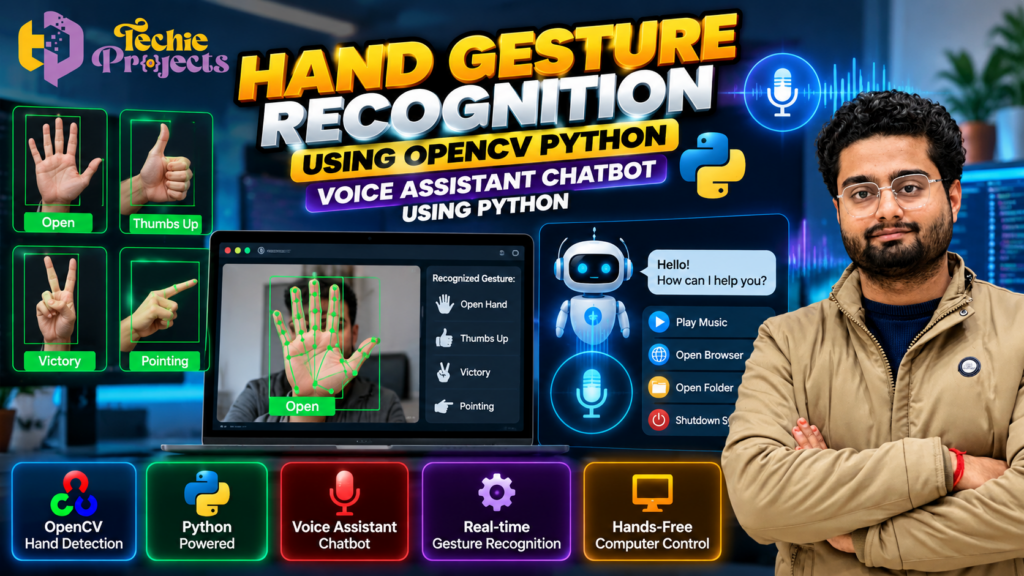
🚀 Looking for a practical Python project for your final-year engineering submission? The Hand Gesture Recognition Using OpenCV Python project combines computer vision, hand gesture detection, and hands-free computer interaction in an engaging application. If you also want to explore voice-based commands, this project topic can help you understand how gesture recognition and a Python voice assistant can be integrated into a single system.
Instead of spending weeks building everything from scratch, configuring Python libraries, and troubleshooting camera or voice-processing errors, explore the available project package from Techie Projects. It can provide a starting point for learning how computer vision and Python automation work together.
🎓 This project may be suitable for Computer Science Engineering, Information Technology, Artificial Intelligence, and Data Science students who want to explore an interactive application with practical uses in human-computer interaction.
Want to purchase this project? Contact Techie Projects to confirm the available source code, gesture controls, voice assistant functionality, installation instructions, documentation, pricing, and other deliverables before placing your order.
- 📲 Call/WhatsApp: +91-9460060699
- 🌎 Website: www.techieprojects.com
- 📺 Instagram: @pythonprojects_
🎬 Watch the Hand Gesture Recognition Project Demo
Explore the project demonstration to understand its interface, gesture-recognition approach, and available voice assistant functionality.
The demo can help you evaluate how the application works and whether its supported features match your academic requirements. Watch the embedded project video below to see the implementation in action.
🧠 What Is Hand Gesture Recognition Using OpenCV Python?
Hand gesture recognition is a computer vision technique that attempts to identify hand positions or movements from images or video. Depending on the system, different gestures may be mapped to actions such as selecting an option, controlling an application, or triggering a predefined command.
The Hand Gesture Recognition Using OpenCV Python project explores how a camera can capture visual input and how Python libraries can process that input to identify selected gestures.
OpenCV provides tools for image processing, camera access, video-frame handling, and visual output. A hand-landmark detection model or another recognition technique may be used to identify finger positions and interpret gestures.
For example, a system may recognize an open hand, a thumbs-up gesture, a victory sign, or a pointing gesture if these classes are supported by its implementation.
When combined with a voice assistant, the application may also accept spoken commands and perform predefined actions. However, gesture recognition and voice control are separate functions, and the exact integration depends on the available project code.
🎯 Objectives of the Project
The main objective is to explore interactive computer control using hand gestures and, where implemented, voice commands.
The learning objectives may include:
- Understanding image processing with OpenCV.
- Exploring hand detection and gesture classification.
- Learning how camera frames are captured and processed.
- Understanding how gestures can be mapped to predefined actions.
- Studying Python-based voice input and command processing.
- Exploring the integration of multiple input methods.
- Learning basic error handling and application testing.
- Understanding the limitations of gesture and voice recognition.
These objectives help students connect Python programming with computer vision and human-computer interaction.
⚙️ How Does the Project Work?
The workflow depends on the actual implementation, but a typical system can include the following stages.
1. Camera Input and Frame Capture
The application receives visual input through a supported camera or video source. OpenCV can capture frames and prepare them for analysis.
Camera quality, lighting, distance, and background conditions can affect the quality of the captured images.
2. Hand Detection and Landmark Identification
A hand-detection or landmark model may identify key points on the hand, including finger joints and fingertips.
These landmarks provide information about the hand’s shape and finger positions. The exact model used depends on the project implementation.
3. Gesture Recognition
The system interprets detected hand information to identify a gesture. This may be performed using predefined rules, geometric calculations, or a trained classification model.
For example, the system may use finger positions to distinguish between an open palm and a thumbs-up gesture, provided these gestures are supported.
4. Mapping Gestures to Actions
Once a gesture is recognized, the program may map it to a predefined action.
Depending on the implementation, possible actions could include selecting an option, controlling a supported application, or triggering a specific computer operation. Not every action is necessarily included in the project.
5. Voice Input and Command Processing
If a voice assistant is included, the application may capture speech through a microphone and process it using a supported speech-recognition method.
The recognized words can then be compared with predefined commands. The system may respond with text, spoken output, or an application action depending on its implementation.
6. Output and Testing
The application may display the detected gesture, recognition status, or result of a command.
Testing should cover supported gestures, different lighting conditions, background noise, microphone availability, and invalid commands. This helps students understand the system’s limitations and reliability.
🖐️ Benefits of Hand Gesture Recognition Using OpenCV Python
The Hand Gesture Recognition Using OpenCV Python project helps students understand how computer vision can recognize hand positions and support interactive computer applications. By combining Python programming with image processing, students can explore how visual input is converted into meaningful commands.
Key benefits include:
- OpenCV experience: Learn how to capture and process images or video frames.
- Gesture detection: Explore how hand landmarks and finger positions can identify supported gestures.
- Python programming: Understand application logic and event handling.
- Computer automation: Study how recognized gestures can trigger predefined actions when implemented.
- Practical learning: Explore a real-world human-computer interaction use case.
- Academic presentation: Explain the system workflow, libraries, testing, and limitations.
This project is particularly relevant to students interested in computer vision, AI applications, and interactive Python software.
⚙️ How Hand Gesture Recognition Using OpenCV Python Works
The Hand Gesture Recognition Using OpenCV Python workflow typically begins by capturing an image or video frame from a supported camera. OpenCV processes the visual input, while a compatible hand-detection method may identify landmarks such as fingertips and finger joints.
The application then interprets the detected hand information to identify supported gestures. Depending on the implementation, a recognized gesture may be mapped to an action, such as selecting an option or controlling a supported application.
If voice assistant functionality is included, a separate speech-processing component may recognize spoken commands and respond according to predefined instructions.
The actual performance depends on camera quality, lighting, hand visibility, recognition methods, and the supported commands. Testing different conditions is important for understanding the system’s limitations.
🎓 Who Should Choose Hand Gesture Recognition Using OpenCV Python?
The Hand Gesture Recognition Using OpenCV Python project may be suitable for Computer Science Engineering, Information Technology, Artificial Intelligence, and Data Science students.
It is a useful topic for learners interested in:
- OpenCV and image processing.
- Hand landmark detection and gesture classification.
- Python application development.
- Human-computer interaction.
- Voice assistant integration, where supported.
- Final-year engineering project demonstrations.
Before purchasing, confirm the available features, source code, installation requirements, documentation, and compatibility with your academic requirements.
🌟 Key Features to Explore
The following are possible features of a project in this category. Confirm which ones are included in the Techie Projects package before purchasing.
- Hand gesture detection: Identifies supported hand positions or gestures.
- OpenCV image processing: Captures and processes camera frames.
- Gesture-based interaction: Maps recognized gestures to predefined actions if implemented.
- Voice assistant integration: Processes spoken commands if included.
- Python application development: Demonstrates how multiple libraries work together.
- Visual feedback: May display detected gestures or command results.
- Hands-free interaction: Can explore alternative ways to interact with a computer.
- Customizable commands: Additional gesture or voice commands may be possible depending on the system design.
Do not assume real-time performance, a specific hand-detection model, advanced voice recognition, or full computer automation unless these features have been verified in the actual implementation.
💻 Technologies Used
A project of this type may use the following technologies.
| Technology | Purpose |
|---|---|
| Python | Main programming language |
| OpenCV | Camera input and image processing |
| MediaPipe or another hand model | Hand landmark detection, if used |
| NumPy | Numerical operations and array processing |
| SpeechRecognition or another speech library | Voice input, if used |
| Text-to-speech library | Spoken responses, if implemented |
| Tkinter or another interface framework | User interface, if included |
The exact libraries depend on the supplied code. Confirm the Python version and dependency list before installation, particularly when combining computer vision, audio, and speech-processing packages.
🖥️ Software and Hardware Requirements
Software Requirements
A typical setup may require:
- Windows or Linux operating system.
- A compatible Python installation.
- OpenCV and other required Python libraries.
- A code editor such as Visual Studio Code or PyCharm.
- Additional hand-detection or speech-processing libraries if used.
Hardware Requirements
- A computer with sufficient RAM and storage.
- A compatible webcam if live gesture recognition is supported.
- A microphone if voice input is included.
- Speakers or headphones if spoken responses are supported.
The precise requirements depend on the implementation. Confirm the required library versions, camera setup, audio devices, and installation process before purchasing.
🎓 Why Choose This Python Project for Final-Year Engineering?
For Computer Science and IT Students
The project provides an opportunity to explore Python programming, image processing, input handling, and application logic through a practical use case.
For AI and Data Science Students
Students can investigate hand landmark detection, gesture classification, recognition errors, and the differences between rule-based methods and machine learning approaches.
For Students Interested in Automation
If voice commands or gesture-triggered actions are implemented, the project can demonstrate how different input methods can be used to control predefined application functions.
For Academic Demonstrations
The visual nature of the project can make it easier to explain camera input, gesture processing, command mapping, and output generation during a presentation or viva.
Use the project according to your institution’s academic integrity rules. Understand the source code and be prepared to explain the libraries, workflow, and limitations.
🌐 Applications of Hand Gesture Recognition
Hand gesture recognition is relevant to several areas of computer vision and human-computer interaction.
- Hands-free interfaces: Exploring alternative input methods for supported applications.
- Smart presentations: Investigating gesture-based navigation where implemented.
- Interactive demonstrations: Showing how camera input can trigger predefined actions.
- Accessibility research: Exploring alternative interfaces for users who may benefit from different interaction methods.
- Educational robotics: Studying how gestures could be mapped to commands in a compatible system.
- Computer vision learning: Understanding hand landmarks, image processing, and gesture classification.
These are general application areas. A particular project should only claim functionality that has actually been implemented and tested.
⚠️ Challenges and Limitations
Understanding the limitations is important when developing a gesture and voice-based application.
- Lighting conditions: Poor lighting can reduce hand-detection quality.
- Hand visibility: Occluded fingers or hands outside the camera frame may not be detected correctly.
- Background interference: Complex backgrounds may affect some recognition methods.
- Voice noise: Background sounds can interfere with speech recognition.
- Hardware compatibility: Camera and microphone access may require configuration.
- Dependency conflicts: Python libraries for image and audio processing may require compatible versions.
- False recognition: An incorrect gesture or command may trigger an unintended action.
Computer actions that affect files or system settings should be designed with safeguards and tested carefully.
🚀 Future Scope
The project can be extended as a learning exercise by adding more supported gestures, improving gesture classification, exploring multilingual voice commands, or developing a more informative interface.
Other possible directions include configurable gesture-to-action mappings, visual recognition feedback, improved error handling, and testing across different camera conditions.
Students may also investigate combining gesture and voice inputs so that commands are triggered only when the system receives the intended input. Such improvements depend on the existing architecture and should be evaluated through testing.
🛒 Buy Hand Gesture Recognition Using OpenCV Python from Techie Projects
Looking for Hand Gesture Recognition Using OpenCV Python for your final-year engineering project? Contact Techie Projects to enquire about the available package, pricing, source code, installation instructions, and documentation.
Before purchasing, ask about:
- Source code availability and supported Python version.
- Hand-detection method and supported gestures.
- Voice assistant and speech-recognition functionality.
- Installation instructions and dependency requirements.
- Project documentation and report availability.
- Demonstration video or interface availability.
- Pricing, delivery timeline, and available support.
- Whether customization is offered and whether additional charges apply.
The exact deliverables depend on the package confirmed at the time of enquiry. Reviewing these details before placing an order helps you make an informed decision.
📲 Contact Techie Projects
- 📲 Call/WhatsApp: +91-9460060699
- 🌎 Website: www.techieprojects.com
- 📺 Instagram: @pythonprojects_
Send your requirements through WhatsApp to ask about current availability, pricing, and technical details.
🔗 Explore Related Python Projects
Interested in more projects involving Python, computer vision, and AI? Visit Techie Projects to explore the available project collection.
Related topics include:
- OpenCV Python Projects
- Computer Vision Projects
- Artificial Intelligence Projects
- Voice Assistant Python Projects
- Mobile App Development
- Final-Year Engineering Projects
Browse related project pages and contact Techie Projects to confirm the available features and package details.
❓ Frequently Asked Questions
1. What is Hand Gesture Recognition Using OpenCV Python?
It is a computer vision application that processes visual input to identify selected hand gestures using OpenCV and, where implemented, a hand-detection or pose-estimation model.
2. Can hand gestures control a computer?
A gesture-recognition application can map supported gestures to predefined computer actions. The available controls depend on the implementation and should be verified before purchase.
3. Does this project include a voice assistant chatbot?
The project title references a voice assistant chatbot, but the exact speech input, response, and command features depend on the supplied implementation. Contact Techie Projects to confirm which functions are included.
4. Which programming language is used?
Python is the main programming language. OpenCV and other compatible libraries may be used for gesture recognition and voice-related functionality.
5. Is this project suitable for final-year engineering students?
It may be suitable for students in computer science, IT, AI, and related fields, depending on institutional requirements and the actual project scope.
6. Does the project include source code and documentation?
The availability of source code, documentation, installation instructions, and other deliverables depends on the package. Confirm the details with Techie Projects before purchasing.
7. How can I purchase this project?
Visit Techie Projects or contact us on WhatsApp to enquire about availability, pricing, technical requirements, and deliverables.
✅ Conclusion
The Hand Gesture Recognition Using OpenCV Python project explores how computer vision can identify hand positions and how recognized gestures may be mapped to interactive commands. When voice-assistant functionality is included, it also offers an opportunity to study speech input and Python automation.
If you are looking for a practical computer vision project for your engineering portfolio or final-year submission, contact Techie Projects to review the available implementation and confirm its suitability before purchasing.
🚀 Ready to explore this project? Enquire on WhatsApp or visit Techie Projects for more information.