
Introduction
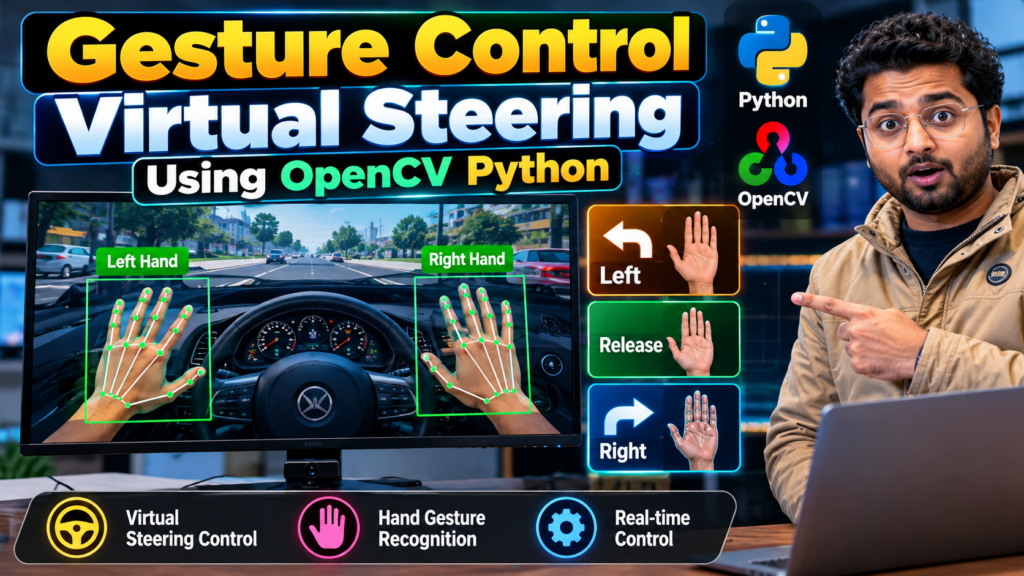
Gesture Control Virtual Steering Using OpenCV Python is an innovative computer vision project that allows users to control a virtual vehicle or steering system using hand gestures instead of a traditional keyboard, mouse, or physical controller.
The project uses a webcam to capture hand movements and computer vision techniques to detect and track the user’s hand. Based on predefined gestures or hand movements, the system generates steering commands such as left, right, straight, accelerate, and brake.
This project is suitable for B.Tech, BE, BCA, MCA, Computer Science, Artificial Intelligence, Machine Learning, and final-year engineering project development.
Students looking for a Hand Gesture Recognition Project using Python and OpenCV, Computer Vision Project, or an innovative final-year project with source code and documentation can customize this system according to their academic requirements.
What Is Gesture Control Virtual Steering?
Gesture Control Virtual Steering is a computer vision-based system that uses hand movements to control a virtual steering interface.
Instead of using a physical steering wheel, the user places their hand in front of a webcam. The application processes the camera feed, detects the hand, tracks its position, and recognizes predefined gestures.
The detected gesture is then converted into a steering command.
For example:
| Hand Gesture / Movement | Action |
|---|---|
| Move hand left | Turn Left |
| Move hand right | Turn Right |
| Hand centered | Straight |
| Specific gesture | Accelerate |
| Specific gesture | Brake |
| Custom gesture | Custom Command |
The exact gesture mapping can be customized according to the project requirements.
This project combines:
- Python
- OpenCV
- Computer Vision
- Hand Gesture Recognition
- Hand Tracking
- Image Processing
- NumPy
- Webcam Processing
Gesture Control Virtual Steering Project Workflow
The basic workflow is:
Webcam → Hand Detection → Hand Tracking → Gesture Recognition → Decision Making → Steering Command → Virtual Vehicle
The system continuously processes camera frames and responds to the user’s hand movements.
How Does Gesture Control Virtual Steering Work?
1. Capture Video Using Webcam
The first step is to access the webcam using Python and OpenCV.
The webcam continuously captures video frames that are processed by the application.
OpenCV can be used for:
- Camera access
- Video capture
- Frame processing
- Image conversion
- Real-time display
2. Detect the Hand
The system identifies the user’s hand from the camera frame.
A hand-tracking framework such as MediaPipe can be used to identify important hand landmarks.
These landmarks provide information about the position of:
- Wrist
- Thumb
- Index finger
- Middle finger
- Ring finger
- Little finger
3. Track Hand Movement
After detecting the hand, the system continuously tracks its movement.
The program can analyze:
- X-coordinate
- Y-coordinate
- Finger position
- Distance between landmarks
- Hand direction
- Hand orientation
- Movement patterns
This information is useful for determining the user’s intended gesture.
4. Recognize Hand Gestures
The detected hand position is compared with predefined gesture rules.
For example:
Left-hand movement → Left steering
Right-hand movement → Right steering
Centered hand → Straight
Additional gestures can be created for acceleration, braking, horn, start, stop, and other controls.
5. Generate Steering Command
After recognizing the gesture, the system generates a corresponding command.
Hand Movement
      ↓
Hand Detection
      ↓
Landmark Tracking
      ↓
Gesture Recognition
      ↓
Steering Decision
      ↓
Virtual Vehicle Control
Technologies Used
The project can be developed using:
- Python
- OpenCV
- NumPy
- MediaPipe
- Computer Vision
- Hand Gesture Recognition
- Hand Tracking
- Webcam
Depending on the implementation, additional libraries or frameworks can be integrated.
Key Features
Real-Time Hand Detection
The system detects the user’s hand through a webcam and processes the video feed in real time.
Hand Gesture Recognition
Predefined hand gestures can be mapped to different steering commands.
Virtual Steering Control
Users can control a virtual steering system without physically touching a steering wheel.
Contactless Interaction
The project demonstrates touch-free human-computer interaction using computer vision.
Real-Time Camera Feedback
The application can display the webcam feed along with hand landmarks, detected gestures, and steering information.
Custom Gesture Mapping
Students can add new gestures according to their project requirements.
Interactive Interface
The system can display:
- Detected hand
- Hand landmarks
- Current gesture
- Steering direction
- Virtual steering wheel
- Current command
- System status
Hand Gesture Recognition Using OpenCV Python
Hand gesture recognition is an important part of this project.
The camera captures the user’s hand, and the computer vision system extracts information from the hand.
Based on landmark coordinates and predefined rules, the system identifies the gesture.
For example:
Hand Left  → LEFT
Hand Right → RIGHT
Hand Center → STRAIGHT
Gesture A → ACCELERATE
Gesture B → BRAKE
This approach can be further improved using machine learning or deep learning models.
Computer Vision Project Using Python
This project is a practical example of computer vision using Python.
It demonstrates how a computer can use a camera as an input device and convert visual information into commands.
Students can learn:
- Image processing
- Video processing
- Object and hand detection
- Hand tracking
- Gesture recognition
- Coordinate analysis
- Real-time computer vision
- Human-computer interaction
Python OpenCV Project for Final Year Students
The Gesture Control Virtual Steering project can be developed as a Python final-year project for students from different academic backgrounds.
It can be suitable for:
- B.Tech Computer Science
- B.Tech Artificial Intelligence
- B.Tech Data Science
- B.Tech Information Technology
- BE Computer Engineering
- BCA
- MCA
- Diploma Computer Engineering
- Engineering final-year projects
The complexity of the project can be increased by adding advanced features and additional modules.
Applications of Gesture Recognition
1. Virtual Gaming
Hand gestures can be used as an alternative controller for racing games and driving simulations.
2. Robotics
Recognized gestures can be converted into commands for robotic vehicles and robotic arms.
3. Human-Computer Interaction
Users can interact with applications without directly touching a physical input device.
4. Automotive Simulation
The project can be used to demonstrate experimental gesture-based vehicle interfaces in simulation environments.
5. Educational Projects
Students can use the project to understand practical applications of Python, OpenCV, computer vision, and gesture recognition.
6. Touchless Interfaces
Gesture recognition can be used to develop touch-free interfaces for different applications.
Advanced Features for the Project
Students can make the project more advanced by adding additional functionality.
Voice + Gesture Control
Combine voice commands with hand gestures.
Arduino Integration
Connect gesture recognition with Arduino to control a physical robotic vehicle.
Gaming Integration
Map hand gestures to keyboard or controller commands for a racing game.
Multiple Gesture Commands
Add gestures for:
- Accelerate
- Brake
- Left
- Right
- Horn
- Start
- Stop
- Pause
Machine Learning Gesture Recognition
A machine learning or deep learning model can be trained to recognize customized gestures.
Real-Time Dashboard
A dashboard can display:
- Current gesture
- Steering angle
- Speed
- System status
- Camera feed
- Detection results
Hardware Requirements
For the basic software version:
- Laptop or Desktop
- Webcam
- Keyboard and Mouse
- Internet connection for installing packages
For an advanced hardware-based project:
- Arduino
- Motor Driver
- DC Motors
- Robotic Car Chassis
- Battery
- Sensors
The exact hardware depends on the selected project scope.
Software Requirements
Recommended software includes:
- Python 3.x
- OpenCV
- NumPy
- MediaPipe
- VS Code / PyCharm / Jupyter Notebook
- Windows or Linux
Advantages of Gesture Control Virtual Steering
The project provides several benefits:
- Touch-free interaction
- Real-time computer vision
- Interactive demonstration
- Easy webcam-based input
- Customizable gestures
- Expandable project architecture
- Practical Python application
- Suitable for academic demonstrations
Limitations
The system may have some limitations.
Lighting Conditions
Poor lighting can affect hand detection.
Camera Quality
Low-quality cameras may reduce detection accuracy.
Hand Occlusion
If the hand is partially hidden, gesture recognition may become less accurate.
Background
Complex backgrounds can sometimes affect computer vision processing.
Gesture Accuracy
Incorrect hand positioning may result in incorrect commands.
Future Scope
The project can be extended in several ways.
Future improvements can include:
- AI-based gesture classification
- Deep learning-based hand recognition
- Voice and gesture combination
- Advanced gaming integration
- Robotic vehicle control
- Multiple-user gesture recognition
- Mobile camera integration
- Real-time analytics dashboard
- Custom gesture training
- Improved gesture accuracy
The project can therefore evolve from a basic Python OpenCV project into a more advanced AI and computer vision project.
Why Choose This as a Final-Year Project?
The project combines multiple technologies rather than performing only a basic image-processing task.
Students can demonstrate:
- Python programming
- OpenCV
- Computer Vision
- Hand Detection
- Hand Tracking
- Gesture Recognition
- Real-Time Video Processing
- Human-Computer Interaction
- Machine Learning concepts
It also provides opportunities for customization, making it suitable for major projects, mini projects, academic projects, and final-year engineering projects.
Mini Project vs Major Project
Mini Project
A basic version can include:
- Webcam
- Hand detection
- Gesture recognition
- Left/right steering
- Simple interface
Major Project
An advanced version can include:
- AI-based gesture recognition
- Multiple gestures
- Virtual driving environment
- Voice control
- Dashboard
- Arduino integration
- Robotic vehicle
- Data logging
- Custom gesture training
This allows students to select the project complexity according to their academic requirements.
Project Documentation and Source Code
A complete academic project can include:
- Python source code
- Project documentation
- Installation guide
- Project report
- PPT presentation
- System requirements
- Project explanation
- Demo guidance
- Custom features
Students can customize the project according to their branch, university requirements, and project guidelines.
Frequently Asked Questions
What is a Gesture Control Virtual Steering project?
It is a computer vision project that uses hand gestures to control a virtual steering system or vehicle.
Can I build this project using Python?
Yes. Python provides libraries such as OpenCV and NumPy that can be used to develop the system.
Which technology is used for hand gesture recognition?
OpenCV and hand-tracking frameworks such as MediaPipe can be used depending on the implementation.
Is this a good B.Tech final-year project?
Yes. The project can be developed as a B.Tech, BE, BCA, MCA, or Computer Science final-year project.
Can I get source code for this project?
The project can be developed with Python source code and customized according to the required features and project scope.
Can this project be connected to Arduino?
Yes. The gesture recognition module can be integrated with Arduino and other hardware to control a robotic vehicle.
Can I customize the hand gestures?
Yes. The gesture mapping can be modified according to the project requirements.
Can this be used as a computer vision project?
Yes. The project demonstrates real-time image processing, hand tracking, gesture recognition, and camera-based computer vision.
Can I make this project an AI project?
Yes. Machine learning or deep learning can be integrated to classify custom hand gestures.
Is this suitable for a major project?
Yes. Additional modules such as AI-based gesture classification, dashboards, gaming integration, Arduino control, and voice commands can increase the project’s complexity.
Related Python and Computer Vision Projects
If you are looking for similar Python, OpenCV, AI, and computer vision projects, explore:
- Face Recognition Attendance System Using Python
- People Counter Using YOLO and OpenCV
- Object Detection and Recognition Using Python
- Sign Language Recognition Using Machine Learning
- OMR Answer Sheet Checking Using Python and Computer Vision
- Helmet and Number Plate Detection Using Python
- Animal Detection Using Machine Learning
- Garbage Detection Using Machine Learning
- AI Exam Proctoring System Using Python
- Intrusion Detection System Using Machine Learning
- Pothole Detection Using Python
- Real-Time Object Detection With Voice Output
Looking for a Final-Year Project?
Are you searching for a Python project, OpenCV project, AI project, machine learning project, computer vision project, or final-year engineering project?
Techie Projects can help with customized project development based on your academic requirements.
Project Support Can Include
✅ Python Source Code
✅ OpenCV / Computer Vision Implementation
✅ Project Documentation
✅ Project Report
✅ PPT Presentation
✅ Installation & Setup Guidance
✅ Project Explanation
✅ Custom Features
✅ Demo & Technical Guidance
Need a Project?
Send your project name, branch, or requirements and discuss the required project scope.
Example WhatsApp Message:
I am interested in the Gesture Control Virtual Steering project. Please share the project details and available features.
Conclusion
Gesture Control Virtual Steering Using OpenCV Python is an innovative computer vision project that demonstrates how hand movements can be converted into digital steering commands.
By combining Python, OpenCV, hand tracking, and gesture recognition, students can build an interactive touchless control system.
The project can be developed as a Python mini project, OpenCV project, computer vision project, B.Tech final-year project, BE project, BCA project, MCA project, or major engineering project.
With additional features such as machine learning, deep learning, Arduino integration, voice control, gaming integration, and custom gesture recognition, the basic system can be transformed into an advanced AI and computer vision final-year project.
☎️ Contact Us For More Queries:-
📲 Call/WhatsApp: +91-9460060699
🌎 Website: www.techieprojects.com
📺 Instagram: @pythonprojects_