
Introduction
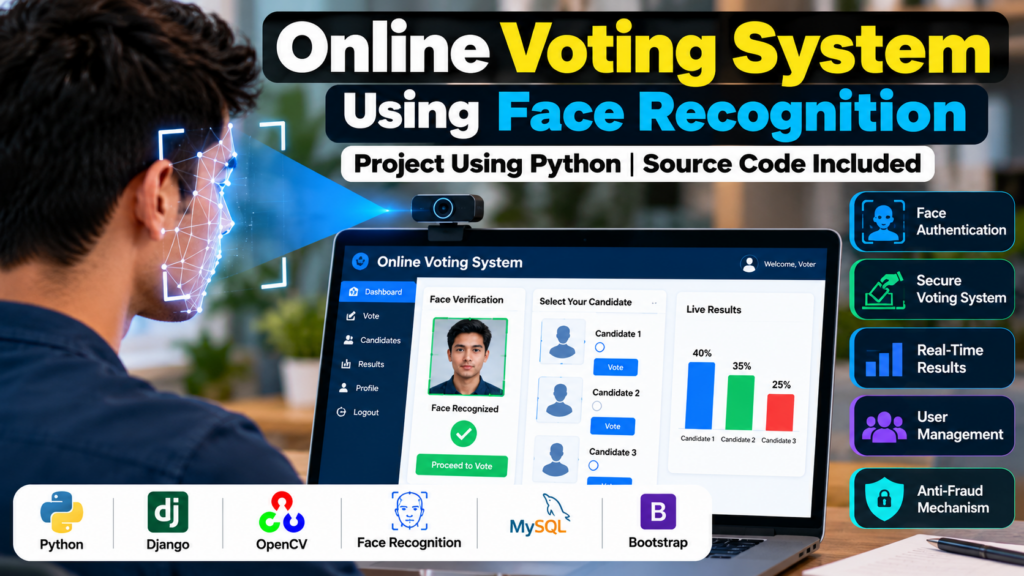
An Online Voting System Project in Python is a software application designed to make the voting process more organized, convenient, and secure. The system can allow registered users to authenticate themselves, view available candidates, cast their vote, and store voting records digitally.
This project uses Python and face recognition technology as an additional identity-verification mechanism. Instead of relying only on a username and password, the system can verify a registered voter through facial recognition before allowing the voting process to continue.
The project is suitable for students looking for a practical Python, machine learning, and computer vision project. It demonstrates concepts such as face detection, face recognition, database management, web development, user authentication, and digital voting workflows.
Educational note: This project is intended for academic and demonstration purposes. A production or government election system would require extensive security audits, legal compliance, privacy protections, accessibility measures, independent verification, and much stronger authentication and election-security controls.
Online Voting System using Python Source Code
Online Voting System Project Overview
The main purpose of the online voting system is to provide a digital platform where authorized voters can participate in an election.
A typical system can include:
- Voter registration
- Voter login
- Face verification
- Candidate information
- Candidate selection
- Vote submission
- Prevention of repeated voting
- Vote record management
- Election result display
- Admin dashboard
- User management
- Database connectivity
The exact features depend on the implementation and project requirements.
Objectives of the Project
The major objectives of an online voting system project are:
- To digitize the basic voting workflow.
- To maintain voter information in a structured database.
- To provide a simple interface for voters.
- To demonstrate identity verification using face recognition.
- To store voting records digitally.
- To prevent a registered user from submitting multiple votes in the same election.
- To provide an organized method for displaying election results.
- To demonstrate Python-based application development.
Key Features
1. Voter Registration
The system can allow eligible users to register their basic information before participating in an election.
Registration information may include:
- Voter name
- Voter ID
- Email address
- Contact information
- Login credentials
- Facial image or face-embedding information
Only the information actually required by the project should be collected.
2. User Authentication
Registered voters can log in using their credentials. Authentication provides the first layer of access control before the voter reaches the voting interface.
3. Face Recognition
Face recognition can be integrated as an additional verification step.
The camera captures the user’s face and compares it with previously registered facial information. If the verification process succeeds, the voter can continue to the next stage.
4. Candidate Management
The administrator can add and manage candidate information.
Candidate records may contain:
- Candidate name
- Candidate ID
- Political group or category
- Candidate image
- Election information
- Description
5. Online Voting
After successful authentication, the voter can view the available candidates and select one candidate according to the rules defined by the project.
The system should clearly indicate that the vote has been submitted.
6. Vote Management
Voting records can be stored in a database. The application can maintain a status indicating whether a particular registered user has already voted in a particular demonstration election.
7. Result Management
An administrator can view aggregated voting results through a dashboard.
The results can be displayed using:
- Tables
- Bar charts
- Candidate-wise vote counts
- Percentage-based visualizations
How the Online Voting System Works
A simplified workflow can be:
Registration → Login → Identity Verification → Face Recognition → Candidate Selection → Vote Submission → Database Update → Result Generation
Step 1: Voter Registration
The user registers with the required information.
Step 2: Login
The registered user enters their login credentials.
Step 3: Identity Verification
The system performs the required identity-verification process.
Step 4: Face Recognition
If face recognition is implemented, the camera captures the user’s face and compares it with the registered facial data.
Step 5: Candidate Selection
After successful verification, the voter can access the candidate list.
Step 6: Vote Submission
The voter selects a candidate and submits the vote.
Step 7: Database Update
The application records the vote and updates the user’s voting status.
Step 8: Result Generation
The administrator can view the aggregated results after the appropriate election stage.
Face Recognition in the Voting System
Face recognition is one of the main computer vision components of this project.
A basic face-recognition workflow can contain:
- Face image capture
- Face detection
- Facial feature extraction
- Comparison with registered facial information
- Verification result
- Access to the voting interface
Libraries such as OpenCV can be used for computer vision tasks, while a suitable face-recognition or machine-learning library can be used depending on the implementation.
For an academic project, it is important to clearly explain that face recognition is an additional verification mechanism, not by itself a guarantee of election security.
Technologies Used
The technology stack can vary according to the implementation.
Programming Language
Python can be used for application logic, database connectivity, machine learning, and computer vision components.
Computer Vision
OpenCV
OpenCV can be used for camera access, image processing, and face-detection-related tasks.
Web Framework
Depending on the implementation, the project can use frameworks such as:
Database
Possible database technologies include:
- MySQL
- SQLite
Front-End
A web-based implementation may use:
- HTML
- CSS
- JavaScript
- Bootstrap
Software Requirements
The following software can be used for developing the project:
- Python 3.x
- VS Code or another Python IDE
- OpenCV
- Required Python packages
- Django or Flask, depending on implementation
- MySQL or SQLite
- Web browser
- Windows, Linux, or another supported operating system
The exact requirements depend on the project’s source code and implementation.
Hardware Requirements
Basic hardware requirements may include:
- Computer or laptop
- Minimum 4 GB RAM
- Dual-core or better processor
- Webcam for face verification
- Keyboard and mouse
- Sufficient storage space
For larger machine-learning workloads, additional computing resources may be useful.
Database Design
A database can be used to store application information.
Possible tables include:
Voter Table
The voter table may contain:
- Voter ID
- Name
- Login information
- Face-related verification data
- Voting status
Candidate Table
The candidate table may contain:
- Candidate ID
- Candidate name
- Candidate image
- Election ID
- Candidate information
Vote Table
The vote table may contain:
- Vote ID
- Election ID
- Candidate ID
- Voter reference
- Timestamp
The exact database structure should be designed according to the project’s implementation and security requirements.
Preventing Duplicate Voting
One important requirement of a voting application is preventing a registered user from submitting multiple votes in the same election.
A demonstration project can maintain a voting status associated with the user and election.
For example:
Not Voted → Vote Submitted → Voted
The database can then prevent another vote from being submitted for the same voter and election.
In a real election system, duplicate-vote prevention would require much more rigorous security architecture and independent verification.
Admin Panel
An administrator interface can provide functionality such as:
- Manage voters
- Add candidates
- Update candidate information
- Manage elections
- Monitor system records
- View aggregated results
- Manage user accounts
Administrative access should be protected with strong authentication and authorization.
Advantages
An online voting system project can demonstrate several advantages:
- Digital voting workflow
- Faster data management
- Reduced manual record keeping
- Easy candidate management
- Centralized database
- Convenient user interface
- Demonstration of biometric verification
- Practical application of Python
- Integration of computer vision and databases
Limitations
A student-level online voting system may have several limitations:
- Face recognition accuracy can vary with lighting and camera quality.
- Different facial poses can affect recognition performance.
- Spoofing and presentation attacks require dedicated security controls.
- Internet connectivity may be required for an online deployment.
- Database security must be carefully implemented.
- A basic project may not provide end-to-end election security.
- Privacy and biometric-data protection require careful design.
- A demonstration application should not be treated as a production election platform.
Future Scope
The project can be extended with additional features such as:
- Multi-factor authentication
- Better face anti-spoofing mechanisms
- Role-based access control
- Secure audit logging
- Election scheduling
- Improved accessibility
- Mobile application support
- Secure notification systems
- Advanced monitoring and security testing
- Improved database architecture
- Privacy-preserving biometric processing
- Independent election-result verification
These features can make the project more suitable for demonstrating advanced software engineering and security concepts.
Applications
An educational online voting system can be demonstrated in controlled environments such as:
- College elections
- Student organization elections
- Club elections
- Classroom voting demonstrations
- Academic projects
- Software-development demonstrations
For real elections, additional legal, technical, operational, and security requirements would apply.
Why This Is a Good Python Project
The Online Voting System Project in Python combines several important technologies in one application.
Students can learn:
- Python programming
- Database management
- Web development
- Computer vision
- Face recognition
- User authentication
- CRUD operations
- Application workflow design
- Data visualization
- Software testing
It can therefore be a useful final-year project for students interested in Python, machine learning, artificial intelligence, or computer vision.
Frequently Asked Questions
What is an online voting system project in Python?
An online voting system project in Python is a digital application that demonstrates voter registration, authentication, candidate selection, vote submission, database management, and result generation.
Can face recognition be used in an online voting project?
Yes. Face recognition can be integrated as an additional identity-verification mechanism in an educational voting application.
Which Python libraries can be used?
Depending on the implementation, libraries such as OpenCV and other face-recognition or machine-learning libraries can be used.
Which database can be used?
MySQL and SQLite are common options for an academic Python project.
Is this project suitable for a final-year project?
Yes. It can demonstrate Python programming, database management, web development, computer vision, and machine-learning concepts.
Can the project be converted into a web application?
Yes. Frameworks such as Django or Flask can be used to develop a web-based version.
Can the voting results be displayed graphically?
Yes. Results can be displayed using tables, charts, or dashboards depending on the implementation.
Conclusion
The Online Voting System Project in Python Using Face Recognition is a practical academic project that combines Python programming, database management, web development, and computer vision.
The project demonstrates how a digital voting workflow can be designed with voter registration, authentication, face verification, candidate selection, vote recording, and result management.
For students, the project provides an opportunity to understand how multiple technologies can work together to create a complete software application. With additional development, the system can be extended with stronger authentication, privacy protections, accessibility features, security controls, and better election-management functionality.
Explore Related Python Projects
- Attendance Management System Project in Python
- College Enquiry Chatbot Project in Python
- Garbage Detection Using OpenCV
- Intrusion Detection System Using Machine Learning
- Machine Learning Projects Using Python
Need Help With Your Project?
Get help with Python, Machine Learning, AI, Computer Vision, and final-year project development.
📲 Call/WhatsApp: +91-9460060699
🌎 Website: www.techieprojects.com
📺 Instagram: @pythonprojects_