
🎓 Introduction
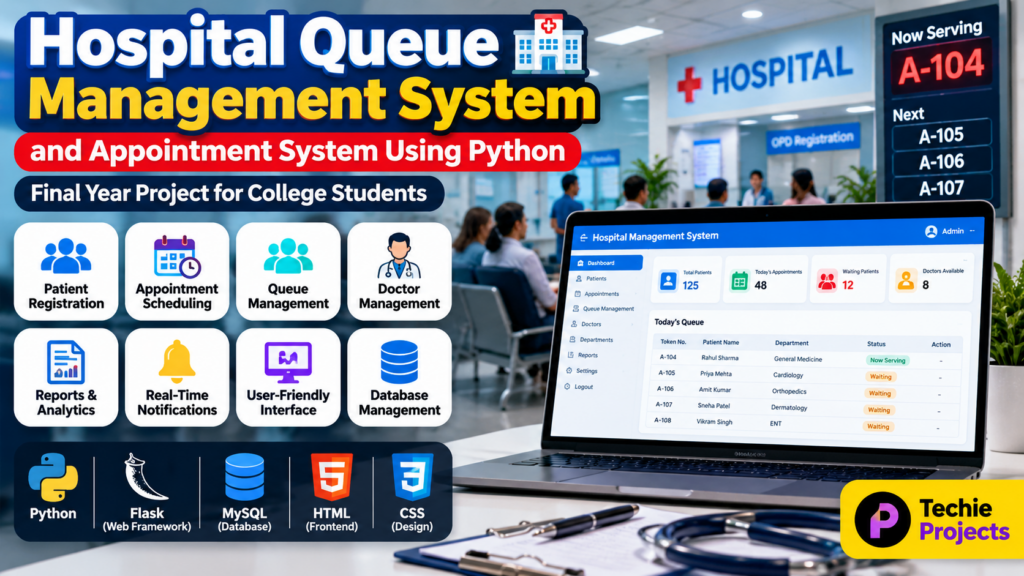
A Hospital Queue Management System Using Python is a software project designed to manage patients, appointments, doctors, and hospital queues efficiently. The system helps reduce waiting time by organizing patients according to their appointment or queue number.
For hospitals and clinics, managing patient queues manually can become difficult when the number of patients increases. A computerized queue management system can provide a structured way to register patients, schedule appointments, manage waiting queues, and display the current serving patient.
This project is suitable for B.Tech, BCA, MCA, Computer Science, IT, and final-year engineering students who want to develop a practical healthcare management project using Python.
The project can be implemented as a web-based or desktop application depending on the required project scope and technologies.
🎥 Watch the Hospital Queue Management System Working Demo
Before choosing or purchasing the project, students can watch the working demonstration video to understand how the hospital queue, appointment management, patient registration, and dashboard modules work.
The demo provides a practical overview of the project interface and workflow.
🏥 What Is a Hospital Queue Management System?
A hospital queue management system is an application that manages the sequence in which patients are served by doctors or hospital departments.
Instead of maintaining patient queues manually, the system can generate queue numbers and maintain their status, such as:
- Waiting
- Called
- In Consultation
- Completed
- Cancelled
The system can also connect queue management with patient registration and appointment scheduling.
🎯 Objectives of the Project
The main objectives of the Hospital Queue Management System Using Python are:
- Manage patient registration digitally
- Generate patient queue numbers
- Manage doctor appointments
- Reduce manual queue management
- Display current and waiting patients
- Maintain patient records
- Manage doctor information
- Track appointment status
- Generate reports
- Improve hospital workflow
- Reduce patient waiting time
- Provide a user-friendly management interface
⭐ Key Features
The project can include several modules to make hospital queue and appointment management easier.
1. Patient Registration
Hospital staff can register new patients by entering information such as:
- Patient name
- Age
- Gender
- Contact number
- Address
- Patient ID
- Department
- Doctor
The system stores the information in the database for future reference.
2. Queue Number Generation
After registration or appointment confirmation, the system can generate a unique queue number for the patient.
For example:
A-101 → A-102 → A-103 → A-104
The queue number helps staff and patients identify the order in which patients should be served.
3. Appointment Management
The appointment module allows hospital staff to schedule appointments between patients and doctors.
Appointment information may include:
- Patient name
- Doctor name
- Department
- Appointment date
- Appointment time
- Appointment status
4. Doctor Management
The administrator can maintain doctor information such as:
- Doctor name
- Department
- Specialization
- Available days
- Available time
- Contact information
5. Queue Status Management
The system can maintain different queue statuses.
For example:
Waiting → Called → In Consultation → Completed
This provides hospital staff with a clear overview of the current queue.
6. Current Patient Display
A queue display can show the patient currently being served.
For example:
Now Serving: A-104
Next: A-105
Next: A-106
This feature can be useful for displaying queue information on a monitor in the waiting area.
7. Patient Search
Hospital staff can search for patients using information such as:
- Patient ID
- Patient name
- Mobile number
- Appointment number
8. Dashboard
An administrator dashboard can display important information such as:
- Total patients
- Today’s appointments
- Waiting patients
- Completed appointments
- Available doctors
- Department statistics
🔄 Hospital Queue Management System Workflow
The basic workflow of the project can be divided into several steps.
Step 1: Patient Registration
The receptionist registers the patient and enters the required information into the system.
Step 2: Appointment Selection
The patient can be assigned an appointment with an available doctor or department.
Step 3: Queue Number Generation
The system generates a queue number based on the current queue.
Step 4: Patient Enters Waiting Queue
The patient’s status becomes Waiting.
Step 5: Doctor Calls Patient
When the doctor is ready, the staff changes the status to Called and displays the queue number.
Step 6: Consultation
The patient enters the consultation room.
The status can then be updated to:
In Consultation
Step 7: Appointment Completion
After consultation, the appointment can be marked as:
Completed
The next patient in the queue can then be called.
💻 Technologies Used
The technologies can vary depending on the project implementation.
A possible technology stack includes:
- Programming Language: Python
- Frontend: HTML, CSS
- Backend: Python Flask
- Database: MySQL
- Database Connectivity: Python database libraries
- Interface: Web-based dashboard
- Development Environment: Visual Studio Code / PyCharm
- Operating System: Windows 10/11
For a desktop version, technologies such as Tkinter and SQLite can also be used.
🗄️ Database Design
The project can use a relational database to store hospital information.
Possible database tables include:
Patient Table
Stores patient information.
Fields may include:
- Patient ID
- Name
- Age
- Gender
- Contact
- Address
Doctor Table
Stores doctor information.
Fields may include:
- Doctor ID
- Doctor Name
- Department
- Specialization
- Availability
Appointment Table
Stores appointment information.
Fields may include:
- Appointment ID
- Patient ID
- Doctor ID
- Appointment Date
- Appointment Time
- Status
Queue Table
Stores queue information.
Fields may include:
- Queue ID
- Patient ID
- Token Number
- Department
- Queue Status
- Date
- Time
📊 Reports and Analytics
The system can generate useful reports for hospital staff.
Examples include:
- Daily patient report
- Doctor appointment report
- Department-wise patient report
- Completed appointment report
- Waiting patient report
- Queue statistics
- Monthly appointment report
These reports can help administrators understand hospital workload and patient flow.
🔔 Real-Time Queue Notifications
An advanced version of the project can include notifications when a patient’s queue number is approaching.
For example:
Your Token: A-108
Currently Serving: A-105
Estimated Queue Position: 3
This feature can improve the patient experience and reduce unnecessary waiting near the reception counter.
🔐 Admin Panel
An administrator panel can be included to manage the complete system.
The admin can:
- Add doctors
- Manage departments
- Register patients
- Manage appointments
- Manage queues
- Update patient status
- View reports
- Manage users
- Maintain database records
User authentication can also be added to protect administrative features.
📱 Advantages of Hospital Queue Management System
The project provides several advantages:
- Reduces manual paperwork
- Organizes patient queues
- Improves appointment management
- Reduces confusion in waiting areas
- Provides centralized patient information
- Makes hospital operations easier to manage
- Improves record management
- Provides useful reports
- Can be expanded with additional healthcare features
🏥 Applications
The system can be used or adapted for:
- Hospitals
- Private clinics
- Medical centers
- Dental clinics
- Diagnostic centers
- Government hospitals
- Specialist clinics
- Healthcare departments
⚙️ Software Requirements
A basic implementation may require:
- Windows 10/11
- Python 3.x
- MySQL or SQLite
- Flask, if developed as a web application
- HTML and CSS
- Code editor such as Visual Studio Code
- Modern web browser
🖥️ Hardware Requirements
Basic hardware requirements may include:
- Intel Core i3 or equivalent processor
- 4 GB RAM or higher
- 500 GB storage or higher
- Keyboard and mouse
- Monitor
- Internet connection for web-based deployment
The actual requirements depend on the project’s implementation and deployment environment.
🚀 Future Scope
The Hospital Queue Management System can be extended with advanced features.
Possible future improvements include:
- Online appointment booking
- SMS notifications
- WhatsApp notifications
- Mobile application
- QR-based patient registration
- Online doctor consultation
- Digital prescription management
- Electronic medical records
- AI-based appointment prediction
- Patient waiting-time prediction
- Cloud database
- Multi-hospital management
- Real-time queue tracking
- Voice-based queue announcements
🎓 Why Is This a Good Final-Year Project?
The Hospital Queue Management System Using Python is a practical final-year project because it combines multiple software development concepts.
Students can demonstrate their knowledge of:
- Python programming
- Database management
- Web development
- User authentication
- CRUD operations
- Appointment scheduling
- Queue management
- Software design
- Dashboard development
- Reporting
The project can also be expanded according to the requirements of a college project, minor project, major project, or final-year engineering project.
❓ Frequently Asked Questions
Can this project be developed using Python?
Yes. Python can be used to develop the backend, database connectivity, queue management logic, and application functionality.
Can MySQL be used for this project?
Yes. MySQL can be used to store patient, doctor, appointment, and queue information.
Can this project be developed as a web application?
Yes. A web-based version can be developed using Python Flask or another suitable Python web framework.
Can an Android application be added?
Yes. The system can be extended with an Android application for patients, doctors, or hospital administrators.
Can online appointment booking be added?
Yes. An online appointment module can allow patients to select doctors, departments, dates, and available time slots.
Can real-time queue management be implemented?
Yes. The project can display the currently serving token and upcoming queue numbers in real time.
Is this suitable for a final-year project?
Yes. The project can be expanded with authentication, database management, reports, notifications, dashboards, and additional healthcare modules to create a comprehensive final-year project.
🎓 Need Help With Your Final-Year Project?
Looking for a Python, AI, Machine Learning, Computer Vision, Web Development, or final-year engineering project?
Techie Projects can help you discuss your project idea, required features, source-code requirements, documentation, and project scope before development.
📲 Call/WhatsApp: +91-9460060699
🌎 Website: www.techieprojects.com
📺 Instagram: @pythonprojects_
🔗 Explore Related Engineering Projects
Students looking for similar project ideas can also explore:
- Hospital Management System Project
- Appointment Management System Project
- Pharmacy Management System Project
- Medical Store Management System
- Student Attendance Management System
- Database Management Projects Using Python
🎯 Conclusion
The Hospital Queue Management and Appointment System Using Python is a practical healthcare project that demonstrates how software can be used to organize patients, appointments, doctors, and hospital queues.
By combining Python programming, database management, appointment scheduling, queue management, and dashboard functionality, the project provides students with an opportunity to develop a real-world software solution.
The system can start as a basic academic project and later be expanded with online appointments, mobile applications, notifications, cloud storage, analytics, and other advanced healthcare features.