
Introduction
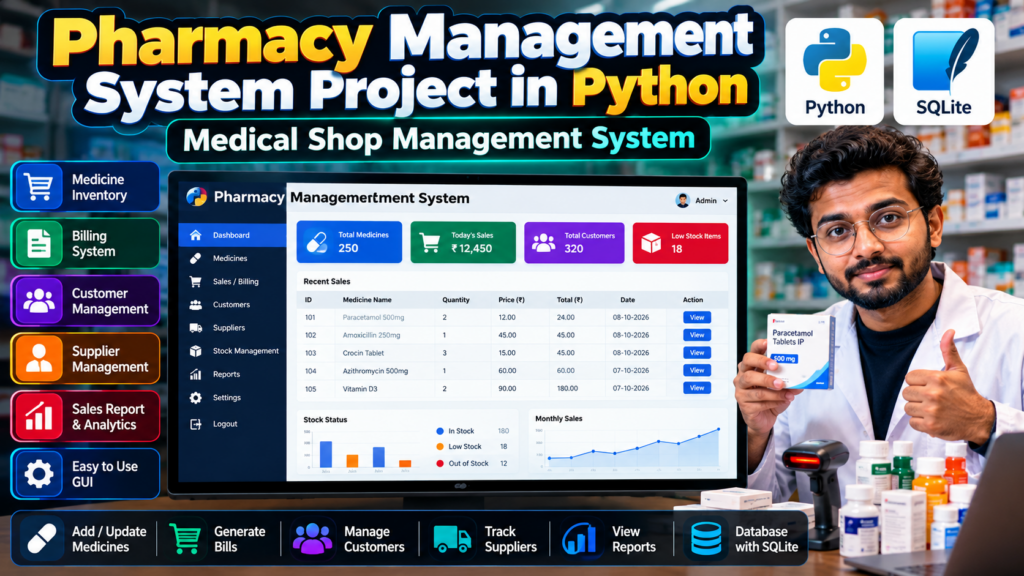
A Pharmacy Management System Project in Python is a software application designed to manage the daily operations of a medical store or pharmacy. The system can help manage medicines, inventory, customers, suppliers, sales, billing, and stock information through a simple graphical user interface.
This project is useful for B.Tech, BCA, MCA, Computer Science, IT, and final-year engineering students looking for a practical Python project. It can also be used as a major project, mini project, academic project, or resume project.
The project demonstrates how Python can be used to develop a real-world management application with database connectivity and an easy-to-use interface.
What Is a Pharmacy Management System?
A pharmacy management system is a computer-based application that helps medical shops maintain their medicine and sales records digitally.
Instead of maintaining medicine details, customer information, billing records, and stock manually, the system stores and manages this information in a structured database.
A typical Pharmacy Management System using Python can provide features such as:
- Medicine management
- Medicine inventory management
- Customer management
- Supplier management
- Sales and billing
- Stock tracking
- Low-stock monitoring
- Sales reports
- Database management
- Search and update functionality
Pharmacy Management System Project Objectives
The main objectives of this Python project are:
- To manage medicine information digitally.
- To maintain pharmacy inventory records.
- To simplify the billing process.
- To store customer and supplier information.
- To track medicine stock.
- To reduce manual record-keeping.
- To provide quick access to pharmacy information.
- To generate useful sales and inventory reports.
- To demonstrate Python and database programming.
- To create a practical project suitable for students.
Key Features
1. Medicine Management
The system allows the administrator to add, update, search, and manage medicine information.
Medicine records may contain:
- Medicine name
- Medicine ID
- Category
- Batch number
- Manufacturer
- Expiry date
- Price
- Quantity
- Supplier information
2. Medicine Inventory Management
Inventory management is an important part of a pharmacy application.
The system can maintain the available quantity of medicines and help identify medicines that are running low.
Students can implement features such as:
- Add stock
- Update stock
- Search medicine
- Delete medicine
- View available stock
- Low-stock alerts
- Expiry-date tracking
3. Pharmacy Billing System
The billing module can calculate the total amount for medicines purchased by a customer.
A basic billing workflow can include:
- Select medicine.
- Enter quantity.
- Retrieve medicine price.
- Calculate item total.
- Add multiple medicines.
- Calculate final bill.
- Store the transaction.
For example:
Total = Medicine Price × Quantity
The system can then calculate the total amount for all medicines included in a transaction.
4. Customer Management
The application can maintain basic customer records.
Possible customer information includes:
- Customer name
- Contact number
- Address
- Purchase history
- Customer ID
This makes it easier to retrieve customer information when required.
5. Supplier Management
A pharmacy may purchase medicines from multiple suppliers.
The supplier module can maintain:
- Supplier name
- Company name
- Contact information
- Address
- Supplied medicines
- Supplier ID
6. Stock Management
Stock management helps the pharmacy administrator monitor available medicines.
The application can display:
- Available medicines
- Current quantity
- Low-stock medicines
- Out-of-stock medicines
- Recently added medicines
7. Search Functionality
A search feature allows users to quickly find medicines from the database.
Users can search using information such as:
- Medicine name
- Medicine ID
- Batch number
- Category
- Supplier
8. Sales Reports
The system can generate useful sales information.
For example:
- Daily sales
- Monthly sales
- Total sales
- Number of transactions
- Most frequently sold medicines
Reports can help demonstrate the practical use of database queries and data processing in the project.
Technologies Used
A Python-based pharmacy management project can use the following technologies:
- Programming Language: Python
- Database: SQLite
- GUI: Tkinter
- Database Connectivity: Python SQLite3
- Development Environment: VS Code / PyCharm
- Operating System: Windows / Linux
If your implementation uses MySQL instead of SQLite, the database section can be changed accordingly.
Software Requirements
The basic software requirements may include:
- Python 3.x
- Tkinter
- SQLite
- VS Code or PyCharm
- Windows 10/11 or Linux
Python packages should be installed according to the libraries used in the actual implementation.
Hardware Requirements
A basic computer system is sufficient for this project.
Recommended requirements:
- Processor: Intel Core i3 or equivalent
- RAM: 4 GB or above
- Storage: 500 GB or above
- Keyboard and mouse
- Monitor
- Operating System: Windows/Linux
Database Design
The database is an important part of the Pharmacy Management System Project in Python.
Possible tables include:
Medicine Table
| Field | Description |
|---|---|
| Medicine ID | Unique medicine identifier |
| Medicine Name | Name of medicine |
| Category | Medicine category |
| Batch Number | Batch information |
| Price | Medicine price |
| Quantity | Available quantity |
| Expiry Date | Expiry information |
Customer Table
| Field | Description |
|---|---|
| Customer ID | Unique customer ID |
| Name | Customer name |
| Contact | Contact number |
| Address | Customer address |
Supplier Table
| Field | Description |
|---|---|
| Supplier ID | Unique supplier ID |
| Supplier Name | Supplier name |
| Company | Company name |
| Contact | Supplier contact |
| Address | Supplier address |
Sales Table
| Field | Description |
|---|---|
| Sale ID | Unique transaction ID |
| Medicine ID | Purchased medicine |
| Quantity | Quantity sold |
| Price | Selling price |
| Total | Transaction amount |
| Date | Sale date |
Pharmacy Management System Workflow
The basic workflow of the project can be:
Login → Dashboard → Medicine Management → Inventory → Customer/Supplier Management → Sales & Billing → Database → Reports
The administrator can add medicine information, update inventory, process sales, generate bills, and review stored records.
How the Project Works
Step 1: Login
The administrator can log into the system using valid credentials.
Step 2: Dashboard
After login, the application displays the main dashboard.
The dashboard can provide access to:
- Medicines
- Customers
- Suppliers
- Sales
- Inventory
- Reports
Step 3: Add Medicine
The administrator enters medicine information and stores it in the database.
Step 4: Manage Inventory
The system updates the available quantity whenever stock is added or a medicine is sold.
Step 5: Generate Bill
The administrator selects medicines and quantities. The application calculates the total amount.
Step 6: Store Transaction
The completed transaction can be stored in the sales database for future reference.
Step 7: Generate Reports
The administrator can view sales and inventory information through reports.
Advantages of Pharmacy Management System
A Python pharmacy management project can provide several advantages:
- Reduces manual record keeping
- Makes medicine searching faster
- Helps manage inventory
- Simplifies billing
- Stores records systematically
- Reduces calculation errors
- Makes sales tracking easier
- Demonstrates real-world software development
- Provides practical database experience
Applications
A pharmacy management system can be adapted for:
- Medical shops
- Retail pharmacies
- Hospital pharmacies
- Small healthcare stores
- Medicine distributors
- Pharmacy inventory management
- Academic software projects
Limitations
A student-level pharmacy management system may have some limitations:
- It may be designed for a single computer.
- Advanced cloud functionality may not be included.
- Online payment integration may not be available.
- Multi-branch synchronization may require additional development.
- Real-world pharmacy compliance features may require specialized implementation.
Therefore, the project should be treated as an educational software project unless it has been specifically developed and validated for real-world pharmacy operations.
Future Scope
The project can be improved with advanced features such as:
- Cloud database
- Multi-user login
- Role-based access
- Barcode scanning
- QR-code integration
- Online medicine ordering
- Email notifications
- SMS notifications
- Automatic stock alerts
- Medicine expiry alerts
- Advanced sales analytics
- Web-based dashboard
- Mobile application
- Multiple pharmacy branch management
Why Choose This Python Project?
The Pharmacy Management System Project in Python is a good choice for students because it combines several important programming concepts in one project.
Students can learn:
- Python programming
- Object-oriented programming
- GUI development
- Database connectivity
- SQL queries
- CRUD operations
- Form validation
- Data management
- Report generation
- Software development workflow
It can also provide a practical project to discuss during a final-year project presentation or technical interview.
Project Ideas You Can Add
Students can extend this project by adding modules such as:
- Medicine Expiry Alert System
- Pharmacy Inventory Prediction
- Medicine Sales Analytics
- Barcode-Based Pharmacy Billing
- Online Pharmacy Management System
- Hospital Pharmacy Management System
- Medicine Recommendation System
- Pharmacy Stock Management Dashboard
🎓 Is This a Good Final-Year Project?
Yes. A pharmacy management system can be developed as a B.Tech, BCA, MCA, or computer science final-year project.
The complexity can be increased depending on the academic requirements. A basic version can focus on Python, Tkinter, and SQLite, while an advanced version can include a web interface, authentication, analytics, cloud database, and additional modules.
Explore Related Python Projects
If you are looking for similar Python projects for your final year, you can explore:
- Restaurant Management System Project in Python
- Hotel Management System Project in Python
- Fees Management System Using Python
- Employee Management System Project in Python
- Inventory Management System Using Python
- Attendance Management System Project in Python
- Billing Software Project in Python
- College Management System Project in Python
These projects can help students compare different domains and select a suitable project based on their skills and academic requirements.
🚀 Looking for a Final-Year Project?
If you are a student looking for a Python, Machine Learning, AI, Computer Vision, Web Development, or final-year engineering project, you can discuss your requirements before selecting a project.
You can discuss:
- Project ideas
- Required features
- Source-code requirements
- Project documentation
- Technology selection
- Project scope
- Implementation requirements
📲 WhatsApp: +91-9460060699
🌐 Website: Techie Projects
📸 Instagram: @pythonprojects_
Frequently Asked Questions
What is a Pharmacy Management System Project in Python?
It is a Python-based software project designed to manage pharmacy operations such as medicines, inventory, customers, suppliers, sales, and billing.
Which technologies can be used for this project?
Python, Tkinter, and SQLite are suitable technologies for developing a desktop-based pharmacy management system.
Is Pharmacy Management System a good final-year project?
Yes. It can be developed as a mini project, major project, B.Tech project, BCA project, MCA project, or resume project.
Can I use MySQL instead of SQLite?
Yes. MySQL can be used when the project requires a server-based database or multiple-user architecture.
Can the project include billing?
Yes. A billing module can calculate medicine prices, quantities, totals, and store sales transactions.
Can this project be converted into a web application?
Yes. The project can be extended using technologies such as Django or Flask to create a web-based pharmacy management system.
Conclusion
The Pharmacy Management System Project in Python is a practical project that demonstrates how Python, GUI programming, and databases can be combined to build a real-world management application.
From medicine inventory and customer management to billing, supplier management, and sales reports, the project provides students with experience in multiple areas of software development.
With additional features such as barcode scanning, cloud databases, analytics, online ordering, and multi-user access, the basic project can be further developed into a more advanced pharmacy management solution.