
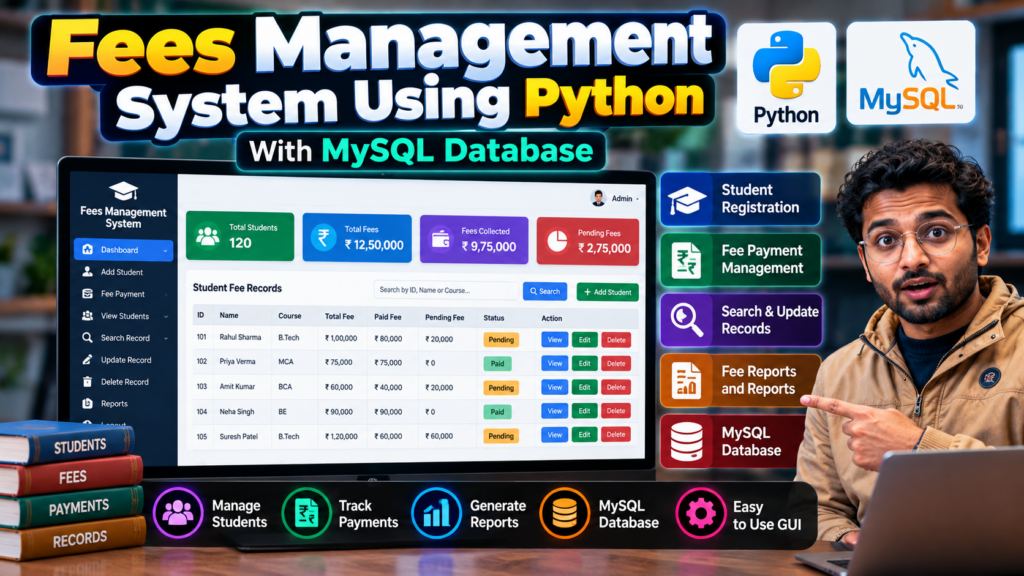
Introduction
A Fees Management System using Python is a database-based application designed to simplify and automate the process of managing student fee records. The system can help schools, colleges, and educational institutions maintain information about students, fee payments, pending amounts, payment dates, and transaction records in an organized way.
This Fees Management System project in Python can be developed using Python, MySQL, and a graphical user interface such as Tkinter. It is a useful Python project for B.Tech, BCA, MCA, BE, Computer Science, and final-year engineering students.
Instead of maintaining fee records manually, administrators can use the application to store, search, update, and manage student payment information through a centralized system.
What Is a Fees Management System?
A Fees Management System is software that helps an educational institution manage student fee-related information.
The system can store details such as:
- Student name
- Student ID
- Course or class
- Admission number
- Contact information
- Total fee
- Paid amount
- Pending amount
- Payment date
- Payment status
- Payment details
The main objective of this Python Fees Management System project is to reduce manual work and make fee record management faster and more organized.
Fees Management System Using Python
The project can be developed using Python programming language with a MySQL database.
Python handles the application logic and user interface, while MySQL can be used to store student and payment records.
A typical architecture is:
User → Python GUI → Application Logic → MySQL Database
The administrator can enter student information, record payments, search existing records, and update fee information through the application.
Objectives of the Fees Management System
The major objectives of this project are:
- To maintain student fee records digitally.
- To reduce manual paperwork.
- To store payment information in a database.
- To calculate paid and pending fees.
- To search student records quickly.
- To update fee information whenever required.
- To improve fee management accuracy.
- To provide an easy-to-use interface for administrators.
- To generate useful fee-related information.
Key Features
1. Student Registration
The administrator can add new students to the system.
Student information may include:
- Student ID
- Student name
- Course
- Class
- Contact number
- Admission number
2. Fee Record Management
The system can maintain individual fee records for students.
Administrators can record:
- Total fees
- Amount paid
- Remaining amount
- Payment date
- Payment status
3. Payment Tracking
The application can track whether a student’s fee has been:
- Paid
- Partially paid
- Pending
4. Automatic Pending Fee Calculation
The system can calculate the remaining amount based on the total fee and amount already paid.
Pending Fee = Total Fee − Paid Fee
This helps administrators quickly identify outstanding payments.
5. Search Student Records
A search feature can help administrators find student information using details such as:
- Student ID
- Name
- Admission number
- Course
6. Update Records
Existing student and fee information can be updated whenever required.
7. Delete Records
Authorized administrators can remove incorrect or outdated records from the database.
8. Database Storage
Student and payment information can be stored in a MySQL database instead of maintaining records manually.
Technologies Used
The project can be implemented using:
- Python
- MySQL
- Tkinter
- MySQL Connector
- HTML/CSS if a web-based version is developed
- VS Code or PyCharm
For a desktop version, Python Tkinter can be used to create the graphical user interface.
How the Fees Management System Works
The basic workflow of the Fees Management System using Python can be divided into several steps.
Step 1: Administrator Login
The administrator can log into the system using authorized credentials.
Step 2: Add Student
The administrator enters student details into the application.
Step 3: Store Student Information
The information is saved into the MySQL database.
Step 4: Add Fee Details
The administrator enters the total fee and payment information.
Step 5: Calculate Pending Amount
The system calculates the remaining fee automatically.
Step 6: Update Payment
Whenever the student makes another payment, the administrator can update the record.
Step 7: Search and View Records
The administrator can search and view student fee information whenever required.
Database Design
A MySQL database can be used to store information for the project.
A student fee table may contain fields such as:
| Field | Description |
|---|---|
| Student ID | Unique student identifier |
| Student Name | Name of student |
| Course | Student course |
| Admission Number | Admission reference |
| Total Fee | Total amount payable |
| Paid Fee | Amount already paid |
| Pending Fee | Remaining amount |
| Payment Date | Date of payment |
| Payment Status | Paid/Pending/Partial |
The database structure can be customized according to the requirements of the college or institution.
Fee Calculation
One of the important features of this project is automatic fee calculation.
For example:
Total Fee = ₹50,000
Paid Fee = ₹30,000
Therefore:
Pending Fee = ₹50,000 − ₹30,000
Pending Fee = ₹20,000
This calculation can be performed automatically by the application.
Python Tkinter Interface
For a desktop-based Fees Management System project in Python, Tkinter can be used to create the graphical user interface.
The interface may contain:
- Login screen
- Dashboard
- Student registration form
- Fee management form
- Search section
- Update button
- Delete button
- Payment section
- Student records table
- Fee status section
A clean interface makes the project easier for administrators to use.
MySQL Database Integration
MySQL provides persistent storage for the project.
Python can communicate with MySQL using a suitable database connector.
The database can store student and payment records so that information remains available when the application is restarted.
This makes the project a practical example of Python database management.
Software Requirements
The following software can be used:
Hardware Requirements
Basic hardware requirements include:
- Computer or laptop
- Minimum 4 GB RAM
- Keyboard
- Mouse
- Storage for application and database
- Internet connection for initial software installation
The exact hardware requirements depend on the project implementation.
Advantages of Fees Management System
A Fees Management System using Python provides several advantages:
- Reduces manual paperwork.
- Makes student fee records easier to manage.
- Saves administrative time.
- Provides quick access to student information.
- Reduces calculation errors.
- Helps track pending payments.
- Provides centralized database storage.
- Makes record searching easier.
- Can be customized according to institutional requirements.
Applications
The project can be used or customized for:
Schools
Manage student fees and payment records.
Colleges
Maintain student fee information for different courses and departments.
Coaching Institutes
Track student payments and pending fees.
Training Centers
Maintain course-wise payment information.
Educational Institutions
Create a centralized student fee management solution.
Limitations
A basic version of the system may have some limitations:
- It may be designed for a single computer.
- Advanced security may not be included.
- Online payment integration may not be available.
- Cloud synchronization may not be supported.
- Automatic notifications may require additional implementation.
These limitations can be addressed by adding advanced features.
Future Scope
The Fees Management System project in Python can be extended with several advanced features.
Online Payment Integration
Students can pay fees through an online payment gateway.
Email and SMS Notifications
The system can automatically notify students about pending payments.
Receipt Generation
The application can generate printable payment receipts.
PDF Reports
Administrators can generate student-wise and course-wise fee reports.
Cloud Database
The system can be connected to a cloud database for remote access.
Role-Based Login
Different access levels can be created for:
- Administrator
- Accountant
- Staff
- Student
Dashboard and Analytics
Charts can display:
- Total collected fees
- Pending fees
- Monthly collection
- Course-wise collection
- Payment status
Mobile Application
A mobile application can be developed so students can view their fee information remotely.
Fees Management System as a Final-Year Project
This project can be developed as a B.Tech final-year project, BE project, BCA project, MCA project, or Computer Science engineering project.
Students can demonstrate practical knowledge of:
- Python programming
- Database management
- MySQL
- GUI development
- CRUD operations
- Software development
- Database connectivity
- Application design
The project complexity can be increased by adding authentication, online payments, reports, dashboards, notifications, and cloud functionality.
Mini Project vs Major Project
Mini Project
A basic version can include:
- Student registration
- Fee entry
- Fee calculation
- Search
- Update
- Delete
- MySQL database
Major Project
An advanced version can include:
- Admin login
- Multiple users
- Online payment
- PDF receipts
- Email notifications
- SMS notifications
- Analytics dashboard
- Cloud database
- Student portal
- Payment history
- Automated reports
Why Choose This Python Project?
The Fees Management System using Python is a practical database management project because it combines programming with a real-world administrative requirement.
Students can learn how to build an application that performs:
- Data entry
- Data storage
- Data retrieval
- Data modification
- Database queries
- Fee calculations
- User authentication
- Report generation
It can also be customized according to the project requirements of a particular college or university.
Frequently Asked Questions
What is a Fees Management System project?
A Fees Management System is an application used to store and manage student fee information, payments, pending amounts, and transaction records.
Can I build a Fees Management System using Python?
Yes. Python can be used to develop the application, while MySQL can be used to store student and payment data.
Which database is suitable for this project?
MySQL is a suitable option for a Python-based Fees Management System. Other databases can also be used depending on the project requirements.
Can this project use Tkinter?
Yes. Tkinter can be used to create a desktop graphical user interface.
Is this suitable for a B.Tech final-year project?
Yes. The project can be developed as a B.Tech, BE, BCA, MCA, or Computer Science final-year project.
Can online payment be added?
Yes. Payment gateway integration can be added as an advanced feature.
Can the project generate fee receipts?
Yes. PDF or printable fee receipts can be added to an advanced version.
Can students check their fee status?
Yes. A student portal can be added so students can view their payment history and pending fees.
Can the project be customized?
Yes. Features, database fields, interface, reports, authentication, and other modules can be customized according to academic requirements.
Explore Related Python Projects
If you are looking for other Python projects for final-year students, explore related project ideas such as:
- College Management System in Python
- Student Management System in Python
- Attendance Management System Project in Python
- Hotel Management System Project in Python
- Restaurant Management System Project in Python
- Employee Management System Project in Python
- Inventory Management System in Python
- Library Management System in Python
- Online Voting System Project in Python
- School Management System Project in Python
These projects can help students explore different areas of Python programming, database management, web development, and software development.
Looking for a Final-Year Python Project?
🎓 Are you looking for a Python project for your final year?
Techie Projects provides project ideas and development support for students working on:
- Python Projects
- Machine Learning Projects
- AI Projects
- Computer Vision Projects
- Web Development Projects
- Database Projects
- IoT Projects
- Final-Year Engineering Projects
You can discuss your project idea, required features, source-code requirements, documentation, and project scope before development.
📲 WhatsApp: +91-9460060699
🌐 Website: Techie Projects
📸 Instagram: @pythonprojects_
Conclusion
The Fees Management System using Python is a practical project for managing student fee records digitally. By combining Python, MySQL, and Tkinter, the application can provide an organized solution for recording student information, tracking payments, calculating pending fees, and managing database records.
The project can start as a simple Python database application and can later be expanded into a complete college or school fee management system with authentication, online payments, PDF receipts, notifications, analytics, and student portals.
For students, this project provides practical experience with Python programming, MySQL database management, GUI development, CRUD operations, and real-world software development, making it a suitable choice for a B.Tech, BE, BCA, MCA, or final-year Computer Science project.