
Introduction
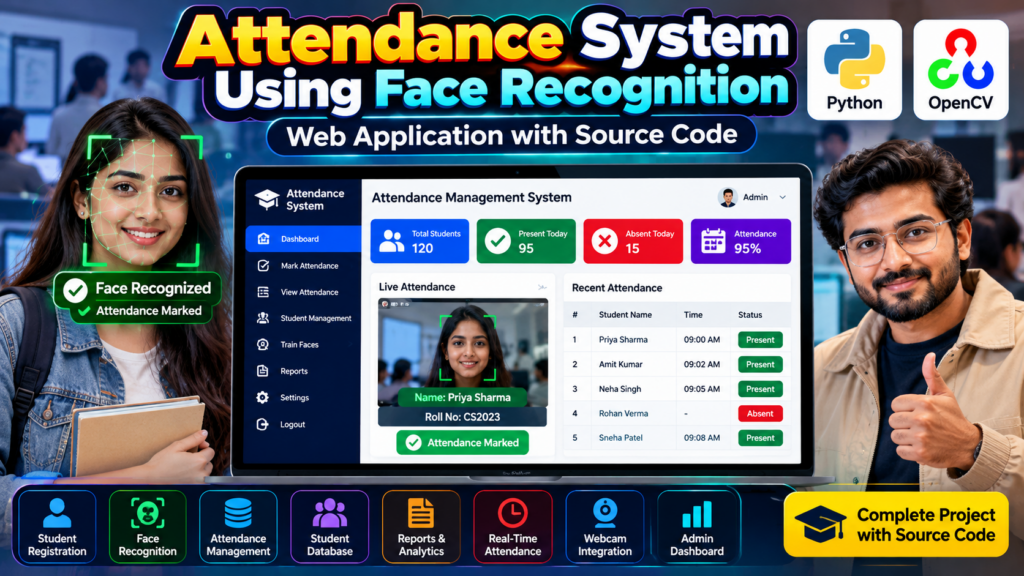
An Attendance System Using Face Recognition in Python is a computer vision-based project that automatically identifies students and records their attendance. Instead of manually marking attendance, the system can use a webcam to detect and recognize registered faces and update attendance records.
This project combines Python, OpenCV, face recognition, image processing, and database management to create a practical attendance management solution.
It is suitable for B.Tech, BCA, MCA, Computer Science, IT, and final-year engineering students looking for a Python-based major project, mini project, or resume project.
🎥 Watch the Attendance System Project Working Demo
Before selecting or purchasing a project, students can watch the working demonstration to understand how the face recognition attendance system operates in real time.
The video demonstrates the project interface, face detection, student recognition, attendance marking, and management dashboard.
What Is a Face Recognition Attendance System?
A face recognition attendance system is an automated application that identifies a person using facial features and records their attendance.
An attendance system using face recognition in Python can automatically identify registered students through a webcam and record their attendance with the date and time. This approach combines face recognition, computer vision, and database management to simplify attendance tracking.
The basic process is:
- Register student information.
- Capture the student’s face using a camera.
- Store the required facial information.
- Start the attendance system.
- Detect faces through the webcam.
- Compare detected faces with registered students.
- Identify the matching student.
- Mark the student as present.
- Store attendance information for future records.
This reduces manual work and provides a faster way to manage attendance.
🎓 Objectives of the Project
The main objectives of this attendance system using face recognition in Python are:
- Automate student attendance.
- Detect faces using a webcam.
- Recognize registered students.
- Reduce manual attendance work.
- Store attendance records digitally.
- Provide an easy-to-use interface.
- Generate attendance information and reports.
- Demonstrate a practical application of computer vision.
Key Features
The project can include the following features:
1. Student Registration
Administrators can register students by entering information such as:
- Student name
- Roll number
- Course or class
- Department
- Student ID
- Face images
The registered information can be stored in a database.
2. Face Detection
The webcam captures video frames and the system detects faces from the camera feed.
Computer vision techniques are used to locate faces before recognition.
3. Face Recognition
After detecting a face, the system compares it with the registered student information.
If a matching student is identified, the student’s details can be displayed.
4. Automatic Attendance
Once the student is successfully recognized, the system can mark the student as present.
The attendance record may contain:
- Student name
- Roll number
- Date
- Time
- Attendance status
5. Attendance Database
Attendance records can be stored digitally so that administrators can retrieve them later.
6. Attendance Dashboard
A dashboard can provide information such as:
- Total students
- Present students
- Absent students
- Attendance percentage
- Recent attendance records
7. Attendance Reports
The system can provide attendance records for different dates or students.
Reports can be useful for teachers and administrators.
How the Attendance System Works
The overall workflow of the project can be divided into several stages.
Step 1: Student Registration
The administrator first registers students in the system.
Student details and face images are collected during registration.
Step 2: Face Data Processing
The captured face information is processed so that it can be used during recognition.
Step 3: Webcam Initialization
The webcam is activated when the attendance process starts.
The camera continuously captures video frames.
Step 4: Face Detection
Each frame is analyzed to identify faces.
The system determines the location of detected faces in the camera frame.
Step 5: Face Recognition
The detected face is compared against registered student data.
If a suitable match is found, the corresponding student is identified.
Step 6: Attendance Marking
After successful recognition, the system records the student’s attendance.
The date and time can also be stored with the attendance record.
Step 7: Database Update
The attendance information is saved in the database.
This allows administrators to access historical attendance records.
Technologies Used
The exact technology stack can vary depending on the implementation, but a typical project may use:
- Python
- OpenCV
- Face Recognition
- NumPy
- Database such as MySQL or SQLite
- Tkinter or a web framework for the interface
- Webcam
Software Requirements
A typical development environment may require:
- Python 3.x
- OpenCV
- NumPy
- Required face-recognition libraries
- MySQL or SQLite
- VS Code, PyCharm, or another Python IDE
- Windows, Linux, or compatible operating system
The exact Python packages depend on the implementation of the project.
Hardware Requirements
Recommended hardware includes:
- Computer or laptop
- Webcam
- Minimum 4 GB RAM
- Intel/AMD processor or equivalent
- Sufficient storage for project files and database
- Keyboard and mouse
A better processor and webcam can provide a smoother real-time experience.
Database Design
The database can contain separate tables for student information and attendance records.
Student Table
Possible fields include:
| Field | Description |
|---|---|
| Student ID | Unique student identifier |
| Name | Student name |
| Roll Number | Student roll number |
| Course | Student course |
| Department | Department name |
| Face Data | Stored recognition information |
Attendance Table
Possible fields include:
| Field | Description |
|---|---|
| Attendance ID | Unique attendance record |
| Student ID | Registered student |
| Date | Attendance date |
| Time | Attendance time |
| Status | Present/Absent |
The database structure can be modified according to the requirements of the college or project.
Attendance Percentage Calculation
The system can calculate attendance percentage using:
Attendance Percentage = (Number of Present Days / Total Working Days) × 100
For example, if a student attends 45 out of 50 working days:
Attendance Percentage = (45 / 50) × 100 = 90%
This information can help students and administrators monitor attendance.
Advantages of Face Recognition Attendance
A well-designed attendance system using face recognition in Python can also provide attendance reports, student records, and real-time monitoring through an easy-to-use dashboard. An automated attendance system provides several advantages:
- Reduces manual attendance work.
- Saves classroom time.
- Provides digital attendance records.
- Makes attendance management easier.
- Can support real-time recognition.
- Reduces repetitive data entry.
- Allows attendance information to be searched later.
- Provides a practical computer vision application.
Applications
An attendance system using face recognition in Python can be adapted for:
- Schools
- Colleges
- Universities
- Coaching institutes
- Training centers
- Computer labs
- Offices
- Workshops
- Educational institutions
The system should be deployed responsibly and according to applicable privacy and data-protection requirements.
Limitations
Like other computer vision systems, face recognition can have limitations.
Performance may be affected by:
- Poor lighting
- Low-quality cameras
- Face angles
- Occlusions such as masks
- Large changes in appearance
- Poor-quality training images
- Similar-looking faces
- Incorrect registration data
Therefore, real-world deployment should include appropriate testing and safeguards.
Future Scope
The project can be extended with additional features such as:
- Mobile application integration
- Email notifications
- SMS notifications
- Cloud database
- Student login
- Teacher login
- Admin dashboard
- Attendance analytics
- Monthly attendance reports
- Excel/PDF report generation
- Multiple classroom support
- Role-based authentication
- Improved recognition performance
These additions can turn a basic mini project into a more comprehensive final-year project.
💡 Project Ideas You Can Add
Students can customize the project according to their academic requirements by adding modules such as:
- Student Management System
- Online Attendance Dashboard
- Attendance Analytics
- Student Performance Tracking
- Automated Attendance Reports
- Faculty Management
- Classroom Management
- Parent Attendance Notifications
- Monthly Attendance Prediction
- Web-Based Attendance Management
Why Choose This as a Final-Year Project?
This project is useful for students because it combines several important technical concepts in one application.
You can demonstrate:
- Python programming
- Computer vision
- Face detection
- Face recognition
- Database management
- GUI/web development
- Real-time video processing
- Data storage
- Report generation
It can also provide a strong topic for a final-year project presentation, project viva, resume, or technical interview.
🎓 Final-Year Project Development
Students can customize the project based on their college requirements, including:
- Project modules
- Database design
- User interface
- Documentation
- Project report
- Presentation
- Additional features
- Source-code requirements
Before selecting a project, discuss the required features, technology stack, documentation, and project scope.
🔗 Explore Related Projects
If you are looking for similar Python and computer vision projects, explore:
- Face Recognition Attendance System
- Student Management System in Python
- College Management System in Python
- Employee Management System in Python
- Object Detection Using Python
- People Counter Using YOLO and OpenCV
- Sign Language Recognition Using Machine Learning
- Gesture Recognition Using OpenCV Python
Frequently Asked Questions
What is an attendance system using face recognition in Python?
It is a software application that uses a camera and facial recognition technology to identify registered students and record their attendance automatically.
Which programming language is used for this project?
Python is commonly used because it provides libraries for computer vision, image processing, databases, and application development.
Which library can be used for face detection?
OpenCV is commonly used for image and video processing and can be integrated with appropriate face detection and recognition techniques.
Is this a good final-year project?
Yes. It combines Python, computer vision, database management, and real-time processing, making it suitable for many B.Tech, BCA, MCA, and engineering students.
Can the project be converted into a web application?
Yes. The project architecture can be extended with a web interface, database, authentication, dashboard, and reporting modules.
Can additional features be added?
Yes. Students can add analytics, reports, notifications, multiple-user login, cloud storage, mobile integration, and other modules depending on their requirements.
🚀 Need Help With Your Final-Year Project?
Looking for a Python, AI, Machine Learning, Computer Vision, or final-year engineering project?
Techie Projects can help you discuss your project idea, required features, source-code requirements, documentation, and project scope.
📲 WhatsApp: +91-9460060699
🌐 Website: Techie Projects
📸 Instagram: @pythonprojects_
Conclusion
An Attendance System Using Face Recognition in Python is a practical computer vision project that demonstrates how facial recognition can be integrated with attendance management.
By combining Python, OpenCV, webcam-based face detection, recognition, and database management, students can develop a project that demonstrates real-world software development concepts.