
Introduction
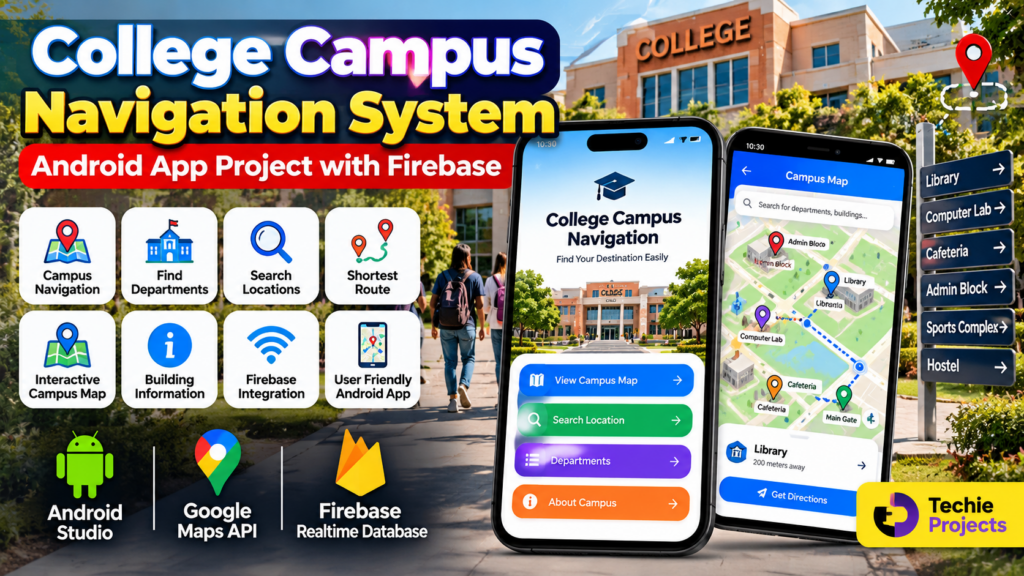
A College Campus Navigation System App is an Android-based application designed to help students, faculty members, visitors, and staff easily find important locations inside a college or university campus.
Large campuses can contain multiple academic buildings, departments, laboratories, libraries, hostels, cafeterias, administrative offices, parking areas, and sports facilities. Finding the correct location can sometimes be difficult, especially for new students and visitors.
This project provides a practical solution by combining an Android mobile application, campus maps, location information, and Firebase integration. The application can be developed as a final-year Android project for B.Tech, BCA, MCA, Computer Science, and IT students.
🎥 Watch the College Campus Navigation System App Working Demo
Before purchasing or selecting the project, students can watch the working demo video to understand the application interface, navigation flow, location search, and overall project functionality.
The demo helps you see how the project works in a practical environment and gives you a better idea of the project scope.
What Is a College Campus Navigation System?
A College Campus Navigation System is a software application that helps users locate different places within a college campus.
Instead of manually asking for directions, users can search for a department, laboratory, library, hostel, cafeteria, administrative block, or other campus facility through the Android application.
The application can display location information and provide navigation assistance based on the implemented campus map and location services.
Objectives of the Project
The main objectives of the College Campus Navigation System App are:
- Help students find important campus locations.
- Provide an easy-to-use Android interface.
- Allow users to search for departments and buildings.
- Display campus locations using a map interface.
- Provide information about important campus facilities.
- Reduce the time required to locate buildings.
- Help new students and visitors navigate the campus.
- Store and manage campus information using Firebase.
- Provide a practical Android application development project.
Key Features
The College Campus Navigation System can include the following features:
Campus Navigation
Users can navigate through different areas of the college campus using the application.
Department Search
Users can search for departments such as Computer Science, Mechanical Engineering, Electrical Engineering, Civil Engineering, and other departments.
Campus Map
An interactive campus map can display important buildings and locations.
Location Search
Users can search for specific locations instead of manually looking through the campus.
Shortest Route
The application can be extended to calculate or display a suitable route between the user’s current location and the selected destination.
Building Information
The system can provide information about individual buildings, departments, laboratories, offices, and other facilities.
Firebase Integration
Firebase can be used for storing and retrieving campus-related information depending on the project implementation.
User-Friendly Android Interface
The application can provide a simple interface so students and visitors can quickly access navigation features.
How the System Works
The basic workflow of the application can be divided into several steps.
Step 1: Open the Application
The user launches the College Campus Navigation System Android application.
The application displays the main screen with navigation options.
Step 2: Search for a Location
The user can search for a specific campus location such as:
- Computer Lab
- Library
- Cafeteria
- Administration Block
- Hostel
- Department
- Sports Complex
- Main Gate
Step 3: Select the Destination
After finding the required location, the user selects the destination.
The application can display information about the selected location and its position on the campus map.
Step 4: View the Campus Map
The selected location can be displayed on an interactive map.
Different markers can represent different buildings and facilities.
Step 5: Get Navigation Information
Depending on the implementation, the application can provide directions or a route toward the selected location.
Technologies Used
The project can be developed using the following technologies:
- Android Studio
- Java or Kotlin
- Firebase
- Google Maps API
- XML
- Android SDK
- Firebase Realtime Database or Firestore
The exact technologies can be modified according to the student’s project requirements.
Software Requirements
The basic software requirements can include:
- Android Studio
- Java or Kotlin
- Android SDK
- Firebase account
- Google Maps API
- Windows 10/11 or compatible operating system
- Internet connection for required API and Firebase services
Hardware Requirements
Recommended hardware requirements include:
- Intel/AMD processor
- Minimum 4 GB RAM
- 8 GB RAM recommended for Android Studio
- At least 10 GB available storage
- Keyboard and mouse
- Android smartphone or emulator for testing
Firebase Integration
Firebase can play an important role in the project by providing a cloud-based backend for storing application data.
For example, the database can contain information such as:
- Building name
- Department name
- Location
- Description
- Contact information
- Working hours
- Facility information
- Map coordinates
The Android application can retrieve this information when required.
Google Maps Integration
Google Maps API can be integrated into the Android application to provide map-based navigation.
The application can use map markers to identify important campus locations.
For example:
Main Gate → Administration Block → Library → Computer Lab → Cafeteria
This can make the application more useful for students and visitors.
Advantages of the Project
The College Campus Navigation System provides several advantages:
- Easy access to campus locations.
- Helpful for new students.
- Useful for visitors.
- Reduces the need for manual directions.
- Provides a practical Android development experience.
- Demonstrates Firebase integration.
- Demonstrates map and location-based functionality.
- Can be customized for different colleges.
- Suitable for an academic final-year project.
Applications
The project can be used in:
- Engineering colleges
- Universities
- Schools and educational campuses
- Medical colleges
- Corporate campuses
- Training institutes
- Large organizational campuses
The system can be customized according to the size and requirements of a particular campus.
Future Scope
The project can be expanded with advanced features in the future.
Voice Navigation
Voice-based navigation can help users find locations without continuously looking at their phones.
Real-Time Location Tracking
GPS-based tracking can be added to determine the user’s current location.
Indoor Navigation
The project can be extended to support navigation inside large buildings.
QR Code Navigation
QR codes can be placed at different campus locations. Scanning a QR code can display information about the particular building or department.
Smart Parking
A smart parking module can be added to help users locate available parking areas.
AI Chatbot
An AI-based campus chatbot can answer questions related to departments, facilities, events, and campus locations.
Emergency Location Assistance
Emergency facilities such as medical rooms, security offices, and emergency exits can be highlighted in the application.
Database Design
A basic database structure can contain tables or collections such as:
Users
Stores information about application users.
Locations
Stores campus building and location information.
Departments
Stores department-related information.
Facilities
Stores information about libraries, laboratories, cafeterias, hostels, sports facilities, and other campus resources.
Navigation Data
Stores coordinates and other information required for campus navigation.
The exact database structure depends on the project implementation.
Why This Is a Good Final-Year Project
The College Campus Navigation System is a practical project because it combines multiple areas of software development.
Students can demonstrate their knowledge of:
- Android application development
- Firebase
- Database management
- Google Maps integration
- UI/UX design
- Location-based services
- Mobile application development
- Software project development
The project can also be customized according to the requirements of a particular college or university.
Project Customization
Students can add additional modules according to their project requirements.
Possible modules include:
- Student login
- Admin panel
- Department management
- Building management
- Campus event information
- Faculty directory
- Hostel navigation
- Smart parking
- Emergency services
- QR-based navigation
- Voice navigation
- AI chatbot
- Real-time GPS navigation
🎓 Need Help With Your Final-Year Project?
Looking for an Android, Python, AI, Machine Learning, Computer Vision, or final-year engineering project?
Techie Projects can help you discuss your project idea, required features, source-code requirements, documentation, and project scope before development.
📲 WhatsApp: +91-9460060699
🌐 Website: www.techieprojects.com
📸 Instagram: @pythonprojects_
Discuss Your Project Requirements Before You Purchase
Students can discuss the required features, technology stack, documentation, project scope, and customization requirements before proceeding with the project.
🔗 Explore Related Engineering Projects
Students looking for similar project ideas can also explore:
- Android App Projects
- College Management System Project
- College Admission Enquiry Chatbot
- Student Attendance Management System
- Smart Parking Management System
- Campus Recruitment System
Frequently Asked Questions
Can this project be developed for a real college?
Yes. The project can be customized according to the campus layout, buildings, departments, and facilities of a particular college.
Can Firebase be used as the backend?
Yes. Firebase can be used to store and retrieve campus information depending on the selected implementation.
Can Google Maps be integrated?
Yes. Google Maps API can be integrated to display campus locations and provide map-based navigation.
Can an admin panel be added?
Yes. An admin panel can be developed to manage buildings, departments, facilities, locations, and other campus information.
Can GPS navigation be added?
Yes. GPS and location-based services can be added depending on the project requirements and implementation.
Can this project be used as a final-year project?
Yes. It can be developed as an Android final-year project and expanded with additional modules based on academic requirements.
Conclusion
The College Campus Navigation System App is a practical Android project that demonstrates how mobile applications, maps, Firebase, and location-based services can be combined to solve a real-world problem.
The application can help students and visitors find important campus locations while providing students with practical experience in Android development, Firebase, database management, and navigation technologies.
With additional features such as GPS tracking, voice navigation, QR-code navigation, smart parking, and an AI chatbot, the project can be further expanded into a complete smart campus solution.