
Introduction
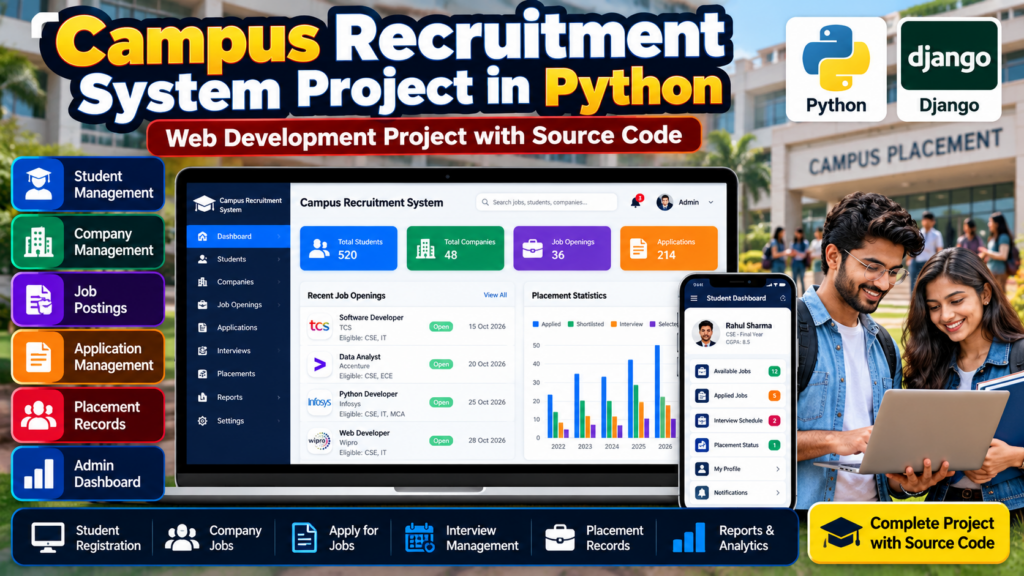
A Campus Recruitment System Project in Python is a web-based application designed to simplify the campus placement and recruitment process for colleges, universities, students, and recruiters. The system can help manage student information, company details, job opportunities, applications, eligibility criteria, recruitment drives, and placement records from a centralized platform.
For engineering and computer science students, this is a practical Python web development project that demonstrates database management, user authentication, form handling, CRUD operations, and application workflow.
This project is suitable for B.Tech, BCA, MCA, Computer Science, IT, and final-year engineering students looking for a major project, mini project, academic project, or resume project.
🎥 Watch the Campus Recruitment System Project Working Demo
See the complete Campus Recruitment System Project in Python working before choosing your project. Watch the demo to understand the interface, student management, company information, recruitment workflow, and overall functionality.
What Is a Campus Recruitment System?
A Campus Recruitment System is software that helps educational institutions manage placement activities digitally.
In a traditional recruitment process, colleges may need to maintain student records, company information, eligibility lists, applications, and placement results manually. A web-based recruitment system can organize these activities in one application.
The system can provide separate functionality for:
- Students
- College placement administrators
- Recruiters
- Companies
- Job opportunities
- Applications
- Placement records
Objectives of Campus Recruitment System
The main objectives of this project are:
- To digitize the campus recruitment process.
- To maintain student placement records.
- To manage company and recruiter information.
- To publish job opportunities.
- To check student eligibility.
- To manage student applications.
- To reduce manual placement work.
- To maintain recruitment records in a database.
- To provide an organized recruitment workflow.
- To demonstrate practical Python web development.
Key Features of the Project
1. Student Registration
Students can register their accounts and provide academic and personal information.
A student profile may contain:
- Student name
- Student ID
- Contact number
- Department
- Course
- Semester
- CGPA
- Skills
- Resume information
2. Student Login
Registered students can securely log into the system and access their dashboard.
The student dashboard can display:
- Available jobs
- Eligible jobs
- Applied jobs
- Application status
- Company information
- Placement updates
3. Student Profile Management
Students can update their information whenever required.
The profile can include academic details, technical skills, certifications, projects, and resume information.
4. Company Registration
Companies or recruiters can be registered in the system.
Company information can include:
- Company name
- Industry
- Location
- Contact number
- Job role
- Salary package
- Eligibility criteria
5. Job Posting
Recruiters or administrators can add new job opportunities.
A job posting may include:
- Job title
- Company name
- Job description
- Required skills
- Minimum CGPA
- Eligible departments
- Job location
- Salary package
- Application deadline
6. Eligibility Checking
The system can help identify students who meet the requirements of a particular recruitment drive.
For example, eligibility can be based on:
- Minimum CGPA
- Academic qualification
- Department
- Graduation year
- Required technical skills
7. Job Application
Eligible students can apply for available job opportunities through the application interface.
The system can store:
Student → Job → Company → Application Status
This creates a structured recruitment workflow.
8. Application Status
Students can check the status of their applications.
Possible statuses include:
- Applied
- Under Review
- Shortlisted
- Interview
- Selected
- Rejected
9. Placement Management
The administrator can maintain placement information and track students who have been selected by companies.
Placement records can include:
- Student name
- Company
- Job role
- Package
- Selection date
- Placement status
10. Admin Dashboard
The administrator can manage the complete system from a centralized dashboard.
The dashboard can provide access to:
- Students
- Companies
- Jobs
- Applications
- Placement records
- Reports
Technologies Used
The technology stack can depend on the actual implementation.
A Python web-based version can use:
- Programming Language: Python
- Framework: Django
- Frontend: HTML, CSS, JavaScript
- Database: SQLite / MySQL
- Web Server: Django Development Server
- Development Environment: VS Code / PyCharm
If your implementation uses Flask instead of Django, the framework can be changed accordingly.
Software Requirements
The basic software requirements for the project may include:
- Python 3.x
- Django
- SQLite or MySQL
- HTML
- CSS
- JavaScript
- VS Code or PyCharm
- Windows 10/11 or Linux
Hardware Requirements
A basic computer is sufficient for developing and running the project.
Recommended configuration:
- Processor: Intel Core i3 or above
- RAM: 4 GB or above
- Storage: 500 GB or above
- Keyboard and mouse
- Monitor
- Internet connection for development resources
Campus Recruitment System Workflow
The basic workflow can be represented as:
Student Registration → Login → Profile → View Jobs → Check Eligibility → Apply → Application Review → Shortlisting → Interview → Selection → Placement Record
For administrators:
Admin Login → Manage Students → Manage Companies → Manage Jobs → Manage Applications → Update Results → Generate Placement Records
How the Campus Recruitment System Works
Step 1: Student Registration
Students create an account and enter their academic and personal details.
Step 2: Student Profile
After registration, students complete their profile by adding education, skills, projects, and other relevant information.
Step 3: Company and Job Creation
The administrator or recruiter adds company information and creates available job postings.
Step 4: Eligibility Checking
The system checks whether students meet the eligibility requirements for a particular job.
Step 5: Application
Eligible students can submit applications for suitable job opportunities.
Step 6: Application Review
The administrator or recruiter reviews applications and updates their status.
Step 7: Shortlisting
Students who meet the recruitment requirements can be shortlisted for further stages.
Step 8: Selection
After interviews or recruitment rounds, the final selection status can be updated.
Step 9: Placement Record
Selected students can be added to the placement database with company and job details.
Database Design
A database is an important part of the Campus Recruitment System Project in Python.
Possible database tables include:
Student Table
| Field | Description |
|---|---|
| Student ID | Unique student identifier |
| Name | Student name |
| Student email | |
| Department | Academic department |
| Course | Degree/course |
| CGPA | Academic score |
| Skills | Technical skills |
Company Table
| Field | Description |
|---|---|
| Company ID | Unique company ID |
| Company Name | Company name |
| Industry | Industry type |
| Location | Company location |
| Contact | Contact information |
Job Table
| Field | Description |
|---|---|
| Job ID | Unique job ID |
| Company ID | Related company |
| Job Title | Position |
| Description | Job details |
| Eligibility | Eligibility requirements |
| Salary | Salary/package |
Application Table
| Field | Description |
|---|---|
| Application ID | Unique application |
| Student ID | Applicant |
| Job ID | Applied job |
| Application Date | Date of application |
| Status | Current status |
Placement Table
| Field | Description |
|---|---|
| Placement ID | Unique record |
| Student ID | Selected student |
| Company ID | Recruiting company |
| Job Role | Selected position |
| Package | Salary package |
| Status | Placement status |
Advantages of Campus Recruitment System
A campus recruitment application can provide several benefits:
- Reduces manual paperwork
- Centralizes student information
- Simplifies job posting
- Makes applications easier to manage
- Helps identify eligible students
- Organizes company information
- Improves placement record management
- Reduces duplicate data entry
- Provides faster access to recruitment information
- Demonstrates practical web development concepts
Applications
The system can be adapted for:
- Engineering colleges
- Universities
- Degree colleges
- Training institutes
- Placement cells
- Career development centers
- Campus recruitment drives
Limitations
A basic academic version of the project may have some limitations:
- It may support only a limited number of users.
- Advanced authentication may not be implemented.
- Email and SMS notifications may not be included.
- Online interview integration may require additional development.
- Large-scale deployment requires additional security and infrastructure.
Future Scope
The project can be enhanced with advanced features such as:
- Email notifications
- SMS notifications
- Resume upload
- Automated eligibility checking
- Online aptitude tests
- Online coding tests
- Interview scheduling
- Video interview integration
- Recruiter dashboard
- Advanced placement analytics
- AI-based resume screening
- Job recommendation system
- Cloud database
- Mobile application
- Role-based authentication
Why Choose This Python Project?
The Campus Recruitment System Project in Python is a useful final-year project because it combines multiple software development concepts.
Students can learn:
- Python programming
- Web development
- Django
- Database management
- SQL
- CRUD operations
- User authentication
- Form handling
- Frontend development
- Backend development
- Application workflow
- Software project architecture
It can also provide a strong topic for a B.Tech project presentation, project viva, technical interview, or resume portfolio.
🎓 Who Can Use This Project?
This project can be suitable for:
- B.Tech Computer Science students
- B.Tech IT students
- BCA students
- MCA students
- Diploma students
- Computer Engineering students
- Final-year engineering students
- Students looking for Python projects
- Students looking for web development projects
Project Ideas You Can Add
Students can extend the system with additional modules such as:
- Resume Management System
- Student Career Management System
- Job Portal Using Python
- Online Interview Management System
- Placement Prediction Using Machine Learning
- Resume Screening Using Machine Learning
- College Management System
- Employee Recruitment Management System
Explore Related Python Projects
If you are looking for more final-year engineering projects, you can explore related project categories such as:
- Python Projects
- Web Development Projects
- Machine Learning Projects
- Artificial Intelligence Projects
- Computer Vision Projects
- Database Projects
- Final-Year Engineering Projects
🚀 Looking for a Final-Year Project?
If you are looking for a Python, Django, AI, Machine Learning, Computer Vision, or Web Development project, you can discuss your requirements before selecting a project.
You can ask about:
- Project source code
- Project features
- Documentation
- Project customization
- Technology requirements
- Final-year project scope
- Project implementation
📲 WhatsApp: +91-9460060699
🌐 Website: Techie Projects
📸 Instagram: @pythonprojects_
Frequently Asked Questions
What is a Campus Recruitment System Project in Python?
It is a web-based application developed using Python that helps colleges manage students, companies, job opportunities, applications, recruitment activities, and placement records.
Which Python framework can be used?
Django is a suitable framework for developing a complete web-based campus recruitment system. Flask can also be used depending on the project requirements.
Is this a good final-year project?
Yes. It can be developed as a B.Tech, BCA, MCA, or computer science final-year project.
Can students add source code to this project?
Yes. A complete implementation can include Python source code, database files, templates, static files, and project documentation depending on the project scope.
Can this project use MySQL?
Yes. MySQL can be used instead of SQLite when a server-based relational database is required.
Can the project include an admin dashboard?
Yes. An admin dashboard can be used to manage students, companies, jobs, applications, and placement records.
Conclusion
The Campus Recruitment System Project in Python is a practical web development project that can help colleges organize student placement and recruitment activities digitally.
By combining Python, Django, database management, HTML, CSS, and JavaScript, students can build a project that demonstrates both frontend and backend development skills.
The project can start with basic student and company management and later be expanded with recruitment automation, resume management, online tests, interview scheduling, analytics, and AI-based features.