
Introduction
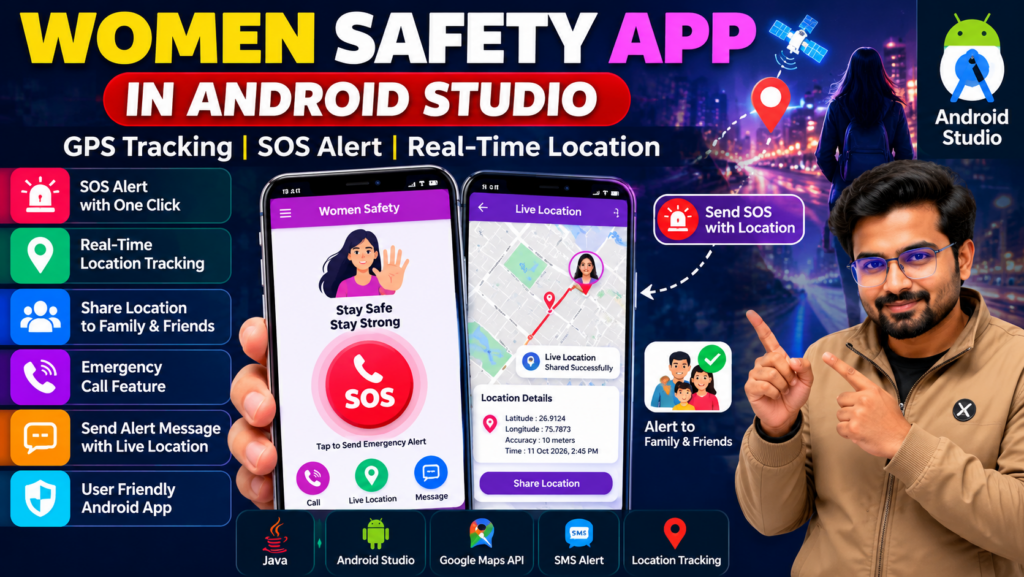
A Women Safety App in Android Studio is an Android application project designed to demonstrate how mobile technology can support personal safety through emergency alerts, location sharing, and quick access to trusted contacts. This project is suitable for B.Tech, BCA, MCA, and computer science students interested in Android development and real-world mobile application development.
The application can combine GPS location services, an SOS button, emergency messaging, and a user-friendly interface to demonstrate how safety-focused mobile apps work. Depending on the implementation, it may also share the user’s location with selected contacts during an emergency.
🎬 Women Safety App Project Demo
Watch the project demonstration to understand the app interface, its available safety features, and the workflow implemented in the Android application.
🎯 Project Overview
The Women Safety App project focuses on building an Android application that provides quick access to selected emergency features. Users may be able to trigger an SOS alert, share their current location, and contact trusted people through supported communication features.
The project helps students understand Android application development, location services, user interface design, and event handling.
⭐ Key Features of the Women Safety App
1. SOS Emergency Alert
An SOS button can allow users to initiate an emergency alert quickly. The exact alert behavior depends on the implemented application logic.
2. GPS Location Tracking
The app can retrieve the device’s location using supported Android location services and display it to the user.
3. Emergency Contact Management
Users may be able to store or select trusted contacts for emergency communication.
4. Location Sharing
The application can share a location link with selected contacts if the required permissions and messaging functionality are implemented.
5. Emergency Calling
A calling feature can provide quick access to a selected contact or emergency number, subject to Android permissions and device settings.
6. User-Friendly Interface
A clear interface helps users access important functions without navigating through multiple screens.
7. Android-Based Implementation
The application is developed using Android development tools and can be extended according to academic project requirements.
🛠️ Technologies Used
The technologies may include the following, depending on the supplied source code:
- Android Studio: Android application development environment
- Java or Kotlin: Programming language
- Android SDK: Application development tools
- GPS and Location Services: Device location retrieval
- Google Maps API: Optional map display and location visualization
- SMS or Messaging Integration: Optional emergency message delivery
- XML: Traditional Android layout design
Confirm the exact programming language, APIs, and integrations before presenting them as implemented features.
⚙️ How Does the Women Safety App Work?
Step 1: Launch the Application
The user opens the application and accesses its main screen.
Step 2: Configure Emergency Contacts
If supported, the user adds trusted contacts who can receive alerts or location information.
Step 3: Retrieve the Current Location
The application requests the necessary location permissions and retrieves the device’s location using the configured Android location service.
Step 4: Trigger an SOS Alert
The user activates the SOS function. The app then performs the emergency action implemented in the project.
Step 5: Share Emergency Information
If messaging and location sharing are configured, the application can send an alert containing a location link to the selected contacts.
Step 6: Display the Result
The application displays an appropriate status or confirmation based on the operation performed.
Important: An SOS feature does not automatically guarantee that help will arrive. Location access, network connectivity, messaging permissions, and the recipient’s availability can affect emergency communication.
💻 Software Requirements
Typical requirements include:
- Android Studio
- Compatible Android SDK
- Java or Kotlin, depending on the project
- Android emulator or physical Android device
- Required libraries and dependencies
- Google Maps API credentials, if map integration is used
🖥️ Hardware Requirements
- Laptop or desktop computer
- At least 8 GB RAM recommended for a comfortable Android Studio development experience
- Sufficient disk space for Android Studio and the SDK
- Android smartphone or compatible emulator for testing
- Internet connection for downloading dependencies and testing network-based features
Actual requirements depend on the development environment and selected Android SDK.
🎓 Applications of the Project
The Women Safety App can be used as an educational example of:
- Android application development
- GPS-based mobile applications
- Emergency contact management
- Location-sharing workflows
- Mobile user interface design
- Permission handling and event-driven programming
It is a student project prototype and should not be relied on as a sole emergency or personal-security solution without thorough testing.
✅ Advantages of the Women Safety App
- Demonstrates practical Android development skills.
- Combines mobile interfaces with location-based functionality.
- Introduces emergency workflow design.
- Can be customized for different academic requirements.
- Provides opportunities to explore Android permissions and APIs.
- Can be extended with additional features in future versions.
⚠️ Limitations
- Location accuracy depends on device settings and environmental conditions.
- Network availability can affect communication.
- Background location features require careful permission handling.
- SMS and calling behavior can vary by device and Android version.
- Personal contact and location data must be handled securely.
- The application cannot guarantee emergency response or personal safety.
🚀 Future Scope
The project can be enhanced with features such as:
- Secure user authentication
- Improved emergency contact management
- Optional map-based location display
- Location-sharing status and delivery feedback
- Battery-aware location updates
- Privacy controls for personal data
- Accessible interface design
- Thorough testing across Android devices
Any additional feature should be implemented and tested before being advertised as part of the application.
❓ Frequently Asked Questions
1. What is a Women Safety App in Android Studio?
It is an Android application project that demonstrates safety-related features such as SOS alerts, emergency contacts, and location sharing.
2. Which programming language is used?
Java or Kotlin can be used for Android development. The correct answer for this project depends on the supplied source code.
3. Does the app support GPS tracking?
It can support location retrieval and sharing when the relevant Android location services and permissions are configured.
4. Can I customize the project?
Customization may be possible depending on the source code, application architecture, and requested features.
5. Can students purchase the project source code?
Contact Techie Projects to confirm source code availability, documentation, setup requirements, included features, and customization options.
🎓 Recommended Projects
- Pharmacy Management System Android App
- Plant Disease Detection Android App
- Hospital Management System Project in Python
- Diet Recommendation System Android App
- Train Live Status Android App
- Women Safety Android App
📩 Get the Women Safety App Project
Looking for a Women Safety App Project in Android Studio with Source Code for your academic project?
Techie Projects helps students explore software projects and enquire about available source code packages, documentation, setup guidance, and implementation support.
Before purchasing, confirm the included features, programming language, deliverables, pricing, and support available for your selected package.
📲 Call/WhatsApp: +91-9460060699
🌎 Website: www.techieprojects.com
📺 Instagram: @pythonprojects_
Conclusion
The Women Safety App in Android Studio project demonstrates how Android development and location services can be combined to create a safety-focused mobile application. It offers students a practical opportunity to explore mobile interfaces, GPS integration, emergency workflows, and application testing.
Contact Techie Projects to enquire about the available project package and determine whether it meets your academic and implementation requirements.