
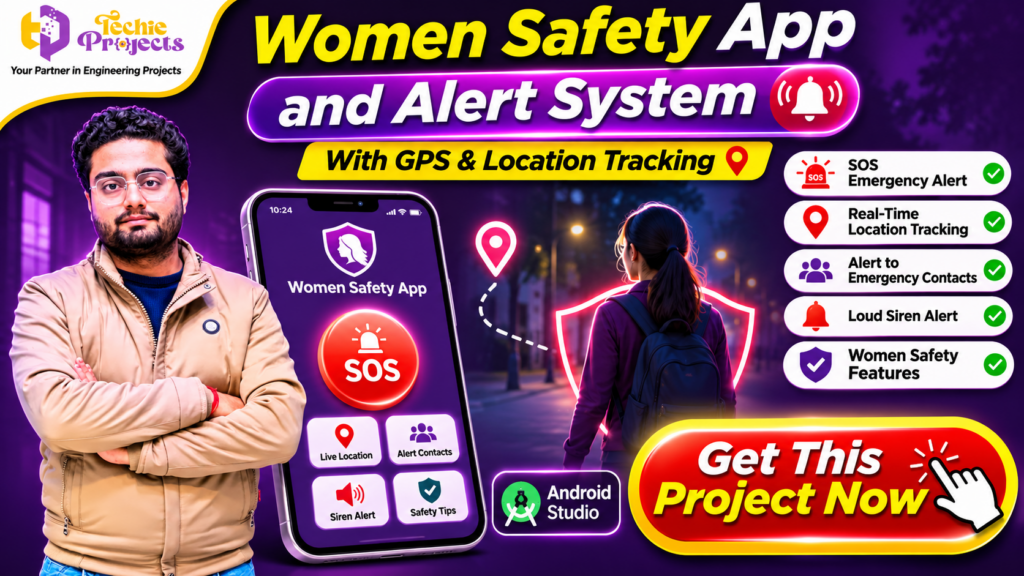
Looking for a practical Android project that combines mobile application development, GPS technology, and emergency alert functionality? The Women Safety App and Alert System is an excellent project choice for engineering students, final-year students, and developers interested in building real-world Android applications.
At Techie Projects, we provide project solutions designed to help students understand application development through practical implementation. If you want to save development time and get a ready project to study, demonstrate, and customize, you can purchase our Women Safety App and Alert System project.
This Android-based project focuses on personal safety by combining features such as SOS emergency alerts, GPS-based location tracking, emergency contact notifications, and safety-related tools, depending on the implemented version. It offers an opportunity to explore how mobile technology can support emergency communication and location sharing.
Whether you are preparing a final-year engineering project, developing an Android Studio application, or looking for an academic project with practical relevance, this project can be a valuable addition to your portfolio.
📞 Contact Techie Projects for Project Enquiries
Interested in purchasing this project? Contact Techie Projects to enquire about the available project package, source code, documentation, and implementation support.
- 📞 Call/WhatsApp: +91-9460060699
- 🌎 Website: www.techieprojects.com
- 📺 Instagram: @pythonprojects_
🎬 Watch the Women Safety App and Alert System Project Demo
Explore the project demonstration to understand its application interface, navigation, and implemented safety features. The demonstration can help you understand the project’s working flow before making a purchase decision.
Watch the available project demo on the Techie Projects website or YouTube channel.
📱 What Is a Women Safety App and Alert System?
A Women Safety App and Alert System is an Android-based application concept designed to provide users with quick access to emergency communication and location-sharing tools. It aims to make it easier for users to contact trusted people when they feel unsafe or require assistance.
The application can use smartphone capabilities such as GPS, internet connectivity, and notification services to support emergency communication. For example, a user may activate an SOS option to initiate an alert process and share their current location with selected emergency contacts, if these functions are implemented and configured in the application.
The project demonstrates how Android development technologies can be combined to create a practical mobile application.
For students, this project provides experience with Android application structure, user interface development, location services, event handling, and mobile application testing.
🎯 Objectives of the Women Safety App and Alert System
The main objective of this project is to demonstrate how an Android application can support personal safety through accessible emergency features.
Some important objectives include:
- Emergency Communication: Provide an interface through which users can initiate an emergency alert.
- GPS Location Tracking: Demonstrate how smartphone location services can retrieve and share location information.
- Emergency Contact Management: Allow users to configure trusted contacts for emergency communication.
- Simple User Interface: Design an interface that makes important functions easy to locate.
- Android Development Practice: Demonstrate the use of Android Studio and related development technologies.
- Practical Learning: Help students understand the development of a mobile application based on a real-world problem.
These objectives make the project relevant to students interested in Android development, mobile computing, and socially useful technology.
⭐ Key Features of the Women Safety App and Alert System
The application can include several safety-oriented features depending on the project implementation and configured services.
1. 🚨 SOS Emergency Alert
An SOS option can provide users with a quick way to initiate an emergency alert. When activated, the application can start the configured alert workflow, such as sending a message to selected contacts.
The SOS function is an important part of the project because it demonstrates how a mobile application can simplify access to emergency communication.
2. 📍 GPS-Based Location Tracking
GPS location tracking is one of the major technical components of this project. Android location services can be used to obtain the device’s location, subject to user permissions and device settings.
The application can use this information to share a location link with selected contacts when the relevant feature is implemented.
3. 👥 Emergency Contact Management
Users may be able to add or manage trusted contacts who can receive emergency notifications. This feature demonstrates contact management and data handling in Android applications.
4. 🔔 Emergency Notifications
The notification functionality can help communicate an alert to configured contacts. Depending on the implementation, notifications may use SMS, internet-based messaging, or another supported communication service.
5. 🔊 Loud Siren Alert
A siren or sound alert can be included as an additional feature to attract attention in an emergency situation. The availability and behaviour of this feature depend on the application’s implementation and device permissions.
6. 🛡️ User-Friendly Interface
An easy-to-use interface is important for any safety-oriented mobile application. The project can demonstrate how Android layouts, buttons, icons, and navigation components are organized to make important options accessible.
7. 📲 Android Application Development
The project provides practical exposure to Android application development, including activity management, interface design, event handling, and integration with smartphone capabilities.
Important: The application is an academic project and should not be treated as a certified emergency-response service or a replacement for official emergency services. Actual alert delivery and location sharing depend on permissions, network availability, device configuration, and the implemented communication services.
⚙️ Technologies Used in the Project
The Women Safety App and Alert System is developed using Android application development technologies.
| Technology | Purpose |
|---|---|
| Android Studio | Android application development environment |
| Java / Kotlin | Application programming language, depending on implementation |
| XML | Android user interface layouts, where applicable |
| GPS / Location Services | Retrieving device location |
| Android SDK | Accessing Android platform features |
| SMS / Internet Services | Supporting configured emergency communication |
| Android Emulator / Smartphone | Application testing |
These technologies help students understand how mobile applications interact with device hardware, operating system services, and external communication facilities.
💻 Software and Hardware Requirements
Before running the project, students should review the development environment and system requirements.
Software Requirements
- Operating System: Windows 10 or Windows 11
- Development Environment: Android Studio
- Programming Language: Java or Kotlin, depending on the supplied source code
- Android SDK: Compatible SDK version
- Interface Design: XML layouts, where applicable
- Testing Platform: Android Emulator or compatible Android smartphone
Hardware Requirements
- Processor: Intel or AMD processor
- RAM: 4 GB minimum; 8 GB or more recommended
- Storage: Sufficient free space for Android Studio and SDK installation
- Smartphone: Android device for practical testing
- Internet Connection: Required for downloading dependencies and testing online services
Actual requirements may vary according to the Android Studio version and project configuration.
🧠 How Does the Women Safety App and Alert System Work?
The working process can be understood through a series of steps.
Step 1: Application Installation
The application is installed on a compatible Android device or launched through an Android emulator. The user opens the application to access its main interface.
Step 2: User Setup
Where supported, the user configures the required application information and adds trusted emergency contacts.
Step 3: Permission Management
The application may request permissions for location access, notifications, or messaging. These permissions must be granted where necessary for the corresponding functions to operate.
Step 4: Location Retrieval
When the location feature is activated, the application can request the device’s current location through Android location services.
Step 5: Emergency Alert Activation
The user can activate the SOS option to initiate the configured emergency alert process.
Step 6: Notification or Location Sharing
If the relevant communication feature is implemented and available, the application can send an alert or location information to selected contacts.
Step 7: Testing and Verification
The application can be tested to verify its interface, location permissions, alert workflow, and supported communication functions.
This workflow provides students with an understanding of how an Android application can connect user actions with smartphone services.
🎓 Why Choose This Project for Your Final Year?
Choosing a suitable final-year project is an important part of an engineering student’s academic journey. A good project should provide practical learning opportunities and allow students to demonstrate their technical knowledge.
The Women Safety App and Alert System offers several learning opportunities.
1. Practical Android Development: Students can understand how Android applications are structured and developed using Android Studio.
2. GPS Integration: The project introduces location services and the handling of location permissions.
3. Real-World Application Concept: It addresses a meaningful problem through a mobile application concept.
4. User Interface Development: Students can learn how to create application screens and connect interface elements with application logic.
5. Application Testing: Students can practice testing different workflows, permissions, and device configurations.
6. Project Presentation: The application provides a demonstrable interface and workflow that can be explained during academic presentations.
7. Customization Opportunities: Students can explore additional features and improvements depending on their academic requirements and technical skills.
🚀 Advantages of the Women Safety App and Alert System
The project offers a combination of technical learning and practical application development.
- Demonstrates Android Studio development.
- Introduces GPS and location-based functionality.
- Provides experience with emergency alert workflows.
- Helps students understand Android permissions.
- Demonstrates mobile application interface design.
- Offers opportunities for feature customization.
- Supports learning about mobile communication services.
- Provides a practical topic for project demonstrations.
These advantages make the project useful for students who want to explore mobile application development through a socially relevant concept.
🛠️ Future Scope of the Project
The application can be extended with additional features to improve its functionality and user experience. Students can explore these enhancements as part of future development work.
1. Live Location Sharing
A future version could support continuous location sharing with trusted contacts, subject to user consent, battery considerations, and appropriate background-location permissions.
2. Emergency Call Integration
The application could provide an option to initiate a call to a configured emergency contact or an appropriate emergency number.
3. Voice-Activated SOS
Voice-based activation could be explored to initiate an alert when interacting with the screen is difficult. This would require suitable voice recognition and permission handling.
4. Wearable Device Integration
The project could be extended to explore communication with compatible wearable devices or smart accessories.
5. Improved User Authentication
Additional authentication features could help protect personal information and emergency contact settings.
6. Map-Based Interface
A map interface could display the user’s location and help users understand location-sharing functionality.
7. Notification Improvements
The application could explore additional notification methods and delivery-status feedback, depending on the services integrated.
These are possible development enhancements, not guaranteed features of every supplied project version.
🛒 Purchase Women Safety App and Alert System from Techie Projects
Ready to purchase the Women Safety App and Alert System for your final-year engineering project? Get in touch with Techie Projects to enquire about the Android Studio source code, project documentation, demo, and available technical support.
Instead of spending additional time building every component from scratch, explore our project package and choose an option that matches your academic requirements.
🎁 What Can You Get?
Depending on the selected package, you can enquire about:
- Android Studio project source code.
- Project documentation and report.
- Application interface and implemented features.
- Setup and execution instructions.
- Project demonstration.
- Technical guidance and customization options.
📞 Contact Techie Projects to Purchase
Have questions about the project price, source code, or delivery? Contact our team directly.
- 📞 Call/WhatsApp: +91-9460060699
- 🌎 Website: www.techieprojects.com
- 📺 Instagram: @pythonprojects_
👉 Enquire today and get started with your Women Safety App and Alert System project!
Techie Projects provides project solutions across Android, Python, Artificial Intelligence, Machine Learning, IoT, Data Science, and other engineering domains.
Benefits of Choosing Techie Projects
- Project solutions across multiple engineering domains.
- Practical project topics for academic learning.
- Source-code-based project options.
- Project demonstration and implementation information.
- Enquiry support for students.
- Options across Android, Python, AI, machine learning, IoT, and other technical domains.
Our goal is to help students explore practical engineering projects and understand the technologies behind their implementation.
👨💻 Who Can Purchase This Project?
The Women Safety App and Alert System can be relevant to:
- B.Tech Computer Science Engineering students.
- B.Tech Information Technology students.
- MCA students.
- Diploma engineering students.
- Android application development learners.
- Students interested in mobile computing.
- Students preparing final-year academic demonstrations.
Students should review their institution’s project guidelines and ensure that their use of purchased project material complies with academic rules.
📚 Recommended Projects from Techie Projects
Looking for more project ideas? Explore other technical domains and discover projects that match your academic interests.
- 🎓 Android App Development Projects
- 🤖 Artificial Intelligence Projects
- 🧠 Machine Learning Projects
- 🐍 Python Projects
- 📊 Data Science Projects
- 📈 Data Analytics Projects
- 🌐 Web Development Projects
- 🔐 Cyber Security Projects
- 📡 Internet of Things (IoT) Projects
- 👁️ Computer Vision Projects
Explore more project options at Techie Projects.
❓ Frequently Asked Questions
1. What is a Women Safety App and Alert System?
It is an Android application project that demonstrates safety-related functions such as SOS alerts, GPS-based location tracking, and emergency contact communication, depending on its implementation.
2. Which technology is used to develop this project?
The project uses Android Studio and Android development technologies. Java or Kotlin may be used as the programming language, depending on the supplied version.
3. Is this project suitable for final-year engineering students?
Yes. It can be considered for academic learning and demonstration by students interested in Android application development, mobile computing, and location-based services. Always check your institution’s project requirements.
4. Does the application support GPS location tracking?
The project concept includes GPS-based location functionality. Actual tracking depends on the supplied implementation, device permissions, and location-service configuration.
5. Can emergency contacts receive SOS alerts?
Emergency contact notifications can be supported when the corresponding communication functionality is implemented and configured. Delivery may depend on SMS or internet connectivity and device permissions.
6. Can I customize the application?
The project can provide a starting point for customization. The changes possible will depend on the supplied source code and development environment.
7. Can I purchase the project source code?
You can contact Techie Projects to enquire about the available project package, source code, documentation, and technical support options.
8. Does the application guarantee personal safety?
No. It is an academic software project, not a certified emergency-response solution. Users should not rely on it as their only safety measure or as a substitute for official emergency services.
🎯 Conclusion
The Women Safety App and Alert System is a meaningful Android application project that combines mobile development with GPS-based location functionality and emergency communication concepts. It gives students an opportunity to understand Android Studio, application interface design, device permissions, and location services through a practical project.
For students preparing a final-year engineering project or exploring Android application development, this project can serve as a useful learning and demonstration opportunity. Its features can also provide a foundation for further customization and technical exploration.
If you are interested in purchasing this project, explore the available package from Techie Projects, confirm the included features and documentation, and choose the version that matches your academic requirements.
Build your Android development skills with a practical project from Techie Projects!