Are you looking for a ready-to-use Exam Evaluation System Using Python for your final-year engineering project, college submission, or academic demonstration? 🚀 Get this complete Python-based project from Techie Projects and explore how Computer Vision and image processing can help automate the examination evaluation process.
Manual answer-sheet checking takes considerable time, requires continuous effort, and can become challenging when educational institutions handle a large number of students. This project demonstrates an intelligent approach to answer-sheet evaluation using Python, OpenCV, and automated checking techniques.
Instead of spending weeks developing everything from scratch, you can purchase this project from Techie Projects and get a practical implementation to study, run, understand, and demonstrate. Whether you are a B.Tech, BCA, MCA, M.Tech, or computer science engineering student, this project offers an interesting opportunity to explore automation, image processing, and intelligent evaluation.
If you need a practical final-year project with a demonstration and technical implementation, contact Techie Projects today to enquire about the complete project package.
📞 Contact Techie Projects for Project Enquiries
Interested in purchasing the Exam Evaluation System Using Python Project? Contact us to enquire about package availability, pricing, source code, documentation, installation guidance, and technical support options.
💬 WhatsApp Enquiry: Chat with Techie Projects
📱 Contact Number: +91 94600 60699
🌐 Official Website: www.techieprojects.com
📸 Instagram: Follow Techie Projects
🎓 Project Areas: Robotics, Machine Learning, Arduino, Deep Learning, Artificial Intelligence, and Android App.
✅ Request Project Details: Share your engineering branch, preferred features, and technical requirements to enquire about the most suitable available package.
🚀 Ready to get started? Click here to enquire on WhatsApp and mention Exam Evaluation System Using Python Project.
Package contents, prices, hardware availability, and support options should be confirmed before purchase.
🎬 Watch the Exam Evaluation System Project Demo
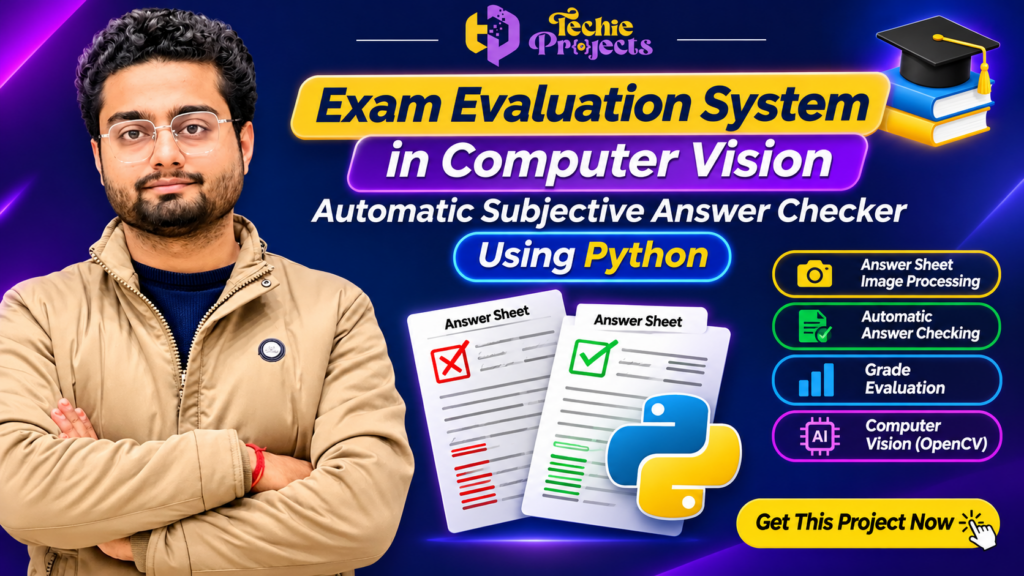
Watch the project demonstration to understand its interface, answer-sheet processing workflow, and automated evaluation concept.
Project: Exam Evaluation System in Computer Vision | Automatic Subjective Answer Checker Using Python
The demonstration helps you understand how the system processes examination-related inputs and supports automated answer evaluation.
🎓 What Is an Exam Evaluation System Using Python?
An Exam Evaluation System Using Python is a computer-based application designed to simplify the examination checking process through image processing and automated evaluation techniques.
Traditionally, teachers manually check answer sheets, compare student responses with expected answers, calculate marks, and prepare results. This process can require significant time, particularly when there are hundreds of answer sheets.
The proposed system demonstrates how Python programming and Computer Vision can assist in automating selected evaluation activities.
The application focuses on processing answer-sheet images and evaluating student responses using predefined answers, matching rules, and configured evaluation logic.
The main objective is to reduce repetitive manual work and demonstrate how technology can support educational assessment.
This project is especially useful for students interested in Python programming, Artificial Intelligence, Machine Learning, and Computer Vision applications.
🎯 Objectives of the Project
The primary objective of this project is to develop an automated examination evaluation application using Python.
Important objectives include:
- Automating selected examination evaluation activities.
- Processing answer-sheet images using image-processing techniques.
- Comparing student responses with predefined model answers.
- Demonstrating automated answer checking.
- Reducing repetitive manual evaluation work.
- Providing an application interface for interacting with the system.
- Exploring the practical application of Python and Computer Vision in education.
- Understanding how intelligent systems can support educational institutions.
By implementing these objectives, students can learn how software applications can improve traditional examination workflows.
⚙️ Key Features of the Exam Evaluation System
The Exam Evaluation System Using Python demonstrates several features related to automated answer checking and examination management.
1. 📄 Answer Sheet Image Processing
Image processing is an important part of the application.
The system works with examination-related images and uses image-processing techniques to prepare inputs for subsequent evaluation.
Depending on the input format and implementation, image-processing operations can include:
- Image loading and preprocessing.
- Image resizing.
- Grayscale conversion.
- Noise reduction.
- Image enhancement.
- Processing examination answer-sheet images.
These operations help prepare image inputs for further processing.
2. 🤖 Automatic Answer Checking
One of the major features is automated answer evaluation.
The application demonstrates how student responses can be checked against predefined model answers using configured comparison techniques.
The evaluation process can consider matching words, important keywords, and predefined answer criteria.
This approach helps demonstrate how computer-based systems can assist teachers during the evaluation process.
3. 🧠 Computer Vision Integration
Computer Vision allows computers to process and analyze visual information.
In this project, Computer Vision techniques support the processing of examination-related images.
Python libraries such as OpenCV provide tools for image loading, preprocessing, transformation, and analysis.
4. 📊 Automated Marks Evaluation
The application demonstrates an automated approach to assigning marks based on configured evaluation rules.
Instead of manually calculating every result, the evaluation logic can process responses and generate corresponding scores.
The actual scoring accuracy depends on the implemented comparison algorithm and evaluation criteria.
5. 💻 User-Friendly Application Interface
A graphical interface helps users interact with the project.
The interface can be used to provide inputs, process examination data, and view evaluation outputs.
A simple interface also makes the project easier to demonstrate during academic presentations.
6. ⚡ Reduced Manual Effort
Checking large numbers of answer sheets can be repetitive.
An automated evaluation workflow demonstrates how software can reduce selected manual tasks and help organize examination-related activities.
7. 🎓 Academic Project Demonstration
The project provides an opportunity to demonstrate several practical concepts, including:
- Python programming.
- Computer Vision.
- Image Processing.
- Automated Evaluation.
- Machine Learning concepts.
- Application Development.
These concepts make the project relevant to computer science and IT engineering students.
🔄 Working Process of the Exam Evaluation System
Understanding the workflow is important when developing or demonstrating an examination automation application.
The general working process can be explained through the following stages.
Step 1: Input Examination Data
The application receives the examination-related input, such as answer-sheet images or student responses, depending on the implemented workflow.
Step 2: Image Preprocessing
The input image is prepared for processing.
Image preprocessing can involve resizing, grayscale conversion, noise removal, and other image enhancement techniques.
Step 3: Answer Identification
The application processes the available answer information.
For image-based text evaluation, an OCR component may be used if included in the implementation to extract readable text from answer sheets.
Step 4: Model Answer Comparison
The extracted or supplied student response is compared with the predefined model answer.
The comparison process can use keyword matching, text similarity, or other configured evaluation techniques.
Step 5: Marks Calculation
The system applies the configured evaluation rules to calculate the score.
The marks depend on the matching criteria and scoring logic.
Step 6: Display Evaluation Results
Finally, the application displays the evaluation output through its interface.
This workflow demonstrates how the Exam Evaluation System Using Python can support examination-related automation.
🛠️ Technologies Used in the Project
The project combines Python programming with image-processing and application-development technologies.
| Technology | Purpose |
|---|---|
| Python | Main programming language |
| OpenCV | Image processing and Computer Vision |
| Machine Learning | Evaluation-related intelligent techniques, where implemented |
| Image Processing | Preparing answer-sheet images |
| Flask | Web application interface, if included in the supplied implementation |
| HTML | Frontend structure |
| CSS | Interface styling |
| JavaScript | Frontend interactions, where applicable |
Note: The exact libraries, frameworks, and modules depend on the supplied project version. Contact Techie Projects for the complete software requirements.
💻 Software and Hardware Requirements
Before running the application, make sure your computer meets the project requirements.
Software Requirements
- Operating System: Windows 10 or Windows 11.
- Programming Language: Python.
- Image Processing Library: OpenCV.
- Development Environment: VS Code, PyCharm, or another Python IDE.
- Required Python packages according to the project configuration.
Hardware Requirements
- Processor: Intel Core i3 or above recommended.
- RAM: 4 GB minimum; 8 GB recommended.
- Storage: Sufficient free disk space for project files and dependencies.
- Input Devices: Keyboard and mouse.
- Camera or image input: Depending on the application workflow.
A dedicated GPU is generally not necessary for basic image-processing demonstrations.
🌟 Benefits of the Exam Evaluation System
The Exam Evaluation System Using Python demonstrates several benefits of applying automation to educational processes.
1. Time-Saving Evaluation Workflow
Manual evaluation requires teachers to inspect each answer sheet individually.
Automated checking techniques can help reduce repetitive checking activities when answers follow suitable evaluation criteria.
2. Better Organization
Digital processing makes it easier to organize examination inputs and evaluation outputs.
3. Practical Learning Experience
Students can understand how programming concepts are applied to real-world educational problems.
4. Understanding Computer Vision
The project provides exposure to image processing and visual data handling.
5. Customization Opportunities
Students and developers can explore additional features such as user authentication, examination management, result reports, and improved answer-matching algorithms.
6. Academic Demonstration
The application offers an interesting topic for final-year project demonstrations, technical presentations, and project discussions.
🎓 Why Choose This Project for Your Final Year?
Selecting a final-year project is an important decision for engineering students.
A good project should demonstrate practical implementation, solve a recognizable problem, and provide opportunities to explain the technologies involved.
The Exam Evaluation System Using Python combines programming, image processing, and automated evaluation in one application.
It can be relevant for students pursuing:
- B.Tech Computer Science Engineering.
- B.Tech Information Technology.
- BCA.
- MCA.
- M.Tech Computer Science.
- Diploma in Computer Engineering.
- Artificial Intelligence and Machine Learning specializations.
Students can use the project to understand the implementation, explore its modules, and prepare for technical discussions.
It also provides opportunities to extend the application with additional functionality.
💼 Why Purchase the Project from Techie Projects?
At Techie Projects, we focus on developing practical software projects for engineering students and technology enthusiasts.
If you want to save development time and explore an existing implementation, purchasing the project can be a convenient option.
Here are some reasons to contact Techie Projects.
✅ Practical Project Implementation
Explore a developed application instead of starting every module from the beginning.
✅ Source Code Enquiry
Get information about the available Python source code and project package.
✅ Project Demonstration
Watch the project demonstration before making your purchase decision.
✅ Technical Guidance
Understand the project workflow, technologies, and implementation details.
✅ Multiple Technology Domains
Apart from examination automation, we develop projects in various technology areas.
Our development domains include:
- Artificial Intelligence.
- Machine Learning.
- Deep Learning.
- Python Development.
- Computer Vision.
- Natural Language Processing.
- Data Science and Analytics.
- Web Development.
- Internet of Things.
- Blockchain Technology.
- Android Application Development.
✅ Student-Focused Project Solutions
We work with students who need practical project ideas and implementation support for their academic requirements.
🚀 Why Choose an Exam Evaluation System Using Python?
Choosing an Exam Evaluation System Using Python gives students an opportunity to explore how automation can improve traditional examination processes. This project combines Python programming, image processing, and Computer Vision to demonstrate an intelligent approach to answer-sheet evaluation. It is suitable for students who want to understand practical software development and build knowledge of emerging technologies.
💡 Exam Evaluation System Using Python for Final Year Projects
The Exam Evaluation System Using Python is a valuable project idea for B.Tech, BCA, MCA, and computer science engineering students. It demonstrates how programming concepts can be applied to educational problems. Students can explore the complete workflow, understand the implementation, and demonstrate the application during their final-year project presentation.
🧠 Computer Vision in Automated Examination Evaluation
An important component of the Exam Evaluation System Using Python is Computer Vision. Image-processing techniques help prepare answer-sheet images for further analysis. Python libraries such as OpenCV provide useful functions for image enhancement, resizing, grayscale conversion, and other preprocessing operations.
📊 Automated Answer Checking with Python
The Exam Evaluation System Using Python demonstrates how student responses can be compared against predefined model answers. Depending on the implemented algorithm, the application can use keyword matching and text-similarity techniques to support automated evaluation. This makes the project useful for understanding the relationship between Python programming and educational automation.
🎓 Purchase Exam Evaluation System Using Python from Techie Projects
Looking for a ready-made Exam Evaluation System Using Python for your engineering project? Techie Projects provides project solutions for students interested in Artificial Intelligence, Machine Learning, Python, and Computer Vision. Contact our team to check source code availability, project demonstrations, documentation, pricing, and other deliverables.
⚙️ Practical Applications of the Project
The Exam Evaluation System Using Python introduces several concepts that can be extended into practical educational applications. Developers can explore examination management, digital answer-sheet processing, automated scoring, result generation, and evaluation reports. Additional features can be incorporated depending on institutional requirements.
🛒 Get Your Exam Evaluation System Using Python Project Today!
Take the next step toward your final-year project with Techie Projects. Get in touch with our team to enquire about the Exam Evaluation System Using Python, review the available demonstration, and confirm the project package that meets your requirements.
📞 Contact / WhatsApp: +91 94600 60699
🛒 How to Purchase the Exam Evaluation System Using Python?
Want to purchase this project for your final-year submission or academic demonstration?
Follow these simple steps.
Step 1: Contact Techie Projects
Send us a WhatsApp message mentioning the Exam Evaluation System Using Python.
Step 2: Request Project Details
Ask for the latest project demonstration, available source code, documentation, software requirements, and pricing.
Step 3: Understand the Implementation
Review the project features and confirm that the available implementation matches your academic requirements.
Step 4: Confirm Your Order
Once you are satisfied with the project details and pricing, proceed with the purchase.
Step 5: Receive Your Project Package
Receive the agreed project deliverables according to the confirmed package.
<mark>Get your project details today!</mark>
📞 Contact / WhatsApp: +91 94600 60699
🌐 Website: www.techieprojects.com
🚀 Recommended Projects from Techie Projects
Interested in exploring more final-year engineering projects? Here are some related project ideas.
- Facial Recognition Attendance System Using Python – Automate attendance recording using face detection and recognition techniques.
- Fake News Detection Using Machine Learning – Analyze news content and classify potentially misleading information.
- Fire Detection and Alarm System Using Python – Demonstrate fire detection using Computer Vision techniques.
- AI-Based Online Examination System – Develop a digital examination platform with automated assessment features.
- AI Exam Proctoring System – Explore automated examination monitoring using Computer Vision.
- Campus Placement Prediction Using Machine Learning – Analyze student data to predict academic performance.
- E-Commerce Chatbot Using Python – Build an intelligent chatbot for online shopping assistance.
These projects offer additional opportunities to explore different areas of computer science and Artificial Intelligence.
📚 Explore Related Python Projects
Looking for more Python-based engineering projects?
Visit Techie Projects to explore project implementations across different domains.
- Python Machine Learning Projects.
- Computer Vision Projects.
- Deep Learning Projects.
- Artificial Intelligence Projects.
- Data Science Projects.
- NLP Projects.
- Final Year Engineering Projects.
Explore our website for additional project demonstrations and implementation details.
🌐 Explore More Projects – www.techieprojects.com
❓ Frequently Asked Questions (FAQs)
1. What is an Exam Evaluation System Using Python?
It is a Python-based application that demonstrates how examination answer sheets and student responses can be processed and evaluated using image processing and automated comparison techniques.
2. Which programming language is used in this project?
Python is the primary programming language used for the application.
3. Does this project use Computer Vision?
Yes. The project focuses on Computer Vision and image-processing techniques for examination-related image processing.
4. Can I purchase this project for my final-year engineering submission?
Yes. Students can contact Techie Projects to enquire about purchasing the project and checking its suitability for their academic requirements.
5. Is the source code available?
Contact Techie Projects to confirm the available source code package and its deliverables.
6. Can I run the project on Windows?
The project is intended for a Python development environment. Check the supplied software requirements for compatible Windows versions and dependencies.
7. Can I modify the project?
Customization depends on the supplied source code and project package. You can discuss additional requirements with our team.
8. Is this project useful for Computer Science students?
Yes. It covers practical concepts related to Python programming, image processing, Computer Vision, and automated evaluation.
9. Does the system guarantee 100% accurate subjective answer checking?
No. Automated subjective evaluation depends on the quality of answer extraction, comparison algorithms, model answers, and scoring criteria. Human review may still be necessary for reliable academic assessment.
10. How can I get the project price?
Contact us directly through WhatsApp at +91 94600 60699 to request current pricing and package details.
🎯 Conclusion
The Exam Evaluation System Using Python is an interesting engineering project that demonstrates how programming and Computer Vision can support the automation of examination-related activities.
From answer-sheet image processing to automated answer comparison and marks evaluation, the project introduces students to practical applications of Python in the education sector.
If you are searching for a practical final-year engineering project, this application can be a valuable learning opportunity.
Instead of spending additional time building every component from scratch, explore the available project package from Techie Projects.
🛒 Ready to purchase your Exam Evaluation System Using Python project?
Contact Techie Projects today to get the project demonstration, source code information, pricing, and available deliverables.
📞 Contact / WhatsApp: +91 94600 60699
🌐 Website: www.techieprojects.com
📸 Instagram: @pythonprojects_
Techie Projects – Practical Engineering Projects and Innovative Technology Solutions.