
Introduction
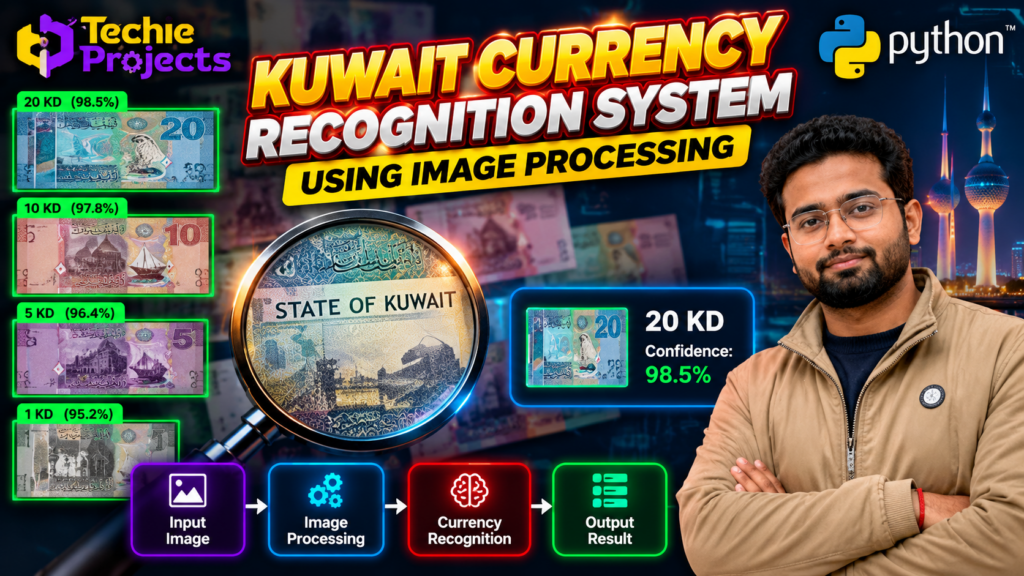
Currency Recognition System Using Image Processing is a Python-based computer vision project that identifies currency notes by analyzing their visual features. The system processes an image of a currency note and uses image processing techniques and classification logic to predict its denomination, depending on the supported dataset and implementation.
Currency recognition is an interesting application of artificial intelligence and image processing. It demonstrates how computers can analyze colors, patterns, shapes, and other visual characteristics to distinguish between different categories of currency notes.
For final-year engineering students, this project offers practical exposure to Python programming, OpenCV, image preprocessing, feature extraction, and image classification. At Techie Projects, students can enquire about project source code, implementation guidance, and customization options for their academic requirements.
The currency recognition system using image processing is a Python-based project that identifies currency notes by analyzing their visual features. It demonstrates how image processing and machine learning techniques can be applied to recognize banknotes and build a practical computer vision application.
If you are looking for a Currency Recognition System Using Image Processing project for your final-year submission, this project is a useful starting point for exploring real-world computer vision applications.
🎬 Currency Recognition System Using Image Processing – Project Demo Video
Explore the project demonstration to understand how a currency image can be processed and classified by a computer vision application. The demonstration can help you learn about the interface, image input, recognition workflow, and predicted currency denomination.
This project is suitable for students who want to explore how image processing techniques can be applied to automated currency classification using Python.
💡 How a Currency Recognition System Using Image Processing Works
The Currency Recognition System Using Image Processing analyzes the visual information present in a currency note and attempts to identify its denomination. The application can be designed to accept an uploaded image or capture an image through a camera, depending on the implementation.
Currency notes contain several visual characteristics, including colors, printed patterns, numerical values, portraits, symbols, and other design elements. An image processing system can examine selected characteristics and use them to classify the input image.
The recognition process depends on the quality of the image, supported currency denominations, preprocessing methods, and the classification technique used in the project.
Project details:
- Project Name: Currency Recognition System Using Image Processing
- Programming Language: Python
- Domain: Image Processing and Computer Vision
- Core Library: OpenCV
- Application Area: Currency Image Classification
- Project Level: Academic and final-year engineering project
- Primary Goal: Identify supported currency denominations from input images
🔍 What Is a Currency Recognition System?
A currency recognition system is an application that analyzes a currency note and predicts its category or denomination. Traditional approaches may rely on manually inspecting the note’s printed features, while an automated system uses computer-based image analysis.
Image processing techniques can help prepare the note image, improve its usability, and extract relevant visual information. A classification algorithm can then compare the extracted information with learned or predefined patterns to produce a prediction.
For example, a system trained or configured to recognize selected Indian currency denominations may analyze an input image and return the predicted denomination if the note belongs to its supported classes.
However, recognition accuracy is not guaranteed. Poor lighting, folded notes, image blur, rotation, damaged notes, and unfamiliar currency designs can affect the result.
⚙️ How Does the Currency Recognition System Work?
1. 📷 Currency Image Input
The process begins when a user provides an image of a currency note. Depending on the implementation, the image may come from an uploaded file, a mobile camera, or a webcam.
The image should contain enough visible information for the recognition algorithm to analyze the note.
2. 🧹 Image Preprocessing
The input image may be resized, cropped, converted into a suitable color space, or adjusted to improve processing consistency.
OpenCV can perform common operations such as image resizing, color conversion, filtering, and thresholding. The exact preprocessing steps depend on the selected recognition approach.
3. 🔎 Feature Extraction
The system extracts useful visual information from the currency image. Possible features include color distribution, edges, texture, shapes, and selected printed patterns.
Feature extraction helps represent the image in a form that can be used by a classification method.
4. 🧠 Currency Classification
The extracted features are passed to the project’s classification logic. Depending on the implementation, this may involve predefined image comparisons, traditional machine learning, or a trained deep learning model.
The classifier predicts the denomination among the categories supported by the system.
5. 💵 Recognition Result
The application displays the predicted denomination or recognition result. A well-designed implementation should also handle unclear images and unsupported inputs rather than confidently assigning an incorrect class.
6. 📊 Result Display
The result can be displayed in a graphical interface along with the input image and status information. The interface and available functions depend on the version of the project.
✨ Key Features of the Project
The following features can be explored or implemented in a Currency Recognition System Using Image Processing project:
- Currency image input: Accepts currency images for analysis.
- Image preprocessing: Prepares images for consistent processing.
- Visual feature analysis: Examines relevant image characteristics.
- Denomination classification: Predicts a supported currency category.
- Python implementation: Demonstrates practical Python programming.
- OpenCV integration: Supports common image processing operations.
- Result visualization: Displays the predicted output through an interface.
- Extensible design: Can be adapted to additional denominations when suitable data and model support are available.
- Academic learning: Helps students understand the stages of an image classification pipeline.
The actual features depend on the source code and model supplied with the chosen version. Confirm the supported denominations, input methods, and included functionality before purchasing.
🛠️ Technologies Used
Python
Python is the main programming language for developing the application, processing input images, running the recognition logic, and displaying results.
OpenCV
OpenCV is a computer vision library used for image loading, resizing, color conversion, filtering, and other image processing tasks.
NumPy
NumPy supports numerical operations and array manipulation that may be required during preprocessing and feature analysis.
Image Processing Techniques
Image processing techniques help prepare the currency image and identify useful visual characteristics. The specific techniques depend on the project’s design.
Classification Algorithm
The classifier determines the predicted currency category. The project may use feature-based classification, traditional machine learning, or a trained deep learning model. The algorithm should be confirmed from the implementation rather than assumed.
Graphical User Interface
A graphical user interface can make the application easier to demonstrate by allowing users to select images and view recognition results.
💻 Software Requirements
Typical software requirements for a Python-based implementation include:
- Operating system: Windows or another compatible operating system
- Programming language: Python
- Image processing library: OpenCV
- Numerical library: NumPy
- Development environment: VS Code, PyCharm, or another Python-compatible editor
- Additional dependencies: As specified in the project’s requirements
If the implementation uses a trained model, the relevant model file and compatible dependencies will also be required.
Students should verify the Python version and package compatibility before installation.
🖥️ Hardware Requirements
A typical development setup may include:
- Processor: Modern Intel or AMD processor
- RAM: 4–8 GB or more recommended
- Storage: Sufficient space for the project files and image dataset
- Camera: Optional, if camera-based image capture is supported
- GPU: Usually not necessary for basic image processing; requirements may differ if a deep learning model is used
The exact hardware requirements depend on the implementation and selected recognition method.
🎓 Objectives of the Project
The main objective is to demonstrate how image processing can be used to recognize supported currency denominations.
Additional objectives include:
- Understanding the fundamentals of computer vision.
- Learning how digital images are loaded and processed.
- Exploring feature extraction and classification.
- Developing a Python-based image recognition application.
- Understanding the importance of training data and image quality.
- Evaluating the performance of a recognition algorithm.
- Identifying the limitations of automated currency classification.
These objectives help students connect theoretical concepts with practical implementation.
🌍 Applications of Currency Recognition
🏦 Banking and Financial Technology Research
Currency recognition can be explored as part of research into automated cash handling and image-based financial applications. Real banking use requires extensive validation and suitable security controls.
🛒 Retail and Cash Handling
Currency classification may be investigated in controlled environments where automated identification of supported denominations is useful.
📚 Academic Projects
Students can use currency recognition to understand image preprocessing, classification, dataset preparation, and computer vision workflows.
♿ Accessibility Research
Currency identification is a potential assistive-technology research area. An academic prototype should not be treated as a dependable accessibility aid without appropriate testing and validation.
🤖 Computer Vision Applications
The project provides a foundation for exploring other image classification tasks, including object recognition and document image analysis.
Important: A basic currency recognition project is not a counterfeit detection or banknote authentication system. Identifying a denomination from an image does not establish whether a note is genuine.
📈 Advantages of the Project
- Demonstrates a practical application of image processing.
- Introduces students to Python and OpenCV.
- Provides experience with image preprocessing and classification.
- Can be demonstrated using sample currency images.
- Offers opportunities to experiment with different features and algorithms.
- Can be extended to additional supported denominations.
- Helps students understand real-world challenges in visual recognition.
⚠️ Limitations and Challenges
Image Quality
Blurred images, poor lighting, shadows, and reflections may reduce recognition performance.
Note Orientation
A rotated or tilted note may be difficult to classify unless the preprocessing method or model handles such variations.
Folded or Damaged Notes
Creases, tears, stains, and missing visual details can affect feature extraction.
Similar Visual Features
Different denominations may share similar colors or design elements. A system relying on limited features may confuse them.
Dataset Limitations
A model or classifier may perform poorly on images that differ from its training or reference data.
Currency Design Changes
New note designs or unsupported currencies may require additional samples and updates to the recognition logic.
To evaluate the system properly, students should test it using separate images covering different lighting conditions, orientations, and image qualities.
🚀 Future Scope
The Currency Recognition System Using Image Processing can be extended in several ways.
- Additional denominations: Add more currency categories with suitable sample images.
- Mobile application: Explore a mobile interface for image-based recognition.
- Real-time camera input: Add live image capture if supported by the chosen platform.
- Deep learning classification: Compare traditional image processing with a trained convolutional neural network.
- Improved preprocessing: Investigate methods for handling rotated, unevenly lit, or low-quality images.
- Performance evaluation: Measure accuracy, precision, recall, and confusion between denominations where appropriate.
- Multicurrency support: Explore recognition of notes from multiple countries using appropriate datasets.
- Accessible interface: Investigate audio feedback and other accessibility features, followed by usability and reliability testing.
These enhancements can help students expand the project and explore more advanced computer vision concepts.
💼 Get the Currency Recognition Project from Techie Projects
Looking for a Currency Recognition System Using Image Processing project for your B.Tech or final-year engineering submission?
Techie Projects helps students explore project implementations in Python, image processing, machine learning, deep learning, and computer vision. You can contact us to discuss the available currency recognition project, source code, setup requirements, and possible customization options.
What Can You Enquire About?
- Available project source code
- Installation and execution guidance
- Explanation of the project workflow
- Customization based on academic requirements
- Available documentation and demonstration materials
- Project pricing and support options
The exact deliverables and support depend on the package selected. Contact us to confirm availability, supported currency denominations, algorithm details, and included files before placing an order.
📲 Contact Techie Projects
📲 Call/WhatsApp: +91-9460060699
🌎 Website: www.techieprojects.com
📺 Instagram: @pythonprojects_
Discuss your requirements before purchasing so that the selected implementation matches your academic goals.
🎓 Explore Related Projects
- People Counting Using OpenCV and Python – Explore image processing and people-counting techniques.
- Crowd Density Estimation Using Deep Learning – Study how density maps can estimate crowd size.
- Real-Time Object Detection Using Deep Learning – Learn how AI models identify objects in images and video.
- Face Recognition Attendance System – Explore face-based identification for an academic attendance application.
- Human Activity Recognition Using Deep Learning – Investigate methods for classifying human activities from visual data.
- Abnormal Activity Detection Using Deep Learning – Study approaches for identifying unusual activity patterns in video.
These are related project ideas. Check the availability and implementation details of each project separately before ordering.
❓ Frequently Asked Questions
1. What is a Currency Recognition System Using Image Processing?
It is an application that analyzes a currency image and predicts its denomination using image processing and classification techniques.
2. Which programming language is used?
Python is commonly used, with OpenCV and NumPy supporting image processing and numerical operations.
3. Can this project recognize Indian currency notes?
It can be configured to recognize supported Indian currency denominations if the implementation includes the appropriate reference images, dataset, or trained model. Confirm the supported denominations before purchasing.
4. Does the project require a GPU?
A basic image processing implementation generally does not require a GPU. A deep learning-based version may have different performance and hardware requirements.
5. Can I customize the project?
Customization may be possible depending on the implementation, requested features, dataset, and available development support. Contact Techie Projects to discuss your requirements.
6. Is this project suitable for final-year engineering students?
It can be a useful academic project for students studying Python, computer vision, and image processing. Follow your institution’s academic-integrity rules when using source code and project assistance.
7. Does currency recognition detect counterfeit notes?
Not necessarily. Denomination recognition and counterfeit detection are different tasks. Authenticity assessment requires appropriate security-feature analysis and rigorous validation.
8. How can I purchase the project?
Contact Techie Projects through WhatsApp to enquire about the available implementation, source code, pricing, deliverables, and customization options.
✅ Conclusion
Currency Recognition System Using Image Processing is a practical computer vision project that demonstrates how Python can be used to analyze currency images and classify supported denominations. By combining image preprocessing, feature analysis, and classification, students can learn important concepts in image processing and artificial intelligence.
The project can be extended with improved preprocessing, additional denominations, deep learning models, and alternative interfaces. Its recognition performance should always be evaluated using appropriate test images, and denomination identification should not be confused with counterfeit authentication.
If you want to explore this project for your final-year engineering submission, contact Techie Projects to discuss source code availability, implementation details, and customization options.
📲 WhatsApp: https://wa.me/919460060699
🌐 Explore Techie Projects: https://techieprojects.com/