
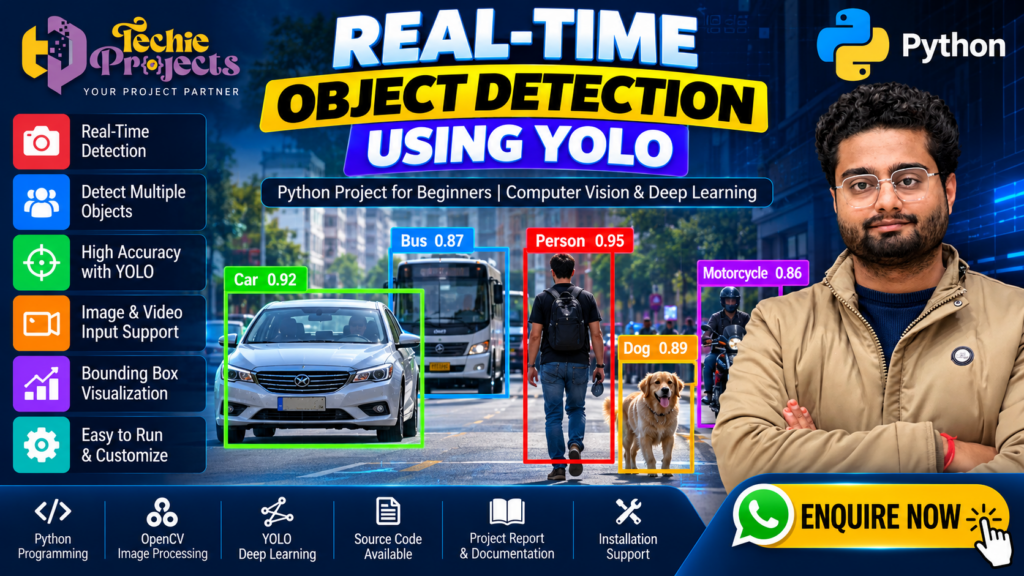
Are you looking for a practical AI project that demonstrates real-time object recognition using Python? 🚀 Real-Time Object Detection Using YOLO is an excellent project topic for engineering students who want to explore computer vision, deep learning, and artificial intelligence through a practical application. Instead of choosing a basic programming project, you can explore how an AI model identifies objects in images and video frames and displays detection results visually.
🎓 At Techie Projects, students can enquire about this project and discuss available project packages, source code, documentation, installation requirements, demonstrations, and technical guidance. Whether you are preparing a B.Tech final-year project, a computer science project, or a machine learning demonstration, our team can help you understand the available options before you purchase.
This project explores how YOLO (You Only Look Once) models can identify objects such as people, cars, buses, bicycles, and other supported categories. It provides an opportunity to study image processing, model inference, object localization, and the development of Python-based computer vision applications.
📞 Contact Techie Projects for Project Enquiries
Interested in purchasing the Real-Time Object Detection Using YOLO project? Contact us to enquire about package availability, pricing, source code, documentation, installation guidance, and technical support options.
💬 WhatsApp Enquiry: Chat with Techie Projects
📱 Contact Number: +91 94600 60699
🌐 Official Website: https://techieprojects.com/
📸 Instagram: Follow Techie Projects
🎓 Project Categories: Artificial Intelligence, Python, Computer Vision, YOLO, Deep Learning, and Image Processing.
✅ Request Project Details: Share your engineering branch, preferred features, and technical requirements to enquire about the most suitable available package.
🚀 Ready to get started? Click here to enquire on WhatsApp and mention Real-Time Object Detection Using YOLO.
🎬 Real-Time Object Detection Using YOLO – Project Demo
Watch the project demonstration to understand how object detection works, how detected objects are displayed with bounding boxes, and how computer vision techniques can process visual input.
The demonstration can help you evaluate the project’s interface, supported functionality, and suitability for your academic objectives. Review the available features and implementation details with Techie Projects before purchasing.
🤖 What Is Real-Time Object Detection Using YOLO?
Real-time object detection is a computer vision technique that identifies and locates objects in images or video frames. Unlike image classification, which assigns a label to an entire image, object detection can identify multiple objects and mark their approximate locations.
YOLO stands for You Only Look Once. It is a family of object detection models designed to predict object locations and categories efficiently. Depending on the model version, hardware, input resolution, and implementation, a YOLO-based application can process video frames quickly enough for real-time or near-real-time demonstrations.
In a Python application, the model receives an image or video frame and returns detection results. These results may include class labels, confidence scores, and bounding-box coordinates. The application can display the results over the original image or video.
This makes the project a useful introduction to practical artificial intelligence and visual data processing.
🎯 Objectives of the Project
The primary objective of this project is to demonstrate how a trained object detection model can identify supported objects from visual input.
The main learning objectives include:
- 🧠 Understanding the fundamentals of computer vision and object detection.
- 🐍 Learning how Python supports AI application development.
- 📷 Processing image and video input.
- 🤖 Exploring YOLO model inference and object localization.
- 📦 Displaying bounding boxes, labels, and confidence scores.
- ⚙️ Understanding model configuration and inference settings.
- 📊 Testing the application with different images and video conditions.
- 🎓 Preparing a clear technical explanation for an academic presentation.
Students can use these objectives to structure their project report, demonstration, and viva preparation.
🔍 Benefits of Real-Time Object Detection Using YOLO
One of the main benefits of Real-Time Object Detection Using YOLO is that it combines Python programming, computer vision, and deep learning in one practical application. Students can explore how an AI model processes visual data and identifies multiple supported objects within an image or video frame.
Other benefits include:
- 🤖 Understanding object detection and model inference.
- 📸 Processing images and video frames using computer vision tools.
- 📦 Displaying object labels, bounding boxes, and confidence scores.
- 🧪 Testing model outputs under different conditions.
- 🎓 Preparing a practical demonstration for engineering coursework.
- 💻 Learning how Python libraries work together in an AI application.
These features make the topic useful for students interested in artificial intelligence, machine learning, and computer vision.
⚙️ Key Features of the YOLO Object Detection Project
The exact features depend on the implementation and package selected. Common features in a Python-based object detection application include the following.
📸 1. Image-Based Object Detection
The application can accept a supported image and process it through the selected YOLO model. Detected objects may be displayed with rectangular bounding boxes and class labels.
This feature helps students understand how a model interprets visual information and produces structured predictions.
🎥 2. Video-Based Detection
Video processing extends object detection beyond a single image. The application can process successive video frames and display the detected objects as the video plays.
Performance depends on the frame resolution, processing hardware, model size, and implementation. Confirm whether live webcam input or recorded video is supported in the package you select.
🚗 3. Multiple Object Recognition
A pretrained YOLO model may recognize several object categories in the same frame, depending on the classes it supports.
For example, a street scene might contain cars, buses, pedestrians, bicycles, and motorcycles. The model can identify supported categories and draw separate bounding boxes around detected objects.
🏷️ 4. Bounding Boxes and Confidence Scores
Bounding boxes show the approximate locations of detected objects. Class labels identify the predicted categories, while confidence scores indicate the model’s confidence in its predictions.
A confidence score is not a guarantee that a prediction is correct. Students should test the model with different inputs and explain possible false positives and missed detections.
🖥️ 5. Visual Output
The results can be displayed in an image window or a graphical interface, depending on the implementation. A clear output screen helps demonstrate the detection workflow during a project presentation.
🔧 6. Configurable Detection Settings
Depending on the selected implementation, users may be able to adjust confidence thresholds, input sources, or other inference parameters. These settings can help students understand the relationship between model configuration and detection output.
🛠️ Technologies Used in Real-Time Object Detection Using YOLO
A typical implementation may use the following technologies. The exact requirements should be confirmed against the supplied code.
- Python: Main programming language for application logic.
- YOLO: Object detection model used for identifying and locating supported objects.
- OpenCV: Image and video processing, camera input, and visual output.
- Ultralytics package or another supported framework: Used when compatible with the selected YOLO implementation.
- NumPy: Numerical operations and array processing where required.
- Pretrained model weights: Model files used to perform inference.
Not every implementation requires every library listed above. Confirm the specific framework, model version, Python version, and package dependencies before installation.
🔄 How the Object Detection System Works
The general workflow of a YOLO-based application can be explained through these steps.
Step 1: 📥 Input Collection
The application receives an image, video file, or supported camera stream. The selected input source depends on the implementation.
Step 2: 🖼️ Image Preprocessing
The input frame is prepared for the model. This may include resizing, formatting, and converting the image into the representation required by the model.
Step 3: 🧠 Model Inference
The YOLO model processes the frame and predicts the locations and categories of objects it recognizes.
Step 4: 📦 Detection Processing
The application interprets the model output and prepares the bounding boxes, class labels, and confidence scores for display.
Step 5: 📊 Result Visualization
The application draws the detection results over the image or video frame. Users can view which objects the model identified.
Step 6: 🧪 Testing and Evaluation
The system is tested with different inputs to understand its behaviour under varying lighting, object sizes, backgrounds, and camera angles.
This workflow gives students a practical way to connect machine learning concepts with software implementation.
⚙️ Implementation of Real-Time Object Detection Using YOLO in Python
The implementation of Real-Time Object Detection Using YOLO generally begins with setting up a compatible Python environment and installing the required dependencies. The application then loads the selected model and prepares the image, video, or camera input for inference.
After processing each frame, the model returns predictions that may include object categories, bounding-box coordinates, and confidence scores. The application can display these results visually so users can observe how the model identifies objects.
The exact implementation depends on the YOLO version, model weights, and software framework used. Students should verify the installation steps and supported features before running the project.
💡 Applications of YOLO-Based Object Detection
Object detection is used in many research and development areas. A student project can demonstrate the underlying concepts without claiming that it is a production-ready system.
Potential applications include:
- 🚦 Traffic analysis: Detecting vehicles and road users in visual data.
- 🏭 Industrial inspection: Identifying selected objects or components in images.
- 🛒 Retail analytics: Exploring object recognition in store environments.
- 🌾 Agriculture: Detecting selected crops, plants, or agricultural objects when supported by an appropriate model.
- 🏠 Smart surveillance research: Identifying supported objects in video streams.
- 🤖 Robotics: Providing visual detection results that may be used by a larger robotic system.
- 🎓 Academic research: Studying object detection algorithms, model performance, and computer vision workflows.
Real-world deployment requires suitable datasets, validation, privacy safeguards, hardware testing, and application-specific evaluation.
🎓 Why Choose This Project for Your Final-Year Submission?
A well-structured object detection project combines multiple technical concepts in one application. It can provide a useful demonstration of Python programming, AI inference, image processing, and result visualization.
Students may benefit from:
- Learning how an object detection pipeline is organized.
- Exploring a practical AI application instead of only studying theory.
- Demonstrating visible outputs during a presentation.
- Understanding model limitations and evaluation techniques.
- Developing confidence in explaining software architecture and dependencies.
- Building a foundation for further study in deep learning and computer vision.
The project’s suitability depends on your course requirements, evaluation criteria, available hardware, and the level of implementation expected by your institution.
💻 Software and Hardware Requirements
Before purchasing or installing the project, verify the requirements for the specific implementation.
Software Requirements
- Operating system compatible with the selected Python environment.
- Python version supported by the project’s dependencies.
- Required object detection framework and model weights.
- OpenCV and other libraries specified in the installation instructions.
- A suitable code editor or development environment.
Hardware Requirements
- A computer with sufficient memory and storage.
- A compatible processor for basic inference.
- A webcam if live camera input is included.
- A supported NVIDIA GPU, if required for accelerated inference.
A GPU is not necessarily mandatory for every version of the project. CPU performance may be sufficient for smaller models or sample images, while larger models and high-resolution video may require more processing power.
🧪 Testing and Evaluation
Testing helps establish what the system can and cannot do. Students should evaluate the application with different image types, video scenes, and object sizes.
Useful evaluation activities include:
- Test images containing one object and multiple objects.
- Compare detection results under different lighting conditions.
- Observe the effect of changing confidence thresholds.
- Record whether the application detects supported objects correctly.
- Check for missed detections and false positives.
- Measure processing speed where relevant.
- Document known limitations and possible improvements.
For a more advanced study, students can investigate precision, recall, mean average precision (mAP), and inference latency. These metrics require an appropriate labelled evaluation dataset and a consistent measurement procedure.
Do not report specific accuracy or speed figures unless they have been measured and verified for the actual implementation.
📊 Performance Testing for Real-Time Object Detection Using YOLO
Testing Real-Time Object Detection Using YOLO helps students understand how input quality, hardware, and model configuration affect detection results. For example, objects that are small, partially hidden, or poorly illuminated may be harder to detect than clearly visible objects.
Useful tests include comparing images with different backgrounds, adjusting the confidence threshold, checking multiple-object scenes, and measuring inference time. Students can document the results and identify situations where the model makes incorrect predictions or misses objects.
For a more detailed evaluation, suitable labelled data can be used to calculate precision, recall, and mean average precision (mAP). Report only measurements obtained from actual testing.
📦 What Should You Confirm Before Purchasing?
At Techie Projects, you can enquire about the available project package before placing an order. To avoid confusion, confirm the following details with the team:
- 📁 Whether the Python source code is included.
- 📄 Whether a project report or documentation is available.
- ⚙️ Which Python version and libraries are required.
- 💾 Whether model weights are included or must be downloaded separately.
- 🖥️ Whether image, video, or webcam detection is supported.
- 🧑💻 Whether installation guidance or technical support is available.
- 🎬 Whether a demonstration video or sample output is provided.
- 💰 The current price, delivery method, and package contents.
These checks help you choose an option that matches your technical requirements and academic expectations.
🛒 Enquire About the Real-Time Object Detection Using YOLO Project
Looking for a practical AI project for your engineering coursework? Contact Techie Projects to discuss the Real-Time Object Detection Using YOLO package and confirm the available source code, documentation, installation instructions, demonstration, and technical support options.
- 📲 Call/WhatsApp: +91-9460060699
- 🌎 Website: www.techieprojects.com
- 📺 Instagram: @pythonprojects_
🎓 Share your branch, course, deadline, and preferred features to enquire about package availability and pricing before purchasing.
🎓 Explore Related Python Projects
If you are interested in AI, Python, and software development, you may also explore these project topics:
- Vehicle Detection and Counting Using Python
- Helmet and Number Plate Detection Using Deep Learning
- Lane Detection for Self-Driving Cars Using Python
- AI Exam Proctoring System Using Python
- Pothole Detection Using Computer Vision
- Plant Leaf Disease Detection Using Deep Learning
- Smart Surveillance System Using AI
- Intrusion Detection System Using Machine Learning
Visit Techie Projects to explore related project categories and enquire about available packages.
❓ Frequently Asked Questions
1. What is Real-Time Object Detection Using YOLO?
It is a computer vision application that uses a YOLO-family model to locate and classify supported objects in images or video frames.
2. Is this project suitable for beginners?
It can be suitable for beginners who understand basic Python and want to learn computer vision. Students may need guidance with package installation, model configuration, and inference concepts.
3. Which programming language is used?
Python is commonly used because it provides libraries and frameworks for image processing, model inference, and application development.
4. Is a GPU required?
Not always. Some models can run on a CPU, although processing speed depends on the model size, input resolution, and computer specifications.
5. Can the system detect multiple objects at once?
Yes, a suitable YOLO model can detect multiple supported objects in the same frame. Actual results depend on the model, confidence threshold, and input quality.
6. Can I use my own images or videos?
This depends on the implementation and supported input options. Confirm whether custom images, video files, and live webcam input are included in the package.
7. Does the project include source code and documentation?
Package contents may vary. Contact Techie Projects to confirm source code, documentation, installation instructions, model weights, and support availability before purchasing.
8. Can this academic project be used directly in production?
Not without further validation. A student demonstration should not be treated as a production-ready safety or surveillance system without extensive testing, privacy review, and deployment safeguards.
✅ Conclusion
Real-Time Object Detection Using YOLO offers an engaging way to study artificial intelligence, Python programming, and computer vision through a practical application. From processing images and video frames to displaying bounding boxes and class labels, the project demonstrates important concepts in modern object detection.
For engineering students, it can provide a foundation for learning model inference, visual data processing, and evaluation techniques. Reviewing the implementation, testing the system, and understanding its limitations are important parts of completing the project successfully.
If you want to explore this project for your academic requirements, contact Techie Projects to discuss package availability, pricing, documentation, installation guidance, and technical support options.
🚀 Ready to explore the project? Enquire with Techie Projects on WhatsApp and mention Real-Time Object Detection Using YOLO.