
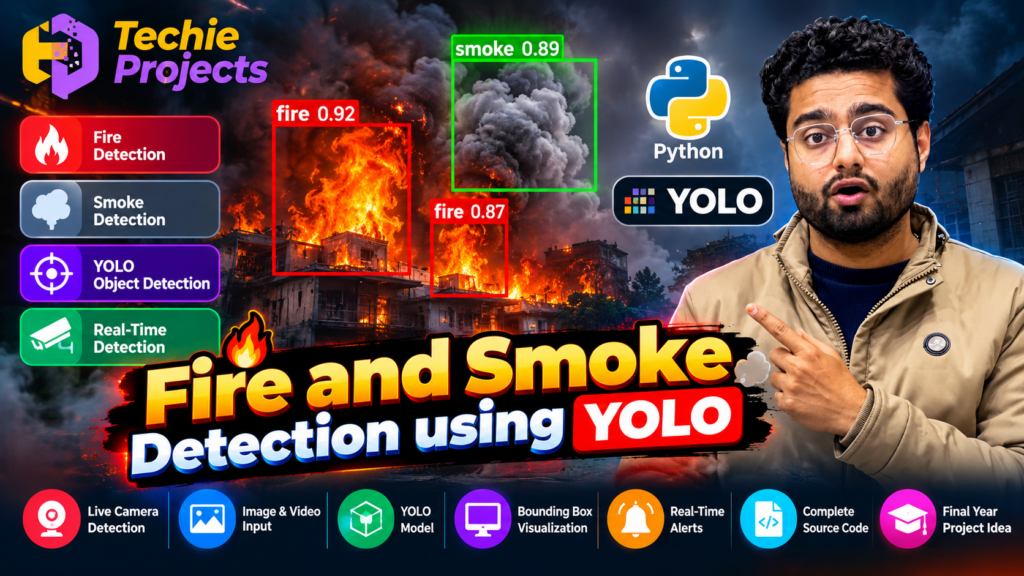
🚀 Introduction
Fire accidents can cause significant damage to buildings, industries, warehouses, laboratories, forests, and residential areas. Early identification of visible fire and smoke can help people investigate potential hazards and take appropriate safety measures. With advancements in Artificial Intelligence (AI) and computer vision, developers can build systems that analyze images and video streams to identify visual patterns associated with fire and smoke.
Fire and Smoke Detection Using YOLO is a deep learning and computer vision project that demonstrates how an object detection model can identify fire and smoke in supported visual inputs. Developed using Python and a YOLO-based detection approach, the project helps students understand image processing, object localization, model inference, and visual result presentation.
Unlike basic image classification, object detection can identify the approximate location of a detected object within an image by drawing a bounding box around it. This makes YOLO a useful technology to study for applications involving visual monitoring and scene analysis.
At Techie Projects, we help engineering students explore practical projects involving Python, Artificial Intelligence, Machine Learning, Deep Learning, and Computer Vision. This project is suitable for students looking for a hands-on learning experience with an AI-based fire and smoke detection application.
🎓 If you are searching for a Fire and Smoke Detection Using YOLO project for your final-year engineering project, you can contact Techie Projects to enquire about source code availability, project demonstrations, implementation guidance, and customization options.
🎬 Fire and Smoke Detection Using YOLO – Project Demo Video
The project demonstration introduces the working concept of an AI-based fire and smoke detection system. It shows how a YOLO model can analyze visual input and display predicted fire or smoke regions using bounding boxes and labels.
Students can use the demonstration to understand the relationship between the input image or video, object detection model, and final output. It also provides an overview of how Python-based computer vision applications can be developed for academic projects.
Watch the demonstration to explore the detection workflow and understand the type of results the application is designed to display.
🔥 What Is Fire and Smoke Detection Using YOLO?
Fire and Smoke Detection Using YOLO is a computer vision application that uses a trained object detection model to identify visual regions belonging to supported classes, such as fire and smoke.
YOLO stands for You Only Look Once. It is a family of object detection models designed to predict object locations and classes from images. Depending on the implementation, the model can process individual images, recorded videos, or frames captured from a live camera.
For example, when a video frame contains visible flames, the model may identify a region as fire and draw a bounding box around it. Similarly, a trained model may identify smoke-like patterns if the relevant class is included in its training data.
The output typically includes:
- 🔥 Predicted fire regions
- 🌫️ Predicted smoke regions
- 📦 Bounding boxes around detected objects
- 📊 Confidence scores for predictions
- 🖥️ A visual display of the processed image or video
Actual detection performance depends on the model version, training dataset, confidence threshold, camera quality, lighting, and environmental conditions.
🎯 Objectives of the Project
The main objective is to demonstrate the application of deep learning and computer vision to visual fire and smoke detection.
The specific objectives include:
- 🧠 Understanding the fundamentals of YOLO-based object detection.
- 🐍 Implementing a computer vision workflow using Python.
- 🖼️ Processing images and video frames.
- 🔥 Detecting visual patterns classified as fire by the trained model.
- 🌫️ Exploring smoke detection using trained object detection classes.
- 📦 Visualizing predictions with bounding boxes and labels.
- 📊 Understanding model confidence scores and detection thresholds.
- 🎓 Building practical knowledge relevant to AI and computer science projects.
- 🛠️ Exploring possible extensions such as event logging and experimental alerts.
🔥 Fire and Smoke Detection Using YOLO: Project Workflow
The system follows a sequence of image processing and model inference operations. The exact implementation may vary depending on the selected YOLO model and project configuration.
1. 📷 Input Image or Video
The application receives an image, a recorded video, or a live camera stream if the implementation supports it. The selected input becomes the starting point for the detection process.
2. 🖼️ Frame Extraction and Preprocessing
When the input is a video, the application extracts individual frames for analysis. The frames are prepared according to the requirements of the selected detection model.
Preprocessing may include resizing the image, converting its format, or preparing pixel data for inference.
3. 🤖 YOLO Model Processing
The prepared frame is passed to the trained YOLO model. The model analyzes visual patterns and predicts object classes and their locations.
If fire and smoke are included as supported classes, the model can produce predictions for those categories.
4. 📍 Object Localization
The model generates bounding boxes around predicted regions. These boxes help users identify where the model believes a particular object is located within the frame.
5. 📊 Confidence Evaluation
Each prediction may include a confidence score. The application can use a configurable confidence threshold to decide which predictions should be displayed.
A confidence score should not be interpreted as a guarantee that a real fire or smoke event exists.
6. 🖥️ Output Visualization
The application displays the analyzed frame with predicted labels, bounding boxes, and confidence scores. Depending on the implementation, it may also show processed video frames or save output files.
7. 🔔 Optional Alert Integration
Additional development may introduce notifications, event logs, or dashboard updates when a potential fire or smoke detection occurs.
These features depend on the actual implementation and should be tested carefully before being used in any safety-related environment.
✨ Key Features of the Project
The following are common features or possible capabilities of a YOLO-based implementation. Confirm which features are included in the available project version before purchasing.
🔥 Fire Detection
The model can identify image regions predicted to belong to the fire class. Detection quality depends on the training data and the visual conditions.
🌫️ Smoke Detection
A model trained for smoke detection can identify regions classified as smoke. Smoke can vary significantly in color, shape, density, and lighting, making robust detection an important challenge.
📦 Bounding Box Visualization
Bounding boxes make it easier to understand the location of the model’s predictions. Labels can identify the predicted class, while confidence scores provide additional information about each result.
🎥 Video Analysis
Recorded-video processing allows the application to analyze a sequence of frames. This helps students explore object detection in dynamic scenes.
📷 Live Camera Support
If configured, the project can process frames from a webcam or compatible camera. Actual processing speed depends on the model, resolution, and available hardware.
🐍 Python-Based Development
Python provides a convenient environment for working with computer vision libraries, trained models, and AI workflows.
🛠️ Customization Possibilities
Depending on the existing implementation, students may explore adding a graphical interface, saving detection results, generating logs, or experimenting with different model settings.
💻 Technologies Used
A typical implementation may use the following technologies:
- 🐍 Python: Main programming language for application logic.
- 🤖 YOLO: Object detection model for identifying supported classes.
- 👁️ OpenCV: Image and video processing, if used by the implementation.
- 🧠 Deep Learning Framework: The framework required by the selected YOLO version.
- 📷 Webcam or Video Input: For camera-based or recorded-video analysis, where supported.
- 🖥️ Development Environment: Visual Studio Code, PyCharm, or another compatible Python IDE.
The exact packages and versions must be confirmed against the supplied source code. Different YOLO implementations can require different dependencies and installation steps.
🖥️ Software and Hardware Requirements
Software Requirements
The expected software setup may include:
- Python installed on the computer
- Required YOLO dependencies
- Compatible deep learning framework
- OpenCV, if required
- Trained model weights
- Model configuration files, where applicable
- Compatible image or video samples
- A Python development environment
Hardware Requirements
Recommended hardware depends on the model and the expected processing speed.
- 💻 A compatible desktop or laptop computer
- 🧮 Sufficient RAM for the selected model
- 💾 Adequate storage for model weights, datasets, and videos
- 📷 A webcam if live input is required
- 🎮 A compatible GPU for acceleration, if available
Smaller models may run on a CPU, although performance can vary. A compatible GPU can improve inference speed for some configurations.
🎓 Applications of Fire and Smoke Detection
Fire and Smoke Detection Using YOLO offers students an opportunity to explore several potential application areas.
🏭 Industrial Monitoring
Computer vision can be investigated as part of industrial monitoring research, where visual analysis may help identify conditions that warrant further inspection.
🏢 Building and Campus Surveillance
Students can experiment with analyzing camera footage to identify visible fire and smoke patterns in indoor or outdoor environments.
🌲 Forest Fire Monitoring Research
Images and videos from outdoor environments can be used to study the challenges of detecting fire and smoke in forests. Such environments introduce difficulties involving distance, weather, background objects, and lighting.
📚 Academic Research
The project can support experimentation with datasets, detection thresholds, inference speed, model evaluation, and visualization techniques.
🧪 Smart Safety Prototypes
Students can explore integrating computer vision with dashboards, event logs, or experimental alert mechanisms.
These are potential areas for research and prototyping. The project should not be considered a certified fire safety solution.
✅ Advantages of the Project
Some important learning benefits include:
- 🧠 Practical exposure to deep learning and object detection.
- 🐍 Experience working with Python-based AI applications.
- 👁️ Understanding image and video processing.
- 📦 Learning how object locations are represented through bounding boxes.
- 📊 Experimenting with confidence thresholds and prediction results.
- 🎥 Exploring real-time computer vision concepts.
- 🛠️ Opportunities to extend the application with additional features.
- 🎓 A useful subject for academic demonstrations and technical presentations.
⚠️ Limitations and Safety Considerations
AI-based detection systems are not perfect. A model may miss visible fire or smoke, incorrectly classify unrelated objects, or perform poorly under conditions that differ from its training data.
Possible challenges include:
- Low lighting and poor image quality
- Fog, dust, clouds, and other smoke-like patterns
- Small or distant flames
- Obstructed camera views
- Unfamiliar environments
- Limited training data
- Hardware limitations and processing delays
Important: This project is intended for educational and experimental purposes. It is not a substitute for certified smoke detectors, fire alarms, approved suppression systems, or professional safety procedures. Real-world deployment requires appropriate validation, fail-safe measures, and compliance with applicable safety standards.
🚀 Future Scope
Students can explore several extensions after understanding the core implementation.
📈 Improve Detection Performance
Test the model with a more diverse dataset and evaluate false positives, missed detections, and performance in different lighting conditions.
📊 Add a Monitoring Dashboard
A dashboard could display processed frames, detection results, timestamps, and historical events if these capabilities are implemented.
🔔 Explore Experimental Notifications
Notifications could be developed to inform a user when the model produces a potential fire or smoke detection. These alerts must be validated and must not replace approved fire safety equipment.
⚡ Optimize Inference Speed
Students can compare different model sizes, input resolutions, and hardware configurations to understand the trade-off between speed and detection quality.
📁 Save Detection Records
The application could be extended to store selected results for later review and experimentation.
🧪 Conduct Model Evaluation
A systematic evaluation using representative test data can help students understand accuracy-related metrics, limitations, and the conditions under which the model performs well or poorly.
💼 Why Choose Techie Projects for Your Final-Year Project?
Choosing a project involves more than selecting an interesting title. Students should understand the technologies involved, the implementation requirements, and the expected academic deliverables.
Techie Projects offers engineering project options across AI, machine learning, deep learning, Python, and computer vision.
If you are interested in this implementation, contact us to enquire about the available project version and its deliverables.
Depending on availability and your requirements, you can ask about:
- 📂 Project source code and included files
- ⚙️ Installation and execution requirements
- 🎬 Project demonstration
- 🧠 Explanation of the project workflow
- 🛠️ Customization options
- 💻 Software and hardware compatibility
- 📚 Support for understanding the implementation
Please confirm the exact deliverables, pricing, and support arrangements before making a purchase.
🛒 How to Purchase the Fire and Smoke Detection Project
Looking for a Fire and Smoke Detection Using YOLO project for your final-year submission or academic learning? Follow these steps to discuss your requirements with Techie Projects.
Step 1: 📲 Contact Us
Open the Techie Projects WhatsApp link and mention the project name.
WhatsApp: https://wa.me/919460060699
Step 2: 🎓 Share Your Requirements
Tell us your course, semester, project objectives, preferred features, and any specific institutional requirements.
Step 3: 📂 Confirm the Deliverables
Ask about source code availability, the included model files, setup instructions, demonstration, and any available customization.
Step 4: 💬 Confirm Pricing and Support
Discuss the price, delivery format, and included support before confirming your order.
Step 5: 🚀 Start Learning
Once the deliverables are confirmed and supplied, review the code, test the implementation, and make sure you understand the workflow before presenting the project.
Ready to enquire? Contact Techie Projects through 📲 Call/WhatsApp: +91-9460060699
🌎 Website: www.techieprojects.com
📺 Instagram: @pythonprojects_
❓ Frequently Asked Questions (FAQs)
1. What is Fire and Smoke Detection Using YOLO?
It is a computer vision project that uses a trained YOLO object detection model to identify visual regions classified as fire or smoke in supported images or videos.
2. Which programming language is used?
Python is commonly used for YOLO-based computer vision applications. The specific libraries depend on the selected model and implementation.
3. Can the project work with a webcam?
Webcam support depends on the supplied implementation and the system configuration. If available, the application can analyze frames captured from a compatible camera.
4. Is this project suitable for final-year CSE students?
Yes. It can be a useful educational project for Computer Science Engineering and AI-related courses because it combines Python, deep learning, and computer vision concepts.
5. Can I purchase the source code?
You can contact Techie Projects to confirm source code availability, included files, pricing, and customization options.
6. Can I customize the project?
Customization may be possible depending on the existing code, selected model, and your requirements. Discuss the desired features before placing an order.
7. Does the model guarantee fire detection?
No. Model predictions can be incorrect, and some events may be missed. The system must not be used as the sole means of fire detection or as a replacement for certified safety equipment.
8. Does the project require a GPU?
Not necessarily. Some models can run on a CPU, but processing speed depends on the model size, input resolution, and hardware. A compatible GPU may improve inference speed.
9. What should I learn before working on this project?
Basic Python programming, image processing concepts, and an introduction to deep learning are helpful. Students should also learn how to install dependencies and evaluate model predictions.
10. How can I enquire about pricing?
Contact Techie Projects on WhatsApp at https://wa.me/919460060699 and mention Fire and Smoke Detection Using YOLO. Confirm the available deliverables and price before ordering.
🎓 Explore Related Projects
If you are interested in AI and computer vision, consider exploring these related project topics:
- Real-Time Object Detection Using YOLO — Learn how object detection models identify objects in images and video.
- Vehicle Detection and Counting System — Explore vehicle localization and counting using computer vision.
- Helmet Detection Using Deep Learning — Study image-based helmet detection.
- Pothole Detection Using Computer Vision — Investigate road image analysis and pothole identification.
- Garbage Detection Using YOLO — Explore object detection for waste identification.
- Face Recognition Attendance System — Study face detection and recognition in an attendance workflow.
Contact Techie Projects to enquire about the availability of these or other engineering project implementations.
🏁 Conclusion
Fire and Smoke Detection Using YOLO demonstrates how deep learning and computer vision can be applied to identifying visible fire and smoke patterns in images and videos. Through this project, students can explore object detection, Python programming, model inference, bounding boxes, confidence scores, and potential extensions such as monitoring dashboards.
For final-year engineering students, it offers a practical way to study an AI-based application while developing an understanding of model performance, testing, and limitations.
If you want to explore or purchase this project, contact Techie Projects to confirm source code availability, project features, customization options, and pricing.
📲 Enquire now on WhatsApp: https://wa.me/919460060699
🌐 Explore more engineering projects: https://techieprojects.com/
Learn, build, test, and understand your next AI project with Techie Projects.