
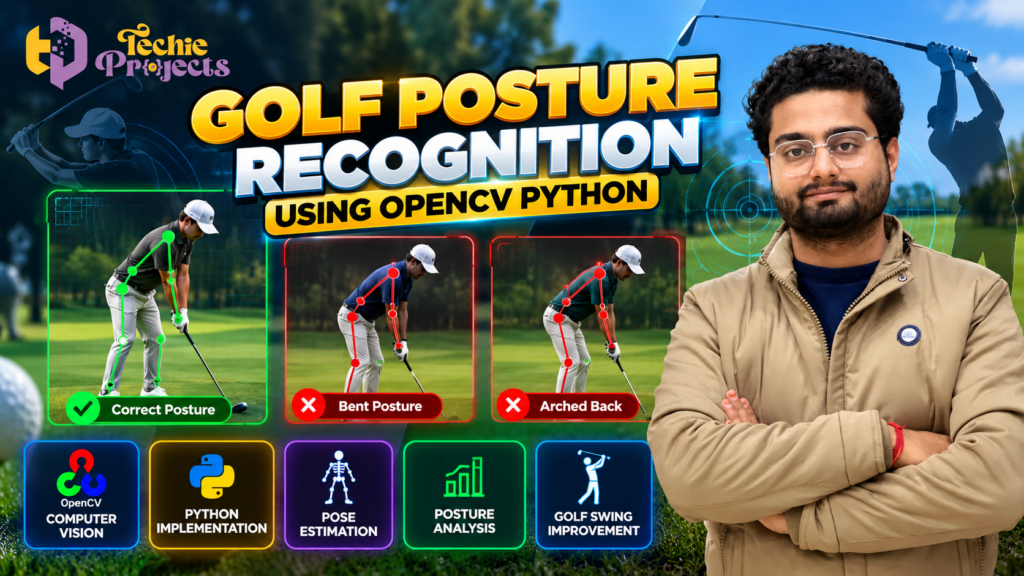
🏌️ Looking for a unique Python project for your final-year engineering submission, computer vision portfolio, or academic demonstration? The Golf Posture Recognition Using OpenCV Python project is an interesting choice for students who want to explore human pose estimation, image processing, and AI-based sports analysis in one application.
Instead of starting from scratch and spending valuable time researching algorithms, setting up dependencies, and building an entire project workflow, explore this project from Techie Projects as a potential starting point for your academic work. It can help you understand how computer vision techniques can analyze a golfer’s body position and how posture-related information may be used to study golf swing movements.
🎓 Whether you are studying Computer Science Engineering, Information Technology, Artificial Intelligence, or Data Science, this project offers an opportunity to explore practical Python programming and computer vision concepts.
Want to purchase this project? Contact Techie Projects to confirm source code availability, installation instructions, documentation, supported technologies, pricing, and other deliverables before placing your order.
- 🌐 Website: Techie Projects
- 📲 WhatsApp: Enquire About the Golf Posture Recognition Project
- 📸 Instagram: Follow Techie Projects
🎬 Watch the Golf Posture Recognition Project Demo
See how the Golf Posture Recognition Using OpenCV Python project is presented and explore its intended approach to golf posture analysis.
The demonstration can help you understand the project concept, visualize the application, and decide whether it matches your academic requirements.
Watch the project demonstration embedded below to explore the available implementation and its supported features.
🧠 What Is Golf Posture Recognition Using OpenCV Python?
Golf posture recognition is a computer vision application that explores how a person’s body position can be analyzed during a golf swing. Posture analysis may involve identifying body landmarks, examining joint positions, and comparing the golfer’s movement with selected reference patterns.
The Golf Posture Recognition Using OpenCV Python project focuses on applying image-processing and computer vision concepts to golf posture analysis. Depending on the implementation, the system may process images or video frames, identify body landmarks using a pose-estimation method, and display visual information about the detected posture.
OpenCV is a widely used computer vision library that provides tools for image processing, video capture, drawing, and visual analysis. When combined with a suitable pose-estimation model, it can form part of a system for studying body movement.
For engineering students, this project demonstrates how programming, visual data, and pose analysis can be combined to address a sports-related problem.
🎯 Objectives of the Project
The main objective is to explore how computer vision can support the analysis of golf posture and body positioning.
Key learning objectives include:
- Understanding the fundamentals of OpenCV and image processing.
- Exploring human pose estimation and body landmark detection.
- Learning how image or video frames can be processed using Python.
- Studying body alignment and joint-position visualization.
- Understanding how posture-related rules can be defined and evaluated.
- Exploring the limitations of automated posture analysis.
- Developing practical skills in Python application development.
- Preparing to explain the project methodology during an academic presentation or viva.
The exact objectives should be aligned with the functions available in the supplied project.
⚙️ How Does the Golf Posture Recognition System Work?
A typical golf posture recognition workflow contains several stages. The actual pipeline depends on the model, libraries, and features used in the implementation.
1. Image or Video Input
The system receives visual input from a supported source. This may be a stored image, a video file, or a live camera feed if the implementation supports it.
The golfer should be visible clearly enough for the selected pose-estimation method to identify the relevant body landmarks.
2. Frame Processing Using OpenCV
OpenCV can read images or video frames and prepare them for further processing. Common operations include resizing, color conversion, frame extraction, and displaying visual results.
For video-based analysis, the system may process individual frames to examine the golfer’s position at different moments during the swing.
3. Human Pose Estimation
Pose estimation attempts to identify body landmarks such as the shoulders, elbows, hips, knees, and ankles.
A compatible pose-estimation model can generate landmark coordinates. These coordinates may then be used to visualize body alignment or calculate angles between selected body segments.
The particular model and landmarks supported should be confirmed from the project’s actual implementation.
4. Posture Analysis
Once landmarks are available, the application may evaluate selected relationships between body parts. For example, it could calculate an angle between the torso and legs or examine shoulder and hip alignment.
A posture classification system requires defined rules, reference examples, or a trained model. The resulting labels depend on the methods implemented and should not automatically be treated as professional golf coaching advice.
5. Visual Output
The system may display processed images with landmarks, lines, angles, or posture labels. Some implementations may include additional visual feedback or a graphical interface.
Check the project demonstration and package details to establish exactly which output features are available.
6. Testing and Evaluation
The application should be tested using different golfer positions, camera angles, lighting conditions, and distances.
Evaluation can examine whether landmarks are detected consistently and whether the implemented posture rules behave as intended. Testing with varied examples helps reveal limitations that may not be apparent in a single demonstration.
🌟 Key Features to Explore
The following are potential features of a project in this category. Confirm which ones are included in the available Techie Projects package.
- Image processing: Uses OpenCV to prepare and display visual input.
- Pose estimation: May identify body landmarks through a compatible pose-estimation model.
- Posture visualization: Can display body landmarks and connecting lines if implemented.
- Golf swing analysis: May support examination of selected body positions during a swing.
- Python implementation: Provides an opportunity to study a practical computer vision workflow.
- Visual demonstration: Can help explain the processing pipeline during a project presentation.
- Technical learning: Offers scope to study image processing, landmark coordinates, and posture-analysis logic.
Do not assume that real-time processing, automatic swing correction, a particular pose-estimation library, or a graphical interface is included unless verified.
💻 Technologies Used
A project of this type may use the following technologies, depending on the implementation.
| Technology | Purpose |
|---|---|
| Python | Main programming language |
| OpenCV | Image processing and video handling |
| MediaPipe or another pose model | Human pose estimation, if used |
| NumPy | Numerical calculations and array operations |
| Matplotlib | Visualizing results, if required |
| Streamlit or another UI framework | User interface, if included |
Not every implementation requires every library listed above. Check the actual source code and dependency list before installing the project.
🖥️ Software and Hardware Requirements
Software Requirements
A typical development environment may require:
- Windows or Linux operating system.
- A compatible Python installation.
- OpenCV and other required Python packages.
- A code editor such as Visual Studio Code or PyCharm.
- A compatible pose-estimation library if the project uses one.
Hardware Requirements
- A computer capable of running the required Python packages.
- Sufficient RAM and storage for the application and its dependencies.
- A webcam if live camera input is supported.
- A compatible GPU is optional for many basic computer vision workflows, although some models may benefit from GPU acceleration.
Exact requirements depend on the implementation. Confirm the Python version, package versions, camera requirements, and installation procedure before purchasing.
🎓 Why Choose This Python Computer Vision Project?
For Computer Science and IT Students
Explore how Python and OpenCV can be used to process visual information. The project can help you understand image input, frame processing, landmark visualization, and the structure of a computer vision application.
For AI and Data Science Students
Study how pose-estimation models identify body landmarks and how numerical features can be used to analyze body positions. You can also investigate the differences between rule-based posture analysis and machine learning-based classification.
For Final-Year Engineering Students
The project provides a sports-related application that can be discussed through a problem statement, system architecture, workflow diagram, implementation details, testing, limitations, and future scope.
For Academic Demonstrations
A visual application can make it easier to explain computer vision concepts. Students should understand the underlying code and be prepared to demonstrate the system using supported inputs.
Use the project in accordance with your institution’s academic integrity rules and ensure that your submission reflects your own understanding.
🏌️ Applications of Golf Posture Recognition
Computer vision-based posture analysis has potential applications in sports technology and movement research.
- Golf swing study: Examining selected body positions during different phases of a swing.
- Sports technology education: Demonstrating the use of visual computing in sports-related applications.
- Pose-estimation research: Studying how body landmarks are detected from images and video.
- Movement visualization: Displaying body landmarks and selected joint relationships.
- Prototype development: Exploring possible interfaces for sports analysis applications.
These applications describe the broader research potential of the technology. The reliability and usefulness of any specific application depend on its implementation and testing.
⚠️ Challenges and Limitations
Understanding limitations is essential when developing a computer vision project.
- Lighting conditions: Poor lighting may affect landmark detection.
- Camera angle: Some body parts may be hidden from the camera.
- Occlusion: The golf club, clothing, or other objects may obstruct parts of the body.
- Movement speed: Fast swings can make accurate frame-by-frame analysis difficult.
- Model limitations: Pose-estimation methods may return inaccurate or missing landmarks.
- Reference requirements: Posture classifications depend on the selected rules or reference data.
- Generalization: A system that works for one person or camera angle may perform differently in another setting.
A posture label should not be treated as a definitive assessment of swing quality or injury risk without appropriate validation and expert review.
🏌️ Benefits of Golf Posture Recognition Using OpenCV Python
The Golf Posture Recognition Using OpenCV Python project helps students explore how computer vision can be applied to sports posture analysis. By combining Python programming and image processing, students can learn how visual information is processed and how body positions may be analyzed using pose-estimation techniques.
Key benefits include:
- Practical OpenCV experience: Understand image processing and video frame handling.
- Pose estimation concepts: Explore how body landmarks can be identified using compatible models.
- Posture analysis: Learn how body positions and joint angles can be examined.
- Python programming skills: Gain experience with a practical computer vision workflow.
- Academic project development: Prepare to explain the methodology, implementation, and limitations during a project presentation.
For students looking for a sports-related AI project, this topic offers an engaging way to connect programming concepts with a practical application.
⚙️ How Golf Posture Recognition Using OpenCV Python Analyzes Body Position
The Golf Posture Recognition Using OpenCV Python workflow may begin by receiving an image, video, or camera frame, depending on the available implementation. OpenCV processes the visual input, and a compatible pose-estimation model may identify body landmarks such as the shoulders, hips, knees, and ankles.
The system can then use the detected landmarks to visualize body alignment or calculate selected joint angles. If posture classification is implemented, predefined rules or a trained model may be used to assign labels to the detected positions.
This workflow helps students understand how image processing, landmark detection, and posture-analysis logic can work together. The quality of the results depends on camera placement, visibility, lighting, and the selected model.
🎓 Who Should Choose Golf Posture Recognition Using OpenCV Python?
The Golf Posture Recognition Using OpenCV Python project may be suitable for Computer Science Engineering, Information Technology, Artificial Intelligence, and Data Science students.
It is particularly relevant for students interested in:
- Computer vision and image processing.
- Python-based application development.
- Human pose estimation.
- Sports analytics and movement visualization.
- AI project demonstrations and technical presentations.
Before purchasing, check your institution’s project requirements and confirm the available source code, documentation, software dependencies, and supported features.
🚀 Future Scope
The project can be extended as a research exercise by exploring additional computer vision capabilities, subject to the selected implementation.
Potential directions include comparing pose-estimation models, calculating joint angles, analyzing swing phases, recording posture measurements, and evaluating landmark detection under different lighting and camera conditions.
Students may also investigate visual feedback interfaces or compare detected positions with carefully defined reference examples. Any claims about improved performance should be supported by testing rather than assumptions.
🛒 Purchase Golf Posture Recognition Using OpenCV Python from Techie Projects
Looking for Golf Posture Recognition Using OpenCV Python for your final-year project or academic portfolio? Techie Projects can help you enquire about the available project package and determine whether it matches your technical requirements.
Before placing your order, confirm the price, source code availability, installation process, documentation, supported input types, and any included support.
- Source code availability and programming language.
- OpenCV and pose-estimation libraries used.
- Installation instructions and dependency versions.
- Project documentation and report availability.
- Availability of a demonstration video or interface.
- Supported input types, such as images, videos, or live camera input.
- Pricing, delivery timeline, and support arrangements.
Deliverables and features depend on the package confirmed at the time of enquiry. Ask questions before purchasing so you understand exactly what is included.
📲 Contact Techie Projects
- 📲 Call/WhatsApp: +91-9460060699
- 🌎 Website: www.techieprojects.com
- 📺 Instagram: @pythonprojects_
Send your requirements through WhatsApp to check availability, pricing, and technical details.
🔗 Explore Related Python Projects
Interested in exploring more computer vision and Python applications? Visit Techie Projects to browse the available project collection.
Related topics include:
- OpenCV Python Projects
- Human Pose Estimation Projects
- Image Processing Projects
- Artificial Intelligence Projects
- Machine Learning Projects
- Final-Year Engineering Projects
Review the available project pages and contact Techie Projects to confirm the details of any project you are considering.
❓ Frequently Asked Questions
1. What is Golf Posture Recognition Using OpenCV Python?
It is a computer vision project that explores the analysis of golfer body positions using Python-based image processing and, where implemented, human pose estimation.
2. Which programming language is used?
Python is the primary language in this project category. OpenCV may be used for image processing, with additional libraries depending on the implementation.
3. Does the project support real-time golf posture recognition?
Real-time functionality depends on the specific implementation. Confirm whether the available package supports live webcam input or only stored images and videos.
4. Is this project suitable for final-year engineering students?
It may suit students in computer science, IT, AI, and data science, depending on institutional requirements and the project’s actual scope.
5. Does the project include source code and documentation?
These deliverables depend on the available package. Contact Techie Projects to confirm source code, documentation, installation instructions, and other included materials.
6. Do I need a GPU to run the project?
Many basic OpenCV applications can run on a CPU. Requirements for pose-estimation models depend on the selected library, model size, and performance expectations.
7. How can I purchase the project?
Visit Techie Projects or contact us on WhatsApp to ask about availability, pricing, technical requirements, and deliverables.
✅ Conclusion
The Golf Posture Recognition Using OpenCV Python project brings together Python programming, image processing, computer vision, and sports-related posture analysis. It offers students a practical way to explore how visual data can be processed and how body landmarks may be used to examine movement.
If you are searching for a computer vision project for your engineering portfolio or final-year academic work, contact Techie Projects to review the available implementation and confirm its suitability.
🏌️ Ready to explore this project? Enquire on WhatsApp or visit Techie Projects for more information.