
🎓 Introduction
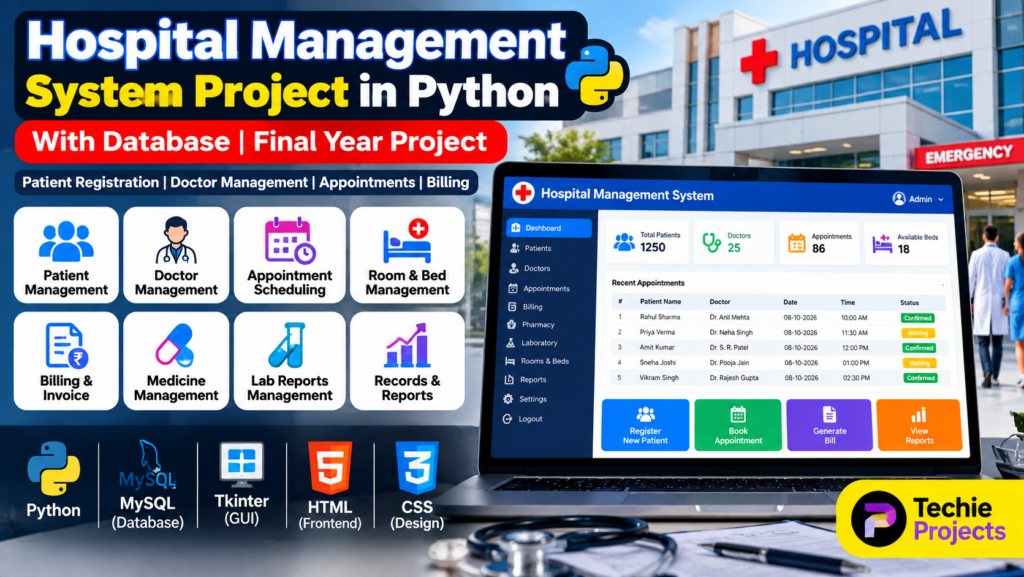
A Hospital Management System Project in Python is a software application designed to manage important hospital operations such as patient registration, doctor management, appointments, rooms, billing, medical records, pharmacy, and reports.
Managing hospital information manually can be time-consuming and difficult, especially when there are many patients, doctors, appointments, and departments. A computerized hospital management system can organize these activities through a centralized application and database.
This project is suitable for B.Tech, BCA, MCA, Computer Science, IT, and final-year engineering students who want to develop a practical Python project based on database management and healthcare operations.
The project can be developed as a desktop application using Python and Tkinter or as a web application using Python Flask and a database such as MySQL.
🎥 Watch the Hospital Management System Project Working Demo
Before purchasing or selecting the project, students can watch the Hospital Management System Project Working Demo to understand the actual interface, modules, database connectivity, and overall project workflow.
The working demonstration provides a practical view of how the system can be used for managing patients, doctors, appointments, and hospital records.
🏥 What Is a Hospital Management System?
A Hospital Management System is a software application that helps hospitals and clinics manage their daily operations digitally.
Instead of maintaining separate paper records, the system can store important information in a structured database.
The system may include modules for:
- Patient registration
- Doctor management
- Appointment scheduling
- Patient records
- Room and bed management
- Pharmacy management
- Laboratory management
- Billing and invoices
- Staff management
- Reports and analytics
- User authentication
A centralized database makes it easier for authorized users to add, update, search, and manage hospital information.
🎯 Objectives of the Hospital Management System Project
The main objectives of this Hospital Management System Project in Python are:
- Digitize hospital management operations
- Manage patient information
- Maintain doctor records
- Schedule patient appointments
- Manage hospital rooms and beds
- Maintain medical records
- Manage pharmacy information
- Generate patient bills
- Store information in a database
- Reduce manual paperwork
- Improve record accessibility
- Generate useful hospital reports
⭐ Features of Hospital Management System
1. Patient Management
The patient management module allows hospital staff to register and maintain patient information.
Patient details may include:
- Patient ID
- Patient name
- Age
- Gender
- Phone number
- Address
- Blood group
- Medical history
- Registration date
Authorized staff can search and update patient information whenever required.
2. Doctor Management
The doctor management module stores information about doctors working in the hospital.
It can include:
- Doctor ID
- Doctor name
- Specialization
- Department
- Contact number
- Available days
- Available time
- Consultation details
This module can also be connected with the appointment system.
3. Appointment Management
The appointment module allows staff to schedule appointments between patients and doctors.
An appointment record may contain:
- Appointment ID
- Patient ID
- Patient name
- Doctor name
- Department
- Appointment date
- Appointment time
- Appointment status
The status can be updated as:
Scheduled → Confirmed → Completed → Cancelled
4. Room and Bed Management
Hospitals need to maintain information about available rooms and beds.
The system can track:
- Room number
- Bed number
- Room type
- Availability
- Patient assigned
- Admission date
- Discharge date
This helps hospital staff identify available beds quickly.
5. Billing and Invoice Management
A billing module can be used to generate patient bills.
The bill may include:
- Consultation charges
- Room charges
- Medicine charges
- Laboratory charges
- Treatment charges
- Other hospital services
The system can calculate the total amount and generate a bill for the patient.
6. Pharmacy Management
The pharmacy module can maintain medicine-related information.
It may include:
- Medicine name
- Medicine ID
- Quantity
- Price
- Supplier
- Manufacturing date
- Expiry date
- Stock status
An advanced version can also generate alerts when medicine stock becomes low.
7. Laboratory Management
The laboratory module can manage diagnostic tests and reports.
Possible information includes:
- Test ID
- Patient ID
- Test name
- Doctor
- Test date
- Test result
- Report status
This allows authorized users to maintain laboratory records digitally.
8. Medical Records
The system can maintain patient medical records including:
- Previous visits
- Diagnoses
- Prescriptions
- Test results
- Doctor notes
- Treatment information
This module can be extended depending on the project’s requirements.
9. Admin Dashboard
An administrator dashboard can provide an overview of hospital operations.
The dashboard can display:
- Total patients
- Total doctors
- Today’s appointments
- Available rooms
- Available beds
- Pending appointments
- Pharmacy stock
- Revenue information
A dashboard makes important information easier to understand.
🔄 Hospital Management System Workflow
The basic workflow of the project can be divided into the following steps.
Step 1: User Login
The authorized administrator or hospital staff member logs into the system using valid credentials.
Step 2: Patient Registration
The receptionist enters patient information into the system.
A unique patient ID can be generated for each patient.
Step 3: Doctor Selection
The patient can be assigned to an appropriate doctor or department based on the required medical service.
Step 4: Appointment Booking
An appointment is created according to the doctor’s availability.
Step 5: Consultation
The doctor examines the patient and records the required information.
Step 6: Medical Record Update
Diagnosis, prescription, laboratory tests, and other information can be stored in the patient’s record.
Step 7: Billing
The system calculates applicable hospital charges and generates the patient’s bill.
Step 8: Discharge
If the patient is admitted, the room and bed information can be updated when the patient is discharged.
Step 9: Report Generation
The administrator can generate reports based on patients, appointments, billing, doctors, pharmacy, or other modules.
💻 Technologies Used
The technology stack depends on the implementation of the project.
A desktop version may use:
- Programming Language: Python
- GUI: Tkinter
- Database: MySQL or SQLite
- Database Connectivity: Python database connector
- IDE: Visual Studio Code or PyCharm
- Operating System: Windows 10/11
A web-based version can use:
- Backend: Python Flask
- Frontend: HTML, CSS, JavaScript
- Database: MySQL
- Server: Flask development server
- IDE: Visual Studio Code
🗄️ Database Design
Database management is an important part of a Hospital Management System Project in Python.
The system can contain several related tables.
Patient Table
The patient table can store:
- Patient ID
- Name
- Age
- Gender
- Phone
- Address
- Blood group
- Registration date
Doctor Table
The doctor table can contain:
- Doctor ID
- Doctor name
- Department
- Specialization
- Phone
- Availability
Appointment Table
The appointment table can store:
- Appointment ID
- Patient ID
- Doctor ID
- Appointment date
- Appointment time
- Status
Billing Table
The billing table can contain:
- Bill ID
- Patient ID
- Service
- Amount
- Payment status
- Billing date
Medicine Table
The medicine table can maintain:
- Medicine ID
- Medicine name
- Quantity
- Price
- Supplier
- Expiry date
Proper database relationships can help maintain consistency between patients, doctors, appointments, billing, and other modules.
🔐 User Authentication
Authentication can be added to protect hospital information.
Different users can have different permissions.
For example:
Administrator: Full system access
Receptionist: Patient and appointment management
Doctor: Patient medical records and appointments
Pharmacist: Medicine and pharmacy management
Account Staff: Billing and payment management
Role-based access can help prevent unauthorized access to sensitive information.
📊 Reports and Analytics
The system can generate reports to help administrators understand hospital operations.
Possible reports include:
- Daily patient report
- Doctor appointment report
- Patient admission report
- Discharge report
- Billing report
- Pharmacy stock report
- Laboratory report
- Department-wise patient report
- Monthly revenue report
Advanced versions can also display this information using charts and graphs.
⚙️ Software Requirements
The basic software requirements may include:
- Windows 10/11
- Python 3.x
- MySQL or SQLite
- Tkinter for desktop implementation
- Flask for web implementation
- Visual Studio Code or PyCharm
- Modern web browser for web-based applications
The exact requirements depend on the project architecture.
🖥️ Hardware Requirements
A basic implementation can run on a standard computer with:
- Intel Core i3 or equivalent processor
- 4 GB RAM or higher
- 500 GB storage
- Keyboard and mouse
- Monitor
- Internet connection for online or web-based features
For larger deployments, the hardware requirements can be increased according to the number of users and database size.
🚀 Advantages of Hospital Management System
A computerized hospital management system provides several benefits:
- Reduces paperwork
- Centralizes hospital information
- Makes patient records easier to manage
- Improves appointment scheduling
- Helps manage doctors and departments
- Simplifies billing
- Improves pharmacy management
- Provides faster access to records
- Generates reports automatically
- Reduces duplicate data entry
- Improves overall workflow
🏥 Applications
The project can be adapted for:
- Hospitals
- Private clinics
- Medical centers
- Diagnostic centers
- Nursing homes
- Multi-specialty hospitals
- Small healthcare centers
- Hospital administration departments
🔮 Future Scope
The Hospital Management System Project in Python can be extended with advanced technologies and features.
Online Appointment Booking
Patients can book appointments through a website or mobile application.
Mobile Application
An Android or iOS application can allow patients and doctors to access relevant services.
SMS and WhatsApp Notifications
The system can send appointment reminders and other notifications.
Online Payment
Payment gateways can be integrated for online bill payments.
Cloud Database
The database can be hosted on a cloud platform to support access from multiple locations.
AI-Based Features
Advanced versions can explore AI-assisted analytics, appointment prediction, patient flow analysis, or other carefully designed healthcare applications.
QR Code Patient Registration
Patients can use QR codes to access registration or appointment information.
🎓 Why Is This a Good Final-Year Project?
The Hospital Management System Project in Python is a practical final-year project because it combines several important computer science concepts.
Students can demonstrate knowledge of:
- Python programming
- Database management
- CRUD operations
- GUI development
- Web development
- Authentication
- Software architecture
- Data management
- Reporting
- User interface design
The project can also be customized according to college requirements by adding additional modules and features.
❓ Frequently Asked Questions
Can this project be developed using Python?
Yes. Python can be used to develop the application’s logic, database connectivity, GUI, backend, and other modules.
Can MySQL be used as the database?
Yes. MySQL can be used to store patient, doctor, appointment, billing, pharmacy, and other hospital records.
Can this project be developed using Tkinter?
Yes. Tkinter can be used to create a desktop-based Hospital Management System.
Can Flask be used?
Yes. Python Flask can be used to develop a web-based version of the project.
Can more modules be added?
Yes. Modules such as pharmacy, laboratory, billing, room management, staff management, online appointments, and reports can be added according to the project requirements.
Is this suitable for B.Tech final-year students?
Yes. The project can be customized and expanded according to the academic requirements of B.Tech, BCA, MCA, and other computer science courses.
🎓 Need Help With Your Final-Year Project?
Looking for a Python, AI, Machine Learning, Computer Vision, Web Development, or final-year engineering project?
Techie Projects can help you discuss your project idea, required features, source-code requirements, documentation, and project scope before development.
📲 Call/WhatsApp: +91-9460060699
🌎 Website: www.techieprojects.com
📺 Instagram: @pythonprojects_
🔗 Explore Related Engineering Projects
Students looking for similar project ideas can also explore:
- Hospital Queue Management System Project
- Pharmacy Management System Project
- Doctor Appointment Management System
- Medical Store Management System
- Database Management Projects Using Python
🎯 Conclusion
The Hospital Management System Project in Python with Database is a practical project for learning how software and databases can be used to manage hospital operations.
The system can manage patients, doctors, appointments, rooms, billing, pharmacy, laboratory records, and reports through a centralized application.
For a final-year project, students can further expand the system with authentication, online appointments, mobile applications, notifications, cloud database integration, analytics, and other modules according to their requirements.