
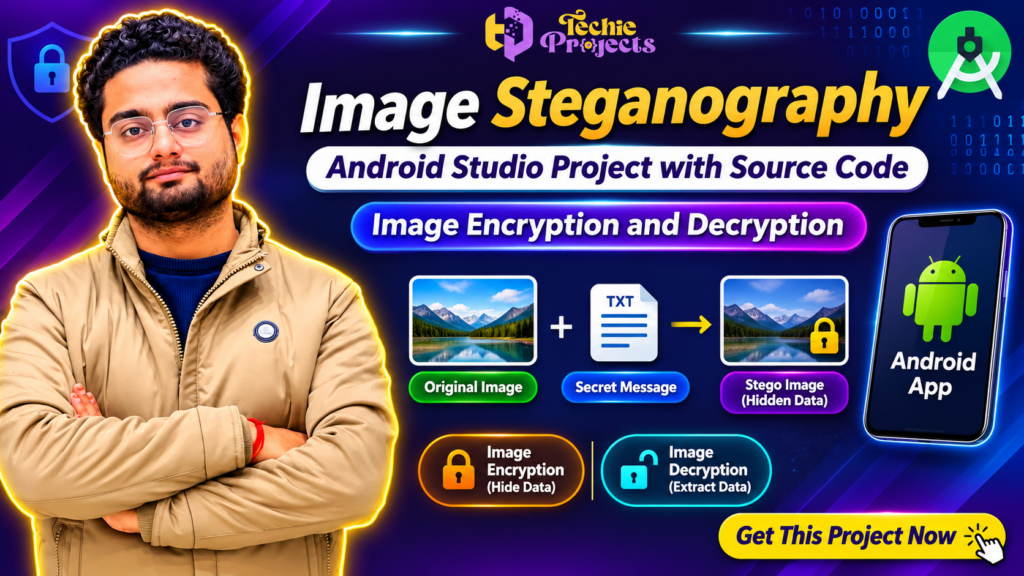
🎓 Looking for an advanced Android Studio project for your final-year engineering submission? Get the Image Steganography Android Studio Project with Source Code from Techie Projects and explore how secret information can be hidden inside digital images and retrieved through an Android application.
Don’t waste weeks struggling with complex implementation, programming errors, and project development from scratch! Techie Projects provides a practical project solution designed to help students understand image steganography, data hiding, image encryption, and decryption using Android development technologies.
🚀 Get This Project Now! Receive project-related resources, source code, implementation guidance, and technical assistance according to your selected package.
Whether you are pursuing B.Tech, BCA, MCA, M.Tech, or another computer science degree, this project offers an interesting opportunity to explore mobile application development and information security.
📞 Contact Techie Projects for Project Enquiries
Interested in purchasing this project? Contact our team directly to check availability, pricing, deliverables, and customization options.
- 📞 Contact / WhatsApp: +91 94600 60699
- 🌐 Website: www.techieprojects.com
- 📸 Instagram: @pythonprojects_
Get your Image Steganography Android Studio Project today and start preparing your academic project with practical implementation support!
🎬 Watch the Image Steganography Android Studio Project Demo
Watch the project demonstration to understand how the application works and how it handles secret information inside digital images.
The demonstration introduces the concept of image steganography, the Android application interface, the process of hiding information, and retrieving hidden data.
You can explore the major project functionalities before purchasing.
🎯 Interested in the complete implementation? Contact Techie Projects to purchase the project with source code.
🔐 What Is an Image Steganography Android Studio Project?
An Image Steganography Android Studio Project is a mobile application development project that demonstrates how confidential information can be concealed inside digital image files.
Steganography is a technique used to hide the existence of information within another ordinary-looking file. Unlike traditional encryption, which converts readable information into an unreadable format, steganography focuses on concealing the presence of the information itself.
For example, a user can select an image, enter a secret message, and use the application to generate an image containing hidden information. The recipient can then use the appropriate extraction functionality to retrieve the embedded message.
This Image Steganography Android Studio Project combines Android application development with information security concepts to create a practical academic project.
The application demonstrates two important operations:
- Image Encryption / Data Hiding: Embedding confidential information into a selected image.
- Image Decryption / Data Extraction: Retrieving the hidden information using the appropriate extraction process.
When cryptographic protection is implemented alongside steganography, the confidential message can receive an additional layer of protection before embedding.
🎯 Main Objectives of the Project
The primary objective is to develop an Android-based application that demonstrates secure information hiding and retrieval.
The important objectives include:
- Developing a user-friendly Android application.
- Understanding image steganography techniques.
- Hiding secret messages inside digital images.
- Retrieving hidden information from processed images.
- Exploring encryption and decryption concepts.
- Understanding image processing and data security.
- Learning Android Studio application development.
- Demonstrating practical information security concepts.
This project is suitable for students who want to explore the relationship between mobile development and cybersecurity.
⚙️ How Does the Image Steganography Application Work?
The application follows a simple workflow that allows users to hide and retrieve confidential information.
1. Select an Original Image
The user first selects an image from the available device storage or image gallery.
The selected image acts as the carrier image in which the secret information will be embedded.
2. Enter a Secret Message
After selecting an image, the user enters the confidential message that needs to be hidden.
The message may contain text or other supported information depending on the implementation.
3. Apply the Hiding or Encryption Process
The application processes the selected image and the secret message.
A steganographic technique can embed the message within image data without creating an obvious visual difference.
If cryptographic functionality is included, the message can also be encrypted before embedding.
4. Generate the Stego Image
After successful processing, the application generates a modified image containing the hidden information.
This output is commonly called a stego image.
The image can be saved or shared with another user, depending on the application’s supported functionality.
5. Extract the Hidden Message
The receiver selects the generated image and performs the extraction operation.
The application retrieves the embedded information using the supported extraction method.
6. Verify the Retrieved Information
The extracted message can be displayed to the user for verification.
This completes the basic image steganography workflow.
🌟 Key Features of the Image Steganography Android Studio Project
The Image Steganography Android Studio Project demonstrates several important features related to information security and mobile application development.
🔹 1. Image Selection
Users can select images for embedding confidential information.
🔹 2. Secret Message Embedding
The application demonstrates how text information can be concealed inside digital images.
🔹 3. Image Encryption
The project explores encryption techniques to protect confidential information before embedding, where supported by the implementation.
🔹 4. Hidden Message Extraction
Users can retrieve the embedded information from a processed image.
🔹 5. Password or Key-Based Protection
The implementation can demonstrate key-based access to hidden information, depending on the selected encryption method.
🔹 6. Android Application Interface
The application provides an interface for interacting with image selection, message entry, embedding, and extraction functionality.
🔹 7. Image Processing
The project introduces students to digital image processing and the manipulation of image data.
🔹 8. Practical Security Application
It provides an academic demonstration of how steganography and cryptography can be combined.
🧠 Technologies Used in the Project
The project introduces students to technologies and concepts used in Android application development and information security.
| Technology | Purpose |
|---|---|
| Android Studio | Android application development environment |
| Java / Kotlin | Application programming, depending on implementation |
| XML | Android user interface design |
| Image Processing | Handling digital image data |
| Cryptography | Protecting confidential information |
| Steganography | Hiding information inside images |
| Android SDK | Android application development tools |
The exact programming language, libraries, and dependencies should be confirmed with the selected project package before purchase.
📱 Android Application Modules
The application can be understood through the following functional modules.
1. User Interface Module
This module provides the interface through which users interact with the application.
It can include image selection, text input, and buttons for performing hiding and extraction operations.
2. Image Selection Module
This module allows users to select the original image that will be used for data hiding.
3. Message Input Module
Users enter the confidential message that needs to be embedded inside the image.
4. Data Hiding Module
This is the main functionality of the application. It demonstrates how information can be embedded into digital image data.
5. Extraction Module
This module retrieves the hidden information from the processed image.
6. Security Module
The security component demonstrates encryption, decryption, or key-based verification functionality where implemented.
7. Output Module
The output module displays the processed image or extracted information to the user.
🔍 Understanding Image Steganography and Cryptography
Although steganography and cryptography are related to information security, they perform different functions.
Steganography: Hides the existence of confidential information inside another file, such as an image.
Cryptography: Converts readable information into a protected format using encryption algorithms.
Combining both techniques can provide an additional security layer.
For example, a secret message can first be encrypted and then embedded inside an image. The receiver must retrieve the hidden information and decrypt it using the appropriate key.
This makes the Image Steganography Android Studio Project a useful academic demonstration of multiple information security concepts.
💡 Applications of Image Steganography
Image steganography has several educational and practical applications.
1. Secure Information Sharing
Steganography can be used to demonstrate concealed communication between users.
2. Digital Information Protection
It introduces techniques for hiding information within digital media.
3. Cybersecurity Research
Students and researchers can explore information hiding and security-related algorithms.
4. Digital Watermarking
Related techniques can be used to embed ownership information or identification data into digital content.
5. Academic Research
The project can support research into image processing, information security, and data hiding techniques.
6. Mobile Security Applications
Android applications can demonstrate how security concepts can be implemented in mobile environments.
🎓 Why Choose This Project for Your Final Year?
Selecting an appropriate final-year project is important for engineering students.
A good project should demonstrate practical programming knowledge, technical understanding, and the ability to implement a working application.
The Image Steganography Android Studio Project offers several academic benefits.
1. Practical Android Development: Students can understand the development of Android applications and their user interfaces.
2. Information Security Knowledge: The project introduces important concepts related to cryptography and steganography.
3. Image Processing Experience: Students can understand how digital images can be processed and modified.
4. Project Demonstration: The application provides an opportunity to demonstrate data hiding and extraction.
5. Technical Learning: Students can explore multiple technologies within one project.
6. Viva Preparation: The project provides several topics for technical discussion, including encryption, image processing, Android development, and data security.
🛒 Why Purchase the Image Steganography Android Studio Project from Techie Projects?
Developing an Android application from scratch can take considerable time, especially when working with image processing and information security concepts.
Techie Projects helps engineering students explore practical software projects through project resources and technical assistance.
When you purchase the Image Steganography Android Studio Project, you can enquire about the following deliverables according to the selected package:
- Complete project source code.
- Project implementation files.
- Android Studio project structure.
- Project demonstration video.
- Installation and execution guidance.
- Project documentation.
- Technical support and customization options.
Please confirm the exact deliverables, compatibility, and support included in your package before purchasing.
🚀 Benefits of Purchasing from Techie Projects
- Practical project solutions for engineering students.
- Projects covering multiple computer science domains.
- Source code availability according to the selected package.
- Assistance with project setup and execution.
- Opportunities to understand real-world programming concepts.
- Project customization enquiries.
- Support for academic project preparation.
Our objective is to help students understand technology through practical project implementations.
💻 Software and Hardware Requirements
The following is a general development environment for an Android Studio-based implementation.
Software Requirements
- Operating System: Windows 10 / Windows 11.
- Development Environment: Android Studio.
- Programming Language: Java or Kotlin, depending on implementation.
- Android SDK.
- Android Emulator or Android Smartphone.
- Required project dependencies and libraries.
Hardware Requirements
- Processor: Intel Core i3 or above recommended.
- RAM: 4 GB minimum; 8 GB recommended.
- Storage: Sufficient free disk space for Android Studio and project files.
- Android Smartphone or Emulator for application testing.
Actual requirements may vary depending on the Android Studio version and project implementation.
📚 How to Develop an Image Steganography Android Studio Project
Students interested in understanding the development process can follow these general steps.
Step 1: Install Android Studio
Download and install Android Studio with the required Android SDK components.
Step 2: Create an Android Project
Create a new Android application and configure the project settings.
Step 3: Design the Application Interface
Create the required screens for selecting images, entering messages, and performing operations.
Step 4: Implement Image Selection
Add functionality to select an image from the device gallery.
Step 5: Implement the Steganography Algorithm
Develop or integrate an appropriate image steganography technique for embedding and extracting information.
Step 6: Implement Security Functionality
Add encryption and decryption functionality if included in the implementation.
Step 7: Test the Application
Test the application using different images and messages to verify that the embedding and extraction processes work correctly.
Step 8: Generate the Final Application
Build the Android application and test its execution on a compatible Android device or emulator.
📊 Future Scope and Improvements
The Image Steganography Android Studio Project can be extended with additional features for research and development.
Possible improvements include:
- Supporting multiple image formats.
- Implementing advanced encryption algorithms.
- Adding biometric authentication.
- Improving the application interface.
- Supporting larger message sizes.
- Adding cloud-based image storage.
- Improving image quality preservation.
- Adding secure file-sharing functionality.
- Supporting additional multimedia formats.
- Developing an advanced Android security application.
These improvements can help students explore more advanced concepts in mobile application development and cybersecurity.
🚀 Get a Complete Image Steganography Android Studio Project
The Image Steganography Android Studio Project from Techie Projects is designed for students who want to explore practical Android development and information security. By purchasing this project, students can enquire about source code, implementation resources, project demonstrations, and technical assistance. It is a useful choice for understanding image-based data hiding and message extraction.
🔐 Practical Implementation of Image Steganography
This Image Steganography Android Studio Project demonstrates how confidential messages can be embedded inside digital images and retrieved through an Android application. Students can explore image processing, encryption concepts, data hiding techniques, and mobile application development through practical implementation.
🎓 Why Purchase This Android Project?
If you are searching for an Image Steganography Android Studio Project for your B.Tech, MCA, or computer science final-year submission, Techie Projects can help you explore the available project package. Contact our team to discuss source code availability, documentation, project demonstrations, and customization requirements.
❓ Frequently Asked Questions (FAQs)
1. What is an Image Steganography Android Studio Project?
It is an Android application project that demonstrates how secret information can be hidden inside digital images and retrieved using an extraction process.
2. Is this project suitable for B.Tech final-year students?
Yes. It is relevant to computer science, information technology, software engineering, and related academic disciplines.
3. Can I purchase the complete source code?
You can contact Techie Projects to enquire about purchasing the available project source code and associated resources.
4. Does this project include encryption and decryption?
The project focuses on image-based information hiding and retrieval, with encryption and decryption functionality as described in the selected implementation.
5. Which software is required?
Android Studio, Android SDK, and the required programming language and project dependencies are needed.
6. Can I customize this project?
Customization options can be discussed with the Techie Projects team based on your academic requirements.
7. Can I watch the project demonstration before purchasing?
Yes. You can watch the available demonstration video to understand the application’s workflow and major functionalities.
8. How can I purchase this project?
Contact Techie Projects through WhatsApp at +91 94600 60699 to enquire about pricing, availability, and purchasing details.
💡 Recommended Projects from Techie Projects
If you are interested in Android development, cybersecurity, and computer science projects, explore these related project ideas:
- Android Application Development Projects – Explore mobile application development.
- Image Encryption and Decryption – Learn about protecting digital images.
- Secure File Sharing Application – Develop a secure file-sharing solution.
- Digital Watermarking System – Explore digital content protection.
- Face Recognition Android Application – Implement facial recognition technology.
- Network Security Projects – Understand network security concepts.
- Data Hiding Using Steganography – Explore information hiding techniques.
- Password-Based Authentication System – Develop secure authentication functionality.
Explore more projects at www.techieprojects.com.
🔥 Get This Image Steganography Android Studio Project Now!
Ready to work on an interesting Android application development project?
Don’t spend unnecessary time searching for project ideas and implementation resources. Get in touch with Techie Projects and enquire about the Image Steganography Android Studio Project with Source Code.
Whether you need a final-year engineering project, an Android development project, or a practical cybersecurity demonstration, our team can help you explore the available project resources.
🎯 Why wait? Start your project journey today!
📞 Contact / WhatsApp: +91 94600 60699
🌐 Website: www.techieprojects.com
📸 Instagram: @pythonprojects_
Techie Projects – Your Destination for Engineering Projects, Source Code and Innovative Technology Solutions.