
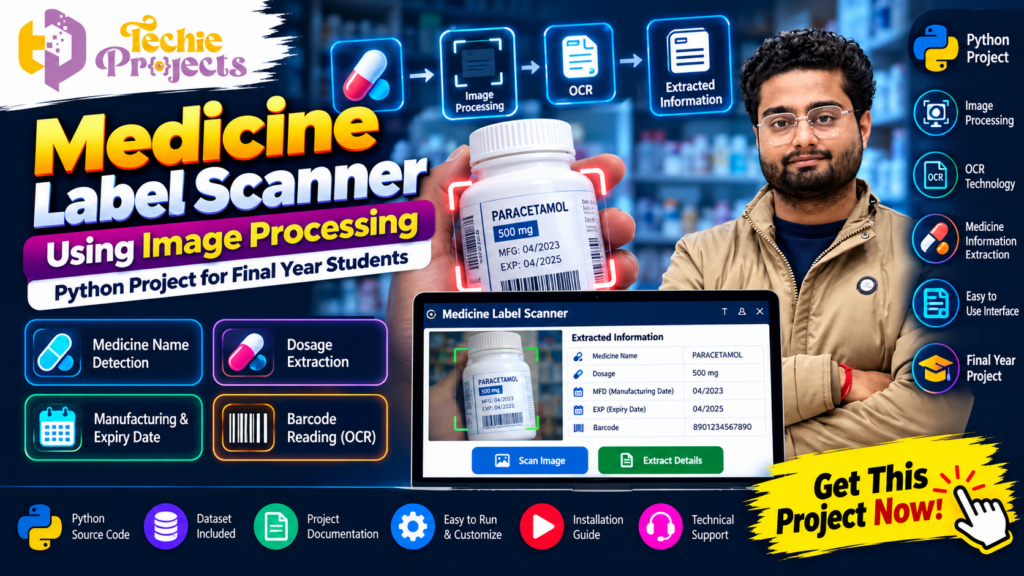
Are you looking for an innovative Python project that combines image processing, OCR technology, and healthcare applications? The Medicine Label Scanner Using Image Processing project from Techie Projects is an excellent choice for students who want to demonstrate practical knowledge of Python programming, computer vision, and automated information extraction.
Instead of developing a basic academic application, you can work on a project that demonstrates how a computer system can read medicine labels from images and extract useful information such as medicine names, dosage details, manufacturing dates, expiry dates, and other printed text. This project is suitable for B.Tech, M.Tech, BCA, MCA, computer science, artificial intelligence, and image processing students.
Want the complete project instead of spending weeks developing it from scratch? Get the Medicine Label Scanner project package from Techie Projects, including source code, project documentation, installation guidance, and technical assistance. Contact us to discuss the project package and available customization options.
📞 Contact Techie Projects for Project Enquiries
- 📲 Call/WhatsApp: +91-9460060699
- 🌎 Website: www.techieprojects.com
- 📺 Instagram: @pythonprojects_
🎬 Watch the Medicine Label Scanner Project Demo
Explore the project demonstration to understand how the application processes medicine label images and extracts information using image processing and OCR technology.
The demonstration helps students understand the application’s interface, image upload process, text recognition workflow, and extracted results.
Project: Medicine Label Scanner Using Image Processing
Technology: Python, Image Processing, and OCR
🔍 What Is Medicine Label Scanner Using Image Processing?
The Medicine Label Scanner Using Image Processing is a Python-based application designed to identify and extract printed information from medicine label images. The system takes an image as input, processes it, and applies Optical Character Recognition (OCR) to identify readable text.
Medicine packaging contains several important details, including:
- Medicine or product name
- Dosage information
- Manufacturing date
- Expiry date
- Batch number
- Manufacturer details
- Other printed information
Manually reading this information can be time-consuming, particularly when dealing with multiple medicine packages. This project demonstrates how image processing and OCR can help automate the text extraction process.
The main objective of the Medicine Label Scanner Using Image Processing project is to build an application that converts text visible in an image into machine-readable information.
It is an educational prototype and should not be considered a medical verification, prescription, or medicine-safety system.
🎯 Objectives of the Project
The major objectives of this project include:
- To develop a Python application for scanning medicine label images.
- To understand the fundamentals of digital image processing.
- To implement OCR technology for extracting printed text.
- To identify important medicine-related information from scanned images.
- To develop a simple and user-friendly graphical interface.
- To demonstrate the practical use of computer vision in healthcare-related applications.
- To improve students’ knowledge of Python programming and image analysis.
⚙️ Key Features of Medicine Label Scanner Using Image Processing
The project includes several features that make it suitable for academic demonstrations and final-year project presentations.
1. 📷 Medicine Image Upload
Users can upload an image of a medicine label through the application interface. The uploaded image is used as the input for the scanning and recognition process.
2. 🖼️ Image Processing
The application processes the uploaded image before text recognition. Image processing techniques can help improve readability by preparing the image for OCR.
Possible preprocessing operations include:
- Image resizing
- Grayscale conversion
- Noise reduction
- Image thresholding
- Contrast enhancement
- Image filtering
3. 🔤 OCR-Based Text Recognition
Optical Character Recognition is an important component of the Medicine Label Scanner Using Image Processing project.
OCR technology converts text present in an image into machine-readable text. It helps the application recognize printed medicine information without requiring users to type every detail manually.
4. 💊 Medicine Name Extraction
The application can identify medicine-related text from the scanned label. Depending on the quality of the image and the OCR output, the recognized information can be displayed for further review.
5. 📅 Manufacturing and Expiry Date Recognition
Medicine labels may contain manufacturing and expiry dates. The project demonstrates how OCR-extracted text can be examined to identify date-related information.
The accuracy of date extraction depends on image quality, text formatting, and the recognition process.
6. 🧾 Dosage Information Extraction
The system can demonstrate the extraction of printed dosage information from a medicine label. Students can explore how recognized text is processed and organized into useful fields.
7. 💻 User-Friendly Interface
A graphical interface allows users to upload images, initiate scanning, and view extracted information without directly interacting with Python code.
8. 📊 Extracted Information Display
After processing, the application displays the recognized text in an organized format. This makes it easier to understand the results and demonstrate the project during academic presentations.
🧠 Technologies Used in the Project
The Medicine Label Scanner Using Image Processing project combines multiple technologies.
🐍 Python Programming
Python is the primary programming language used to develop the application. It provides libraries for image processing, OCR, data handling, and graphical user interface development.
👁️ OpenCV
OpenCV is a computer vision library used for image-processing operations. It provides functions for resizing, color conversion, filtering, thresholding, and other image manipulation tasks.
🔤 OCR Technology
OCR is used to recognize printed text from medicine label images. It converts image-based text into digital text that can be analyzed by the application.
🧮 NumPy
NumPy supports numerical operations and array manipulation. Digital images can be represented as arrays, making NumPy useful for image-processing workflows.
🖥️ Tkinter
Tkinter can be used to create a graphical user interface in Python. It helps users interact with the application through buttons, image previews, and result displays.
🗂️ Additional Python Libraries
Depending on the implementation, supporting libraries may be used for image handling, text processing, and application functionality.
🔄 Working Process of Medicine Label Scanner Using Image Processing
The project follows a sequence of operations to extract information from a medicine label image.
Step 1: Upload Medicine Image
The user selects a medicine label image from the computer. The application loads the image for processing.
Step 2: Image Preprocessing
The input image is prepared for OCR. Operations such as grayscale conversion, resizing, filtering, and thresholding may be applied.
Step 3: Text Recognition
The processed image is passed to the OCR engine. The OCR system analyzes the image and recognizes the visible printed characters.
Step 4: Text Extraction
The recognized text is returned as digital output. The application can then process the extracted content to identify relevant medicine information.
Step 5: Information Organization
The extracted text can be organized into categories such as medicine name, dosage, manufacturing date, and expiry date, depending on the implementation.
Step 6: Display Results
Finally, the application displays the recognized information through its graphical interface.
🏗️ System Architecture
The Medicine Label Scanner Using Image Processing project can be understood through the following modules:
1. Input Module: Accepts medicine label images from the user.
2. Image Preprocessing Module: Improves the image for text recognition.
3. OCR Module: Converts printed text into machine-readable text.
4. Text Processing Module: Processes the recognized text and identifies relevant information.
5. Output Module: Displays the extracted information to the user.
This modular architecture helps students understand how different components work together in a computer vision application.
📚 Applications of Medicine Label Scanner
The concepts demonstrated in this project can be explored in several areas:
- Healthcare technology demonstrations: Understanding how software can process medicine packaging information.
- Pharmacy information systems: Exploring automated extraction of printed product details.
- OCR research: Studying text recognition from real-world images.
- Computer vision education: Learning image preprocessing and recognition techniques.
- Document digitization: Applying OCR concepts to printed labels and documents.
- Academic research: Exploring improvements in text extraction, image quality, and recognition accuracy.
The project is an educational demonstration. Extracted information should always be checked against the original packaging and reliable sources.
🎓 Why Choose This Project for Your Final Year?
Selecting a suitable final-year project is important for engineering and computer application students. A good project should demonstrate technical knowledge, practical implementation, and the ability to explain a complete software workflow.
The Medicine Label Scanner Using Image Processing project offers several academic benefits:
Practical Python Experience
Students can understand how Python libraries are used together to develop a working application.
Computer Vision Knowledge
The project introduces important image-processing concepts, including image enhancement and preprocessing.
OCR Implementation
Students can learn how text recognition works and how image-based information can be converted into digital text.
Real-World Problem Understanding
The project demonstrates how computer vision concepts can be applied to a practical information-extraction problem.
Project Demonstration
The graphical interface and image-processing workflow make the project suitable for academic demonstrations and presentations.
🛒 Get the Complete Medicine Label Scanner Project from Techie Projects
Are you interested in purchasing the Medicine Label Scanner Using Image Processing project for your academic submission?
Techie Projects provides project packages designed to help students understand and demonstrate Python-based engineering projects.
Instead of starting every component from zero, you can enquire about the available project package and receive details about the included files and support.
📦 What Can Be Included in the Project Package?
Depending on the selected package and confirmed scope, the project may include:
- Python project source code
- Required project files
- Dataset or sample medicine label images, where applicable
- Project installation guidance
- Software requirements
- Project documentation
- Working demonstration
- Code explanation
- Technical assistance
- Customization guidance, if available
Please confirm the exact deliverables and support arrangements with Techie Projects before purchasing.
⭐ Why Choose Techie Projects?
Techie Projects focuses on providing engineering and computer science project solutions for students.
You can enquire about:
- Python projects
- Machine learning projects
- Artificial intelligence projects
- Image processing projects
- Computer vision projects
- Deep learning projects
- Final-year engineering projects
Our aim is to help students understand project implementation and prepare for academic demonstrations.
📲 Purchase or Enquire About This Project
Interested in getting the Medicine Label Scanner project?
Contact Techie Projects to check availability, pricing, source code details, documentation, and installation support.
📲 Call/WhatsApp: +91-9460060699
🌎 Website: www.techieprojects.com
📺 Instagram: @pythonprojects_
💻 Software and Hardware Requirements
The following are typical requirements for developing and running a Python image-processing application. Exact requirements depend on the implementation.
Software Requirements
- Programming Language: Python
- Operating System: Windows 10 or Windows 11
- Image Processing: OpenCV
- Numerical Processing: NumPy
- OCR Engine: Compatible OCR software or library
- GUI Framework: Tkinter
- Code Editor: Visual Studio Code or PyCharm
Hardware Requirements
- Processor: Intel or AMD processor
- RAM: 4 GB minimum recommended
- Storage: 500 GB HDD or SSD
- Input Devices: Keyboard and mouse
- Display: Standard monitor
🚀 Future Enhancements
The Medicine Label Scanner Using Image Processing project can be extended with additional features to make it more advanced.
1. 📱 Mobile Application Integration
The project could be extended into a mobile application that allows users to capture medicine label images using a smartphone camera.
2. ☁️ Cloud-Based Image Processing
Cloud integration could allow images and extracted information to be processed through a remote service.
3. 🌐 Multilingual OCR
Additional OCR language support could help recognize medicine labels containing different languages.
4. 🤖 Advanced Text Recognition
Deep learning-based text recognition methods could be explored to improve recognition under challenging image conditions.
5. 🗃️ Database Integration
A database could be introduced to store scanned images and extracted text for demonstration and record-management purposes.
6. 📊 Improved Information Classification
Additional text-processing techniques could help organize recognized content into structured fields.
❓ Frequently Asked Questions (FAQs)
1. What is Medicine Label Scanner Using Image Processing?
It is a Python-based project that processes medicine label images and uses OCR technology to extract printed text and medicine-related information.
2. Which programming language is used?
Python is the primary programming language used in the project.
3. What is the role of OpenCV?
OpenCV is used for image-processing operations such as resizing, grayscale conversion, filtering, and thresholding.
4. What is OCR in this project?
OCR stands for Optical Character Recognition. It converts printed text in an image into machine-readable digital text.
5. Is this project suitable for final-year students?
Yes. It can be suitable for B.Tech, M.Tech, BCA, MCA, and computer science students interested in Python, OCR, and image processing.
6. Can I get the source code?
You can contact Techie Projects to check the availability of the complete source code package and its deliverables.
7. Does the project include documentation?
Documentation availability and format should be confirmed with Techie Projects before purchasing.
8. Can the project be customized?
Customization options may be available depending on the requirements and project scope. Contact Techie Projects to discuss your needs.
9. Does the application guarantee correct medicine information?
No. OCR can make recognition errors due to image quality, lighting, packaging design, and printed text. The application is an educational prototype and must not be used to make medical decisions.
10. How can I purchase this project?
Visit https://techieprojects.com/ or contact Techie Projects through WhatsApp at +91 94600 60699.
🔗 Explore Related Python and Image Processing Projects
If you are interested in the Medicine Label Scanner project, you can also explore other projects related to computer vision, OCR, artificial intelligence, and machine learning.
- OCR-Based Text Recognition System: Extract text from images using Optical Character Recognition.
- Number Plate Recognition System: Recognize vehicle registration numbers from images.
- Face Recognition Attendance System: Demonstrate automated attendance using face recognition.
- Document Scanner Using OpenCV: Detect document boundaries and process document images.
- Object Detection Using YOLO: Identify and locate objects in images and videos.
- Plant Disease Detection Using Deep Learning: Classify plant leaf images using deep learning.
- Medical Image Classification: Explore image classification techniques for healthcare-related academic research.
Visit https://techieprojects.com/ to explore more Python, AI, machine learning, and final-year engineering projects.
🎯 Conclusion
The Medicine Label Scanner Using Image Processing project is an interesting combination of Python programming, computer vision, image preprocessing, and OCR technology. It demonstrates how a software application can analyze medicine label images and convert printed information into digital text.
For students interested in image processing and healthcare-related technology, this project offers an opportunity to understand a complete application workflow, from image upload to text extraction and result display.
If you want to save development time and explore a ready project package, contact Techie Projects to enquire about the Medicine Label Scanner project, source code, documentation, installation guidance, and technical support.
📲 Get This Project Now!
📲 Call/WhatsApp: +91-9460060699
🌎 Website: www.techieprojects.com
📺 Instagram: @pythonprojects_