
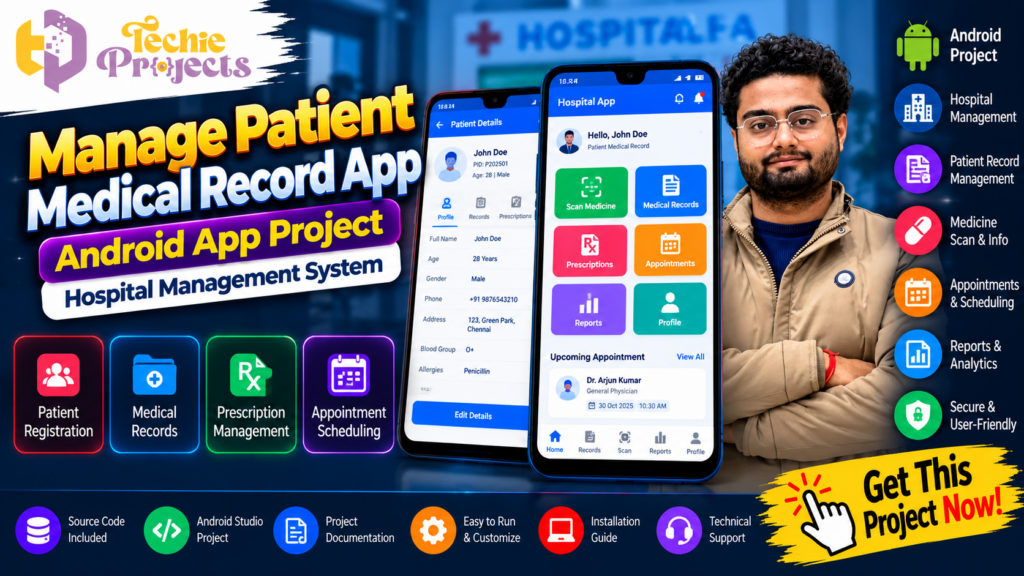
Looking for a professional Android project for your final-year submission? Want to develop an application that combines patient registration, medical record management, medicine scanning, and hospital-related information in one platform? The Manage Patient Medical Record App from Techie Projects is an interesting project for students who want to explore Android application development and healthcare management technology.
Instead of spending weeks building every module from scratch, you can enquire about the complete Manage Patient Medical Record App Android Project package from Techie Projects. Get information about the available source code, project files, installation guidance, documentation, and technical support. Whether you are a B.Tech, M.Tech, BCA, MCA, or computer science student, this project provides an opportunity to understand how mobile applications can organize patient-related information.
This project demonstrates how an Android application can help users manage patient profiles, medical records, prescriptions, medicine information, and other healthcare-related details through a structured interface.
Want to get this project for your academic work? Contact Techie Projects today to check the package, pricing, and available support.
📞 Contact Techie Projects for Project Enquiries
- 📲 Call/WhatsApp: +91-9460060699
- 🌎 Website: www.techieprojects.com
- 📺 Instagram: @pythonprojects_
🎬 Watch the Manage Patient Medical Record App Project Demo
Explore the project demonstration to understand the Android application interface, patient information management, medicine scanning, and available modules.
The demonstration helps students understand the application’s workflow and how different features are organized in a mobile application.
Project Name: Manage Patient Medical Record App
Project Type: Android Application
Domain: Healthcare and Hospital Management
🔍 What Is Manage Patient Medical Record App?
The Manage Patient Medical Record App is an Android-based healthcare management application designed to demonstrate the organization and management of patient-related information through a mobile interface.
In traditional record-management processes, patient information may be maintained using paper documents, registers, and separate files. Managing these records can become difficult when information needs to be searched, updated, or reviewed.
A digital patient record application provides a structured way to store and access information. It can help demonstrate how mobile technology supports patient registration, medical history management, prescription records, and medicine-related information.
The application brings several healthcare-related functions together in one interface. Users can explore patient registration, scan medicine images, add medical records, view available medical information, search medicine details, and log out of the application.
The main purpose of this project is to demonstrate Android development concepts through a practical healthcare application.
🎯 Objectives of the Project
The major objectives of the Manage Patient Medical Record App include:
- To develop an Android application for managing patient-related information.
- To provide a structured interface for patient registration.
- To demonstrate digital medical record management.
- To implement a medicine scanning feature.
- To explore medicine information search functionality.
- To organize healthcare-related information through different application modules.
- To understand Android application development and user interface design.
- To provide students with practical experience in developing a healthcare-based mobile application.
⚙️ Key Features of Manage Patient Medical Record App
The application contains multiple modules that demonstrate how healthcare information can be managed through an Android interface.
1. 👤 User Registration and Login
The registration and login module provides an entry point for users to access the application.
Depending on the implemented authentication workflow, users can register their details and log in using their credentials.
This module demonstrates basic authentication concepts and provides a structured starting point for the application.
2. 🏥 Home Page Dashboard
After successful login, users can access the application’s home page.
The dashboard provides navigation to different modules, making it easier to access the available features.
Typical options include:
- Scan Medicine
- Scan Image
- Add Medical Record
- All Medical Records
- Search Medicine
- Logout
The dashboard helps organize the application’s functionality in one place.
3. 💊 Scan Medicine
The Scan Medicine module demonstrates how medicine-related information can be accessed through a scanning feature.
Users can explore the medicine scanning workflow and understand how image-based information can be processed within a healthcare application.
This module can be useful for demonstrating the integration of image input and medicine-related information management.
4. 📷 Scan Image
The Scan Image module provides an option to upload or select an image for processing.
Image-based features are useful in Android applications because they allow users to work with visual information instead of entering every detail manually.
This module also provides an opportunity to understand image selection, image handling, and mobile application integration.
5. 📝 Add Medical Record
The Add Medical Record module allows users to enter patient-related medical information.
Depending on the implemented fields, the record may include:
- Patient name
- Age
- Gender
- Weight
- Height
- Visit date
- Medical condition
- Hospital name
- Prescription information
- Additional medical notes
This module demonstrates how structured patient information can be entered and organized through a mobile interface.
6. 📂 All Medical Records
The All Medical Records module provides access to previously added medical information.
Instead of navigating through separate paper documents, users can explore a centralized record-list interface.
This feature demonstrates the concept of digital record organization and retrieval.
7. 🔎 Search Medicine
The Search Medicine module allows users to explore medicine-related information using a search interface.
Search functionality is an important part of information-management applications because it helps users locate relevant entries without manually reviewing every available record.
8. 🚪 Logout Functionality
The logout module allows users to exit the application after completing their activities.
It demonstrates basic session-management and navigation concepts in Android application development.
🧠 Technologies Used in the Project
The Manage Patient Medical Record App combines Android application development concepts with healthcare-related functionality.
☕ Java Programming
Java is the programming language indicated in the project’s software requirements. It is widely used for Android application development and supports application logic, event handling, and user interface interactions.
📱 Android Application Framework
The Android framework provides the environment for developing and running mobile applications.
It supports application navigation, screen layouts, user interaction, and access to device features.
🎨 XML User Interface Design
XML layouts are commonly used in Android development to define screen structures, buttons, text fields, menus, and other interface elements.
A well-organized interface makes it easier for users to navigate between different application modules.
🗄️ Data Management
Patient record applications require a way to organize and retrieve information. Depending on the implementation, data may be handled using a local database or another storage mechanism.
📷 Image Handling
The scanning-related modules demonstrate image selection and handling within an Android application.
These functions help students understand how mobile applications work with image-based input.
🔄 Working Process of Manage Patient Medical Record App
The application follows a structured workflow that connects its different modules.
Step 1: User Registration
The user starts by registering through the application’s registration interface, if registration is required.
Step 2: User Login
After registration, the user enters the required login credentials to access the application.
Step 3: Open the Dashboard
After successful login, the application displays the home page with different module options.
Step 4: Select an Application Module
The user can select the required option, such as Scan Medicine, Scan Image, Add Medical Record, All Medical Records, or Search Medicine.
Step 5: Enter or Process Information
The user can enter patient information, access medical records, or use the image-related functionality supported by the application.
Step 6: View Medical Information
The application provides an interface for viewing the available information and records.
Step 7: Logout
After completing the activities, the user can log out of the application.
🏗️ System Architecture and Modules
The Manage Patient Medical Record App can be understood through the following modules.
1. Authentication Module: Handles user registration and login functionality.
2. Dashboard Module: Provides navigation to the application’s main features.
3. Medicine Scanning Module: Demonstrates medicine-related scanning functionality.
4. Image Scanning Module: Handles image selection and image-based operations.
5. Medical Record Module: Supports adding and managing patient-related information.
6. Search Module: Provides an interface for finding medicine-related information.
7. Logout Module: Allows users to exit the application.
This modular approach makes the project easier to understand, demonstrate, and extend.
🎓 Why Choose This Android Project for Your Final Year?
Selecting a suitable final-year project is an important step for engineering and computer application students. A good project should demonstrate technical knowledge, practical implementation, and an understanding of real-world applications.
The Manage Patient Medical Record App provides several learning opportunities.
1. Practical Android Development
Students can explore Android application structure, layouts, navigation, and event handling.
2. Healthcare Application Development
The project demonstrates how mobile applications can be designed for healthcare-related information management.
3. Multiple Functional Modules
The application combines several features, allowing students to understand how different modules work together.
4. User Interface Design
Students can learn how to organize information and provide navigation through an Android interface.
5. Academic Project Demonstration
The application’s different modules provide useful topics for project demonstrations, presentations, and viva preparation.
6. Scope for Future Enhancements
Students can explore additional features such as appointment scheduling, notifications, cloud storage, and improved record searching.
🛒 Purchase Manage Patient Medical Record App from Techie Projects
Are you interested in purchasing the Manage Patient Medical Record App for your academic project?
Techie Projects provides project solutions for engineering and computer application students who want to explore practical software development.
Instead of developing every module independently, you can enquire about the available project package and understand its deliverables before purchasing.
📦 What Can Be Included in the Project Package?
Depending on the selected package and confirmed scope, the deliverables may include:
- Android application source code
- Complete project files
- Required software information
- Installation guidance
- Project documentation
- Application demonstration
- Code explanation
- Technical details
- Customization guidance, if available
- Technical assistance, as agreed
Contact Techie Projects to confirm exactly what is included in the package before placing an order.
⭐ Why Choose Techie Projects?
Techie Projects focuses on providing engineering and computer science project solutions.
Students can explore projects in several technical domains, including:
- Android Application Development
- Python Projects
- Artificial Intelligence Projects
- Machine Learning Projects
- Image Processing Projects
- Computer Vision Projects
- Deep Learning Projects
- Internet of Things Projects
- Data Analytics Projects
Our aim is to help students understand project implementation and prepare for academic demonstrations.
📲 Get This Project Now!
Ready to get the Manage Patient Medical Record App?
Contact Techie Projects to enquire about project availability, pricing, source code, documentation, and installation support.
- 📲 Call/WhatsApp: +91-9460060699
- 🌎 Website: www.techieprojects.com
- 📺 Instagram: @pythonprojects_
💻 Software and Hardware Requirements
The following are typical requirements for working with an Android application. Confirm the exact environment and dependencies supplied with the project.
Software Requirements
- Programming Language: Java
- Application Platform: Android
- Development Environment: Android Studio
- Operating System: Windows 10 or Windows 11
- User Interface: Android XML layouts
- Android SDK: Compatible version required by the project
Hardware Requirements
- Processor: Intel or AMD processor
- RAM: 4 GB minimum; 8 GB or more recommended for Android Studio
- Storage: Sufficient space for Android Studio, SDK tools, and project files
- Input Devices: Keyboard and mouse
- Android Device or Emulator: For testing the application
🚀 Future Enhancements
The Manage Patient Medical Record App can be extended with additional functionality to make it more advanced.
1. ☁️ Cloud-Based Medical Records
Cloud storage could be integrated to support access to records across multiple authorized devices.
2. 📅 Appointment Management
An appointment module could allow users to schedule and manage hospital visits.
3. 🔔 Notification System
Notifications could be introduced for appointment reminders and other application events.
4. 🔐 Improved Data Security
Additional security mechanisms could be implemented to protect patient information and restrict unauthorized access.
5. 📊 Medical Record Analytics
A reporting module could summarize selected information for authorized users.
6. 👨⚕️ Doctor and Patient Portals
Separate interfaces could be developed for doctors, patients, and administrators, with appropriate access permissions.
7. 🌐 Online Database Integration
An online database could be introduced to support centralized record management.
These enhancements are possible development directions and may require additional implementation beyond the current project.
❓ Frequently Asked Questions (FAQs)
1. What is Manage Patient Medical Record App?
It is an Android-based healthcare application that demonstrates patient registration, medical record management, medicine scanning, and medicine search functionality.
2. Which programming language is used?
The project requirements indicate Java as the programming language.
3. Which platform is used to develop the application?
The project is designed as an Android application and can be worked on using a compatible Android development environment.
4. What are the main features of this application?
The main features include registration, login, dashboard navigation, Scan Medicine, Scan Image, Add Medical Record, All Medical Records, Search Medicine, and Logout.
5. Is this project suitable for B.Tech students?
Yes. It can be suitable for B.Tech computer science and related engineering students interested in Android and healthcare application development.
6. Can BCA and MCA students use this project?
Students from BCA, MCA, and related computer application courses can also explore this project, subject to their academic requirements.
7. Can I get the complete source code?
Contact Techie Projects to check the availability of the complete Android source code and project files.
8. Does the package include project documentation?
Documentation availability and format should be confirmed with Techie Projects before purchasing.
9. Can I customize the application?
Customization options may be available depending on your requirements and the project scope. Contact the team to discuss the changes you need.
10. How can I purchase this project?
Visit https://techieprojects.com/ or contact Techie Projects through WhatsApp at +91 94600 60699.
11. Is this application suitable for actual hospital use?
The project is presented as an academic software demonstration. Actual clinical or hospital deployment would require appropriate security, privacy, reliability, regulatory, and professional validation.
🔗 Explore Related Android and Healthcare Projects
Interested in more healthcare and mobile application projects? Explore these related project topics on Techie Projects:
- Medicine Label Scanner Using Image Processing – Explore medicine label text extraction using image-processing techniques.
- Healthcare Chatbot Using Machine Learning – Demonstrate a chatbot application for healthcare-related information.
- Mental Health Chatbot Project Using Python – Explore conversational AI and chatbot development.
- Multiple Disease Prediction Using Machine Learning – Study machine learning techniques for symptom-based prediction.
- Medical Image Classification Using Deep Learning – Explore medical image classification concepts.
- Hospital Management System – Understand hospital-related information and management workflows.
- Doctor Appointment Booking App – Explore mobile application development for appointment scheduling.
Visit https://techieprojects.com/ to explore more final-year engineering projects, Android applications, Python projects, and AI-based solutions.
🎯 Conclusion
The Manage Patient Medical Record App is an interesting Android application project that demonstrates how mobile technology can be used to organize patient-related information. With modules for registration, medical records, medicine scanning, image handling, and medicine search, it offers students an opportunity to understand the development of a multi-module healthcare application.
For B.Tech, M.Tech, BCA, MCA, and final-year students, this project can provide practical exposure to Java programming, Android application development, user interface design, and healthcare-related software workflows.
If you are looking for a project package with source code and documentation, contact Techie Projects to check the available options and technical support.
📲 Get This Project Now – Contact Techie Projects!
📲 Call/WhatsApp: +91-9460060699
🌎 Website: www.techieprojects.com
📺 Instagram: @pythonprojects_