
Introduction
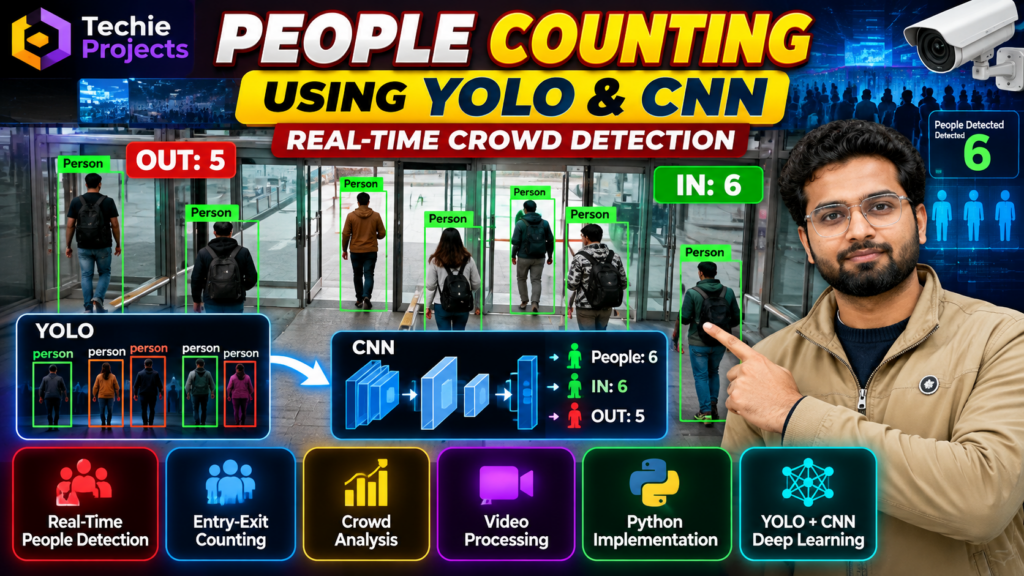
People counting using YOLO is an exciting computer vision project that helps detect and count people in images and video streams using artificial intelligence. This project is suitable for final-year B.Tech, B.E., computer science, artificial intelligence, and data science students who want to explore object detection, deep learning, and real-time video analytics.
The People Counting with YOLO and Crowd Counting Using CNN project demonstrates how computer vision techniques can identify people, track their movement, and estimate the number of individuals visible in a scene. It provides a practical way to understand how AI-based monitoring systems work in crowded public spaces, shopping malls, offices, campuses, and other environments.
At Techie Projects, we help engineering students explore practical Python, machine learning, and deep learning projects. If you are looking for a people counting project with implementation guidance, project customization, or source-code availability, contact us to discuss the options suitable for your academic requirements.
🎬 People Counting with YOLO – Project Demo Video
Watch the project demonstration to understand how the people counting system detects individuals in a video and displays the counting results. The demo helps you explore the project’s interface, object detection workflow, and practical use of computer vision.
The demonstration can also help you understand how a people counting application can be adapted for academic experiments and real-world scenarios.
🎯 What Is People Counting Using YOLO?
People counting using YOLO is a computer vision application that detects people in images or video frames and counts the detected individuals. YOLO, which stands for You Only Look Once, is an object detection approach designed to locate objects and classify them in images.
A typical implementation processes video frames, identifies people using a trained detection model, and displays bounding boxes around detected individuals. Depending on the implementation, it can also maintain counts across frames or track people moving through a defined entry or exit region.
Crowd counting using CNN is a related approach that uses convolutional neural networks to analyze visual information and estimate crowd size. Some systems detect and count individual people, while density-estimation systems predict crowd density in scenes where individuals are difficult to distinguish.
Both approaches are useful for learning about AI-based visual analysis, although their performance depends on the model, training data, camera angle, lighting, and crowd conditions.
🚀 Project Overview
This project combines computer vision and deep learning concepts to demonstrate how automated people counting can work.
Project name: People Counting with YOLO and Crowd Counting Using CNN
Project domain: Artificial Intelligence, Deep Learning, and Computer Vision
Programming language: Python
Core technology: YOLO-based object detection; CNN-based crowd estimation where implemented
Application type: Image and video analysis
Suitable for: B.Tech, B.E., CSE, AI, ML, Data Science, and related engineering courses
The exact features and model configuration depend on the selected project implementation. Contact Techie Projects to confirm the available code, model, interface, and customization options before purchasing.
💡 Objectives of the Project
The main objective is to demonstrate automated people detection and counting through computer vision.
Key objectives include:
- 🎯 Detect people in images or video frames.
- 🔢 Count the detected individuals in a scene.
- 📹 Process video input for visual monitoring.
- 🧠 Understand YOLO object detection and CNN concepts.
- 📊 Display detection results in a readable format.
- 🏙️ Explore practical applications of crowd monitoring.
- 🛠️ Provide a foundation for experimenting with customized computer vision features.
These objectives make the project useful for students who want to connect theoretical AI concepts with a working software application.
⚙️ How Does the People Counting Project Work?
The people counting using YOLO system combines person detection and video processing to estimate the number of people visible in a scene. This makes it a useful computer vision project for students exploring automated counting and AI-based video analytics.
1. 📥 Input Image or Video
The system receives visual input from a stored video, image, or supported camera source. The available input options depend on the implementation.
2. 🖼️ Frame Processing
For video input, the application reads frames and prepares them for processing. Resizing or other preprocessing may be performed according to the model’s requirements.
3. 🤖 Person Detection Using YOLO
The detection model analyzes each frame and identifies objects belonging to the person class. It returns detection locations and confidence scores.
4. 📦 Bounding Box Visualization
The application can draw bounding boxes around detected people. These visual indicators help users understand which individuals the model has identified.
5. 🔢 Counting Detected People
The system counts valid person detections in the processed frame. If tracking or entry-and-exit counting is included, additional logic can be used to reduce repeated counts as people move across frames.
6. 📊 Result Display
The processed output may display the detected people, bounding boxes, and count. The result can be used for project demonstrations, testing, and further analysis.
7. 🧪 Testing and Evaluation
The system should be tested on different scenes, including varying lighting, camera angles, crowd sizes, and partial occlusions. Evaluation helps identify cases where the detector misses people or counts incorrectly.
🌟 Key Features of the People Counting Project
One important advantage of people counting using YOLO is the ability to visualize detected individuals with bounding boxes. This helps students understand object detection results and evaluate how the model performs under different lighting and crowd conditions.
The available features depend on the specific version you choose. Typical features of a YOLO-based implementation include:
👥 Person Detection
Detects people visible in supported image or video input and marks their locations.
🔢 Automated Counting
Calculates the number of detected people in a processed frame. More advanced implementations may include tracking-based counting.
🎥 Video-Based Analysis
Processes video footage to demonstrate how computer vision can analyze a changing scene.
📦 Visual Detection Results
Displays bounding boxes and detection information to make the output easier to interpret.
🧠 Deep Learning Integration
Introduces students to object detection models and the broader concepts behind deep learning-based visual recognition.
🛠️ Customization Possibilities
Depending on the implementation, additional features may include entry-and-exit counters, line-crossing detection, graphical dashboards, saved results, or a camera-based monitoring interface. Confirm the required features before ordering.
🧰 Technologies Used
A typical implementation may use the following technologies:
- Python: Main programming language for application development.
- YOLO: Object detection model for identifying people in images and video.
- OpenCV: Image and video processing, frame handling, and visualization.
- CNN: Deep learning architecture that can support visual feature extraction or crowd-density estimation.
- NumPy: Numerical operations and array processing.
- PyTorch or another supported framework: Model execution and deep learning operations, depending on the selected implementation.
Not every version requires every library. The exact package versions and installation requirements should be confirmed against the supplied project files.
💻 Software and Hardware Requirements
Software Requirements
A typical development environment may include:
- Python 3
- Visual Studio Code, PyCharm, or another Python editor
- OpenCV
- The required YOLO model package and dependencies
- A compatible deep learning framework if required by the selected model
- Windows or another supported operating system
Hardware Requirements
- A computer capable of running the selected Python environment
- Sufficient RAM for video processing and model inference
- A webcam or sample video if live or video input is required
- A compatible GPU for faster processing when supported; a GPU is not necessarily mandatory for every implementation
Performance will vary depending on model size, hardware, input resolution, and software configuration.
🏙️ Applications of People Counting Technology
Businesses and institutions can explore people counting using YOLO to study visitor traffic and estimate occupancy in suitable environments. Actual results depend on camera placement, model performance, and scene complexity.
People counting systems can support a variety of monitoring and analytics applications.
🛍️ Shopping Malls and Retail Stores
Retail businesses can use people counting to estimate visitor traffic and study busy periods. Such information may support staffing and store-layout decisions.
🎓 Colleges and Educational Institutions
A demonstration system can help students explore visitor counting and occupancy-monitoring concepts in campus environments.
🚉 Railway Stations and Public Places
Crowd analytics may help estimate the number of people visible in monitored areas. Real-world deployment requires careful testing and suitable operational safeguards.
🏢 Offices and Commercial Buildings
People counting can support approximate occupancy analysis in entrances, corridors, and common areas.
🎪 Events and Exhibition Venues
Organizers may use people counting technologies to study visitor flow and estimate crowd sizes in appropriate settings.
🔬 Research and Academic Projects
Students can use this project to experiment with object detection, video analytics, tracking, and model evaluation.
📈 Advantages of the Project
The project offers several learning benefits:
- Practical exposure to Python and computer vision.
- Understanding of deep learning-based object detection.
- A visual demonstration suitable for project presentations.
- Opportunities to compare detection-based counting with CNN-based density estimation.
- Scope for customization and further experimentation.
- A foundation for exploring real-time video analytics.
Automated counting can reduce the need for manual observation in some workflows, but the reliability of the results must be measured before using them for operational decisions.
⚠️ Limitations and Challenges
Like other computer vision systems, people counting using YOLO can make mistakes.
Occlusion: People standing behind others may not be detected correctly.
Lighting: Poor lighting, shadows, or glare can affect detection.
Camera angle: Overhead, distant, or unusual viewpoints may reduce accuracy.
Crowded scenes: Closely packed individuals can be difficult to distinguish.
Repeated counts: A system without tracking may count the same person in multiple frames.
Processing speed: Performance depends on the model, resolution, and available hardware.
These limitations make testing and evaluation important parts of a good engineering project. The application should not be treated as a guaranteed source of accurate occupancy data without suitable validation.
🔮 Future Scope of the Project
Students can extend the project with additional functionality based on their objectives and available resources.
- 🚪 Entry and exit counting: Count people crossing a predefined line in each direction.
- 📹 Live camera integration: Process a supported webcam or surveillance video stream.
- 📊 Analytics dashboard: Visualize counts over time and summarize busy periods.
- 🧍 Multi-object tracking: Assign temporary tracking IDs to detected individuals to support movement analysis.
- ☁️ Web-based interface: Present supported results through a web dashboard.
- 🧠 Crowd-density estimation: Experiment with CNN-based approaches for dense scenes.
- 📈 Performance evaluation: Compare detection quality, counting error, and inference speed across test videos.
These are possible extensions, not guaranteed features of every project package.
🛒 Get the People Counting Project from Techie Projects
Looking for a practical computer vision project for your engineering studies? Techie Projects can help you explore available project options and discuss the implementation requirements.
The people counting using YOLO project is relevant to students interested in Python, artificial intelligence, machine learning, deep learning, and video analytics.
Contact us to discuss:
- 📁 Project source-code availability.
- ⚙️ Installation and execution requirements.
- 🧑💻 Implementation guidance and explanation.
- 🛠️ Customization requirements.
- 🎓 Academic demonstration and presentation needs.
- 💬 Pricing and delivery details.
Availability, included documentation, and customization scope should be confirmed before purchase.
🧑💻 Contact Us for Project Details
📲 Call/WhatsApp: +91-9460060699
🌎 Website: www.techieprojects.com
📺 Instagram: @pythonprojects_
Send us your course, project requirements, and preferred features. We can discuss a suitable option for your academic project.
🎓 Explore Related Projects
If you are interested in computer vision and AI, explore these related project ideas:
- Real-Time Object Detection Using YOLO
- Vehicle Detection and Counting System
- Face Recognition Attendance System
- Crowd Monitoring Using Computer Vision
- Accident Detection Using Deep Learning
- Human Activity Recognition Using Machine Learning
These topics offer opportunities to explore object detection, tracking, image processing, and video analysis. Check the Techie Projects website for available project pages and implementation options.
❓ Frequently Asked Questions
1. What is a people counting project?
A people counting project uses computer vision to detect individuals in images or videos and estimate how many people are present. More advanced versions can track movement and count entry or exit events.
2. What is YOLO used for in this project?
YOLO is used to detect people in video frames or images. The application can use its detections to calculate a count and visualize the results.
3. What is the difference between YOLO and CNN-based crowd counting?
YOLO-based systems typically detect individual people and count the detections. CNN-based crowd-density approaches can estimate crowd size from density patterns, which may be useful in very crowded scenes where individuals overlap.
4. Is this project suitable for final-year engineering students?
Yes. It is a relevant learning project for students in computer science, AI, machine learning, and data science, provided the implementation meets their course requirements.
5. Can the project work with a webcam?
Webcam support depends on the implementation and its configuration. Confirm that live camera input is included before purchasing if this feature is essential.
6. Can I customize the people counting project?
Potential extensions include entry-and-exit counting, object tracking, dashboard integration, and performance evaluation. The feasibility of each feature depends on the available code and project scope.
7. How can I purchase this project?
Contact Techie Projects through WhatsApp at https://wa.me/919460060699. Share your requirements to confirm availability, pricing, included files, and any customization options.
If you want to build a people counting using YOLO project for your final-year submission, contact Techie Projects to discuss source-code availability, implementation guidance, and customization options.
✅ Conclusion
People counting using YOLO is a useful educational project for exploring object detection, deep learning, and video analytics with Python. It demonstrates how a computer vision model can detect people, visualize the results, and estimate counts from supported visual input.
For students looking to develop their understanding of AI-based applications, this project offers a practical starting point with opportunities for further experimentation. Contact Techie Projects to discuss source-code availability, implementation guidance, and customization options for your final-year engineering project.