
Introduction
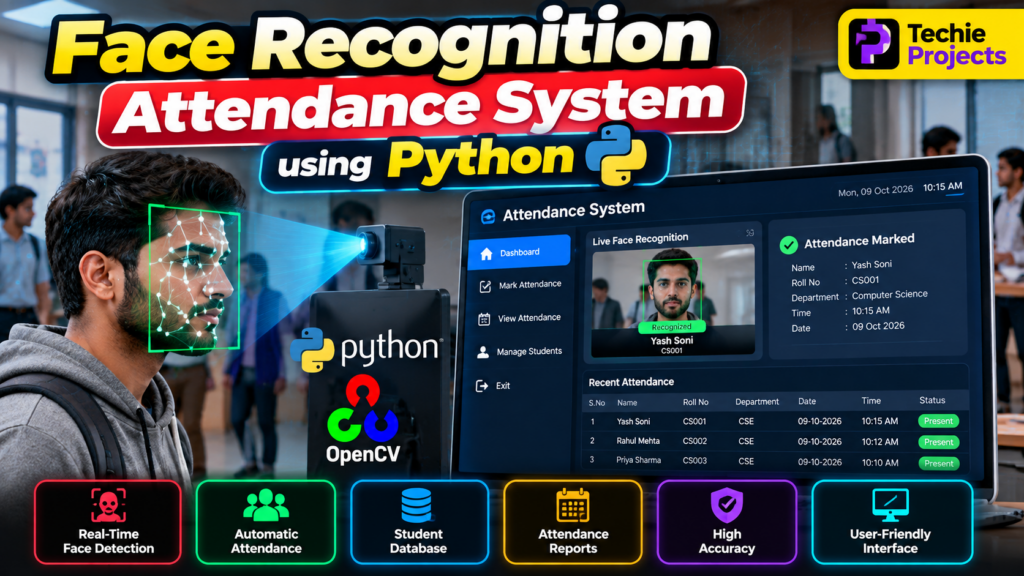
The Face Recognition Attendance System Using Python is a computer vision project that automates attendance recording by identifying registered individuals through facial images. Instead of manually marking attendance, the system captures a face through a camera, compares it with registered face data, and records attendance when a match is detected.
This project combines Python programming, OpenCV, face recognition techniques, and database management to demonstrate how automation can improve attendance workflows. It is suitable for B.Tech Computer Science students, final-year engineering projects, diploma students, and learners interested in Artificial Intelligence and Machine Learning.
Looking for a practical final-year project? Techie Projects provides project details, implementation guidance, and source-code options to help students understand and develop their projects.
🎬 Project Working Demo – Face Recognition Attendance System Using Python
Watch the complete working demonstration of the Face Recognition Attendance System Using Python to understand how the project works in real time.
In this project demo, you can see how the application processes camera input, detects faces, recognizes registered users, and records attendance.
What you’ll see in the project demo:
- 📸 Live face detection using a camera.
- 🧑 Face recognition for registered users.
- ✅ Automatic attendance marking after successful recognition.
- 📊 Attendance records with date and time.
- 💻 Project interface and final output.
▶️ Watch the Project Working Demo:
🎯 Objectives of the Project
The main objectives of the face recognition attendance system are:
- Automate attendance recording using facial recognition.
- Reduce repetitive manual attendance tasks.
- Identify registered individuals using a camera.
- Store attendance records with dates and timestamps.
- Generate attendance reports for review.
- Demonstrate Python-based computer vision in a practical application.
⭐ Key Features of the Face Recognition Attendance System
1. Face Detection
The system processes camera frames or images to locate faces. Face detection identifies where a face appears, while face recognition attempts to determine whether it belongs to a registered person.
2. Face Recognition
The recognition component compares detected facial information with enrolled records. Recognition performance depends on the selected model, image quality, lighting, camera position, and enrollment data.
3. Automatic Attendance Recording
When the system recognizes a registered person, it can record attendance along with the date and time. Duplicate-entry rules can help prevent multiple attendance records for the same session.
4. Student or Employee Database
The application can maintain registered user details and associated attendance records. Depending on the implementation, data may be stored in CSV files, SQLite, MySQL, or another database.
5. Attendance Reports
The system can display or export attendance records to help authorized users review daily attendance and maintain records.
6. User-Friendly Interface
A graphical interface can make it easier to register users, start face recognition, view attendance, and manage records.
⚙️ Technologies Used
The technologies depend on the project’s actual implementation. A typical Python-based system may use:
- Python: Core programming language.
- OpenCV: Image processing and camera access.
- Face recognition model or library: Facial feature extraction and matching.
- NumPy: Numerical operations on image and feature data.
- SQLite or MySQL: Optional storage for user and attendance records.
- Tkinter: Optional graphical user interface.
Only list libraries and tools that are actually included in your project.
🔄 How Does the System Work?
Step 1: Register Users
The administrator registers students or employees and captures suitable face images with their permission.
Step 2: Process Facial Images
The system detects faces and prepares the facial information required by the selected recognition method.
Step 3: Recognize Registered Faces
The captured face is compared with enrolled records. The system accepts a match only when it meets the configured recognition threshold.
Step 4: Record Attendance
After a successful match, the system records the person’s identifier, date, time, and attendance status.
Step 5: View Attendance Records
Authorized users can review saved attendance records and generate reports according to the features implemented in the application.
💻 Software Requirements
Typical software requirements may include:
- Python 3
- OpenCV
- NumPy
- A compatible face recognition library or model
- SQLite or MySQL, if database storage is used
- Tkinter, if a desktop interface is included
- Windows, Linux, or another supported operating system
Check the project’s installation instructions for the exact compatible versions.
🖥️ Hardware Requirements
- A laptop or desktop computer
- Webcam or compatible camera
- Sufficient RAM to run Python and the selected model
- Adequate storage for application files and attendance records
A dedicated GPU may be useful for some models but is not necessarily required for a basic implementation.
✅ Advantages of the Project
- Reduces manual attendance entry.
- Demonstrates practical Python and computer vision skills.
- Can maintain searchable digital attendance records.
- Provides an opportunity to integrate databases and graphical interfaces.
- Can be extended for classroom, office, or laboratory use.
⚠️ Limitations and Privacy Considerations
Recognition can be affected by poor lighting, camera quality, face angles, and changes in appearance. False matches and missed recognitions are also possible.
Facial data is sensitive personal information. A real deployment should obtain appropriate consent, protect stored data, restrict access, and provide a manual attendance alternative. The system should be tested for accuracy and fairness before being used for important attendance decisions.
🚀 Future Scope
The project can be extended with features such as:
- A web-based attendance dashboard.
- Daily, weekly, and monthly reports.
- Role-based administrator access.
- Email notifications for authorized users.
- Integration with an existing student management system.
- Secure database backups.
- Improved recognition models and presentation-attack safeguards.
These features should be presented as future enhancements unless they are already implemented.
🎓 Why Choose This as a Final-Year Project?
The Face Recognition Attendance System Using Python combines programming, image processing, data management, and application development in one practical project. It provides opportunities to demonstrate system design, implementation, testing, and documentation during a final-year project presentation.
Students should understand the code, test the implementation, document its limitations, and be prepared to explain the workflow during their project evaluation.
❓ Frequently Asked Questions
1. What is a face recognition attendance system?
It is an application that uses facial recognition to identify enrolled people and record attendance electronically.
2. Which programming language is used?
Python is commonly used, with libraries such as OpenCV and a compatible face recognition model.
3. Is this project suitable for B.Tech students?
Yes. It can be suitable for Computer Science and related engineering students, depending on the project scope and academic requirements.
4. Can the system store attendance in a database?
Yes. A suitable implementation can use SQLite, MySQL, or another database to store user details and attendance records.
5. Can I customize the project?
Customization depends on the selected project package and implementation. Possible extensions include reporting, database integration, a graphical interface, and a web dashboard.
6. Does face recognition always provide accurate results?
No. Accuracy depends on the model, image quality, lighting, camera placement, and other conditions. The system should be evaluated before practical deployment.
🔗 Explore Related Python Projects
Explore other project ideas from Techie Projects:
- Face Detection Using OpenCV Python
- Hand Gesture Recognition Using OpenCV Python
- Helmet and Number Plate Detection Using YOLO
- Exam Proctoring System using Python
- Smart Parking Management System Using Python
🎓 Looking for a Final-Year Project?
Need help selecting a suitable Python, Artificial Intelligence, Machine Learning, or Computer Vision project?
Techie Projects can help you explore project options and request details about source code, requirements, documentation, and implementation support.
- 📲 Call/WhatsApp: +91-9460060699
- 🌎 Website: www.techieprojects.com
- 📺 Instagram: @pythonprojects_
Contact us with your academic requirements to discuss project availability, included features, and support options before purchasing.
Conclusion
The Face Recognition Attendance System Using Python is a practical computer vision project that demonstrates how facial recognition can support automated attendance recording. By combining Python, image processing, recognition techniques, and data storage, students can explore an end-to-end application suitable for learning and project demonstrations.
Explore the available project options from Techie Projects to find an implementation that matches your requirements and academic goals.