Are you searching for a professional Task Management System Project for your college submission, final-year project, or web development portfolio? 🚀 Want to build a modern project management application with an interactive dashboard, task tracking, project analytics, AI-powered planning interface, and a professional user interface?
Get your complete Task Management System Project from Techie Projects! 🎓
Instead of spending weeks designing a dashboard, writing HTML and CSS, implementing JavaScript functionality, and developing every interface from scratch, you can explore our ready-to-use project solution. This project is designed for students who want practical exposure to modern web development and want to understand how a real-world task management application is structured.
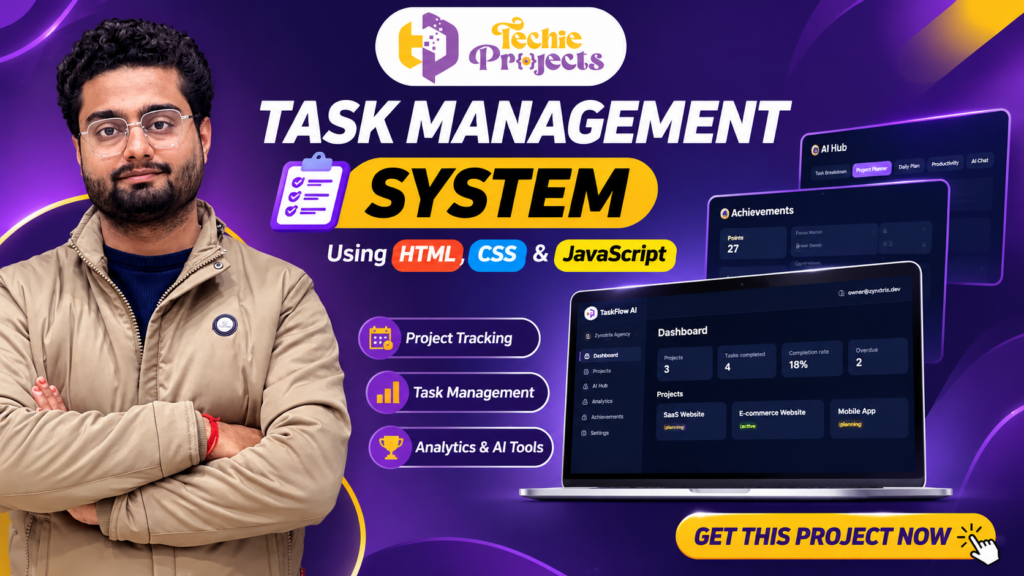
The Task Management System Project is developed using HTML, CSS, and JavaScript. It features a modern dashboard, project management interface, task progress tracking, analytics, achievements, and an AI Hub interface. It provides an excellent opportunity to understand how different sections of a web application work together.
Whether you are a B.Tech, BCA, MCA, B.Sc. Computer Science, or diploma student, this project can help you learn practical frontend development concepts while preparing your academic project demonstration.
🎯 Looking for the complete project with source code? Contact Techie Projects today to enquire about project availability, source code, demonstration, implementation guidance, and pricing.
📞 Contact Techie Projects for Project Enquiries
Want to get this Task Management System Project for your college submission?
- WhatsApp: +91-9460060699
- Website: www.techieprojects.com
- Instagram: @pythonprojects_
Our team can help you enquire about project availability, source code, project demonstrations, and technical details.
🎬 Watch the Task Management System Project Demo
Explore the working interface of this Task Management System Project through the project demonstration.
The demonstration showcases the dashboard, project management section, task progress overview, AI Hub, analytics, achievements, and login interface.
Watch how the different modules are organized and how the application presents project information through a modern dashboard.
📌 What Is a Task Management System Project?
A Task Management System is a web-based application designed to organize projects, manage tasks, monitor progress, and improve productivity.
In traditional task management, people often use notebooks, spreadsheets, or multiple applications to organize their daily activities. Managing several projects manually can become difficult, especially when multiple tasks have different priorities and deadlines.
A web-based task management application provides a centralized interface where users can organize project information, track tasks, and monitor completion progress.
This Task Management System Project demonstrates how HTML, CSS, and JavaScript can be used to develop a modern project management interface.
The application includes a dashboard that displays important project information, a dedicated project management section, task progress indicators, analytics, and additional productivity-related interfaces.
It is suitable for academic demonstrations and practical learning in frontend web development.
🚀 Key Features of the Task Management System Project
The project includes several useful modules that demonstrate different aspects of a modern task management application.
1. 📊 Interactive Dashboard
The dashboard provides an overview of important project activities.
It displays summary cards containing information such as:
- Total projects
- Completed tasks
- Overall completion rate
- Overdue tasks
- Recent projects
The dashboard allows users to understand the overall project status from one place.
A well-designed dashboard is an important component of a professional project management application because it presents important information in an organized format.
2. 📁 Project Management Module
The project management section provides a dedicated space for organizing different projects.
Users can view project cards containing project names, descriptions, and their current status.
The demonstrated interface includes sample projects such as:
- SaaS Website
- E-commerce Website
- Mobile App
Each project can be represented through a separate card with its status.
This module helps students understand how project information can be organized using reusable frontend components.
3. 📋 Task Tracking System
Task tracking is one of the most important components of a task management application.
The project interface provides a task overview with different status categories:
- Backlog
- To Do
- In Progress
- Testing
- Completed
These categories represent the different stages of task development.
Students can use this module to understand task organization and how progress information can be represented visually.
4. 📅 Calendar View
The project interface includes a calendar navigation option.
A calendar-based interface is useful for organizing tasks according to their planned dates and deadlines.
It provides an opportunity to understand how date-based task organization can be integrated into a web application.
5. 📈 Gantt Chart Interface
The Gantt section provides a project scheduling interface.
Gantt charts are commonly used in project management to represent tasks and their timelines.
This feature introduces students to the concept of visual project scheduling and task dependencies.
6. 🔄 Sprint Management
Sprint management is useful for understanding Agile project development.
The application includes a Sprints navigation option within the project interface.
This section introduces the concept of dividing project development into smaller work cycles.
It is particularly useful for students interested in software engineering and Agile development methodologies.
7. ✨ AI Hub Interface
One of the interesting parts of this project is its AI Hub interface.
The demonstrated interface includes multiple productivity-related options:
- Task Breakdown
- Project Planner
- Daily Plan
- Productivity
- Meeting Assistant
- AI Chat
The Project Planner interface includes a text area where users can describe their project requirements.
This provides an excellent demonstration of how AI-assisted productivity features can be organized inside a web application.
The availability of actual AI-generated responses depends on the implemented AI integration and backend configuration.
8. 🏆 Achievement System
The achievements section introduces gamification into the application.
The demonstrated interface displays:
- Total points
- Current level
- Current streak
- Longest streak
- Achievement badges
Examples of achievement categories include Focus Master, 30-Day Streak, Team Hero, Speed Demon, and Early Bird.
Gamification can make productivity applications more engaging by encouraging users to complete tasks and maintain consistent progress.
9. 📊 Analytics Dashboard
Analytics helps users understand project progress through visual summaries.
The project interface displays task status information using progress bars and summary cards.
Examples include:
- Total tasks
- Completed tasks
- Overdue tasks
- Completion percentage
- Task status breakdown
This module provides practical exposure to presenting numerical information through dashboard components.
10. 🔐 User Login Interface
The application also demonstrates a modern login screen.
The login interface contains:
- Email field
- Password field
- Login button
- Forgot password option
- Google login option
- GitHub login option
- Sign-up navigation
These elements help students understand the structure of authentication interfaces.
Actual authentication and third-party login functionality require appropriate backend and provider configuration.
🛠️ Technologies Used in This Project
The Task Management System Project uses three important frontend technologies.
HTML (HyperText Markup Language)
HTML provides the structural foundation of the web application.
It is used to organize:
- Dashboard sections
- Navigation menus
- Project cards
- Task lists
- Input fields
- Forms
- Buttons
- Content sections
HTML makes it possible to structure different components of the application.
CSS (Cascading Style Sheets)
CSS is responsible for the visual appearance and layout of the application.
It can be used to implement:
- Dark dashboard design
- Sidebar navigation
- Responsive layouts
- Dashboard cards
- Typography
- Buttons and icons
- Progress indicators
- Login page styling
The project uses a modern dark-themed interface that provides a professional appearance.
JavaScript
JavaScript adds interactivity to the application.
It can be used to implement:
- Navigation interactions
- Task management operations
- Dynamic dashboard updates
- Form validation
- Project status updates
- Progress calculations
- Interactive user interfaces
JavaScript is an essential technology for developing dynamic frontend applications.
💻 System Requirements
Before running the project, students should have a suitable development environment.
Recommended requirements include:
- Operating System: Windows 10/11, Linux, or macOS
- Code Editor: Visual Studio Code
- Browser: Google Chrome, Microsoft Edge, or Firefox
- Technologies: HTML, CSS, and JavaScript
- RAM: 4 GB or above recommended
- Internet Connection: Required for online resources or configured external integrations
These requirements are suitable for basic frontend development and testing.
📂 How to Run the Task Management System Project
Students can follow these general steps to understand and run the project.
Step 1: Get the Project Source Code
Obtain the project source code and associated files from Techie Projects after confirming the available package.
Step 2: Extract the Project Files
If the project is supplied in ZIP format, extract it into a folder on your computer.
Step 3: Open Visual Studio Code
Install and open Visual Studio Code.
Select the extracted project folder using the Open Folder option.
Step 4: Review the Project Structure
Explore the available HTML, CSS, and JavaScript files.
Understand how different components are organized and connected.
Step 5: Configure Dependencies
If the supplied version includes additional dependencies or integrations, follow the provided installation instructions.
Step 6: Run the Application
Start the application using the instructions provided with the project package.
For a simple static HTML implementation, you can open the main HTML file in a browser. If the supplied version uses a development server, follow its specific startup command.
Step 7: Explore the Application
Navigate through the available sections:
- Dashboard
- Projects
- Analytics
- AI Hub
- Achievements
- Settings
Explore the different interfaces and understand how the application is organized.
🎓 Why Is This Project Useful for College Students?
A practical web development project is an excellent way to apply theoretical knowledge.
The Task Management System Project can help students understand several important concepts.
1. Practical Web Development Experience
Students can understand how HTML, CSS, and JavaScript work together to create a complete web application interface.
2. Final-Year Project Preparation
The application offers multiple modules that can be discussed during academic project demonstrations.
3. Improved Programming Knowledge
Students can explore how frontend components, forms, layouts, and interactive elements are organized.
4. Better Portfolio Development
A project management application can be a useful addition to a beginner’s web development portfolio.
5. Understanding Real-World Applications
Project dashboards, task tracking, analytics, and user interfaces are common concepts in professional software applications.
6. Viva and Presentation Preparation
Students can study the project modules and prepare explanations about the technologies, interface design, application workflow, and implementation.
🏫 Who Can Use This Project?
This project can be useful for students pursuing:
- B.Tech Computer Science Engineering
- B.Tech Information Technology
- BCA
- MCA
- B.Sc. Computer Science
- Diploma in Computer Engineering
- Software Development Courses
- Web Development Training Programs
It is suitable for beginners who want to explore frontend development and intermediate students who want to understand a multi-section web application.
⭐ Why Choose Techie Projects?
Choosing an appropriate college project is an important part of academic preparation.
At Techie Projects, our goal is to help engineering and computer science students explore practical project ideas and understand modern technologies.
When you enquire about this Task Management System Project, you can discuss the following:
- Project source code availability
- Project functionality and modules
- Technology requirements
- Project demonstration
- Installation and execution instructions
- Customization possibilities
- Project pricing
- Technical guidance options
Our project offerings cover multiple domains, including Python, Machine Learning, Artificial Intelligence, Deep Learning, IoT, Data Science, and Web Development.
Instead of selecting a project only because of its title, understand its functionality and choose a solution that matches your academic requirements.
💰 Get This Task Management System Project Now!
Are you ready to work on a professional web development project?
If you need a Task Management System Project for your final-year submission, college demonstration, or practical learning, Techie Projects can help you explore the available project package.
Get in touch with our team to enquire about:
- Complete project source code
- Project demonstration
- Installation guidance
- Technical specifications
- Customization options
- Pricing and availability
🎯 Don’t waste your valuable project preparation time starting everything from scratch. Explore this project and take the next step in your web development journey!
📲 Enquire Now on WhatsApp: https://wa.me/919460060699
🌐 Visit: www.techieprojects.com
❓ Frequently Asked Questions (FAQs)
1. What is a Task Management System Project?
A Task Management System Project is a web application designed to organize projects, manage tasks, monitor progress, and display productivity information through a centralized dashboard.
2. Which technologies are used in this project?
The project is based on HTML, CSS, and JavaScript for frontend development.
3. Is this project suitable for final-year students?
Yes. It can be explored by B.Tech, BCA, MCA, and other computer science students for academic learning and project demonstrations, subject to their college requirements.
4. Does the project include a dashboard?
Yes. The demonstrated interface includes a dashboard with project summaries, completed tasks, completion rate, and overdue task information.
5. Does this project include an AI Hub?
Yes. The demonstrated interface includes an AI Hub with options such as Task Breakdown, Project Planner, Daily Plan, Productivity, Meeting Assistant, and AI Chat. Actual AI functionality depends on the configured implementation.
6. Can beginners understand this project?
Yes. Students with basic HTML, CSS, and JavaScript knowledge can use the project as a learning resource and explore its different components.
7. Can I get the complete source code?
You can contact Techie Projects to enquire about the complete source code package, included modules, and availability.
8. How can I purchase this project?
Contact Techie Projects through WhatsApp at +91-9460060699 or visit www.techieprojects.com to enquire about pricing and project availability.
💡 Recommended Projects
Looking for more web development and computer science projects? Explore other project ideas from Techie Projects.
- Intrusion Detection System Using Machine Learning
- AI Exam Proctoring System Using Python
- Accident Detection and Alert System Using AI
- Vehicle Detection and Counting Using Python
- Brain Tumor Detection Using Deep Learning
- Helmet and Number Plate Detection Using AI
- AI-Based Smart Waste Segregation System
- IoT-Based Smart Home Automation System
Explore more engineering and computer science projects at www.techieprojects.com.
🎯 Conclusion
The Task Management System Project using HTML, CSS, and JavaScript is a useful practical learning opportunity for students interested in web development and modern productivity applications.
With its dashboard, project management interface, task status overview, calendar and sprint navigation, AI Hub, achievements, analytics, and login interface, the project demonstrates how multiple application modules can be organized into one professional-looking web application.
For B.Tech, BCA, MCA, and final-year engineering students, it can serve as a valuable starting point for understanding frontend development and preparing academic demonstrations.
If you are looking for a Task Management System Project with source code and project guidance, contact Techie Projects today.
🚀 Get Your Project. Learn New Technologies. Build Your Future!
Techie Projects – Your Destination for Engineering and Computer Science Projects.