
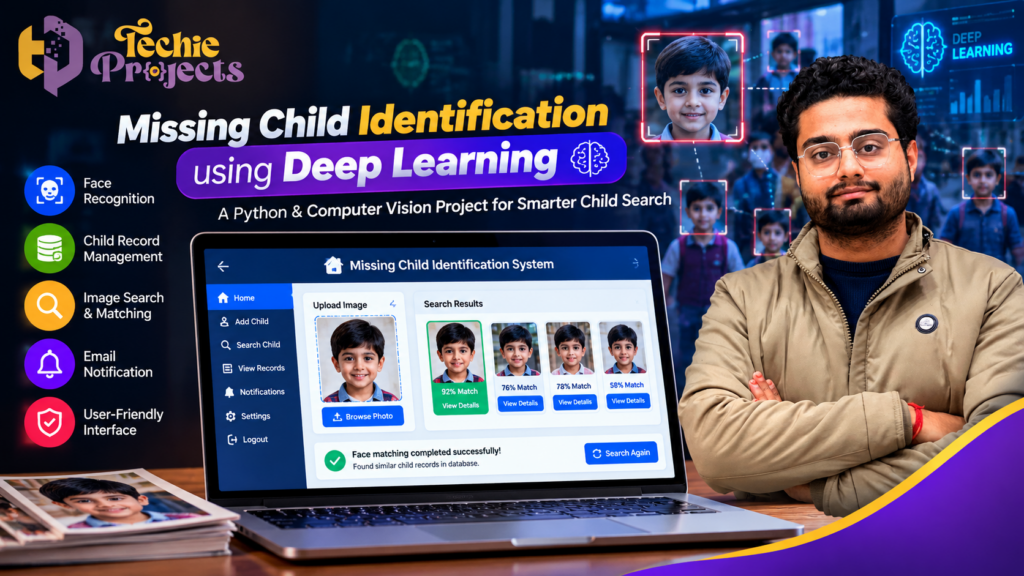
Finding and identifying missing children is a serious challenge that can require extensive manual investigation, searching through photographs, and comparing available information. The Missing Child Identification Using Deep Learning project demonstrates how artificial intelligence and face recognition techniques can help organize child records and support the process of matching a searched photograph with registered records. 🎓
If you are a B.Tech, B.E., MCA, M.Tech, or computer science student looking for an AI-based final year project, Techie Projects can help you explore this practical computer vision solution. Enquire about the project source code, installation guidance, documentation, and technical support options to understand whether this project matches your academic requirements.
📲 Contact Techie Projects
- WhatsApp: Enquire about the Missing Child Identification Using Deep Learning project
- Website: https://techieprojects.com/
- Instagram: Techie Projects
- Contact number: +91 94600 60699
🎬 Missing Child Identification Using Deep Learning – Project Demo
The project demonstration introduces the application’s interface and explains how child records can be managed and how a search process can be initiated. Watching the demonstration can help students understand the project’s workflow before enquiring about the complete project package.
The system illustrates how image-based identification can be incorporated into a desktop application using Python and computer vision concepts. Actual identification accuracy depends on the model, image quality, available records, and testing conditions.
📌 What Is Missing Child Identification Using Deep Learning?
Missing Child Identification Using Deep Learning is an artificial intelligence project designed to demonstrate how facial image analysis can assist in searching for a possible match within a collection of registered child records.
Traditional record searches may involve reviewing photographs and personal information individually. A computer vision-based system can help automate parts of this process by extracting facial features from images and comparing them with stored records.
The project combines programming, image processing, database operations, and a graphical user interface. It is suitable for students who want to explore a practical application of AI and deep learning while developing an understanding of how image-based search systems work.
Important: A potential facial match is not proof of identity. Any real-world use involving missing children requires authorized records, strong privacy safeguards, human verification, and appropriate involvement from responsible authorities.
🎯 Objectives of the Project
The main objective is to demonstrate a technology-assisted workflow for managing child records and searching for possible facial matches.
Key objectives include:
- 🧠 Demonstrating the use of deep learning and facial recognition concepts.
- 🖼️ Allowing users to work with child photographs.
- 🗂️ Organizing relevant records in a structured database.
- 🔍 Supporting image-based searches against registered records.
- 🖥️ Providing a graphical interface for interacting with the system.
- 📧 Demonstrating how a notification workflow could be integrated.
- 🎓 Helping students understand a complete AI-based application.
The project is intended for academic demonstration and learning. It should not be treated as a verified operational missing-child identification service.
⚙️ How Does the System Work?
The general workflow can be divided into several stages.
1. 👤 Child Record Registration
An authorized user can enter the information required by the application and register a photograph. Depending on the implementation, the form may contain a name, age, contact details, and other relevant information.
Access to such records should be restricted. Real deployments must obtain appropriate authorization and follow applicable privacy and child-protection requirements.
2. 🖼️ Image Selection
The user selects a photograph for a search. Image quality can affect the outcome, particularly when the photograph is blurry, poorly lit, outdated, or captured from an unusual angle.
A responsible system should communicate these limitations rather than presenting every result as reliable.
3. 🧠 Facial Feature Analysis
A facial recognition model processes the selected image and represents relevant facial characteristics in a numerical form. These representations can then be compared with those associated with registered photographs.
The specific model and matching approach depend on the implementation supplied with the project.
4. 🔎 Searching Registered Records
The application compares the search representation against available records and may return possible matches according to its matching method or threshold.
A result should be treated as a lead requiring further investigation, not as a confirmed identification. Poor-quality images, changes in appearance, and model limitations can cause false matches or missed matches.
5. 📋 Displaying Potential Results
The interface can display the information associated with a possible match so that an authorized reviewer can inspect the result. The exact fields and interface depend on the implementation.
6. 📧 Notification Workflow
An email or notification feature may be incorporated where supported by the project. Notifications should avoid exposing sensitive personal information unnecessarily and should only be sent to authorized recipients.
✨ Key Features of the Project
The following features describe the main capabilities that can be demonstrated or explored in this type of application. Confirm the exact functionality available in the project package before purchasing.
🖥️ Graphical User Interface
A desktop interface allows users to interact with the application without entering every command manually. Buttons, input fields, and result screens make the workflow easier to demonstrate during a project presentation.
📝 Record Management
The application can demonstrate how child records are entered and retrieved. Structured records make it easier to organize photographs and associated information than relying on unstructured files alone.
🔍 Image-Based Search
Image-based search is the central concept of the project. It demonstrates how a computer vision model can compare a selected photograph with stored facial representations.
🧠 Deep Learning Integration
The project introduces students to the role of trained models in extracting facial features and comparing images. It also provides an opportunity to study the limitations of model-based decisions.
🗄️ Database Integration
A database can be used to store records and retrieve relevant information during the search process. Students can examine how the interface, database, and image-processing components work together.
📧 Notification Support
Where implemented, a notification mechanism can demonstrate how the application communicates a potential result to an authorized recipient. Notifications should clearly state that a match is unverified.
🧪 Testing and Evaluation
The project can be used to study the effects of image quality, lighting, facial angles, and model thresholds on search results. Testing should include both successful and unsuccessful comparisons.
🔍 How Missing Child Identification Using Deep Learning Works
Missing Child Identification Using Deep Learning uses face recognition and image-processing techniques to compare an uploaded child photograph with images stored in a database. The system extracts facial features, calculates similarity scores, and displays potential matches to help users review relevant records.
The project can include child registration, image upload, database management, facial matching, search results, and email notifications. These features make the application a useful computer vision project for students exploring practical deep learning applications.
🚀 Key Features of Missing Child Identification Using Deep Learning
The Missing Child Identification Using Deep Learning project demonstrates how AI can support image-based searching and record management.
- Face Recognition: Analyze facial features and compare photographs.
- Image Search: Upload an image and retrieve potentially similar records.
- Child Record Management: Store and manage authorized records in a database.
- Match Results: Display similarity scores for further review.
- Email Notifications: Notify authorized users when the configured workflow identifies a potential match.
- User-Friendly Interface: Provide simple options for adding records and searching images.
These features can help students understand how deep learning, Python, and computer vision work together in a real-world-inspired application.
🎓 Why Choose This Deep Learning Project?
Missing Child Identification Using Deep Learning is a relevant academic project for computer science and AI students who want to demonstrate image processing, facial recognition, database integration, and application development.
At Techie Projects, you can enquire about project source code, setup guidance, documentation, and technical details. Contact us to confirm the available package and features before purchasing.
Important: Facial similarity is not proof of identity. Any real-world use requires appropriate privacy safeguards, authorized data access, human verification, and involvement of relevant authorities.
🛠️ Technologies Used
The following technologies are relevant to this category of project. The exact libraries and versions should be checked against the supplied source code.
🐍 Python
Python provides the main programming environment for building the application’s workflow, connecting libraries, handling records, and integrating the user interface.
👁️ Computer Vision
Computer vision techniques allow a program to process images and extract useful visual information. They are an important part of image-based search applications.
🧠 Deep Learning and Face Recognition
A suitable trained model can generate facial representations that are compared to find potential similarities. Model selection, threshold calibration, and evaluation are essential to understanding the system’s reliability.
🗃️ Database Technology
A database stores structured records and helps the application retrieve information associated with a potential match. The database technology used will depend on the project implementation.
🖥️ GUI Framework
A Python GUI framework, such as Tkinter if used in the supplied code, can provide forms, buttons, image previews, and result screens.
📧 Email Integration
An email library or notification service may be used if this functionality is included in the implementation.
🎓 Why Choose This Project for Your Final Year?
Missing Child Identification Using Deep Learning brings together multiple computer science concepts in one project. Students can learn about Python programming, image processing, databases, model integration, user-interface development, and software testing.
It can also provide a strong starting point for a presentation about responsible AI, biometric privacy, and the importance of human oversight when automated systems support sensitive decisions.
💡 Learning Opportunities
By studying the source code, students can explore:
- How data moves between the interface and backend.
- How image inputs are prepared for a model.
- How facial representations are compared.
- How records are stored and retrieved.
- How errors and invalid inputs should be handled.
- How testing can measure system performance.
- Why privacy and fairness matter in facial recognition.
These concepts are relevant to computer science, artificial intelligence, machine learning, and computer vision coursework.
📦 What Should You Check Before Purchasing?
Before ordering the Missing Child Identification Using Deep Learning project from Techie Projects, contact the team to confirm the package contents and compatibility with your requirements.
Depending on the selected package, ask whether it includes:
- Python source code.
- Project installation instructions.
- A list of software dependencies.
- Project documentation or a report.
- A system workflow or architecture explanation.
- A demonstration video.
- Technical guidance for running the application.
- Support for understanding the major code modules.
Availability may vary by package. Confirm the final deliverables, price, delivery method, and support terms before making payment.
🛒 Get the Project Details
Want to use this project as a learning resource for your final year? Contact Techie Projects to discuss the available source code package and the documentation or installation support you need.
📲 Call/WhatsApp: +91-9460060699
Mention “Missing Child Identification Using Deep Learning” in your enquiry so the team can identify the project you are asking about.
💻 System Requirements
The requirements depend on the model and libraries used in the source code. A typical Python desktop application may require the following:
Software Requirements
- Programming language: Python.
- Operating system: Windows or another supported operating system.
- Required Python packages: as specified in the project’s dependency list.
- Database: according to the supplied implementation.
- GUI framework: according to the source code.
- Computer vision or deep learning libraries: compatible versions specified by the project.
Hardware Requirements
- A compatible laptop or desktop computer.
- Sufficient RAM to run Python and the required libraries.
- Adequate storage for the source code, dependencies, and image records.
- A GPU only if required by the model or chosen configuration.
Check the actual dependency versions and hardware requirements before installation. Deep learning libraries may have specific operating-system, Python-version, or hardware compatibility constraints.
🧪 Testing and Evaluation
Testing is important because an image recognition result can be affected by many variables. For an academic demonstration, the application should be evaluated using appropriately authorized images and controlled test cases.
Suggested Test Cases
1. Valid image input: Check whether the application accepts an image in a supported format.
2. Invalid image input: Verify that unsupported or corrupted files are handled without crashing.
3. Registered record search: Check whether the application can retrieve records and perform its intended comparison.
4. No possible match: Confirm that the system handles cases where no result meets the matching threshold.
5. Image quality variation: Test how lighting, blur, image resolution, and viewing angle affect results.
6. Database operations: Verify that records can be stored and retrieved as expected.
7. Notification behaviour: If notifications are implemented, test that they go only to the intended authorized recipient.
A meaningful evaluation should report measured results from actual tests rather than assuming that the model is perfectly accurate. Students can document limitations and explain how false positives and false negatives affect the application.
🔐 Privacy, Security, and Responsible Use
Photographs and facial representations are sensitive information, especially when children are involved. Any practical deployment requires careful planning beyond writing the code.
Important safeguards include restricting access to authorized users, protecting stored records, minimizing unnecessary data collection, using secure communication, and establishing appropriate retention and deletion procedures.
Images should only be used with suitable authorization. The application should not be used to identify, track, or disclose information about a child without lawful authority. Any possible match must be independently verified by appropriately trained people and responsible authorities.
For an academic project, use appropriately authorized test data and explain these safeguards in the report and presentation.
🚀 Possible Future Enhancements
Students may explore the following ideas as future development work, subject to authorization and responsible data handling:
- Improved image preprocessing: Study how resizing and image-quality checks affect model input.
- Access control: Add secure authentication for authorized users.
- Audit logs: Record access to sensitive information for accountability.
- Secure storage: Improve protection for records and associated files.
- Performance evaluation: Compare suitable models using a carefully designed test set.
- Better error handling: Provide clear messages for invalid files and failed searches.
- Usability improvements: Make the interface easier for authorized reviewers to navigate.
- Privacy controls: Add retention policies and appropriate record deletion workflows.
These enhancements can help students demonstrate software engineering skills while considering the risks of biometric systems.
❓ Frequently Asked Questions
1. What is Missing Child Identification Using Deep Learning?
It is an AI-based project that demonstrates how facial image analysis can help search for possible matches among registered records. It is a learning and demonstration system, not proof of a person’s identity.
2. Which programming language is used?
Python is commonly used for this type of project. The exact libraries and framework depend on the supplied implementation.
3. Is this project suitable for B.Tech and computer science students?
It can be suitable for students studying computer science, artificial intelligence, machine learning, or computer vision, depending on their syllabus and project requirements.
4. Can I purchase the source code?
You can contact Techie Projects to ask about the available source code package, documentation, installation instructions, pricing, and technical support terms.
5. Does the project include documentation?
Documentation availability depends on the package. Confirm the report format, installation guide, and other deliverables with Techie Projects before purchasing.
6. Does facial recognition always identify the correct person?
No. Facial recognition systems can produce false matches or fail to find a genuine match. Results depend on image quality, model performance, and other factors and must be independently verified.
7. Can I run the project on my laptop?
That depends on your operating system, Python version, hardware, and the project’s dependencies. Check the installation requirements before setting up the application.
8. Can I modify the project for academic learning?
You can ask Techie Projects about the permitted use and modification terms of the package. Follow your institution’s academic-integrity policy and clearly explain your own work.
🎓 Explore Related Projects
- Face Recognition Attendance System – Automate attendance using face detection and recognition.
- Human Detection Using Deep Learning – Detect people in images and video streams.
- Object Detection Using YOLO – Detect and classify objects in real time.
- Image Classification Using CNN – Classify images using convolutional neural networks.
- Real-Time CCTV Surveillance System Using AI – Analyze video footage for monitoring and security.
- Crime Detection Using Machine Learning – Explore an AI-based approach to identifying suspicious activity.
📞 Contact Techie Projects to Enquire
If you are looking for a practical AI and computer vision project for your academic learning, the Missing Child Identification Using Deep Learning project is worth exploring.
Contact Techie Projects to confirm the available package, source code, documentation, installation process, and support options before ordering.
- 📲 Call/WhatsApp: +91-9460060699
- 🌎 Website: www.techieprojects.com
- 📺 Instagram: @pythonprojects_
Explore the project, understand its technical requirements, and choose a package that suits your academic needs. Use the system responsibly and treat every automated result as a potential match requiring human verification.