The Black and White Image Colorization Using GAN project demonstrates how artificial intelligence can transform grayscale photographs into visually appealing colored images using advanced deep learning techniques.
Are you looking for an advanced Artificial Intelligence project that combines Deep Learning, Image Processing, and Generative Adversarial Networks? Black and White Image Colorization Using GAN is an excellent project for students who want to explore how AI can automatically transform grayscale images into realistic colored images.
This project uses a powerful deep learning approach to predict suitable colors for black-and-white photographs. Instead of manually editing every image, the trained model learns color patterns from image datasets and generates color information automatically.
🎓 Get this Black and White Image Colorization Using GAN project from Techie Projects and explore a practical implementation of Generative Adversarial Networks, U-Net architecture, PatchGAN discriminator, Python, and Deep Learning.
📞 Contact Techie Projects for Project Enquiries
Looking for the complete project implementation, source code, or project assistance? Contact Techie Projects to discuss project availability, pricing, and deliverables.
- 🌐 Website: www.techieprojects.com
- 📸 Instagram: Techie Projects
- 📩 Project Enquiries: Contact Techie Projects on WhatsApp
🎬 Watch the Black and White Image Colorization Using GAN Project Demo
Explore the working demonstration of the project and understand how the system converts an original grayscale photograph into a colorized image.
The demonstration showcases the following functionality:
- Uploading a black-and-white image.
- Processing the uploaded image using a trained deep learning model.
- Generating color information through the GAN architecture.
- Displaying the original and colorized images.
- Downloading the generated color image.
- Uploading another image for colorization.
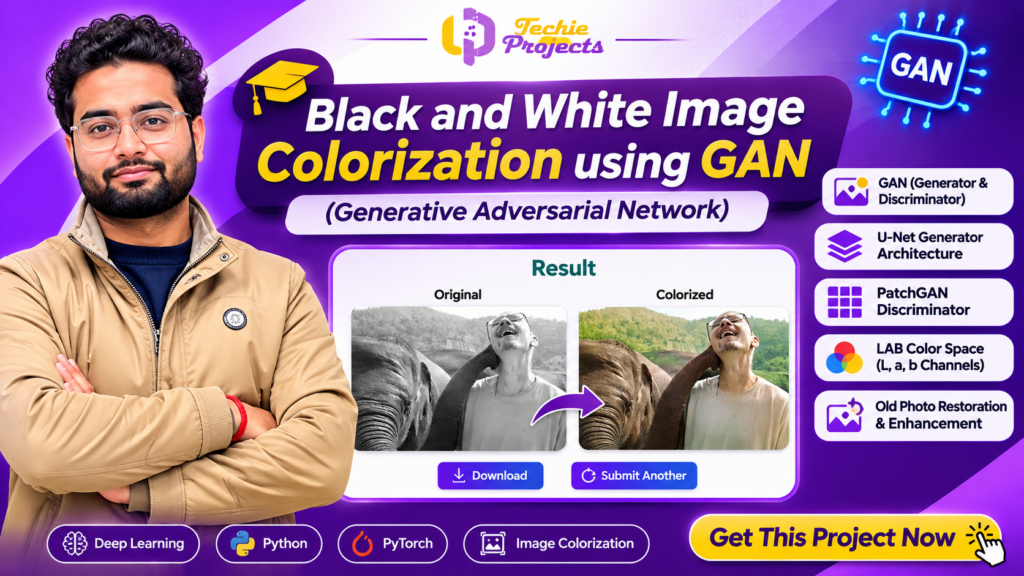
The result interface displays the original image and its AI-generated color version side by side, making it easy to compare the output.
📌 Introduction to Black and White Image Colorization Using GAN
Black-and-white photographs preserve important visual memories, historical events, and valuable information. However, grayscale images do not contain the original color information, which makes them visually different from modern photographs.
Traditional photo colorization requires manual editing and professional image-processing skills. The process can be time-consuming, especially when dealing with large collections of photographs.
Artificial Intelligence provides a more automated approach to this problem.
Black and White Image Colorization Using GAN is an AI and Deep Learning-based application that automatically predicts appropriate colors for grayscale images.
The project uses a Generative Adversarial Network (GAN) architecture consisting of two major neural networks:
- Generator Network
- Discriminator Network
The generator predicts color information from grayscale images, while the discriminator evaluates whether the generated color images look realistic.
The system uses LAB color space to separate image brightness from color information. The L channel represents lightness, while the a and b channels represent color information.
The model predicts the a and b channels and combines them with the original L channel to reconstruct a color image.
The architecture of Black and White Image Colorization Using GAN combines a U-Net-based generator and a PatchGAN discriminator to produce realistic color predictions while preserving important image details.
This approach makes the project useful for understanding modern AI-based image generation and restoration techniques.
🎯 Objectives of the Project
The main objective of this project is to develop an intelligent image-colorization system using Generative Adversarial Networks.
The important objectives include:
- Automatically converting black-and-white images into colored images.
- Applying Deep Learning techniques to image processing.
- Implementing GAN architecture for image generation.
- Using U-Net as the generator architecture.
- Using PatchGAN as the discriminator architecture.
- Understanding LAB color space conversion.
- Preserving image structure and brightness information.
- Generating realistic color predictions.
- Developing a user-friendly web application for image colorization.
- Allowing users to download the generated images.
The project also helps students understand how different neural network components work together to solve a real-world computer vision problem.
🧠 Technologies Used in Black and White Image Colorization Using GAN
The project combines Python programming, image processing, and deep learning technologies.
The major technologies and concepts include:
1. Python
Python is the primary programming language used for implementing the project. It provides libraries and frameworks for image processing, numerical computation, and deep learning.
2. Deep Learning
Deep Learning is used to train neural networks that learn complex patterns from image datasets. The model learns the relationship between grayscale image information and corresponding color information.
3. Generative Adversarial Network (GAN)
GAN is the main architecture used in this project. It consists of a generator and discriminator that work together during training.
4. U-Net Architecture
U-Net is used as the generator network. It extracts image features and reconstructs color information while using skip connections to preserve important image details.
5. PatchGAN Architecture
PatchGAN is used as the discriminator. It evaluates local image patches to determine whether generated color information appears realistic.
6. LAB Color Space
LAB color space separates lightness from color information, allowing the model to predict colors while retaining the original image brightness.
7. Flask Web Framework
Flask provides the web application interface through which users can upload grayscale images and view the colorized results.
⚙️ How Does Black and White Image Colorization Using GAN Work?
The complete project follows a sequence of image-processing and deep learning operations.
1. Input Image
The process begins when a user uploads a black-and-white image.
The input image contains grayscale information that represents different brightness levels.
The system accepts the uploaded image and prepares it for model processing.
2. Image Preprocessing
The uploaded image undergoes preprocessing before being passed to the neural network.
The preprocessing steps include:
- Loading the image.
- Resizing and cropping the image to 256 × 256 pixels.
- Converting RGB images into LAB color space.
- Normalizing pixel values to the required range.
- Separating the L channel from the a and b channels.
The L channel is used as the model input, while the a and b channels provide the target color information during training.
3. Generator Network (U-Net)
The generator is responsible for predicting the color information of the grayscale image.
This project uses U-Net architecture, which contains an encoder and decoder structure.
Encoder:
The encoder extracts important visual features from the input image. It gradually reduces spatial dimensions while learning image patterns.
Decoder:
The decoder reconstructs the output and predicts color information.
Skip Connections:
Skip connections transfer useful features from encoder layers to corresponding decoder layers. This helps preserve image details during reconstruction.
The generator produces two output channels representing the predicted a and b color information.
4. Discriminator Network (PatchGAN)
The discriminator evaluates the generated color images.
This project uses PatchGAN architecture, which examines smaller patches of an image rather than evaluating only the entire image as a single unit.
Its main responsibilities include:
- Examining local image regions.
- Evaluating generated color patterns.
- Distinguishing realistic image patches from generated ones.
- Providing feedback to improve the generator.
The discriminator helps the generator learn to produce more realistic colorized images.
5. Loss Function
Loss functions guide the training process and help both networks improve.
The project uses two important loss components.
GAN Loss:
GAN loss encourages the generator to produce colorized images that can appear realistic to the discriminator.
L1 Loss:
L1 loss measures the difference between predicted color information and the ground-truth color information.
The final generator loss is calculated using:
Generator Loss = GAN Loss + λ × L1 Loss
In the provided workflow, λ is set to 100.
This combination balances realistic image generation with similarity to the original target colors.
6. Model Training
During training, the generator and discriminator work together.
The training process follows these steps:
- The generator receives a grayscale image.
- It predicts the corresponding color information.
- The real and generated images are prepared for discriminator evaluation.
- The discriminator learns to distinguish real and generated image patches.
- The generator is updated to improve its predictions.
- GAN loss and L1 loss guide the learning process.
- Sample results and model checkpoints are saved periodically.
Over multiple training iterations, the generator learns to predict more suitable colors for grayscale images.
7. Image Colorization During Testing
After training, the generator can be used to colorize new grayscale images.
The inference process includes:
- Uploading or selecting a grayscale image.
- Resizing the image to the required dimensions.
- Converting the image into LAB color space.
- Extracting and normalizing the L channel.
- Passing the L channel through the trained generator.
- Predicting the a and b channels.
- Combining the original L channel with predicted color channels.
- Converting the resulting LAB image back into RGB format.
The final output is a colorized image that can be displayed or saved.
🌐 Web Application Workflow
The Black and White Image Colorization Using GAN technology can be explored in historical photograph restoration, digital media processing, creative applications, and image enhancement research.
An important feature of this project is its Flask-based web interface.
The application provides a simple way for users to interact with the trained GAN model without manually executing individual image-processing operations.
The web application follows this workflow:
Step 1: Upload Image
The user selects and uploads a black-and-white photograph through the web interface.
Step 2: Image Processing
The Flask application receives the uploaded image and performs the required preprocessing operations.
Step 3: Model Prediction
The preprocessed image is passed to the trained generator model.
Step 4: Color Image Generation
The generator predicts color information and produces the colorized image.
Step 5: Display Results
The application displays two images:
- Original: The uploaded grayscale photograph.
- Colorized: The AI-generated color photograph.
Step 6: Download Result
The user can download the generated colorized image using the Download button.
Step 7: Submit Another Image
The Submit Another button allows the user to process another grayscale photograph.
✨ Key Features of the Project
The major features of Black and White Image Colorization Using GAN include:
1. AI-Based Automatic Colorization
The system automatically predicts image colors using a trained deep learning model.
2. GAN-Based Architecture
The project implements generator and discriminator networks to improve generated image quality.
3. U-Net Generator
U-Net architecture extracts image features and uses skip connections to preserve important visual details.
4. PatchGAN Discriminator
PatchGAN evaluates local image regions to encourage realistic color generation.
5. LAB Color Space Processing
LAB color space separates lightness and color information, making the colorization process easier to structure.
6. Image Comparison
The application displays the original and colorized images side by side.
7. Download Functionality
Users can download the generated colorized photograph.
8. Flask-Based Interface
The web application provides a convenient interface for uploading and processing images.
9. Multiple Image Processing
Users can submit another image after completing the previous colorization operation.
📸 Output of Black and White Image Colorization Using GAN
The project generates a colorized version of the original grayscale image.
The output interface contains two sections:
Original Image: Displays the uploaded black-and-white photograph.
Colorized Image: Displays the photograph after processing through the trained GAN generator.
The provided demonstration shows a grayscale photograph of a person standing beside an elephant. The application generates a colorized version of the same scene.
The results can be compared visually to understand how the model predicts colors for different image regions.
The system also provides Download and Submit Another options for convenient usage.
It is important to understand that AI-generated colors are predictions. The model does not recover the exact historical colors of an original photograph unless reliable color references are available. Results depend on training data, model architecture, and image quality.
🎓 Applications of GAN-Based Image Colorization
The Black and White Image Colorization Using GAN system processes input images in LAB color space, extracts grayscale information, and predicts the missing color channels using a trained neural network.
Black and White Image Colorization Using GAN has several practical applications.
1. Historical Photograph Restoration
Historical photographs can be colorized to create more visually engaging representations of the past.
2. Digital Image Enhancement
The project can be explored as an image-enhancement solution for grayscale photographs.
3. Film Restoration
AI-based colorization techniques can support experimental restoration workflows for old films and archived video frames.
4. Media and Entertainment
Creative professionals can explore automated colorization for visual storytelling and digital content creation.
5. Educational Research
Students and researchers can use this project to understand GAN architectures, computer vision, and image generation.
6. Digital Archives
Libraries and digital archives can explore AI-assisted methods for presenting historical photographs.
📚 Advantages of Black and White Image Colorization Using GAN
Some important advantages include:
- Reduces the need for manual colorization.
- Demonstrates practical applications of Artificial Intelligence.
- Uses advanced Deep Learning architecture.
- Combines image processing with neural network training.
- Provides an interactive web application.
- Supports visual comparison of original and generated images.
- Helps students understand GAN-based image generation.
- Provides an excellent foundation for further computer vision experiments.
One of the major advantages of Black and White Image Colorization Using GAN is its ability to automate image restoration without requiring users to manually select colors for different objects.
🚀 Future Scope of the Project
The project can be extended with additional features and improvements.
1. Higher Resolution Colorization
Future versions can explore higher-resolution image processing to preserve more visual details.
2. Improved GAN Architecture
Advanced generator and discriminator architectures can be tested to improve color prediction.
3. Video Colorization
The project can be extended to process grayscale video frames and explore video colorization.
4. Real-Time Colorization
Optimized neural networks can be investigated for faster image processing.
5. Cloud-Based Application
The application can be deployed on a cloud platform to make image colorization accessible through the internet.
6. User Authentication
A login and registration system can be integrated to manage user activity.
7. Batch Image Processing
Future development can support uploading multiple grayscale images for processing.
💡 Why Choose This GAN Image Colorization Project?
If you are looking for an advanced AI project, Black and White Image Colorization Using GAN is an excellent project topic for understanding real-world applications of deep learning and computer vision.
Unlike simple image-processing projects, this implementation demonstrates how two neural networks can work together to generate new image information.
Students can understand:
- How GAN architecture works.
- How U-Net extracts and reconstructs image features.
- How PatchGAN evaluates generated images.
- How LAB color space separates brightness and color.
- How GAN loss and L1 loss guide model training.
- How a trained deep learning model can be integrated with Flask.
- How users interact with an AI-based image-processing application.
The project is suitable for exploring concepts related to Artificial Intelligence, Machine Learning, Deep Learning, Computer Vision, and Image Processing.
🛒 Get Black and White Image Colorization Using GAN Project from Techie Projects
Are you planning to develop an advanced AI or Deep Learning project for your academic submission?
Techie Projects provides project-based solutions for engineering students who want to explore practical implementations of modern technologies.
Black and White Image Colorization Using GAN is an interesting project choice for students working with Artificial Intelligence, Python, Deep Learning, and Computer Vision.
You can contact Techie Projects to enquire about the project package, source code availability, implementation details, documentation, and demonstration.
What to Discuss Before Purchasing?
Before placing your order, you can confirm the following deliverables:
- Python project source code.
- GAN model implementation.
- U-Net generator implementation.
- PatchGAN discriminator implementation.
- Image preprocessing functionality.
- Flask web application.
- Model weights and checkpoints, if included.
- Project documentation, if included.
- Installation and execution instructions.
- Project demonstration and support availability.
The exact deliverables, pricing, and support depend on the selected project package.
Why Techie Projects?
Techie Projects focuses on practical engineering projects across Artificial Intelligence, Machine Learning, Deep Learning, Python, IoT, and other technical domains.
Whether you are working on a final-year project, a mini project, or an academic demonstration, you can explore project solutions that help you understand practical technology implementations.
🌐 Visit www.techieprojects.com to explore more engineering projects.
💡 Recommended Projects
If you are interested in Black and White Image Colorization Using GAN, you can also explore these related AI and Deep Learning projects:
- Image Caption Generator Using Deep Learning – Generate descriptive text for uploaded images.
- DeepFake Detection Using Deep Learning – Explore AI techniques for identifying manipulated media.
- Image Classification Using CNN – Classify images into predefined categories using convolutional neural networks.
- Object Detection Using YOLO – Detect and identify objects in images and videos.
- Face Recognition Attendance System – Develop an automated attendance application using face recognition.
- Plant Leaf Disease Detection Using CNN – Identify plant diseases from leaf images.
- AI-Based Image Enhancement System – Explore intelligent techniques for improving image quality.
🎯 Conclusion
Black and White Image Colorization Using GAN is an advanced Artificial Intelligence and Deep Learning project that demonstrates how neural networks can automatically add predicted colors to grayscale images.
By combining Generative Adversarial Networks, U-Net, PatchGAN, LAB color space, and Flask, the project provides a complete workflow for image preprocessing, model training, color prediction, and result visualization.
The generator predicts color information, while the discriminator evaluates the realism of generated image patches. The LAB color space helps preserve the original brightness while adding predicted color channels.
The project provides practical learning opportunities for students interested in Python, Artificial Intelligence, Computer Vision, and Deep Learning.
If you want to explore this project for your academic work, contact Techie Projects to discuss availability and purchase options.
Explore more AI and Deep Learning projects at www.techieprojects.com.