
Introduction
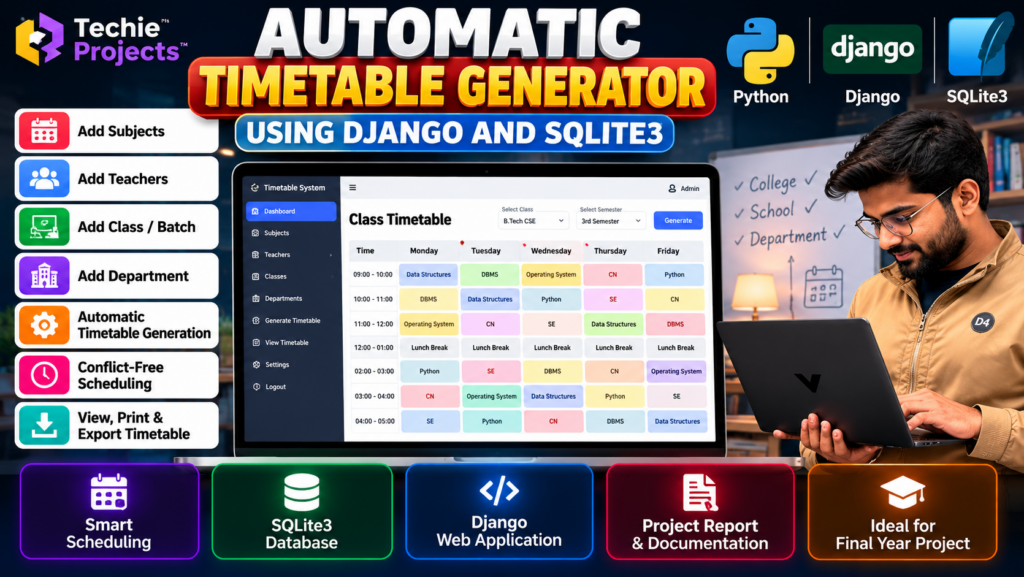
Looking for an automatic timetable generator using Django for your B.Tech, B.E., BCA, MCA, or computer science final-year project? This Python-based web application demonstrates how academic schedules can be organized using a database-driven system.
The automatic timetable generator using Django project focuses on managing subjects, teachers, classes, departments, and timetable slots through a web interface. Using Django and SQLite3, students can explore web development, database integration, and timetable scheduling concepts.
At Techie Projects, students can enquire about project availability, source code, documentation, installation instructions, and customization options for their academic requirements.
🎬 Project Demo: Automatic Timetable Generator Using Django
Watch the project demonstration to explore the interface, timetable management workflow, and available scheduling features.
The demo helps students understand the project’s intended functionality before deciding whether it matches their final-year project requirements.
🎯 Objectives of the Automatic Timetable Generator
The main objective of this automatic timetable generator using Django project is to simplify academic timetable management and demonstrate how scheduling information can be organized through a web application.
- Organize academic timetable information in a web application.
- Manage subjects, teachers, classes, and departments.
- Demonstrate timetable creation and scheduling workflows.
- Store and retrieve timetable records using a database.
- Reduce repetitive manual work involved in timetable preparation.
- Explore Python, Django, and SQLite3 integration.
- Provide a foundation for future academic scheduling improvements.
🚀 Key Features of the Timetable Generator Project
1. Subject Management
The application can provide a module for maintaining subject information, including subject names and related academic details.
2. Teacher Management
Teacher information can be stored and managed through the application, depending on the implemented functionality.
3. Class and Batch Management
The system can organize timetable information according to classes, batches, or semesters.
4. Department Management
Department-related records can help organize academic information for different programs or branches.
5. Automatic Timetable Generation
The main purpose of an automatic timetable generator is to create schedules based on configured subjects, classes, teachers, time slots, and scheduling rules.
The actual generation algorithm and supported constraints depend on the implementation included in the project.
6. Timetable Viewing
Users can view generated timetable records through the application’s interface, according to the available modules.
7. Database Integration
SQLite3 can store application records, such as subjects, teachers, classes, and timetable entries.
8. Django Web Interface
Django provides the web application framework for handling requests, managing data, and displaying information through web pages.
Note: Confirm the actual functionality in your project before advertising features such as automatic conflict detection, optimized scheduling, or PDF export.
⚙️ How Does an Automatic Timetable Generator Work?
An automatic timetable generator using Django can collect academic information, apply configured scheduling rules, create timetable records, and display the resulting schedule. The exact scheduling logic depends on the implemented algorithm.
Step 1: Add Academic Information
The administrator enters available information about subjects, teachers, classes, and departments.
Step 2: Configure Time Slots
The application uses the available days, periods, and time slots to define the timetable structure.
Step 3: Apply Scheduling Rules
The system processes the configured scheduling rules. Depending on the algorithm, these rules may include teacher availability, subject requirements, and class-period restrictions.
Step 4: Generate the Timetable
The application creates timetable entries according to the supported rules and available information.
Step 5: Store Timetable Records
Generated records are saved in the configured database, such as SQLite3.
Step 6: View and Manage the Timetable
Users can view the resulting timetable through the application interface and manage records using the available features.
This describes a general workflow. The actual scheduling logic should be verified against the supplied source code.
🛠️ Technologies Used
The automatic timetable generator using Django uses Python for application logic, Django for web development, and SQLite3 for database storage, provided these technologies are included in the supplied implementation.
- Python: Main programming language.
- Django: Web application framework.
- SQLite3: Relational database for storing application records.
- HTML: Structure of web pages.
- CSS: Styling and layout.
- JavaScript: Additional interface interactions, if implemented.
- Django ORM: Database operations through Django’s object-relational mapping system.
Confirm the actual dependencies and versions before installation.
💻 Software Requirements
Typical software requirements include:
- Python with a compatible version.
- Django and the project’s required dependencies.
- SQLite3 database support.
- Visual Studio Code, PyCharm, or another suitable code editor.
- A compatible web browser.
- Required project files and configuration settings.
The exact Python and Django versions depend on the project configuration.
🖥️ Hardware Requirements
A typical development setup may include:
- Processor: Intel Core i3 or equivalent, or better.
- RAM: 4 GB minimum; 8 GB recommended for comfortable development.
- Storage: Sufficient free disk space for Python, dependencies, and project files.
- Internet connection for downloading dependencies when required.
Actual requirements depend on your development environment.
✅ Advantages of an Automatic Timetable Generator
- Organizes academic scheduling information.
- Demonstrates practical Python and Django development.
- Helps students understand database-driven web applications.
- Reduces repetitive data-entry work when scheduling functionality is implemented.
- Can be extended with additional scheduling rules.
- Provides a useful topic for academic project demonstrations.
📌 Applications of the Timetable Generator
An academic timetable generator can be adapted for:
- Engineering colleges.
- Schools and educational institutions.
- College departments.
- Semester-based academic programs.
- Classroom scheduling.
- Teacher and subject allocation.
The suitability for each environment depends on the implemented scheduling rules and administrative features.
🔮 Future Scope
The project can be enhanced with additional features such as:
- Teacher availability management.
- Classroom and laboratory allocation.
- Conflict detection for teachers and classes.
- Timetable export to PDF or Excel.
- Multiple department and semester support.
- User authentication and administrative roles.
- Advanced scheduling algorithms.
- Automated timetable regeneration after schedule changes.
These are potential improvements and should not be presented as existing features unless they are implemented and tested.
🎓 Why Choose This Project for Your Final Year?
The Automatic Timetable Generator Using Django and SQLite3 is a practical project topic for students interested in Python, web development, database management, and academic scheduling.
This automatic timetable generator using Django project is relevant to students interested in Python programming, database management, and web application development. It provides an opportunity to explore academic scheduling and application design.
It provides opportunities to study Django models, database relationships, web interfaces, and scheduling logic. Students can also explore possible improvements and explain their implementation during project demonstrations.
Before selecting the project, verify that its available features and documentation satisfy your institution’s requirements.
🛒 Purchase Automatic Timetable Generator Project Source Code
Looking for an automatic timetable generator using Django with source code? Contact Techie Projects to confirm project availability, implemented features, documentation, installation instructions, customization options, and pricing.
📲 Call/WhatsApp: +91-9460060699
🌎 Website: www.techieprojects.com
📺 Instagram: @pythonprojects_
Techie Projects can help you enquire about the available project package and its suitability for your requirements.
Before purchasing, ask us to confirm:
- Python and Django source code availability.
- SQLite3 database and configuration files.
- Implemented timetable generation features.
- Installation and setup instructions.
- Project report and documentation availability.
- Supported scheduling rules and algorithms.
- Customization options.
- Pricing and delivery details.
The available package contents and support arrangements should be confirmed before placing your order.
📲 Get Project Details and Pricing on WhatsApp
Contact Techie Projects to discuss your academic requirements, confirm project availability, and request pricing details.
👉 Enquire About the Automatic Timetable Generator on WhatsApp
🌐 Explore More Engineering Projects
📸 Follow Techie Projects on Instagram
🎓 Recommended Projects
Explore these related project topics on Techie Projects:
- College Management System Project – Manage college-related information through a software application.
- Student Management System Project – Organize student records and academic information.
- Attendance Management System Project in Python – Record and manage student attendance.
- Library Management System Project – Manage books, borrowing records, and library information.
- Online Examination System Project – Explore digital examination and assessment workflows.
Visit the corresponding project pages to learn about their technologies, features, and availability.
❓ Frequently Asked Questions
1. What is an Automatic Timetable Generator Using Django?
It is a web application project designed to organize academic scheduling information and generate timetables according to the rules supported by its implementation.
2. Which programming language is used?
Python is the main programming language, while Django provides the web development framework.
3. Why is SQLite3 used?
SQLite3 is a relational database option that can store subjects, teachers, classes, and timetable records for a project of this type.
4. Is this project suitable for final-year students?
It may be suitable for students studying computer science, information technology, or software development, subject to their college’s project guidelines.
5. Does the system automatically prevent timetable conflicts?
That depends on the scheduling algorithm. Confirm whether teacher, class, room, and time-slot conflicts are checked in the actual implementation.
6. Can I purchase the source code?
Contact Techie Projects to confirm the availability of source code, documentation, installation instructions, and other package details.
7. How can I get the project price?
Use the WhatsApp enquiry link to discuss your requirements and request the current price.
Conclusion
The Automatic Timetable Generator Using Django and SQLite3 is a practical academic project for exploring Python web development, database management, and timetable scheduling.
If you are interested in this project for your final-year submission, contact Techie Projects to confirm the available features, source code, documentation, customization options, and pricing.
Start your project enquiry today: Contact Techie Projects on WhatsApp