
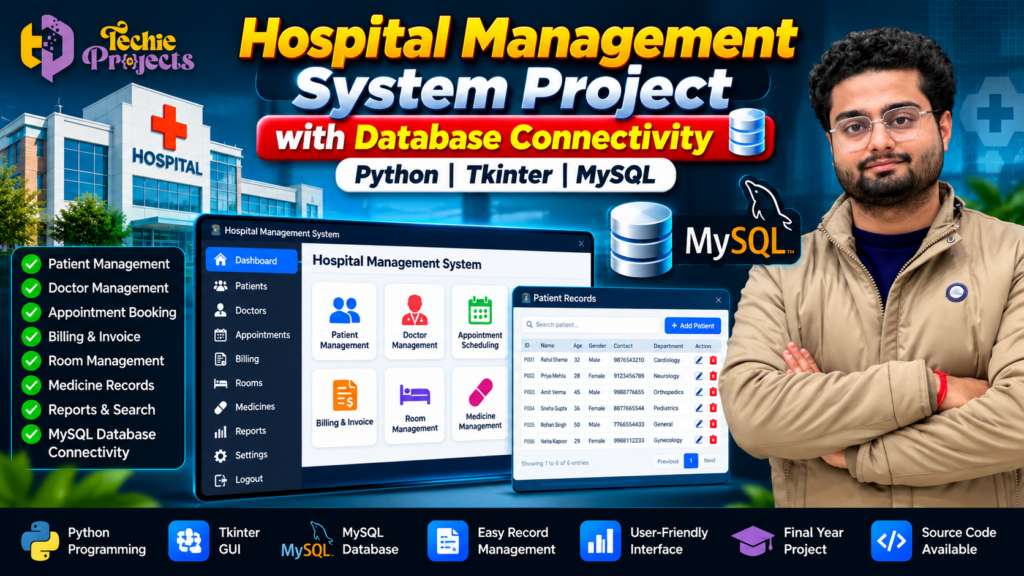
Hospital Management System Project in Python with MySQL | Tkinter
Looking for a Hospital Management System Project in Python for your final-year submission, college practical, or Python programming portfolio? Explore this project from Techie Projects to understand how a desktop-based hospital management application can organize patient information, doctor records, appointments, and other hospital-related data through a graphical interface and database connectivity.
Instead of spending weeks starting from scratch, choose a project that matches your academic requirements and learn how Python, Tkinter, and MySQL can work together in a practical application. Whether you are a B.Tech, BCA, MCA, diploma, or computer science student, this project can help you explore database management, GUI development, application logic, and software design.
Contact Techie Projects to enquire about purchasing this project and confirm the available source code, installation instructions, documentation, and other deliverables before ordering.
🎬 Hospital Management System Project Demo
Explore the project demonstration to understand the application’s interface, navigation, and available functionality.
Watch the demonstration below to see how the Hospital Management System Project in Python works.
Watch the Hospital Management System Project Demo on YouTube
🏥 What Is a Hospital Management System Project in Python?
A hospital management system is a software application designed to organize information associated with hospital operations. Depending on its implementation, it can provide options for managing patient records, doctor details, appointments, billing information, room records, and other administrative data.
The Hospital Management System Project in Python uses Python for application logic, Tkinter for the graphical user interface, and MySQL for database storage and retrieval.
The graphical interface allows users to interact with application forms, buttons, menus, and data tables rather than entering every operation through a command-line terminal. Database connectivity makes it possible to store and retrieve records when the application is configured correctly.
This project is useful for students who want to understand how different software components combine to create a working desktop application.
🎯 Project Objectives
The main objectives of this hospital management application include:
- Organizing patient and doctor information.
- Demonstrating database connectivity using Python and MySQL.
- Providing a graphical interface for data entry and navigation.
- Exploring record creation, retrieval, updating, and deletion where implemented.
- Understanding how a desktop application can manage structured information.
- Applying programming and database concepts to a practical academic project.
The exact functions available depend on the implementation supplied with the project.
💻 Technologies Used in the Project
1. Python Programming Language
Python is used to implement application logic, process user input, connect application components, and execute database operations. Its readable syntax makes it suitable for students learning software development.
2. Tkinter GUI
Tkinter is Python’s standard interface for creating desktop graphical applications. It can provide windows, forms, buttons, labels, menus, and other interface elements.
In a hospital management application, these components can help users enter information and navigate between different modules.
3. MySQL Database
MySQL is a relational database management system used to store structured records. Depending on the implementation, the database may contain tables for patients, doctors, appointments, billing, or other hospital-related information.
4. Python–MySQL Connectivity
A database connector allows Python code to communicate with MySQL. It can execute queries, insert records, retrieve information, and update stored data.
Correct database configuration and appropriate handling of user input are important for reliable operation.
⚙️ Main Features of a Hospital Management System
The following are common modules in this type of project. Confirm which modules are included in the specific version before purchasing.
1. Patient Management
A patient management module can store basic patient details, such as identification number, name, age, contact information, and other relevant fields. Depending on the implementation, users may be able to add, search, edit, or delete records.
2. Doctor Management
This module can organize doctor details, including names, specializations, contact information, and identifiers. It demonstrates how related information can be stored and retrieved through a database.
3. Appointment Management
An appointment module can help organize appointment dates, times, patient details, and doctor assignments. The available scheduling functions depend on the project’s implementation.
4. Billing and Invoice Records
A billing module can demonstrate how payment-related entries or invoice information are recorded and retrieved. It should not be assumed to support real payment processing unless that functionality is specifically included.
5. Room Management
A room management module can maintain records associated with hospital rooms, room numbers, categories, or availability, depending on the implemented design.
6. Medicine Records
A medicine module can demonstrate the storage of medicine names and related information. Inventory tracking, stock alerts, and pharmacy billing should be confirmed separately.
7. Search and Record Management
Search functionality can help users locate stored records. Database operations may also demonstrate adding, viewing, updating, and deleting information where supported.
8. Database Connectivity
The connection between Python and MySQL is an important learning component. Students can explore how application actions interact with database tables and how stored information is retrieved for display.
🔄 How the Hospital Management System Works
A typical workflow for this application follows these steps:
- Launch the application: Open the desktop program in the configured Python environment.
- Access the interface: Navigate through the available screens and forms.
- Enter information: Fill in the relevant fields for the selected module.
- Validate input: Check that required fields and data formats are appropriate.
- Connect to the database: The application sends supported operations to MySQL.
- Store or retrieve records: The database processes the request and returns the result.
- Display the result: The interface shows the relevant information or operation status.
This workflow helps students understand the relationship between the user interface, application logic, and database layer.
🎓 Why Choose This Python Project for Your College Submission?
A practical application can be more useful for learning than studying individual programming concepts in isolation. This project brings together several skills commonly used in desktop software development.
Practical Python learning: Explore functions, conditional logic, event handling, and application structure.
GUI development: Understand how forms and buttons can make an application easier to use.
Database management: Learn about tables, records, queries, and database connectivity.
Project demonstration: Use the application to explain its workflow, modules, and technical implementation during a presentation, subject to your college’s requirements.
Portfolio development: A completed and understood project can help demonstrate your programming and database skills to others.
Students should review their institution’s rules on project assistance, purchased code, attribution, and individual assessment before submitting externally developed work.
🏥 Benefits of Hospital Management System Project in Python
The Hospital Management System Project in Python helps students explore practical software development concepts using Python, Tkinter, and MySQL. It demonstrates how a desktop application can connect a graphical interface with a relational database to manage structured information.
Key learning benefits include:
- Understanding Python application logic and event handling.
- Learning how to build graphical interfaces with Tkinter.
- Exploring MySQL tables, queries, and database connectivity.
- Understanding record creation, searching, updating, and deletion where implemented.
- Practising software testing, debugging, and project presentation.
For students looking for a practical Python and database project, this application provides a useful learning example that connects programming concepts with a hospital-related use case.
🛠️ Software and Hardware Requirements
The exact requirements depend on the project version. A typical Python desktop implementation may use the following setup.
Software Requirements
- Operating system: Windows or another supported desktop operating system.
- Programming language: Python.
- GUI library: Tkinter.
- Database: MySQL.
- Database connector: A compatible Python MySQL connector.
- Code editor or IDE: Visual Studio Code, PyCharm, or another compatible editor.
Hardware Requirements
- A desktop computer or laptop.
- Sufficient RAM and storage for Python, MySQL, and project files.
- Keyboard and mouse or an equivalent input method.
Check the actual software versions and compatibility requirements before installation. The requirements listed here are general guidance, not a guarantee that every configuration will work without adjustment.
📚 What Can Students Learn from This Project?
Working through a hospital management application can introduce students to important software development concepts, including:
- Python functions and program organization.
- Graphical user interface development with Tkinter.
- Relational database design.
- SQL queries and database operations.
- Connecting a desktop application to a database.
- Input validation and error handling.
- Testing, debugging, and troubleshooting.
- Explaining software architecture and application workflows.
Students can use these concepts to build their understanding and prepare to explain the project in their own words.
💻 How Hospital Management System Project in Python Uses MySQL
Database connectivity is an important part of the Hospital Management System Project in Python. The application can use MySQL to store and retrieve information through queries executed by Python code.
For example, a patient record may contain an identification number, name, age, and contact details. Depending on the available modules, users may be able to add a new record, search for an existing entry, or update stored information through the application interface.
Python handles the application logic, Tkinter provides the graphical interface, and MySQL manages structured records. This combination helps students understand how separate software components work together in a desktop application.
🚀 Possible Applications
A hospital management application can be used as an academic demonstration of record-management concepts in settings such as:
- College programming laboratories.
- Database management practicals.
- Python mini-project demonstrations.
- Final-year software project presentations.
- Learning exercises focused on desktop applications.
This educational project should not be treated as a production-ready hospital system without appropriate security, privacy safeguards, testing, access controls, backups, and professional validation. Real patient information should not be entered into an unverified academic application.
🛒 Purchase Hospital Management System Project in Python from Techie Projects
Need a Hospital Management System Project in Python for your upcoming college assignment or project demonstration? Contact Techie Projects to enquire about the available version, pricing, and package contents.
Before placing an order, share your requirements and confirm the exact package contents. Ask whether the selected version includes:
- Project source code.
- Installation and setup instructions.
- Database files or SQL scripts.
- Project documentation or report.
- Explanation of the code and workflow.
- Demonstration video or other learning materials, if available.
Availability may vary by package. Confirm the price, delivery format, included services, and any support arrangements directly before purchasing.
📲 Contact Techie Projects
- 📲 Call/WhatsApp: +91-9460060699
- 🌎 Website: www.techieprojects.com
- 📺 Instagram: @pythonprojects_
When contacting us, mention that you are interested in the Hospital Management System Project in Python with MySQL. Share your course, project deadline, and any specific requirements so the available option can be checked.
🔗 Explore Related Python Projects
If you are exploring more programming and database-based ideas, you can also investigate:
- Student Management System using Python and MySQL.
- Library Management System using Python.
- Inventory Management System with Database Connectivity.
- Employee Management System using Python.
- Online Appointment Booking System.
- Hospital Billing Management System.
- Pharmacy Management System.
These are related project ideas; their features and availability may differ.
Explore more project resources on the Techie Projects website.
❓ Frequently Asked Questions
1. What is a Hospital Management System Project in Python?
It is a desktop application that demonstrates how Python can be used to manage hospital-related records through a graphical interface and a database.
2. Which technologies are used in this project?
A typical implementation uses Python, Tkinter, MySQL, and a compatible Python database connector.
3. Is this project suitable for engineering students?
It may be suitable for students studying Python programming, database management, or software development, subject to their course requirements and institutional rules.
4. Can I purchase this project from Techie Projects?
You can enquire through WhatsApp or the Techie Projects website. Confirm current availability, price, and deliverables before ordering.
5. Does the project include source code and documentation?
Please confirm the contents of the specific package before purchasing. Source code, reports, installation instructions, and other materials should not be assumed to be included unless confirmed.
6. Can beginners learn from this project?
Beginners can use it to explore GUI development and database connectivity, although some Python and SQL fundamentals will make the implementation easier to understand.
7. Can this project be used in a real hospital?
An academic demonstration is not automatically suitable for real clinical or administrative use. Production deployment requires security reviews, privacy protections, reliable backups, appropriate access controls, testing, and compliance with applicable requirements.
🎯 Final Thoughts
The Hospital Management System Project in Python with MySQL connectivity offers a practical way to explore desktop application development, database operations, and structured record management. It can help students connect programming concepts with a real-world-inspired use case.
If you need this project for learning or an academic assignment, contact Techie Projects to discuss your requirements and confirm the available package details before purchasing.
Start your project enquiry today: WhatsApp Techie Projects | Visit Techie Projects