
Introduction
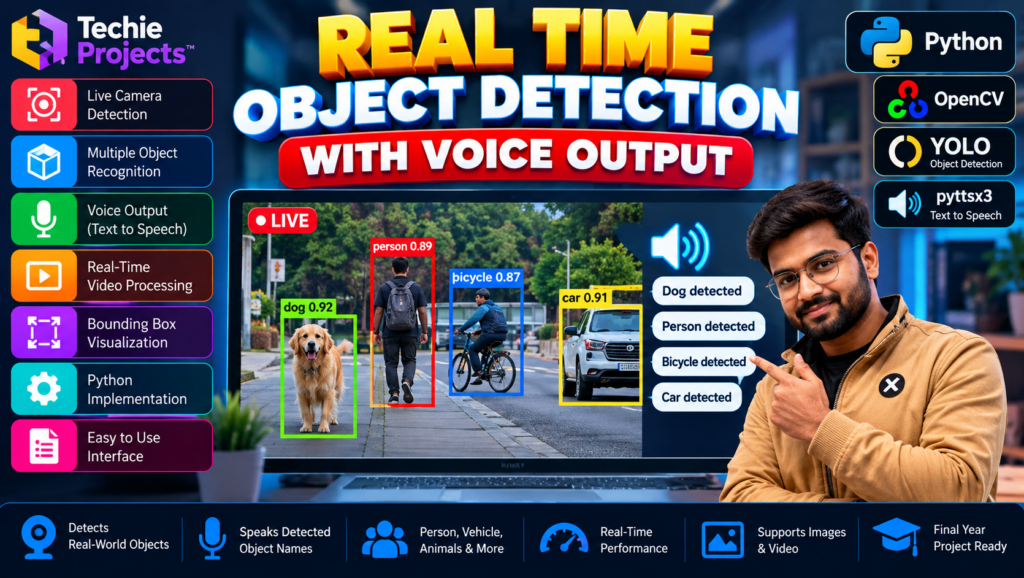
Real time object detection with voice output using Python is a computer vision project that identifies objects in images or video and provides spoken descriptions of detected objects. By combining object detection, OpenCV, and text-to-speech technology, the project demonstrates how AI can make visual information more accessible through audio feedback.
This project is suitable for B.Tech, B.E., BCA, MCA, Computer Science, Artificial Intelligence, and Data Science students looking for a practical final-year project. It introduces object detection, video processing, voice synthesis, and the integration of multiple Python libraries.
If you want to purchase a working project for academic learning, contact Techie Projects to enquire about the available source code, documentation, implementation details, and pricing.
🎬 Project Demo: Real Time Object Detection with Voice Output
Watch the project demonstration to understand how the application detects objects and generates voice output.
The demo can help you review the interface, supported object classes, and audio feedback. Actual features depend on the supplied implementation, model, and installed libraries.
🎯 What Is Real Time Object Detection with Voice Output Using Python?
Real time object detection with voice output using Python combines a trained object detection model with a speech-generation system. The model analyzes video frames, identifies supported objects, and returns labels and locations for the detected items.
A text-to-speech component can convert selected object labels into spoken audio. This creates an interactive demonstration of how computer vision and speech technology can work together.
For example, if the model detects a person, dog, bicycle, or car, the application may announce the corresponding label. The available classes and spoken responses depend on the trained model and the implementation.
✨ Key Features of the Project
The following features may be included, depending on the supplied version:
- Object detection: Identify supported objects in video frames.
- Real-time video processing: Process frames from a supported camera or video source.
- Bounding-box visualization: Highlight detected objects on the display.
- Object labels: Show the names of detected object classes.
- Voice output: Speak selected detection labels using a text-to-speech library.
- Python integration: Connect computer vision and audio components.
- Interactive interface: Provide visual controls if a graphical interface is included.
Confirm camera support, supported object classes, voice announcement frequency, and interface features before purchasing.
🎓 Objectives of the Project
The main objectives of real time object detection with voice output using Python are:
- Understand object detection using a trained machine learning model.
- Learn video capture and frame processing with Python.
- Identify objects from supported categories.
- Display labels and bounding boxes.
- Convert selected detection labels into speech.
- Integrate computer vision and text-to-speech libraries.
- Explore accessibility-focused AI applications.
⚙️ How Does the System Work?
1. Video Input
The application receives frames from a supported webcam or video file, depending on its configuration.
2. Image Processing
OpenCV reads and prepares the frames for the object detection model. Processing may include resizing or converting the frame into the model’s expected input format.
3. Object Detection
The trained model analyzes each frame and predicts the classes and locations of supported objects.
4. Detection Visualization
The application can draw bounding boxes and display object labels so users can see what the model has detected.
5. Text-to-Speech Conversion
Selected object labels are passed to a text-to-speech component, which generates spoken output.
6. Audio Feedback
The application plays the generated speech so users can hear the detected object names. The responsiveness of voice feedback depends on model speed, audio generation, and the implementation’s announcement logic.
🧰 Technologies Used
Python
Python connects the video-processing, detection, and speech-generation components.
OpenCV
OpenCV supports camera access, video reading, frame processing, and visualization.
YOLO or Another Object Detection Model
A trained model, such as a compatible YOLO version, may be used to identify objects. The exact model depends on the supplied project.
Text-to-Speech Library
A library such as pyttsx3 or another compatible speech engine can convert object labels into audio, if used by the implementation.
NumPy
NumPy supports numerical operations and image-array processing.
💻 Software and Hardware Requirements
Software Requirements
- Python
- OpenCV
- The object detection package and model weights
- The text-to-speech library used by the project
- NumPy and other required dependencies
- VS Code, PyCharm, or another compatible editor
Hardware Requirements
- Laptop or desktop computer
- Compatible processor
- Sufficient RAM
- Webcam if live camera detection is required
- Speakers or headphones for voice output
A compatible GPU may improve performance with larger models, but the actual requirements depend on the selected model and configuration.
🌟 Advantages of Real Time Object Detection with Voice Output
- Demonstrates practical AI and computer vision concepts.
- Combines visual detection with audio feedback.
- Helps students understand how Python libraries work together.
- Offers an introduction to accessibility-oriented applications.
- Can be tested with supported images, videos, or camera input.
- Provides opportunities for further experimentation with detection models.
🏢 Applications of Object Detection with Voice Output
This type of system can support research and prototypes in areas such as:
- Accessibility-focused computer vision
- Educational AI demonstrations
- Object identification experiments
- Interactive computer vision applications
- Smart-device prototypes
- Assistive technology research
Important: A student project should not be assumed to provide reliable navigation or safety assistance. Real-world assistive systems require extensive testing, appropriate safeguards, and evaluation under practical conditions.
⚠️ Limitations of the Project
Some challenges to consider include:
- Poor lighting can reduce detection performance.
- Small or partially hidden objects may be missed.
- Similar-looking objects may be classified incorrectly.
- Speech generation can introduce delays.
- Repeated announcements can make the application difficult to use.
- Background noise can affect the user’s ability to hear spoken output.
- Detection quality depends on the trained model and supported classes.
The project should be evaluated using suitable test conditions rather than assuming that every detection is correct.
🚀 Future Scope
Possible enhancements to real time object detection with voice output using Python include:
- Adding configurable voice announcements.
- Reducing repeated speech for continuously detected objects.
- Supporting additional object classes with a suitable model.
- Improving video-processing performance.
- Adding a graphical interface.
- Supporting multiple languages if the speech engine allows it.
- Exploring offline operation and audio settings.
- Evaluating the application under different lighting conditions.
These enhancements may require additional development beyond the current project.
🎓 Why Choose This Project for Your Final Year?
Real time object detection with voice output using Python brings together computer vision, machine learning, and speech synthesis in one practical topic.
It can help students learn about:
- Object detection models
- OpenCV video processing
- Python library integration
- Bounding boxes and classification labels
- Text-to-speech systems
- Testing and performance evaluation
Before selecting the project, confirm that the included functionality matches your college’s requirements and your intended demonstration.
📦 What Should You Confirm Before Purchasing?
Before purchasing the project from Techie Projects, enquire about the availability of:
- Python source code
- Model weights and configuration files
- Required libraries and installation instructions
- Supported object categories
- Voice output implementation
- Webcam or video-file support
- Project documentation or report
- Setup assistance and support terms
Ask whether the package includes live camera detection, a graphical interface, and automatic voice announcements, rather than assuming these features are included.
📲 Purchase the Real Time Object Detection with Voice Output Project
Looking for a real time object detection with voice output using Python project for your B.Tech, B.E., BCA, MCA, or final-year submission?
Techie Projects can help you enquire about the available implementation, source code, documentation, supported features, and pricing before you purchase.
Get Project Details and Pricing on WhatsApp
📲 Call/WhatsApp: +91-9460060699
🌎 Website: www.techieprojects.com
📺 Instagram: @pythonprojects_
Contact us to confirm availability, included deliverables, setup requirements, and pricing.
🔗 Explore Related Projects
Add internal links to these relevant project articles on your website:
- People Detection and Tracking Using YOLO
- Crowd Counting Using YOLO
- Real-Time Sign Language Detection Using OpenCV
- Face Recognition Attendance System
- Abnormal Activity Detection Using Deep Learning
Link each title to its corresponding published article.
❓ Frequently Asked Questions
1. What is real time object detection with voice output using Python?
It is a computer vision application that identifies supported objects in images or video and uses speech synthesis to announce selected detection labels.
2. Which programming language is used?
Python is used to integrate video processing, object detection, and text-to-speech components.
3. Which libraries are required?
The requirements depend on the implementation but may include OpenCV, a compatible object detection framework, NumPy, and a text-to-speech library.
4. Can the project detect objects through a webcam?
Webcam detection is possible if the supplied implementation supports camera input and the required hardware is available.
5. Does the project speak every detected object?
That depends on the speech-announcement logic. Some implementations announce selected labels, while others may use additional rules to limit repeated audio.
6. Is the project suitable for final-year engineering students?
It may be suitable for students studying Computer Science, Artificial Intelligence, Data Science, or related fields, subject to institutional requirements and the actual features included.
7. How can I purchase the project?
Contact Techie Projects on WhatsApp to enquire about availability and pricing.
📝 Conclusion
Real time object detection with voice output using Python is an educational project that demonstrates how object detection and speech synthesis can be integrated into one application.
It introduces students to video processing, trained detection models, visual predictions, and audio feedback. Its actual capabilities depend on the model, libraries, and features included in the implementation.
If you want to purchase this project for academic learning, contact Techie Projects to confirm the available source code, documentation, setup requirements, and pricing.
👉 Contact Techie Projects on WhatsApp to get started.