
Introduction
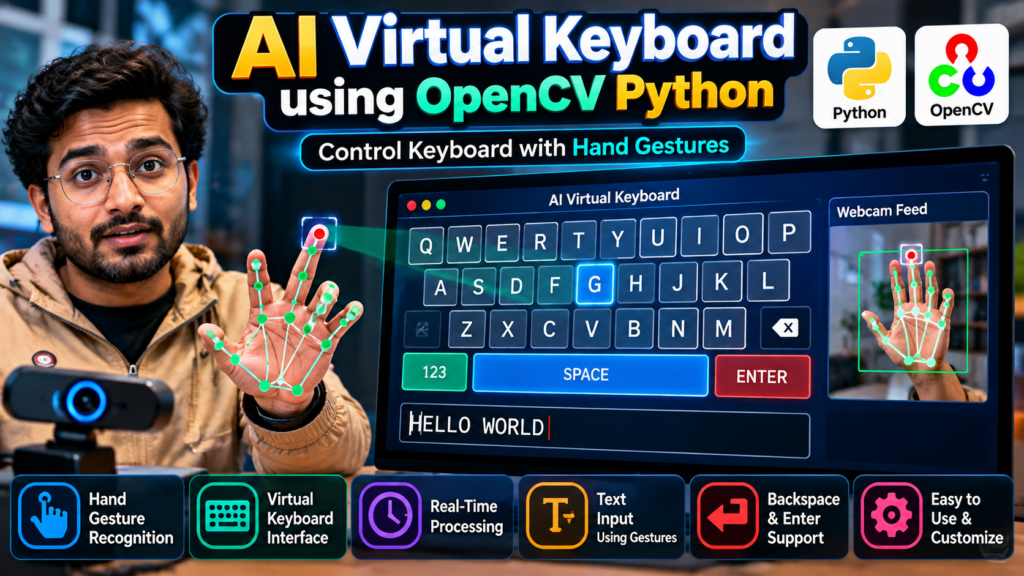
An AI Virtual Keyboard using OpenCV Python is a computer vision project that allows users to interact with a virtual keyboard using hand gestures instead of a physical keyboard. The system uses a camera to detect the user’s hand and fingers and maps specific hand movements to virtual keyboard keys.
This project is useful for students who want to learn Python, OpenCV, computer vision, hand gesture recognition, and human-computer interaction. It can also be developed as a final-year project, mini project, major project, or resume project.
The main idea is to display a virtual keyboard on the computer screen and allow the user to select keys by moving their finger over the desired key.
What Is an AI Virtual Keyboard?
An AI virtual keyboard is a software-based keyboard that allows users to enter text without directly using a physical keyboard.
In this project, a webcam captures the user’s hand movements. OpenCV processes the camera frames and identifies the hand and finger positions. When the user’s finger interacts with a virtual key, the corresponding character can be selected.
For example, the virtual keyboard may contain:
- A–Z alphabet keys
- Number keys
- Space key
- Backspace key
- Enter key
- Special keys
The system can be extended with additional controls depending on the project requirements.
AI Virtual Keyboard Using OpenCV Python Project
The AI Virtual Keyboard using OpenCV Python project combines computer vision and hand gesture recognition to create an interactive typing interface.
The general workflow is:
- Capture video through a webcam.
- Detect the user’s hand.
- Track hand and finger positions.
- Display a virtual keyboard.
- Determine which virtual key the finger is pointing toward.
- Detect a predefined gesture or selection action.
- Register the selected character.
- Display the typed text.
This makes the project a practical example of computer vision-based human-computer interaction.
Objectives of the Project
The main objectives of the AI virtual keyboard project are:
- To develop a virtual keyboard using Python.
- To use OpenCV for real-time image processing.
- To detect hand and finger movements.
- To implement hand gesture-based interaction.
- To reduce dependency on a physical keyboard for basic text input.
- To understand real-time computer vision.
- To create an interactive Python project for academic use.
- To demonstrate human-computer interaction using gestures.
Key Features
1. Virtual Keyboard Interface
The application displays a keyboard on the screen with different virtual keys.
2. Hand Gesture Recognition
The system detects hand movements captured through the webcam.
3. Finger Tracking
Finger positions can be used to determine which virtual key the user is interacting with.
4. Real-Time Processing
The webcam feed is processed continuously to provide an interactive experience.
5. Touch-Free Interaction
The project demonstrates how users can interact with a computer without directly touching a physical keyboard.
6. Text Input
Selected virtual keys can be converted into characters and displayed as typed text.
7. OpenCV-Based Computer Vision
OpenCV provides the image-processing functionality required for webcam-based interaction.
Technologies Used
The project can be developed using the following technologies:
- Python
- OpenCV
- Hand gesture recognition techniques
- Computer vision
- Webcam/camera
- Tkinter or another GUI framework, if required
Python acts as the main programming language, while OpenCV handles the camera input and image-processing operations.
Software Requirements
Recommended software requirements include:
- Python 3.x
- OpenCV
- Tkinter
- Windows 10/11 or another compatible operating system
- Python IDE such as VS Code, PyCharm, or IDLE
Additional Python packages may be required depending on the hand-tracking approach used in the implementation.
Hardware Requirements
A basic implementation can work with:
- Laptop or desktop computer
- Webcam
- Keyboard and mouse for normal system operation
- Minimum 4 GB RAM
- Adequate storage for Python libraries and project files
A better processor and webcam can provide smoother real-time performance.
How the AI Virtual Keyboard Works
The working process can be divided into several stages.
Step 1: Capture Webcam Video
The webcam captures live video of the user’s hand.
OpenCV reads the camera frames and processes them continuously.
Step 2: Process the Video Frame
Each captured frame is converted and processed to make hand detection and tracking possible.
The system continuously analyzes the incoming frames.
Step 3: Detect the Hand
The computer vision component identifies the user’s hand within the camera frame.
The hand position provides the information required for gesture-based interaction.
Step 4: Track the Finger
The system tracks the position of the user’s finger.
The finger position is then compared with the coordinates of the virtual keyboard keys.
Step 5: Display the Virtual Keyboard
A keyboard is displayed on the screen.
For example:
Q  W  E  R  T  Y  U  I  O  P
 A  S  D  F  G  H  J  K  L
  Z  X  C  V  B  N  M

        SPACE
The design can be customized according to the project requirements.
Step 6: Select a Key
When the tracked finger reaches a particular key and the required gesture is detected, the application identifies that key.
For example, pointing toward the A key can select the character A.
Step 7: Generate Text
The selected characters are added to the text area.
For example:
H → E → L → L → OThe final output becomes:
HELLOHand Gesture Recognition
Hand gesture recognition is one of the most important components of this project.
Different gestures can be assigned to different actions.
For example:
- Finger pointing → Select key
- Finger movement → Move between keys
- Specific gesture → Confirm selection
- Special gesture → Delete character
- Special gesture → Create space
The exact gestures depend on the implementation.
Role of OpenCV in the Project
OpenCV is an important Python library for computer vision and image processing.
In this project, OpenCV can be used for:
- Webcam access
- Video frame processing
- Image manipulation
- Hand-region processing
- Finger-position analysis
- Drawing virtual keyboard elements
- Real-time visualization
This makes the project a useful example for students learning OpenCV projects using Python.
Project Workflow
The overall workflow can be represented as:
Webcam
   ↓
Capture Video
   ↓
OpenCV Image Processing
   ↓
Hand Detection
   ↓
Finger Tracking
   ↓
Virtual Keyboard
   ↓
Key Position Detection
   ↓
Gesture-Based Selection
   ↓
Character Generation
   ↓
Typed Text
Advantages of AI Virtual Keyboard
The project provides several advantages:
- Demonstrates practical computer vision.
- Provides touch-free interaction.
- Helps students understand gesture recognition.
- Uses Python and OpenCV.
- Can be implemented using commonly available hardware.
- Provides an attractive real-time project demonstration.
- Can be extended with additional gestures.
- Useful for learning human-computer interaction concepts.
Applications
An AI virtual keyboard can be explored in several areas.
Human-Computer Interaction
Gesture-based interfaces can provide alternative ways of interacting with computers.
Touch-Free Systems
The concept can be adapted for environments where physical contact with devices should be minimized.
Accessibility
Gesture-based interfaces can be explored as alternative interaction mechanisms for users who may have difficulty using traditional input devices.
Smart Interfaces
The project can be extended as part of a larger computer vision-based smart interface.
Educational Projects
It is particularly suitable for:
- B.Tech projects
- BCA projects
- MCA projects
- Computer Science projects
- Python projects
- Computer Vision projects
- AI projects
- Final-year engineering projects
Limitations
Although the project demonstrates an interesting approach to computer interaction, it has some limitations.
Lighting Conditions
Poor lighting can make hand detection more difficult.
Camera Quality
Low-quality webcams may reduce tracking accuracy.
Hand Occlusion
If fingers overlap or the hand is partially hidden, detection may become less reliable.
Processing Performance
Real-time computer vision requires sufficient processing power for smooth performance.
Gesture Accuracy
The accuracy depends on the hand-tracking and gesture-recognition approach used in the implementation.
Future Scope
The AI virtual keyboard can be improved in several ways.
Voice and Gesture Combination
Voice commands can be combined with hand gestures to create a multimodal interface.
Improved Hand Tracking
More advanced hand-tracking techniques can improve accuracy and stability.
Personalized Keyboard
The system could allow users to customize the keyboard layout.
Multiple Languages
The keyboard could be extended to support multiple languages.
Mobile and Web Applications
The concept could potentially be adapted for web or mobile-based interfaces.
AI-Based Gesture Recognition
Machine learning models can be incorporated to recognize a wider range of gestures.
Smart Accessibility Interface
The project can be developed further as an accessibility-oriented interaction system.
Why Choose This as a Final-Year Project?
The AI Virtual Keyboard using OpenCV Python project is a strong option for students because it combines multiple technical concepts in one application.
Students can demonstrate knowledge of:
- Python programming
- OpenCV
- Computer vision
- Image processing
- Hand gesture recognition
- Real-time video processing
- GUI development
- Human-computer interaction
The project also provides a visually attractive demonstration during a project presentation or viva.
Project Scope for Students
Students can develop the basic version first and then add advanced features.
Basic Version
- Webcam input
- Hand detection
- Virtual keyboard
- Finger tracking
- Character selection
Intermediate Version
- Multiple gestures
- Backspace
- Enter
- Space
- Text display
- Improved key selection
Advanced Version
- AI-based gesture classification
- Multiple keyboard layouts
- Voice integration
- Accessibility features
- Multi-language typing
- Advanced computer vision techniques
Frequently Asked Questions
What is an AI Virtual Keyboard using OpenCV?
An AI Virtual Keyboard using OpenCV is a computer vision project that allows users to interact with a virtual keyboard using hand and finger gestures.
Which programming language is used?
Python is used as the primary programming language.
Which library is used for computer vision?
OpenCV is one of the main libraries used for webcam processing and computer vision operations.
Is this suitable for a final-year project?
Yes. The project can be developed as a B.Tech, BCA, MCA, or final-year computer science project, with additional features added according to the required project scope.
Can this project be developed as a major project?
Yes. Students can expand the basic virtual keyboard with advanced gesture recognition, voice interaction, multiple languages, accessibility features, and other modules.
Is a webcam required?
A webcam or compatible camera is required for the real-time hand gesture interaction approach.
Can the project be modified?
Yes. Students can customize the keyboard layout, gestures, interface, typing mechanism, and additional features according to their requirements.
🎓 Recommended Related Python Projects
If you are looking for similar Python, AI, and Computer Vision projects, explore related project ideas such as:
- Gesture Control Virtual Steering Using OpenCV Python
- Sign Language Recognition Using Machine Learning
- Face Recognition Attendance System Using Python
- Real-Time Object Detection Using Python
- People Counter Using YOLO and OpenCV
- OMR Answer Sheet Checking Using Python and Computer Vision
- Hand Gesture Recognition Using OpenCV Python
- AI-Based Exam Proctoring System
- Object Detection and Recognition Using Python
- Diabetes Prediction System Using Machine Learning
Explore Related Python Projects
Students can also explore different categories of final-year projects, including:
- Python Projects
- Artificial Intelligence Projects
- Machine Learning Projects
- Computer Vision Projects
- Deep Learning Projects
- Web Development Projects
- IoT Projects
- Database Management Projects
- Final-Year Engineering Projects
🚀 Need Help With Your Final-Year Project?
Choosing the right project idea is an important part of your final-year project development. You can discuss your project idea, required features, source-code requirements, documentation, technology stack, and project scope before starting development.
WhatsApp: +91-9460060699
Website: Techie Projects
Instagram: @pythonprojects_
Conclusion
The AI Virtual Keyboard using OpenCV Python is an interactive computer vision project that demonstrates how hand gestures can be used to control a virtual keyboard. By combining Python, OpenCV, webcam-based image processing, and hand gesture recognition, students can build a practical project that demonstrates real-time human-computer interaction.
The project can be developed as a simple Python mini project or expanded into a more advanced AI and computer vision final-year project with additional gesture recognition, accessibility features, voice commands, and intelligent interaction capabilities.