
Introduction
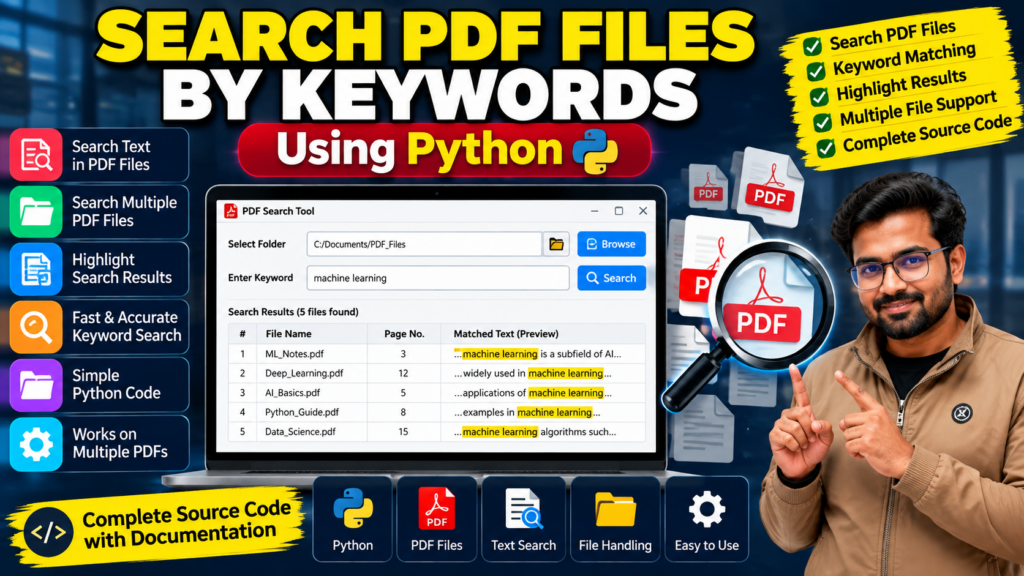
The Search PDF Files by Keywords Using Python project is a practical Python application that helps users find specific words or phrases inside PDF documents. Instead of opening and reading multiple files manually, users can search for a keyword and identify documents containing matching text.
This project demonstrates Python programming, PDF text extraction, keyword matching, file handling, and automation. It is suitable for B.Tech, BCA, MCA, and computer science students who want to explore document-processing applications and build practical programming skills.
🎬 Project Working Demo
Watch the project demonstration to explore how the PDF search tool works, how keywords are entered, and how matching documents can be identified.
🔍 What Is a PDF Keyword Search Tool?
A PDF keyword search tool is an application that searches PDF documents for specific words or phrases. Using Python libraries, the application can extract readable text from PDF files and compare it with a user’s search query.
For example, a student could search for “machine learning” across a folder containing lecture notes, research papers, and project documentation. The application can then display matching files, depending on the features implemented.
🎯 Objectives of the Project
The main objectives of this project are to:
- Search PDF documents using specific keywords.
- Extract readable text from PDF files.
- Find matching words or phrases.
- Reduce the time required to locate information.
- Organize document searching through a simple workflow.
- Demonstrate Python-based file processing and automation.
⭐ Key Features of the PDF Search Project
1. Search PDF Files by Keywords
Enter a keyword or phrase to search the text extracted from supported PDF documents.
2. Multiple PDF File Searching
Search through multiple PDF documents in a selected folder, if supported by the implementation.
3. Text Extraction
Extract readable text from PDFs using an appropriate Python library.
4. Search Result Display
Display matching filenames and other available information, such as page numbers or matching text snippets, depending on the implemented features.
5. User-Friendly Interface
A graphical interface can make it easier to select folders, enter keywords, and view results.
6. File Handling
Process files in a selected directory and organize search results for easier access.
7. Faster Document Retrieval
Help users locate relevant information without manually opening every document.
🛠️ Technologies Used
The project may use the following technologies, depending on the supplied implementation:
- Python: Core programming language.
- PyMuPDF or PyPDF2: PDF text extraction.
- Tkinter: Optional graphical user interface.
- OS and pathlib: File and directory handling.
- Visual Studio Code or PyCharm: Development environment.
The exact libraries should match the project’s source code.
⚙️ How Does the Project Work?
The general workflow of a PDF keyword search application is:
- Select a folder: Choose the directory containing PDF documents.
- Enter a keyword: Type the word or phrase you want to find.
- Read PDF files: The application opens supported PDFs and extracts their readable text.
- Match keywords: Python compares the extracted text with the search query.
- Collect results: The application records files that contain matching text.
- Display results: Show matching filenames and any additional search information supported by the application.
Scanned PDFs containing images may require OCR (Optical Character Recognition) if their text is not embedded in a readable form.
💻 Software Requirements
Typical requirements include:
- Python 3
- A compatible operating system
- A Python code editor or IDE
- A PDF text extraction library
- Required Python packages
- PDF documents for testing
A graphical interface may require Tkinter or another GUI framework, depending on the implementation.
🖥️ Hardware Requirements
A standard laptop or desktop computer is generally sufficient for a basic PDF search application.
- Dual-core processor or better
- At least 4 GB RAM
- Sufficient storage for Python, libraries, and PDF files
- Keyboard and mouse
Processing time may increase when searching large numbers of documents or very large PDFs.
🎓 Applications of PDF Keyword Searching
A Python PDF search tool can be useful for:
- Searching college notes and study materials
- Finding information in research papers
- Locating topics in technical documentation
- Searching reports and manuals
- Organizing digital document collections
- Exploring document-processing automation
✅ Advantages of the Project
- Reduces manual document searching.
- Demonstrates practical Python programming.
- Introduces text extraction and file handling.
- Can be extended with a graphical interface.
- Helps students understand keyword matching.
- Provides a foundation for document search applications.
⚠️ Limitations
- Image-only PDFs may require OCR.
- Incorrectly encoded PDFs may produce incomplete text.
- Keyword matching may not identify synonyms or related concepts.
- Large document collections may require optimization.
- Search results depend on the text extraction method and implemented features.
Features of Search PDF Files by Keywords Using Python
Search PDF files by keywords using Python is a document-processing project that helps users find specific words or phrases inside PDF documents. Instead of opening every file and reading it manually, users can search for relevant text using a Python-based search tool.
The main features may include:
- Keyword search: Find specified words or phrases in PDF text.
- PDF text extraction: Extract searchable text from supported PDF documents.
- Multiple-file searching: Search through multiple PDF files if supported by the implementation.
- Search results: Display matching files or text snippets where available.
- Time-saving workflow: Reduce manual effort when locating information in documents.
- Python integration: Apply file handling and text-processing techniques.
The available features depend on the supplied project implementation.
How Search PDF Files by Keywords Using Python Works
Search PDF files by keywords using Python typically involves selecting PDF documents, extracting their text with a compatible Python library, and matching the extracted text against the user’s search keyword.
The application then displays the matching files or relevant text, depending on its design. Scanned PDFs may require OCR because they do not always contain directly extractable text.
Applications of Search PDF Files by Keywords Using Python
Search PDF files by keywords using Python can be useful for academic document searches, research papers, digital libraries, reports, and collections of technical documents. It also helps students understand PDF processing, text extraction, file handling, and keyword matching in Python.
🚀 Future Scope
The PDF keyword search tool can be enhanced with:
- OCR support for scanned documents
- Search by multiple keywords
- Case-insensitive search
- Highlighted search results
- Page number identification
- Exporting results to CSV or Excel
- A web-based search interface
- Semantic search using natural language processing
These features can be added according to project requirements and the existing code structure.
❓ Frequently Asked Questions
1. What is the Search PDF Files by Keywords Using Python project?
It is a Python application that searches readable text inside PDF documents to identify files containing specific keywords.
2. Which Python libraries can be used?
Libraries such as PyMuPDF and PyPDF2 can extract text from PDFs. The appropriate choice depends on the project’s implementation.
3. Can it search multiple PDF files?
Yes, a suitable implementation can process multiple PDF files within a selected directory.
4. Can it search scanned PDF documents?
Scanned PDFs generally require OCR to convert page images into searchable text.
5. Can students purchase the project source code?
Contact Techie Projects to enquire about source code availability, documentation, installation guidance, and the features included in the available package.
🔗 Explore Related Projects
If you are looking for similar Python and computer vision projects, explore:
- Face Recognition Attendance System
- Student Management System in Python
- College Management System in Python
- Employee Management System in Python
- Object Detection Using Python
- People Counter Using YOLO and OpenCV
- Sign Language Recognition Using Machine Learning
- Gesture Recognition Using OpenCV Python
📩 Get the PDF Search Project from Techie Projects
Looking for a PDF Search Tool Project in Python with Source Code for your academic work?
Techie Projects helps students explore programming projects and enquire about source code packages, documentation, setup instructions, and customization options.
Before purchasing, contact us to confirm the available features, deliverables, pricing, and support.
📲 Call/WhatsApp: +91-9460060699
🌎 Website: www.techieprojects.com
📺 Instagram: @pythonprojects_
Conclusion
The Search PDF Files by Keywords Using Python project demonstrates how document text extraction, keyword matching, and file handling can simplify information retrieval. It is a useful learning project for students interested in Python programming, automation, and document-processing applications.
Contact Techie Projects to enquire about the available project package and determine whether it matches your academic and implementation requirements.