
Introduction
YOLO architecture explained in this guide helps students understand how the YOLO (You Only Look Once) family of models detects objects in images and videos. YOLO is widely used in computer vision because it predicts object locations and class labels through a single detection pipeline, making it useful for many real-time detection applications.
If you are learning deep learning or developing a final-year computer vision project, understanding the architecture will help you explain the model workflow, select an appropriate implementation, and customize a detection application.
🎬 Project Demo
Watch the project demonstration to see how object detection works in practice. The demonstration can help you understand the input, detection results, and visual output produced by the implementation.
What Is YOLO Architecture?
YOLO is a family of object detection models designed to locate and classify objects in an image. Unlike traditional pipelines that may handle region proposals and classification in separate stages, YOLO-style detectors predict object locations and classes through a unified model.
The precise architecture differs between YOLO versions. Components, feature extraction methods, prediction heads, and training strategies can change between implementations, so the design should be understood in the context of the specific version being studied.
🧠 Main Components of YOLO Architecture
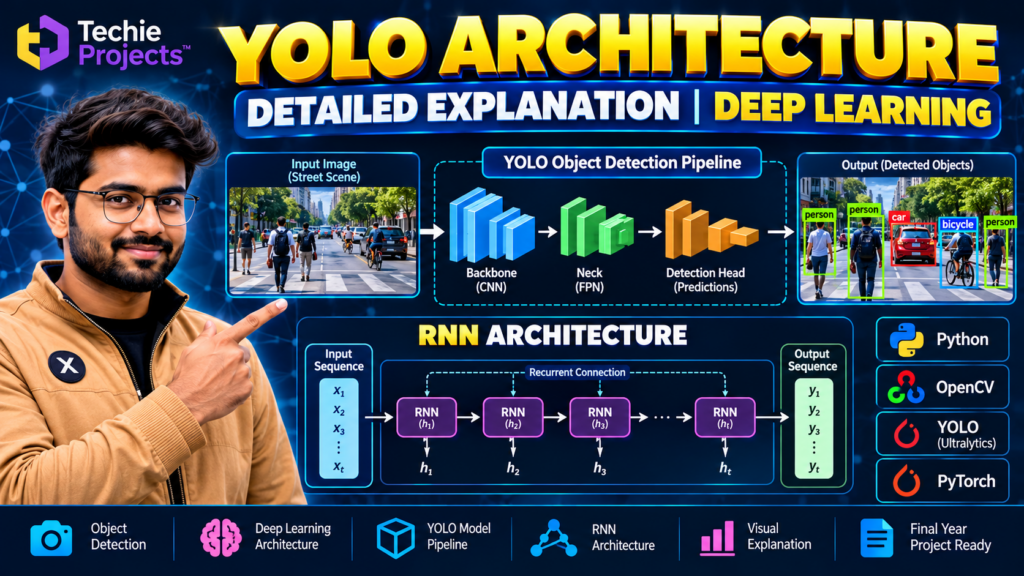
1. Backbone
The backbone extracts useful visual features from an input image. Early layers typically learn basic patterns such as edges and textures, while deeper layers capture more complex shapes and object characteristics.
These features provide the information required by later stages of the detection model.
2. Neck
The neck combines features from different levels of the network. This helps the detector use both detailed spatial information and higher-level semantic information.
Many YOLO implementations use feature-pyramid or path-aggregation concepts, although the exact design depends on the model version.
3. Detection Head
The detection head uses extracted features to predict object classes and locations. Depending on the model, its outputs may include bounding-box coordinates, class scores, and object confidence information.
The predicted boxes are processed to produce the final detection results. Many implementations use non-maximum suppression or a related post-processing method to reduce duplicate detections.
⚙️ How YOLO Object Detection Works
A typical YOLO detection workflow includes the following stages:
- Image input: A camera frame, image, or video frame is provided to the model.
- Preprocessing: The input is resized and prepared according to the model’s requirements.
- Feature extraction: The backbone extracts visual information.
- Feature fusion: The neck combines useful information from different feature levels, where supported by the architecture.
- Prediction: The detection head generates candidate object locations and class predictions.
- Post-processing: The model implementation filters and organizes predictions.
- Visualization: Detected objects are displayed with bounding boxes, labels, and confidence scores.
The exact steps and tensor shapes depend on the YOLO version, model configuration, and inference library.
YOLO Architecture Explained: Key Advantages
- Efficient detection workflow: YOLO models are designed to predict object locations and classes in a unified pipeline.
- Multiple object classes: A model trained on suitable classes can detect several object types in the same image.
- Video applications: Detection can be applied frame by frame to video streams.
- Visual results: Bounding boxes and labels make results easier to inspect.
- Flexible use cases: Models can be adapted for suitable applications using appropriate datasets and configurations.
Actual speed and detection quality depend on the model version, hardware, input resolution, dataset, and configuration.
Applications of YOLO
YOLO-based object detection can be explored in many computer vision applications, including:
- Vehicle and traffic object detection
- People detection and counting
- Helmet and safety equipment detection
- Animal detection
- Manufacturing defect inspection
- Retail object monitoring
- Sports video analysis
- Educational image and video processing projects
Applications involving people or surveillance should be designed with appropriate privacy safeguards and human oversight.
Technologies Used in a Python YOLO Project
A typical educational implementation may use:
- Python: Main programming language
- Ultralytics YOLO or another supported implementation: Model loading and inference, depending on the selected version
- OpenCV: Image and video processing
- NumPy: Numerical operations
- PyTorch: Model execution for PyTorch-based implementations
- Matplotlib: Optional visualization and analysis
Check the requirements of your chosen model version before installing packages. Not every YOLO release uses identical dependencies or APIs.
Software and Hardware Requirements
Software Requirements
- Python version compatible with the selected model
- Required YOLO implementation and dependencies
- OpenCV, if used for image or video handling
- A suitable code editor, such as Visual Studio Code
- Windows, Linux, or another supported operating system
Hardware Requirements
- A modern multi-core processor
- Sufficient RAM for the selected model and input size
- A compatible NVIDIA GPU is optional for many small experiments and can accelerate supported workloads
- Storage for the code, model weights, and datasets
The exact requirements depend on the model size, inference workload, and whether training is required.
YOLO Architecture Explained: Understanding the Detection Pipeline
YOLO architecture explained step by step helps you understand how an object detection model processes an image and predicts the location of objects. The architecture typically includes a backbone, a neck, and a detection head, although the exact design depends on the YOLO version.
The backbone extracts visual features, the neck combines information from different feature levels, and the detection head generates object predictions. These components work together to identify supported object classes and draw bounding boxes around detected objects.
Benefits of Understanding YOLO Architecture Explained
Learning YOLO architecture explained is useful for students who want to understand computer vision beyond simply running a pretrained model. It helps you explore feature extraction, feature fusion, object classification, bounding-box prediction, and inference performance.
You can apply this knowledge when developing Python projects such as people detection, vehicle detection, crowd counting, and real-time object detection. The actual capabilities depend on the selected model, its training data, and the implementation.
YOLO Architecture Explained for Final-Year Projects
For a final-year project, understanding YOLO architecture makes it easier to describe the model workflow during a presentation or viva. You can demonstrate input images, detection results, confidence scores, and bounding boxes, then explain how the model produces those outputs.
Why Choose a YOLO-Based Final-Year Project?
A YOLO object detection project gives students an opportunity to study model inference, image preprocessing, bounding boxes, class predictions, and application development. It can also provide a practical demonstration for a project presentation or viva.
Before selecting a project, confirm the exact features included in the implementation, the supported input formats, the model version, and whether source code and documentation are available.
🎓 Project Demo and Learning
Use the available demonstration to review the project’s interface and output. If you are building your own version, experiment with suitable test images, compare different input conditions, and document the limitations of your chosen model.
📲 Get Project Details and Pricing
Looking for a YOLO-based computer vision project for your academic learning or final-year demonstration?
Contact Techie Projects to ask about project availability, supported features, source code, documentation, setup instructions, and pricing. Confirm the included deliverables before placing an order.
📲 Call/WhatsApp: +91-9460060699
🌎 Website: www.techieprojects.com
📺 Instagram: @pythonprojects_
🔗 Explore Related Projects
Explore related topics on Techie Projects and add links to the corresponding published articles:
- YOLO Object Detection Project
- People Detection and Tracking Using YOLO
- Crowd Counting Using YOLO
- Real-Time Object Detection with Voice Output
- Helmet Detection Using YOLO
Frequently Asked Questions
What does YOLO stand for?
YOLO stands for “You Only Look Once.” It refers to an object detection approach that predicts object locations and classes through a unified model.
What are the main components of YOLO architecture?
A common high-level description includes the backbone for feature extraction, the neck for feature fusion, and the detection head for object predictions. Exact implementations vary by version.
Can YOLO detect multiple objects in one image?
Yes. A suitably trained YOLO model can detect multiple objects and return predictions for supported classes in the same image.
Is YOLO suitable for real-time applications?
Many YOLO models are designed for efficient inference, but actual performance depends on the model, hardware, image resolution, and software configuration.
Can beginners learn YOLO using Python?
Yes. Beginners with basic Python knowledge can start by running a pretrained model on sample images and then explore image processing, model configuration, and evaluation.
Conclusion
YOLO architecture explained through its backbone, neck, and detection head provides a useful foundation for understanding modern object detection. By learning the complete workflow, students can better understand how visual features become object predictions and how YOLO can be applied to educational computer vision projects.
Choose an implementation that matches your learning objectives, test it carefully, and describe its real capabilities and limitations accurately.