🚀 Get the YOLO Object Detection Project from Techie Projects! Are you looking for a complete AI and Deep Learning project for your final-year engineering submission? Purchase the YOLO Object Detection Project using Python and explore how advanced computer vision technology identifies multiple objects in images and videos.
The YOLO Object Detection Project is designed for B.Tech, M.Tech, Computer Science, Artificial Intelligence, and Machine Learning students who want to understand real-time object detection. This project demonstrates how the YOLO algorithm detects objects, generates bounding boxes, identifies object categories, and displays prediction results.
🎯 If you want to save development time and get started with a practical computer vision implementation, contact Techie Projects today. Enquire about the available source code, project demonstration, documentation, and implementation assistance.
📞 Contact Techie Projects for Project Enquiries
Interested in purchasing the IoT-Based Smart Home Automation System Project? Contact us to enquire about package availability, pricing, source code, documentation, installation guidance, and technical support options.
💬 WhatsApp Enquiry: Chat with Techie Projects
📱 Contact Number: +91 94600 60699
🌐 Official Website: www.techieprojects.com
📸 Instagram: Follow Techie Projects
🎓 Project Areas: Robotics, Machine Learning, Arduino, Deep Learning, Artificial Intelligence, and Android App.
✅ Request Project Details: Share your engineering branch, preferred features, and technical requirements to enquire about the most suitable available package.
🚀 Ready to get started? Click here to enquire on WhatsApp and mention IoT-Based Smart Home Automation System Project.
Package contents, prices, hardware availability, and support options should be confirmed before purchase.
🎬 YOLO Object Detection Project Demo
Watch the YOLO Object Detection Project demonstration to understand how the Python-based system identifies different objects using Deep Learning.
The demonstration covers real-time object detection, object classification, bounding box generation, and the overall working of the YOLO-based computer vision system.
🤖 What Is a YOLO Object Detection Project?
A YOLO Object Detection Project is a computer vision application that uses the You Only Look Once algorithm to identify and locate multiple objects in images and videos. The system predicts object classes, bounding boxes, and confidence scores using a trained deep learning model.
YOLO stands for You Only Look Once. It is a popular family of real-time object detection models used in computer vision applications.
Traditional image classification systems generally identify the main category present in an image. Object detection systems go further by identifying individual objects, predicting their classes, and locating them using bounding boxes.
YOLO approaches object detection by processing an image through a neural network and predicting object locations and class probabilities in a single model inference process.
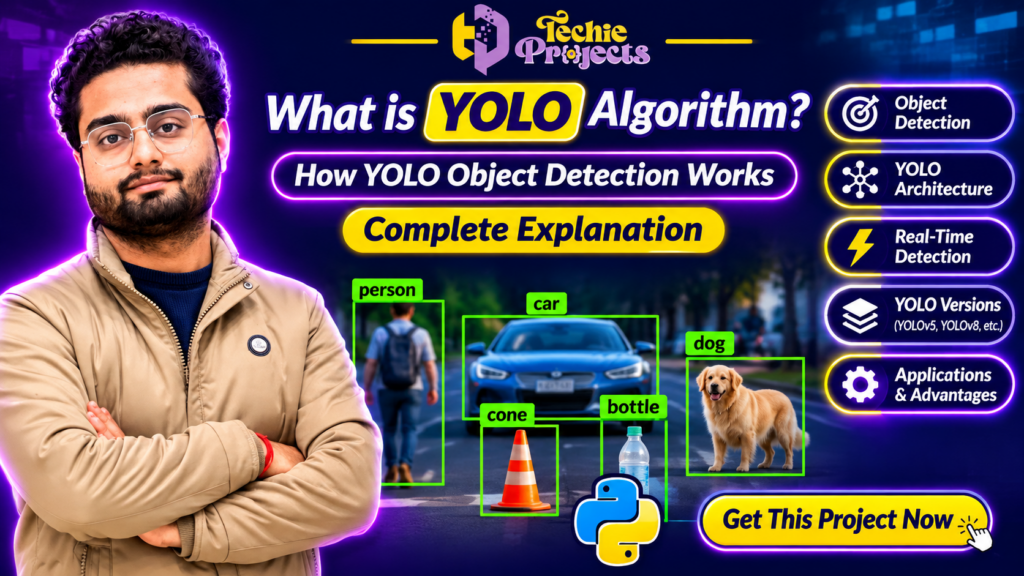
For example, when an image contains a person, a car, a dog, and a traffic cone, a trained YOLO model can identify these objects and display separate bounding boxes around them.
The main advantage of YOLO is its ability to perform object detection efficiently, making it suitable for applications where detection speed is important.
The YOLO Object Detection Project demonstrates these concepts through practical Python implementation.
Key Characteristics of YOLO
- ⚡ Fast object detection.
- 🎯 Multiple object identification.
- 🧠 Deep learning-based predictions.
- 📦 Bounding box generation.
- 📷 Image and video processing.
- 🚗 Applications in intelligent transportation.
- 🔍 Real-time computer vision capabilities.
🧠 How Does YOLO Object Detection Work?
The YOLO algorithm follows a deep learning-based detection pipeline. It processes input images and predicts the objects present in them.
Here is a simplified explanation of its working process.
1. Input Image or Video
The system receives an image or video frame as input. The image may contain multiple objects that need to be detected.
For real-time detection, a camera can continuously capture frames and send them to the detection model.
2. Image Preprocessing
Before processing, the input image is resized and prepared according to the model’s input requirements.
Preprocessing helps maintain consistent input dimensions and prepares image data for neural network inference.
3. Deep Learning Model Processing
The prepared image is passed to the YOLO model.
The neural network extracts visual features and predicts possible object locations, object confidence information, and class scores.
4. Bounding Box Prediction
The model generates bounding boxes around detected objects.
Each bounding box represents the approximate location of an identified object in the image.
5. Object Classification
The model predicts the category of each detected object.
For example:
- Person
- Car
- Dog
- Bicycle
- Bottle
- Traffic cone
The available categories depend on the model and the dataset used for training.
6. Confidence Score Calculation
Each detection includes a confidence score that indicates the model’s confidence in its prediction.
A confidence threshold can be configured to filter out detections below the selected value.
7. Final Detection Output
The system displays the final predictions using bounding boxes, object labels, and confidence scores.
This makes the detection results easy to understand and useful for practical computer vision applications.
🧠 How Does the YOLO Object Detection Project Work?
The YOLO Object Detection Project follows a deep learning pipeline:
- Input an image or video.
- Preprocess the image.
- Pass the input to the YOLO model.
- Extract object detection predictions.
- Generate bounding boxes.
- Identify object categories.
- Display final detection results.
💻 YOLO Object Detection Project Overview
The YOLO Object Detection Project is designed to demonstrate the implementation of an AI-powered object detection system using Python and Deep Learning.
The project focuses on identifying multiple objects from image and video inputs.
It provides an opportunity to understand how computer vision models process visual information and generate meaningful predictions.
🎯 Main Project Objectives
- Understand the fundamentals of object detection.
- Explore the YOLO deep learning architecture.
- Implement object detection using Python.
- Identify multiple objects in images.
- Process video frames for object detection.
- Display bounding boxes around detected objects.
- Understand confidence scores and class predictions.
- Explore practical applications of computer vision.
⭐ Features of the YOLO Object Detection Project
The following are important features associated with a YOLO-based object detection implementation.
1. Real-Time Object Detection
The system can process video frames and identify objects as they appear, depending on the model, hardware, and configuration.
2. Multiple Object Detection
YOLO can detect multiple objects in the same image or video frame.
For example, a road scene may contain several vehicles, pedestrians, and other objects.
3. Object Classification
The model identifies the predicted category of each detected object and displays the corresponding label.
4. Bounding Box Visualization
Rectangular bounding boxes are drawn around detected objects to show their approximate locations.
5. Confidence Score Display
The system can display confidence scores alongside object labels to make predictions easier to interpret.
6. Image-Based Detection
Users can provide static images as input and observe the model’s detection results.
7. Video-Based Detection
The system can process video files frame by frame and display detection results.
8. Computer Vision Integration
The project demonstrates how Python-based computer vision tools can be integrated with deep learning models.
💻 Technologies Used in the YOLO Object Detection Project
The implementation uses Python and computer vision technologies.
| Technology | Purpose |
|---|---|
| Python | Main programming language |
| YOLO | Object detection model |
| OpenCV | Image and video processing |
| PyTorch | Deep learning framework, depending on implementation |
| NumPy | Numerical operations |
| Computer Vision | Visual data analysis |
| Deep Learning | Object recognition and prediction |
The exact framework and library versions depend on the selected YOLO implementation.
🖥️ Software Requirements
The following is a suggested development environment:
- Operating System: Windows 10/11 or compatible Linux distribution.
- Programming Language: Python.
- IDE: Visual Studio Code, PyCharm, or Jupyter Notebook.
- Computer Vision Library: OpenCV.
- Deep Learning Framework: PyTorch, where applicable.
- Model: Compatible YOLO model weights.
- Additional Libraries: NumPy and other required dependencies.
💻 Hardware Requirements
Suggested hardware requirements for development and testing:
- Processor: Intel Core i3 or higher.
- RAM: Minimum 4 GB; 8 GB or more recommended.
- Storage: Sufficient space for Python libraries, model weights, and datasets.
- Graphics: NVIDIA GPU recommended for faster model inference and training.
- Camera: Webcam for live object detection, if supported.
Actual performance depends on the model size, input resolution, hardware, and inference configuration.
📊 Applications of YOLO Object Detection
Object detection is widely used in industries where identifying and locating objects automatically can improve efficiency.
The YOLO Object Detection Project provides a foundation for understanding several real-world applications.
🚗 1. Traffic Monitoring System
YOLO can be used to detect vehicles, pedestrians, motorcycles, and other road objects.
With suitable customization, the system can support vehicle counting and traffic analysis applications.
🏭 2. Industrial Automation
Manufacturing industries can use computer vision to identify products, monitor production lines, and detect certain visible defects.
🛡️ 3. Security and Surveillance
Object detection technology can help identify people and vehicles in surveillance footage.
Additional tracking and alert mechanisms can be integrated into more advanced systems.
🏥 4. Healthcare Applications
Computer vision can support selected medical imaging research applications. Such systems require specialized datasets, validation, and domain-specific development.
🌾 5. Agriculture
YOLO-based models can be customized to identify crops, fruits, weeds, and certain plant diseases using appropriate training datasets.
🛒 6. Retail Store Monitoring
Retail applications may use object detection for product identification, shelf monitoring, and customer movement analysis.
🚦 7. Smart City Applications
Smart city solutions can integrate object detection for traffic monitoring, pedestrian analysis, and intelligent transportation systems.
📚 Advantages of Using YOLO
YOLO offers several advantages for modern computer vision development.
- Speed: Designed for efficient object detection.
- Multiple detections: Can identify multiple objects in one image.
- Versatility: Supports different image and video applications.
- Automation: Reduces the need for manual visual identification.
- Scalability: Different model sizes can be selected depending on requirements.
- Practical learning: Helps students understand real-world AI implementation.
However, detection accuracy and speed depend on model selection, dataset quality, hardware, and configuration.
🔬 YOLO Versions: Understanding the Evolution
YOLO has evolved through multiple generations, introducing improvements in architecture, training techniques, inference performance, and detection capabilities.
Some important versions and model families include:
YOLOv1
The original YOLO approach introduced single-stage object detection by predicting bounding boxes and class probabilities in one network.
YOLOv2
YOLOv2 introduced improvements such as anchor boxes and better detection performance.
YOLOv3
YOLOv3 introduced multi-scale predictions and improved object detection across different object sizes.
YOLOv4
YOLOv4 introduced several architectural and training improvements to improve detection performance.
YOLOv5
YOLOv5 became widely adopted in Python-based computer vision projects because of its accessible implementation and development ecosystem.
YOLOv8
YOLOv8 introduced an updated architecture and supports multiple computer vision tasks, including object detection.
Newer YOLO Models
Newer YOLO model families continue to introduce improvements in model architecture, deployment, speed, and accuracy. The best choice depends on the application and supported software ecosystem.
🎓 Why Choose the YOLO Object Detection Project for Your Final Year?
Engineering students often look for projects that combine practical implementation with modern technologies.
The YOLO Object Detection Project is suitable for students interested in Artificial Intelligence, Machine Learning, Deep Learning, and Computer Vision.
Benefits for Students
1. Practical AI Learning
Understand how deep learning models process images and identify objects.
2. Python Programming Experience
Explore Python libraries and their integration with computer vision models.
3. Final-Year Project Demonstration
Use the project as a practical learning and demonstration platform.
4. Technical Knowledge Development
Learn about model inference, bounding boxes, confidence scores, and object classification.
5. Future Project Opportunities
Build upon the basic implementation to explore vehicle counting, smart surveillance, traffic analysis, and other applications.
6. Portfolio Development
A customized and well-understood implementation can demonstrate your computer vision knowledge to potential employers.
🎓 Why Purchase the YOLO Object Detection Project?
Building an AI project from scratch requires selecting a suitable model, configuring dependencies, preparing inputs, understanding inference, and debugging implementation issues.
Techie Projects helps students explore practical engineering projects across Artificial Intelligence, Machine Learning, Python Development, Data Science, and other technical domains.
When you enquire about purchasing this project, our team can explain the available project package and its included components.
What Can You Enquire About?
- Python source code availability.
- Project implementation details.
- YOLO model configuration.
- Installation and execution guidance.
- Project demonstration.
- Technical documentation availability.
- Customization requirements.
- Additional development support.
Important: Confirm the exact deliverables, supported Python version, model requirements, documentation, and assistance included in your selected package before purchasing.
🎯 Who Should Purchase This Project?
The project is suitable for:
- B.Tech Computer Science students.
- B.Tech Information Technology students.
- M.Tech students.
- AI and Machine Learning students.
- Computer Vision learners.
- Python developers.
- Deep Learning enthusiasts.
- Students working on engineering project demonstrations.
🚀 Get Your YOLO Object Detection Project Now!
Getting started with Techie Projects is simple.
Step 1: Contact Our Team
Send us an enquiry through WhatsApp with the project name.
Step 2: Discuss Project Requirements
Tell us whether you need source code, documentation, implementation assistance, or customization.
Step 3: Confirm Project Availability
Our team will explain the available package, pricing, and deliverables.
Step 4: Confirm Your Purchase
After reviewing the details, proceed with the purchase through the agreed process.
Step 5: Start Exploring the Project
Set up the required environment, execute the implementation, and understand the working of the detection model.
🎯 Ready to Get Your Project?
Purchase Enquiry:
📞 WhatsApp: +91-9460060699
💡 Recommended Projects
Looking for more interesting Artificial Intelligence and Computer Vision projects? Explore these related project ideas from Techie Projects.
- 🚗 Vehicle Detection and Counting System
- 🪖 Helmet Detection Using Deep Learning
- 🛣️ Pothole Detection Using YOLO
- 👤 Face Recognition Attendance System
- 🌿 Plant Leaf Disease Detection Using Deep Learning
- 🚘 Automatic Number Plate Recognition System
- 🛡️ Intrusion Detection System Using Machine Learning
- 🎥 AI-Based Video Surveillance System
- 🧠 DeepFake Detection Using Deep Learning
- 🔍 Real-Time Object Detection with Voice Output
These projects can help students explore different applications of Artificial Intelligence, Deep Learning, and Computer Vision.
❓ Frequently Asked Questions (FAQs)
1. What is a YOLO Object Detection Project?
It is a computer vision implementation that uses a YOLO model to identify and locate objects in images or videos using bounding boxes and class predictions.
2. Which programming language is used?
Python is commonly used for implementing YOLO-based object detection applications.
3. Is YOLO suitable for final-year engineering projects?
Yes. It is a relevant topic for students interested in Artificial Intelligence, Machine Learning, Deep Learning, and Computer Vision.
4. Can YOLO detect multiple objects simultaneously?
Yes. A trained YOLO model can detect multiple objects within the same image or video frame.
5. Does the project support real-time object detection?
Real-time detection can be implemented using a compatible camera and model configuration. Actual speed depends on the hardware and model size.
6. Can I customize the project?
Yes. Depending on the selected implementation, you can explore custom datasets, object classes, detection thresholds, and model configurations.
7. Is a GPU required?
A GPU is recommended for faster training and inference, but compatible YOLO models can also run on CPUs with potentially lower performance.
8. Can I purchase this project from Techie Projects?
Yes. Contact Techie Projects through WhatsApp to enquire about project availability, pricing, deliverables, and technical assistance.
🌟 Conclusion
The YOLO Object Detection Project is an excellent practical learning opportunity for students and developers interested in modern Artificial Intelligence and Computer Vision technologies.
From identifying objects in images to processing video streams, YOLO demonstrates how deep learning can solve real-world visual recognition problems.
Whether you are exploring computer vision for the first time or preparing an advanced engineering project demonstration, understanding YOLO can help you develop valuable technical skills.
At Techie Projects, we aim to provide practical project solutions that help students explore emerging technologies and gain hands-on technical knowledge.
🎓 Don’t wait until your project submission deadline!
Get in touch with Techie Projects today to enquire about purchasing the YOLO Object Detection Project and take the next step toward your engineering project journey.
📞 Contact / WhatsApp: +91 94600 60699
🌐 Website: www.techieprojects.com
📸 Instagram: @pythonprojects_
Techie Projects – Turning Innovative Ideas into Practical Technology Solutions!